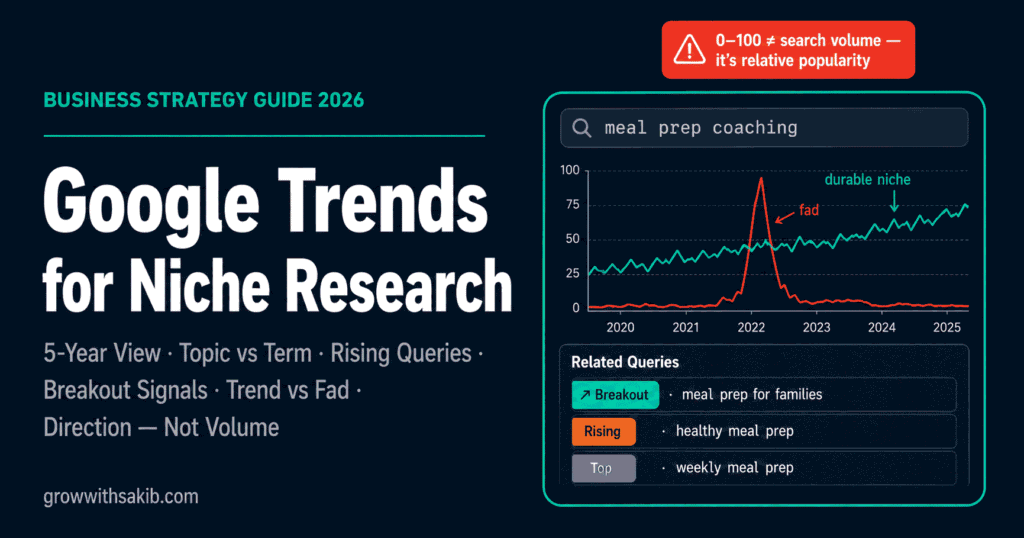
To use Google Trends for niche research, open the free Explore tool, search your niche topic, and check three things: whether interest is rising or fading over five years, how it breaks down by region, and which Related Queries are labelled “Rising” or “Breakout.” Trends shows direction and emerging demand — not exact search volume.
Google Trends is the fastest free way to sanity-check a niche before you commit. But it’s also the most misread tool in the kit — people treat its numbers like search volume and draw the wrong conclusion. This guide walks through the actual workflow, screen by screen, and shows you how to read it correctly. It’s the tool-level companion to the broader method in how to validate market demand for a niche, which is itself a step in the pillar guide on finding the right niche.
What Is Google Trends — and What It Actually Measures
Google Trends is a free tool that shows the relative popularity of search queries over time, by region, and against each other. According to Google’s Search Central documentation, it provides a random sample of aggregated, anonymised, and categorised Google and YouTube searches.
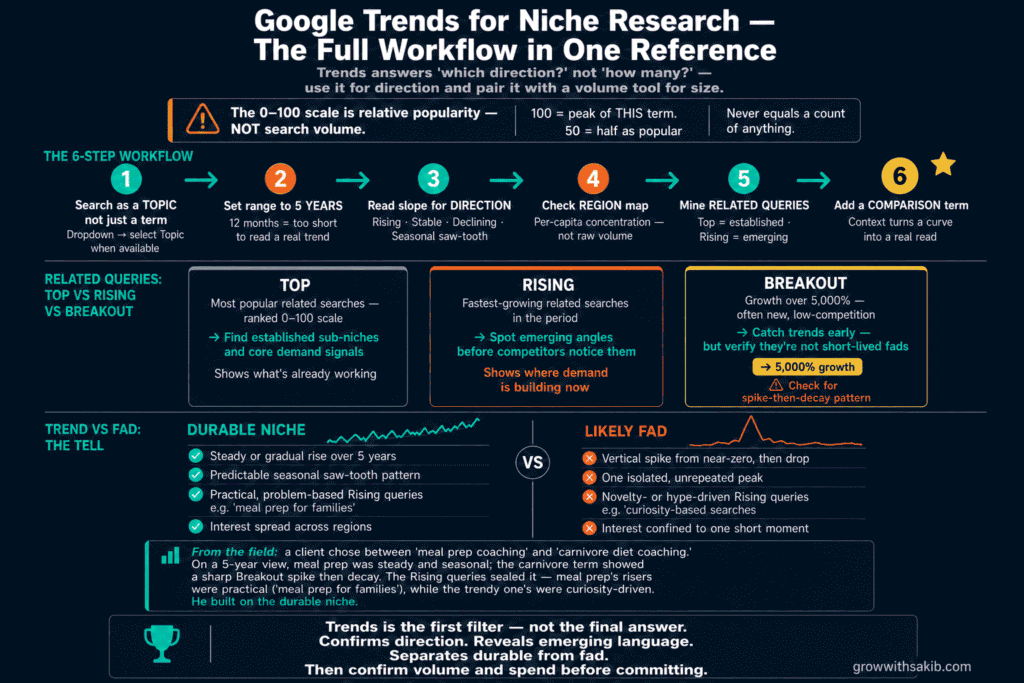
The key word is relative. Per the official Google Trends FAQ, each data point is divided by the total searches in its time and place, then scaled from 0 to 100, where 100 is the query’s peak. So a value of 50 means “half as popular as this term’s peak” — not 50 searches, and not 50% of anything you can spend. Trends measures interest direction, not absolute volume.
That single distinction is why Trends pairs so well with a volume tool. Use Trends to answer “is this growing or dying?” and a tool like Ahrefs or Semrush to answer “how big is it?” — then use what you find to build niche topical authority by consistently covering the topics the data confirms have durable, growing demand.
How to Use Google Trends for Niche Research: Step by Step
Here’s the exact workflow. Each step pulls a different insight, and together they tell you whether a niche is worth deeper validation.
Step 1: Search your niche as a Topic, not just a term
Open the free Trends Explore tool and type your niche. As you type, a dropdown offers two kinds of result: plain search terms and grouped Topics (labelled with a category like “Subject”). Pick the Topic when one exists — it bundles related phrasings and spellings, giving a fuller picture than a single term.
Step 2: Set the time range to 5 years
The default 12-month view is too short to tell a trend from a blip. Switch to “Past 5 years.” A niche that’s been climbing or steady for years is far safer than one with a single recent spike, which often signals a fad rather than a durable market.
Step 3: Read the Interest Over Time graph for direction
Look at the overall slope, not individual bumps. Rising or stable is good. A steady decline is a warning. Also watch for a regular saw-tooth pattern — that’s seasonality, which tells you when demand peaks and when it goes quiet. Ignore isolated single-day spikes; Google notes these shouldn’t be read as meaningful search activity.
Step 4: Check Interest by Region
Scroll to the regional map. This tells you where your niche is strongest — invaluable for local service businesses or for choosing which market to target first, and useful for confirming niche buying power by region before committing to one geography. Remember these are per-capita relative rankings, so a small region topping the list means high concentration of interest, not raw numbers.
Step 5: Mine Related Queries — Top vs. Rising
This is the goldmine. The Related Queries box can be sorted two ways, and the difference matters. Per Google’s News Initiative training, if you see “Breakout” instead of a percentage, the term grew by more than 5,000%.
| Sort option | What it shows | Use it to |
|---|---|---|
| Top | Most popular related searches (0–100 scale) | Find established sub-niches and core demand |
| Rising | Fastest-growing related searches | Spot emerging angles before competitors |
| Breakout | Growth over 5,000% (often new, low-competition) | Catch trends early — but check they’re not fads |
Rising and Breakout queries are where niche sub-topics and content ideas come from — they reveal the exact language your future target audience is starting to use.
Step 6: Compare your niche against a benchmark
A lone trend line lacks context. Click “+ Add comparison” and put your niche beside a related term you already understand, or a known steady topic. Comparison turns an abstract curve into a real read on relative size and momentum — the single most underused feature in the tool.
Trend or Fad? How to Tell the Difference
The most valuable judgment Google Trends supports is separating a lasting niche from a passing craze. Here’s the tell.
| Durable niche | Likely fad |
|---|---|
| Steady or gradual rise over 5 years | Vertical spike from near-zero, then drop |
| Predictable seasonal pattern | One isolated, unrepeated peak |
| Practical, problem-based Rising queries | Novelty- or hype-driven Rising queries |
| Interest spread across regions | Interest confined to one short moment |
Common Mistakes When Using Google Trends
- Reading the 0–100 scale as search volume. It’s relative popularity, never a count.
- Using the 12-month default. Too short to separate a trend from noise; always extend to 5 years.
- Reacting to single-day spikes. Google itself warns these are often meaningless.
- Analysing a niche in isolation. Without a comparison term, the curve has no context.
- Chasing every Breakout. High growth is exciting, but many breakouts are short-lived fads.
- Stopping at Trends. It shows direction only — confirm volume and spend elsewhere, starting with a full niche validation test that moves from interest through to live proof of payment.
Where Google Trends Falls Short
Trends is a starting point, not a verdict. Because it samples data and hides low-volume queries, very small or brand-new niches may show “not enough data” even when real demand is forming — so thin Trends data doesn’t always mean no opportunity.
It also can’t tell you whether interest converts to money. A topic can trend strongly and still have no one willing to pay, which is why Trends should always feed into a fuller market demand validation process that checks intent and spend. And since it only captures Google and YouTube search, niches that grow through referrals, local word of mouth, or other platforms won’t show their true size here. Treat Trends as one instrument on the dashboard, not the whole panel — the complete niche-selection framework shows where Trends fits within the full process from skill identification through to launch.
Frequently Asked Questions
How do I use Google Trends for niche research?
Open the free Explore tool, search your niche as a Topic, and set the range to five years. Read the Interest Over Time graph for direction and seasonality, check Interest by Region for location strength, and mine Related Queries sorted by Rising for emerging sub-topics. Finish by comparing your niche against a benchmark term for context.
Does Google Trends show search volume?
No. Per Google’s own documentation, Trends shows relative popularity on a 0–100 scale, where 100 is the term’s peak — not a count of searches. It’s sampled and normalised. For actual search volume, use a dedicated keyword tool like Ahrefs or Semrush alongside it.
What does “Breakout” mean in Google Trends?
“Breakout” appears in Related Queries when a term has grown by more than 5,000% in the selected period, according to Google’s News Initiative training. It often marks new, low-competition topics with rising demand — valuable for early content, though some breakouts turn out to be short-lived fads.
What’s the difference between Top and Rising queries?
Top queries are the most popular related searches over your time frame, ranked on the 0–100 scale — they reveal established demand. Rising queries grew fastest since the previous period and surface emerging interest. Use Top to map core sub-niches and Rising to spot opportunities before competitors notice them.
Is Google Trends enough to validate a niche?
No. Trends shows whether interest is rising, steady, or fading, but not how many people search or whether they’ll pay. Pair it with a volume tool and evidence of actual spending — active job posts, paying competitors, or ads. Trends is the first filter in validation, not the final answer.
What time range should I use in Google Trends?
Use “Past 5 years” for niche research. The 12-month default is too short to tell a durable trend from a temporary blip. A five-year view reveals whether a niche is genuinely growing, seasonal, or declining, and exposes one-off spikes that would otherwise look like real momentum.
Key Takeaways
- Google Trends measures relative popularity (0–100), not absolute search volume.
- Search your niche as a Topic and always set the range to five years.
- Read the slope for direction and seasonality; ignore isolated single-day spikes.
- Interest by Region guides local targeting and market prioritisation.
- Related Queries — Top for established demand, Rising and Breakout for emerging sub-topics.
- Always add a comparison term to give your niche’s trend real context.
- Trends shows direction only — confirm volume and spend before committing to a niche.