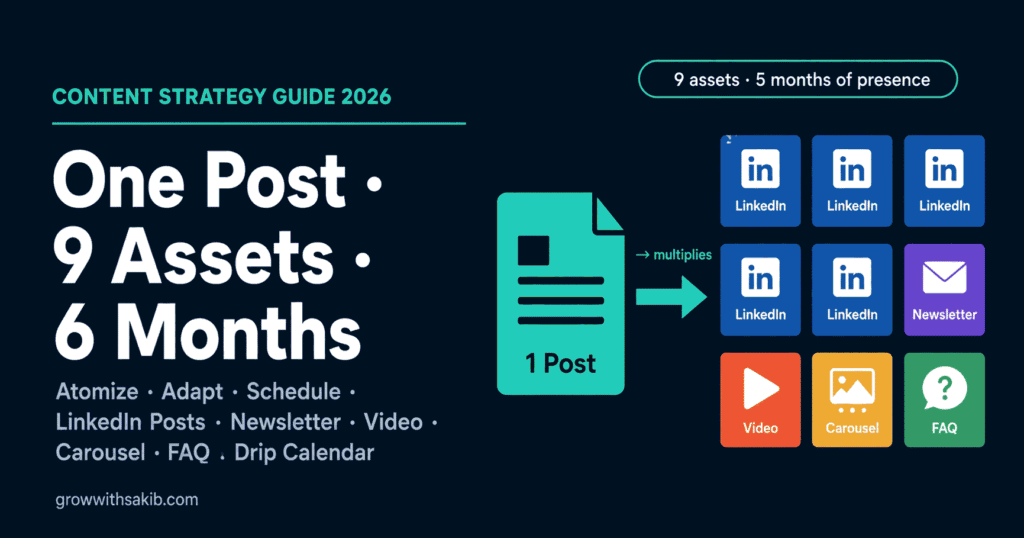
Most people publish a blog post, share the link once, and move on. That’s like cooking a huge meal and throwing away everything but one plate. You already did the hard part – the research, the thinking, the writing. A content repurposing strategy squeezes months of value out of that one effort.
This is the full how-to, with a copy-paste template for every format. It expands the repurposing multiplier from the content strategy for small business guide on GrowWithSakib. The post you repurpose should be a solid, comprehensive one – ideally written with the blog-post framework on GrowWithSakib. Let’s multiply it.
Why Content Repurposing Works
Three simple reasons make repurposing one of the highest-leverage moves in content marketing:
- Different people, different formats – some read blogs, some scroll LinkedIn, some only watch video. Repurposing meets each person where they already are.
- Repetition builds trust – marketing research consistently finds people need to encounter a message several times before it sticks. Repurposing gives your idea those repeat exposures across platforms.
- More output, same input – you multiply your reach without multiplying your workload, which is the only sustainable way for a solo owner or small team to stay consistent.
Which Blog Post Should You Repurpose?
Not every post is worth the effort. Pick one that is:
- Evergreen – useful for months or years, not tied to a passing moment, so the repurposed pieces stay relevant.
- Comprehensive – a meaty 2,000-word post with several distinct points gives you more atoms to work with than a thin one.
- Proven or high-intent – a post that already gets traffic, or answers a question customers really care about, is worth amplifying.
Don’t repurpose a weak post hoping the new formats will save it – if the original idea didn’t land, the pieces won’t either. Start with your best.
The Method: Atomize, Adapt, Schedule
The whole strategy is three moves:
- 1. Atomize – break the post into its component ideas: the main thesis, each key point or heading, each stat, each tip. A good 2,000-word post has 5-8 of these “atoms.”
- 2. Adapt – reshape each atom to fit the destination platform. This is the opposite of copy-paste; a LinkedIn post reads nothing like a carousel slide.
- 3. Schedule – drip the finished assets across weeks and months so one post keeps you visible without dumping everything at once.
Step 1: Atomize Your Post
Open your post and pull out every idea that could stand on its own. Your headings are usually your atoms. For example, a post titled “How to Price Your Freelance Services” might atomize into: the main framework, the biggest pricing mistake, a specific formula, a mindset shift, a real example, and three quick tips. That’s six atoms – each one is raw material for a piece of content.
Do this first: list your atoms in a simple note before you write anything. This single list feeds all nine assets, so it’s the highest-leverage five minutes in the whole process.
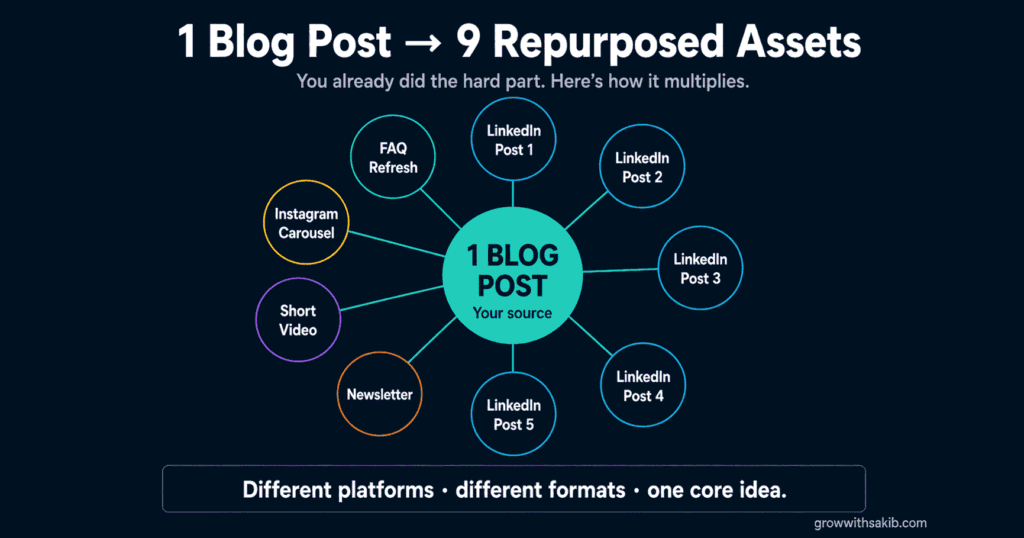
The 9 Assets (With Copy-Paste Templates)
Now turn those atoms into the nine assets. Here’s each format with a template you can fill in.
Assets 1-5: Five LinkedIn Posts
Your five strongest atoms each become one LinkedIn post, from a different angle. Use this structure for all five, spinning the angle each time:
| LinkedIn Post Template [HOOK – one bold line that stops the scroll: a surprising claim, a mistake, or a question] [CONTEXT – 1-2 short lines setting up why it matters] [VALUE – the atom itself, as 3-5 short lines or a mini-list. One idea, clearly.] [TAKEAWAY – the one thing to remember] [SOFT CTA – e.g. “I broke the full process down on the blog – link in comments.”] |
Spin the five posts across these angles so they don’t feel repetitive:
| Post / Angle | Drawn From |
|---|---|
| 01. The contrarian hook | Your boldest claim or myth-buster |
| 02. The how-to / list | Your framework or quick tips |
| 03. The story / lesson | Your real example or a mistake |
| 04. The stat | Your most striking number + why it matters |
| 05. The mistake | The biggest error people make + the fix |
Asset 6: One Email Newsletter
Your newsletter shares the post’s core idea with your list and drives them to read the full thing. Keep it personal and short.
| Email Newsletter Template Subject: [The post’s main promise, as a benefit or question – e.g. “The pricing mistake costing you clients”] Hi [First name], [HOOK – a personal line or the problem your post solves, 1-2 sentences] [THE ONE IDEA – the single most useful takeaway from the post, in 2-3 short paragraphs] [LINK – “I wrote the full step-by-step here: (link to the post)”] [PS – a second hook or a question inviting a reply] |
Asset 7: One Short Video Script
Turn your single best atom into a 30-60 second script for a Reel, TikTok, or YouTube Short. Speak to camera or record slides with a voiceover – and add captions, since much of social video is watched on mute.
| Short Video Script Template (30-60s) [HOOK 0-3s: the scroll-stopper – a bold claim or the problem, said fast] [PROBLEM 3-10s: why this matters / who it’s for] [VALUE 10-45s: 3 quick points or the one framework – keep each point to a sentence] [CTA 45-60s: “Full breakdown on the blog – link in bio”] (On-screen captions throughout) |
Asset 8: One Instagram Carousel
Your post’s headings map beautifully onto carousel slides – one idea per slide. Design it in a free tool like Canva with your brand colours. Aim for 8-10 slides.
| Instagram Carousel Template Slide 1: [HOOK – bold headline or question, mirror the blog title] Slides 2-8: [ONE atom per slide – a heading as the slide title, max ~25 words of copy, one idea each] Slide 9: [RECAP – the key takeaways as a short list] Slide 10: [CTA – “Save this + read the full guide (link in bio)”] |
Asset 9: One Updated FAQ Section
This is the on-site asset that actually strengthens your SEO and AI citations. Pull the real questions your post answers and add them as a clean FAQ section – on the post itself or a related page. Each answer: the question as a heading, then a direct answer in a sentence or two.
| FAQ Section Template Q: [A real question your post answers, phrased exactly as someone would ask it] A: [Direct answer in the first sentence, then one sentence of context. ~40-60 words.] (Repeat for 3-5 real questions from the post) |
This format matters most because clean question-and-answer content is one of the strongest formats for getting cited by AI – see the guide to FAQ content and schema on GrowWithSakib for how to do it right.
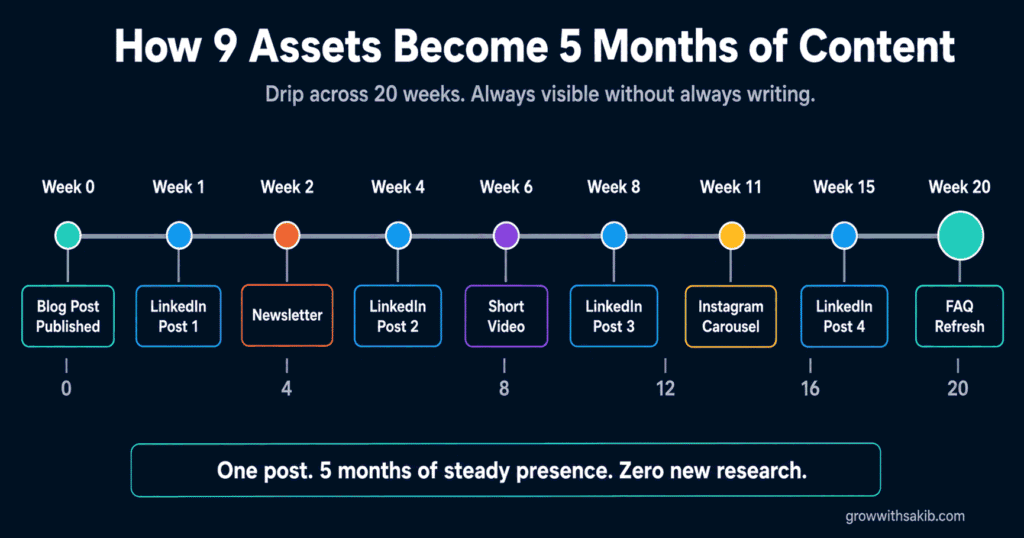
How 9 Assets Become 5 Months of Content
Here’s the part that makes “six months” real: you don’t publish all nine at once. You drip them. Spacing them out keeps you consistently visible from one post, and gives each asset room to breathe. Here’s a sample calendar for one post’s nine assets:
| Timing / Asset to Publish |
|---|
| Week 0: Publish the blog post + add the updated FAQ (Asset 9) |
| Week 1: Email newsletter (Asset 6) |
| Week 2: LinkedIn post 1 – the contrarian hook |
| Week 4: Instagram carousel (Asset 8) |
| Week 6: LinkedIn post 2 – the how-to |
| Week 8: Short video (Asset 7) |
| Week 11: LinkedIn post 3 – the story |
| Week 15: LinkedIn post 4 – the stat |
| Week 20: LinkedIn post 5 – the mistake |
That’s roughly five months of steady presence from one post – and if you repurpose one post a month, the calendars overlap into a continuous, always-on content engine that never leaves you staring at a blank page. Align which platforms you prioritise with where your audience actually is, using the content audience profile guide on GrowWithSakib.
Getting Repurposing Right (and Wrong)
A few honest guardrails:
- Adapt, never copy-paste – pasting your blog text into LinkedIn reads as lazy and performs badly. Each platform has its own rhythm; reshape for it.
- Repurpose for reach and depth – social extends reach; the on-site FAQ and internal links build the SEO and AI authority. Do both.
- Only repurpose strong posts – multiplying a weak idea just gives you more weak content. Quality in, quality out.
- Still make some original content – repurposing is a multiplier, not a total replacement. Keep feeding the machine fresh flagship posts.
Done well, repurposing is the closest thing to free content there is. You’re not creating more – you’re finally using what you already made. Track which formats drive the most traffic and engagement with the guide to tracking results on GrowWithSakib, and do more of what works.
Common Content Repurposing Mistakes
| Mistake | Why It Hurts | Do This Instead |
|---|---|---|
| Copy-pasting across platforms | Reads lazy; performs badly | Adapt each atom to the platform |
| Repurposing weak posts | More weak content, no gain | Start with your best, evergreen posts |
| Dumping all assets at once | Burns the post in a day | Drip them over weeks and months |
| Skipping the on-site FAQ | Misses the real SEO/AI win | Add the updated FAQ every time |
| No link back to the post | Wastes the traffic opportunity | Point every asset back to the source |
| Repurposing only, never creating | The engine runs dry | Keep making fresh flagship posts |
| Ignoring what performs | Repeats what doesn’t work | Track results and double down |
Frequently Asked Questions
1. What is a content repurposing strategy?
A content repurposing strategy is a system for turning one piece of content into many by adapting it into different formats for different platforms. For example, a single 2,000-word blog post can become 5 LinkedIn posts, an email newsletter, a short video, an Instagram carousel, and an updated FAQ – nine assets from one. The method is to atomize the post into key points, adapt each into a platform-native format, and schedule them over time.
2. How many pieces of content can I get from one blog post?
A solid 2,000-word blog post can realistically become nine or more assets: 5 LinkedIn posts (one per key point), 1 email newsletter, 1 short video script, 1 Instagram carousel, and 1 updated FAQ section. The number depends on how many distinct ideas (“atoms”) the post contains – a comprehensive post with several headings gives you more raw material. Focus on quality adaptations over hitting a big number.
3. How do I turn one blog post into six months of content?
Create nine assets from the post, then drip them out on a calendar rather than all at once. Spacing five LinkedIn posts, a newsletter, a video, a carousel, and an FAQ across roughly five months keeps you consistently visible from one post. If you repurpose one post a month, the calendars overlap into a continuous, always-on content engine – so you’re never starting from a blank page.
4. Which blog posts should I repurpose?
Repurpose your evergreen, comprehensive, and proven posts. Evergreen posts stay relevant for months or years, so the repurposed pieces don’t go stale. Comprehensive 2,000-word posts have more distinct points to atomize. And posts that already get traffic or answer a real customer question are worth amplifying. Avoid repurposing weak or thin posts – if the original idea didn’t land, the new formats won’t fix it.
5. Is content repurposing the same as copying my content everywhere?
No – that’s the biggest mistake people make. Repurposing means adapting your content to fit each platform’s language, length, and rhythm, while keeping the core idea intact. Pasting the same blog text onto LinkedIn, Instagram, and email reads as lazy and performs poorly because it ignores how each platform works. A LinkedIn post, a carousel slide, and a video script should all read completely differently, even from the same idea.
6. Does repurposing content help SEO?
Partly, and it’s worth being precise. Social posts on LinkedIn or Instagram extend your reach but live on those platforms – they’re not your indexed web pages, so they don’t directly build your SEO. The formats that do help SEO and AI citations are the on-site ones: an updated FAQ section, new sections added to the post, and internal links. So repurpose for reach through social, and for search authority through on-site formats.
7. How long does it take to repurpose a blog post?
Once you have templates, an afternoon. The highest-leverage step is atomizing – listing the post’s key points, which takes about five minutes and feeds everything else. From there, each format is a fill-in-the-blank using a template: a few minutes per LinkedIn post, the newsletter, the video script, the carousel outline, and the FAQ. Batching all nine assets in one focused session is far faster than creating each from scratch.
8. What tools do I need to repurpose content?
You don’t need much. A free design tool like Canva handles carousels and graphics, your phone records short video, and your email and social platforms handle distribution. Optional AI tools can help draft first versions from your atoms. But the core process – atomize, adapt with templates, schedule – needs no special software. Start with templates and your existing tools before adding anything paid or automated.
Key Takeaways
- A content repurposing strategy turns one 2,000-word blog post into nine assets: 5 LinkedIn posts, 1 newsletter, 1 video script, 1 Instagram carousel, and 1 updated FAQ.
- The method is three moves: atomize the post into key points, adapt each into a platform-native format, and schedule them over time.
- Atomizing is the highest-leverage step – list the post’s 5-8 key ideas first, and that one list feeds all nine assets.
- Use a template for each format so repurposing becomes fast, repeatable fill-in-the-blank work, not creation from scratch.
- Drip the nine assets across a calendar – roughly five months from one post – and overlapping monthly posts create an always-on engine.