Here is a situation most Meta advertisers have experienced. You launch a campaign, and for the first week the performance is all over the place — cost per result swings wildly from day to day, delivery feels inconsistent, and nothing looks like it is working. So you tweak the targeting. Add a new creative. Adjust the budget. And somehow things get worse. The costs go up and the results never stabilise.
What is happening almost always has nothing to do with your audience, your creative, or your offer. It has to do with the learning phase — and specifically, with repeatedly resetting it before it can finish.
The learning phase is one of the most misunderstood mechanisms in Meta advertising. It is also one of the most expensive to get wrong. This guide gives you everything you need to understand it, work with it, and exit it as efficiently as possible — including what changed in 2026 with Meta’s Andromeda algorithm update, and how it fits into the complete Meta Ads framework.
What the Meta Ads Learning Phase Actually Is
Every time you create a new ad set or make significant changes to an existing one, Meta’s delivery system enters what it calls the learning phase. During this period, the algorithm does not yet know who in your target audience is most likely to take the action you want — a purchase, a lead submission, a video view, whatever you are optimising for.
So it explores. It tests different sub-segments of your audience, different delivery times, different placements, and different creative combinations to gather data on what works for your specific campaign in your specific context. This exploration is inherently less efficient than optimised delivery — which is why costs are higher and results are more volatile during this period.
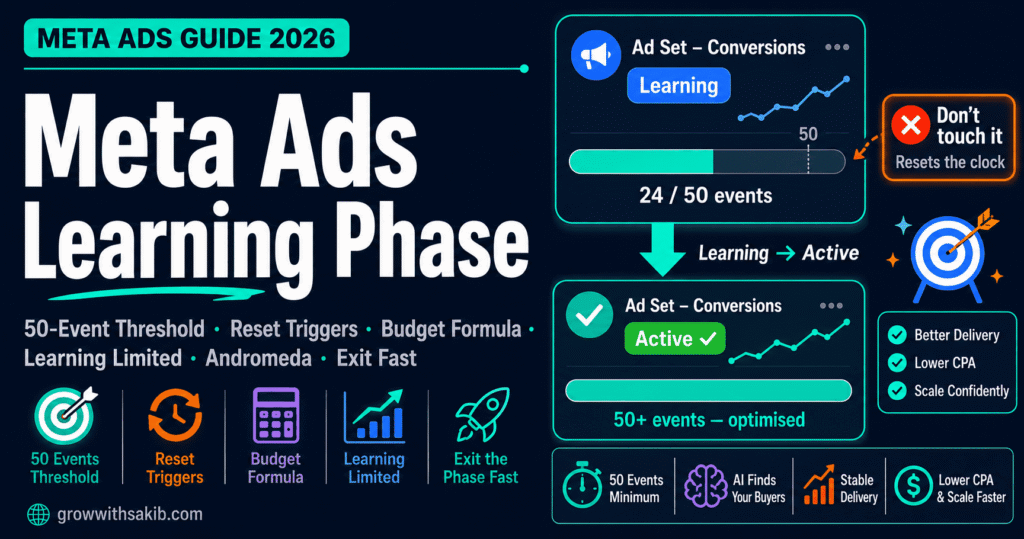
The learning phase ends when Meta’s algorithm has accumulated enough data to move from exploration to optimisation. The threshold is approximately 50 optimisation events within any 7-day rolling window. Once that threshold is reached, the ad set status changes from ‘Learning’ to ‘Active’ — the algorithm has stabilised its delivery model and can start finding your best customers consistently.
The new employee analogy — and why it falls short
Most explanations describe the learning phase using a ‘new employee’ analogy: the algorithm is like a talented new hire who needs time to understand your business before performing at full capacity. This is useful but incomplete.
A better way to think about it: the learning phase is Meta’s algorithm running thousands of simultaneous micro-experiments on your behalf. Every impression is a data point. Every conversion — or non-conversion — feeds back into a model that predicts which users are most likely to complete the desired action. The algorithm is not just learning about your audience once. It is continuously refining its predictions, with each new data point updating the model.
When you interfere with that process — by changing the targeting, the creative, the budget significantly — you do not just pause the learning. You invalidate the data collected so far. The algorithm’s model no longer matches the current campaign conditions, so it has to start the exploration process again from scratch.
The Andromeda Update: Why the Learning Phase Matters More in 2026
To understand the learning phase in 2026, you need to understand Andromeda — Meta’s major algorithm update that completed its global rollout in January 2026 and fundamentally changed how ad delivery works.
What Andromeda changed
In the old Meta ad delivery system, advertisers primarily controlled targeting. You defined your audience, and Meta’s algorithm delivered your ads within those boundaries. Creative influenced performance within the audience — but the audience boundaries controlled who saw the ad.
Andromeda reversed that sequence. Under Andromeda, your creative signals determine audience discovery. The algorithm uses engagement behaviour — hook rates, completion rates, interaction patterns — to identify which users across a much broader pool are most likely to convert. Interest stacks and lookalike layers no longer control delivery the way they used to. They provide context, not command.
The practical implication for the learning phase: Andromeda needs more conversion data to build its predictive model, and it is more sensitive to disruption when that data is accumulating. The 50-event threshold has not changed. But what triggers a learning phase reset has expanded.
| Andromeda Change | Impact on Learning Phase | What You Should Do Differently |
| Creative signals now drive audience discovery — not just audience definition | The algorithm needs more creative diversity to explore effectively; narrow creative limits exploration quality | Provide 6–10 distinct creative concepts per campaign, not minor variations of one concept |
| Reset thresholds tightened (April 2026 update) | Changes that previously did not trigger resets now do — small bid adjustments, minor audience tweaks | Apply even stricter change discipline than before; bundle all edits into single sessions |
| Learning phase duration extended for many accounts | Typical exit time stretched from 4–7 days to 7–14 days post-Andromeda rollout | Do not judge performance in the first 7 days; allow 14 days before drawing conclusions |
| CAPI + EMQ signal quality more critical than ever | Andromeda’s feedback loop depends on clean conversion data — poor tracking slows learning | Ensure Pixel + CAPI is fully configured with EMQ above 7.0 before launching campaigns |
| Andromeda reported ROAS drops 15–40% for some accounts during rollout | Attribution conservatism, not real revenue loss — algorithm readjusting attribution models | Triangulate against GA4 and server-side data before making budget decisions based on reported ROAS — the same cross-channel tracking discipline that applies to organic and paid measurement simultaneously. |
The 50-Event Threshold: What It Really Means
The number 50 events in 7 days has not changed since Meta introduced the learning phase concept. But what it means in practice is widely misunderstood.
It is a rolling window, not a fixed start date
The 50-event threshold applies to any 7-day rolling window — not the 7 days from when you launched the campaign. This means an ad set that generated 47 events in its first 7 days is still in learning. But if it generates 10 more events in days 8–14, bringing the 7–14 day window total to 55, it may exit learning even though the first week did not hit the threshold.
The practical implication: do not panic if you are close to the threshold at day 7. Give the campaign time to accumulate events across the rolling window before concluding it is stuck.
The event must be the optimisation event — not any event
The 50 events that count toward the threshold are specifically the optimisation event your campaign is targeting. If you are running a Sales campaign optimised for Purchases, only Purchase events count. AddToCart events, InitiateCheckout events, and ViewContent events do not count toward your Purchase-optimised ad set’s learning threshold — even if those events are firing frequently.
This is where many advertisers get confused. Their Events Manager shows hundreds of events firing daily. But the campaign is still in learning because the specific optimisation event — the one the campaign is targeting — is not generating 50 instances per week.
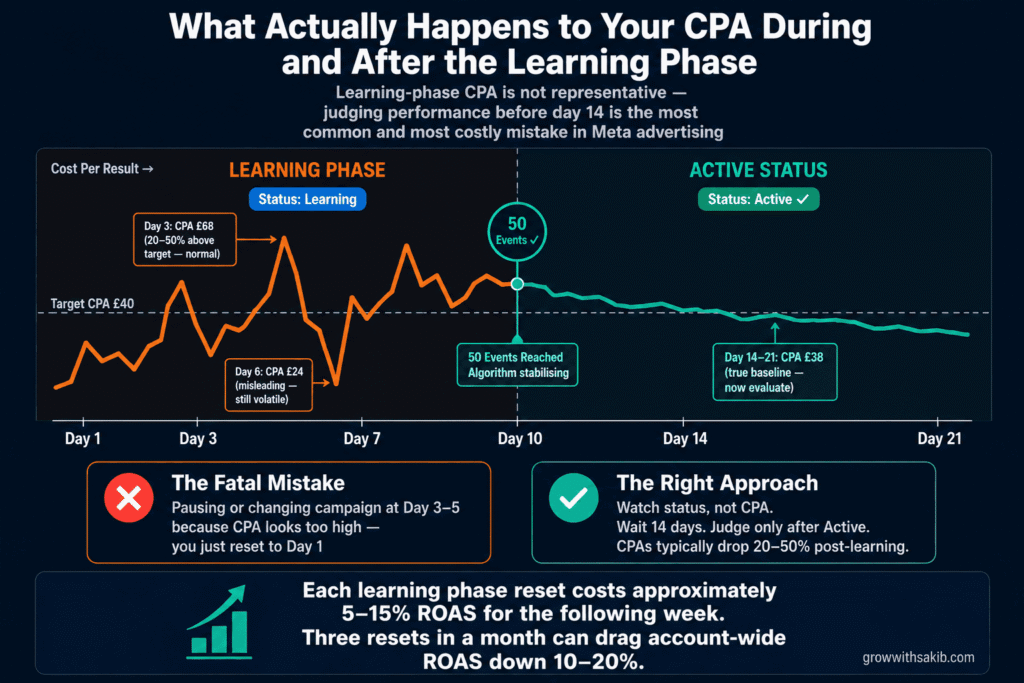
The cost of learning phase mismanagement
This is the number that most guides bury at the end or skip entirely. Learning phase mismanagement has a quantifiable cost.
Reading the Status Indicators: Learning vs Learning Limited vs Active
Ads Manager shows three primary statuses related to the learning phase. Understanding exactly what each one means — and what triggers each — is the foundation of effective campaign management.
| Status | Colour in Ads Manager | What It Means | What to Do |
| Learning | Blue text | Ad set is actively accumulating optimisation events. Normal for new campaigns. Performance will be volatile. | Do not make significant changes. Monitor without intervening. Judge results after 14 days, not 3. |
| Learning Limited | Blue text with warning | Ad set is unlikely to exit learning. Cannot generate 50 events/week due to budget, audience, event, or structural constraints. | Diagnose the cause immediately. See Section 5. This status will not self-resolve with patience alone. |
| Active | No special indicator | Ad set has exited learning. Algorithm has stabilised delivery. Performance should be more consistent and costs lower. | Monitor performance trends. Scale using the 20% budget rule. Avoid structural changes that would trigger a reset. |
| Active (Optimising) | No special indicator | Newer status label in some accounts — same as Active but with a signal that performance may still improve over time. | Same as Active. Continue running without significant changes. |
What Resets the Learning Phase — the Complete List
This is the section most advertisers need most urgently, because the number one cause of repeated learning phase cycling is accidental resets triggered by well-intentioned campaign edits.
Confirmed reset triggers (as of May 2026, post-Andromeda)
| Action | Resets Learning? | Notes |
| Changing the campaign objective | Always | Objective change creates effectively a new campaign — full reset |
| Changing the optimisation event | Always | e.g. switching from Purchase to Lead — full reset |
| Changing bidding strategy | Always | e.g. Lowest Cost to Cost Cap — full reset |
| Changing bid cap or cost cap amount | Usually | Even small changes to bid cap can trigger reset — be conservative |
| Budget change above 20% | Always | The 20% rule: stay below this threshold for gradual scaling |
| Changing targeting parameters | Always | Including adding or removing interests, locations, or demographics |
| Pausing and reactivating (7+ days) | Always | Algorithm loses confidence in learned model after extended pause |
| Adding new ads to an existing ad set | Always | New creative invalidates the existing optimisation model |
| Removing ads from an active ad set | Usually | Depends on proportion removed — removing all but one creative typically resets |
| Changing ad creative (image/video/copy) | Always (for that ad) | The specific ad resets; other ads in the same ad set may continue |
| Changing the landing page URL | Usually | If destination changes significantly, new exploration needed |
| Budget change below 20% | Never (historically) | Post-Andromeda: some accounts report resets on smaller changes — stay as conservative as possible |
| Pausing and reactivating (under 24 hours) | Generally not | Short pauses typically do not trigger full resets — but avoid during learning |
| Changing campaign name or ad set name | Never | Cosmetic changes do not affect delivery |
| Adjusting ad scheduling (start/end date) | Sometimes | Extending an end date is usually safe; significant scheduling changes may reset |
The 20% budget rule — why exactly 20%?
The 20% threshold for budget changes is not arbitrary — it connects directly to how Meta Ads cost and budget efficiency work, covered in the Meta Ads cost guide. When you increase your budget, Meta’s algorithm needs to find more users to reach — changing the delivery dynamics it has been calibrating for. A small increase (under 20%) can typically be accommodated by the existing delivery model without significant re-exploration. An increase above 20% materially changes the conditions the algorithm has been learning, requiring a new exploration phase.
The practical implication: never jump from £100/day to £300/day in one edit. Instead, increase to £120, wait 3–4 days, increase to £144, wait again, and continue the progression. It feels slow. It preserves your learning phase progress. Over four weeks of 20% incremental increases, you can nearly triple your budget without triggering a single reset.
Diagnosing Learning Limited: The Four Causes and Their Fixes
‘Learning Limited’ has four distinct causes. The fix is different for each one, and applying the wrong fix wastes time and budget. Diagnose before you act.
Cause 1: Budget too low for the optimisation event
This is the most common cause and the most straightforward to fix. If your daily budget cannot generate enough optimisation events to reach 50 in 7 days, the learning phase cannot exit. The math is unforgiving.
Example: you are optimising for Purchase with a target CPA of £40 and a daily budget of £20. At your target CPA, you generate 0.5 purchases per day — or 3.5 purchases per week. At that rate, reaching 50 purchases takes over 14 weeks. Meta recognises this mathematically and flags the ad set Learning Limited almost immediately.
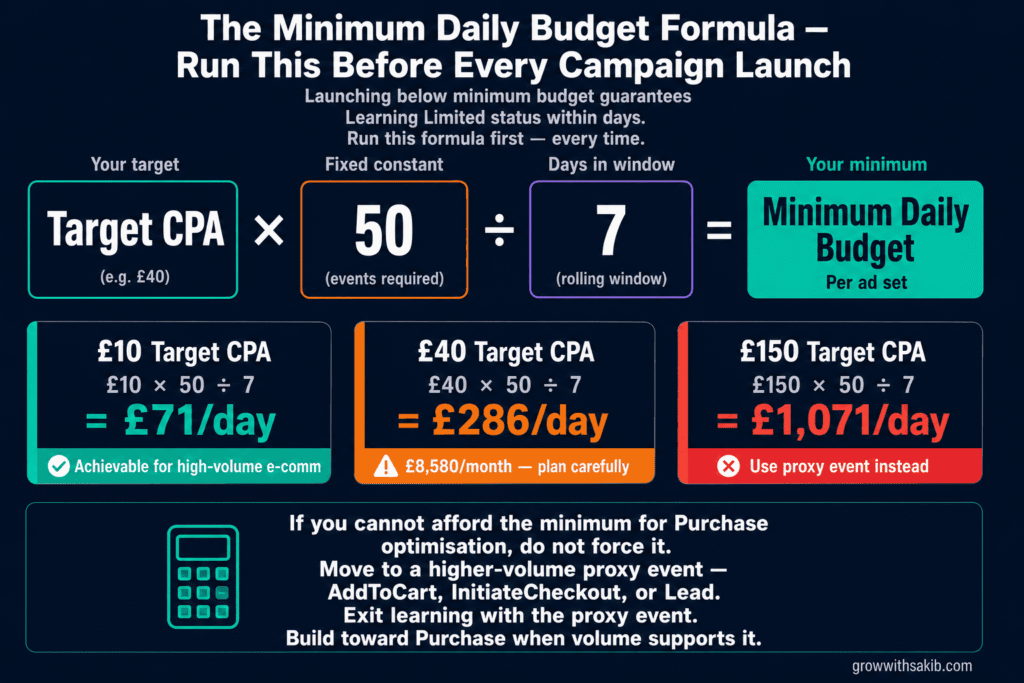
Minimum daily budget = (Target CPA × 50) ÷ 7
If your target CPA is £40: (£40 × 50) ÷ 7 = £285/day minimum. If your actual budget is £100/day, you are structurally incapable of exiting learning for a Purchase-optimised campaign at that CPA.
| Target CPA | Minimum Daily Budget | What This Means |
| £10 (low-ticket, high-volume) | £71/day | Achievable for e-commerce brands with high purchase frequency |
| £20 (e-commerce, mid-range) | £143/day | Standard e-commerce minimum — about £4,300/month |
| £40 (mid-ticket or service) | £286/day | £8,580/month — significant commitment for SMBs |
| £80 (B2B or high-consideration) | £571/day | £17,130/month — only viable at scale with strong unit economics |
| £150 (professional services, high LTV) | £1,071/day | Requires either very high LTV or a proxy event lower in funnel |
Cause 2: Audience too small or too narrow
Even with a sufficient budget, an audience that is too small or too tightly defined prevents the algorithm from finding enough qualifying users to generate 50 events.
The math: a technically sufficient budget needs an audience large enough to contain 50 potential converters per week. If your audience of 80,000 users has a conversion rate of 0.5%, your effective converting pool is 400 people. Finding 50 of them in a week with broad delivery is feasible. If your audience is 15,000 users at the same conversion rate, your converting pool is 75 people — and reaching all 75 in 7 days while staying within budget becomes structurally difficult.
- Fix: Broaden your targeting. Remove restrictive interest layers. Enable Advantage+ Audience, which gives Meta access to a much larger exploration pool — particularly effective for Meta Ads for local business where radius targeting can artificially restrict audience size. A minimum audience of 500,000 to 2 million is generally safer for standard campaigns.
- Counter-intuitive reality: Broader audiences often exit learning faster — not because you are targeting less specifically, but because Meta has more inventory to find your 50 converters within. The algorithm’s ability to identify high-value users within a broad pool is significantly better than your ability to pre-define a narrow segment.
Cause 3: Optimisation event too infrequent
You might have adequate budget and a large audience — but if the specific conversion event you are optimising for happens rarely, you cannot generate 50 in 7 days regardless of how much you spend.
This is particularly acute for B2B advertisers optimising for high-consideration conversions (demo requests, consultation bookings, enterprise contract signings) and for new advertiser accounts targeting purchases before they have established customer history.
- Fix: Move to a higher-volume proxy event (see Section 7 for the full funnel event ladder). Use the proxy event to exit learning and establish stable delivery, then move downstream once you have the volume to support it.
Cause 4: Structural fragmentation — too many ad sets splitting conversion volume
This is the most common advanced mistake and the hardest to diagnose because it looks like adequate setup on the surface. You have five ad sets, each with a £60/day budget — total budget £300/day. Your target CPA is £15, so the total account should generate 20 purchases per day, or 140 per week. That sounds like plenty to exit learning.
But each individual ad set only generates 28 purchases per week (140 ÷ 5). None of them hit the 50-event threshold individually. All five stay in Learning Limited indefinitely, even though the total account volume is more than sufficient.
- Fix: Consolidate. Merge multiple ad sets into fewer, larger ad sets with higher per-set budgets. Or switch to Campaign Budget Optimisation (CBO) / Advantage+ Shopping, which pools budget across ad sets and can direct more spend toward the ad set generating events fastest.
- The Advantage+ Shopping advantage: ASC uses a single campaign structure with Meta handling audience and budget allocation. There is no fragmentation by design — all conversion volume accumulates in one learning pool, which is a structural reason ASC exits learning significantly faster than manually fragmented setups.
The Optimisation Event Ladder: Choosing the Right Event When Purchases Are Not Enough
One of the highest-leverage decisions in Meta campaign setup is which event to optimise for. The common mistake is always optimising for the bottom-funnel event — Purchase, Lead, Sale — without checking whether your volume supports it.
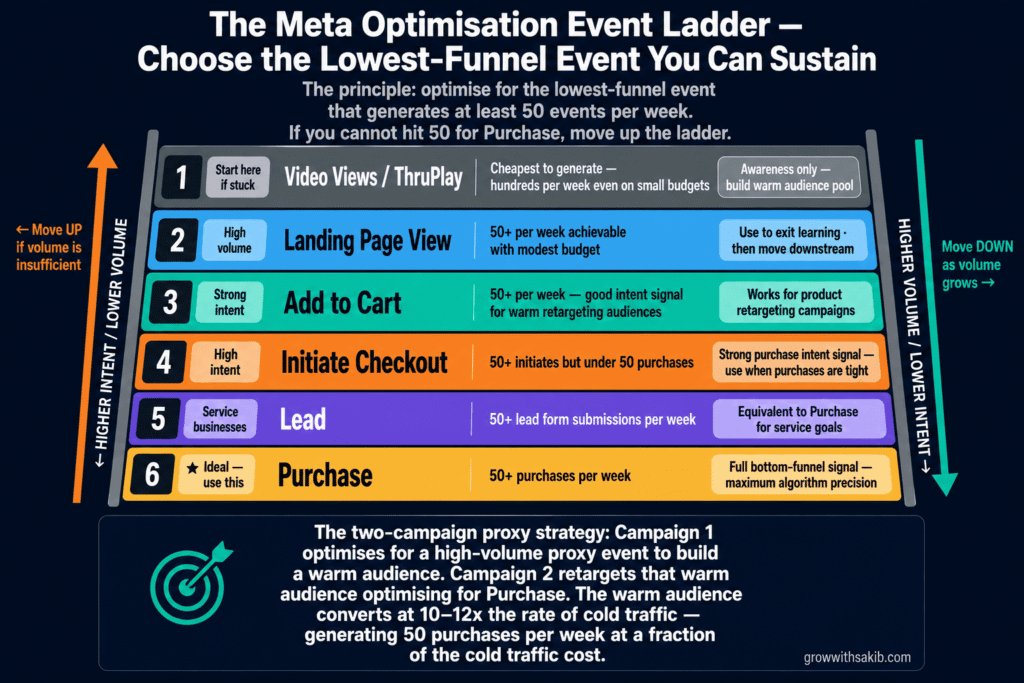
The principle: optimise for the lowest-funnel event that generates at least 50 events per week. If you cannot generate 50 purchases per week, do not optimise for Purchase. Move up the funnel.
| If you generate per week… | Optimise for… | Why |
| 50+ Purchases | Purchase | Full bottom-funnel signal — ideal for algorithm precision |
| 50+ InitiateCheckout but under 50 Purchases | Initiate Checkout | Higher volume than Purchase; still strong purchase intent signal |
| 50+ AddToCart but under 50 Initiates | Add to Cart | Good intent signal; works for warm retargeting audiences |
| 50+ Lead form submissions | Lead | For service businesses — Lead is equivalent to Purchase in signal quality for your goal |
| 50+ Landing Page Views but under above | Landing Page View | Weaker signal but high volume — use to exit learning, then move downstream |
| Very few events across all types | Video Views or ThruPlay | Cheapest to generate; use for awareness campaigns to build warm audience pools |
The funnel event strategy: start at the highest volume event that still represents meaningful intent. Exit learning with that event. Build your warm audience pool. Then create a new campaign — retargeting the audience built in the proxy event campaign — optimising for your true bottom-funnel event. The second campaign has a smaller but warmer audience and a much higher conversion rate, meaning it can generate 50 events per week at a lower budget.
8 Strategies to Exit the Learning Phase Faster
These are ordered by impact — start at the top.
1. Calculate minimum budget before launching — not after getting stuck
Run the budget formula (Target CPA × 50 ÷ 7 days) before you set your campaign budget. If you cannot afford the minimum, either raise the budget, reduce your CPA target (by improving conversion rate or offer), or choose a higher-volume proxy event. Do not launch a purchase-optimised campaign at £30/day and hope it works.
2. Consolidate ad sets — fewer, larger, not many small
The single most impactful structural change most advertisers can make. Merge five £50/day ad sets into two £125/day ad sets. Or one £250/day ad set. Each conversion event now contributes to a single learning pool rather than being split across five separate learning thresholds. The total spend is identical. The learning phase completion is dramatically faster.
3. Use Advantage+ Audience or ASC for faster exploration
Advantage+ Audience gives the algorithm a larger exploration pool — typically all adults in your target geography, with your manual audience serving as a suggestion rather than a hard constraint. More exploration space means faster identification of high-converting users, which means faster event accumulation.
Advantage+ Shopping Campaigns (ASC) go further: they eliminate fragmentation by design, with Meta handling all audience and budget allocation within a single campaign structure — and use Meta ad formats optimised specifically for catalogue-based delivery. ASC typically exits learning in 3–5 days versus 7–14 days for equivalent manual campaigns. For e-commerce advertisers with a product catalogue, ASC is the most efficient path to fast learning phase exit.
4. Launch all creative variations simultaneously
Adding new ads to an ad set that is already in learning triggers a reset. The correct approach: decide on your creative test variations before launch, and upload all of them simultaneously when the campaign goes live. Meta sees the full ad set from day one, no mid-flight changes, no resets. All creative variations contribute to the same learning pool from the start.
Alternatively, use Dynamic Creative (now called Flexible Ads in some accounts) or Advantage+ Creative to test multiple headline, image, and copy combinations within a single ad unit. Meta sees it as one ad — no reset risk when combinations are explored internally.
5. Fix your tracking before launching
If Meta cannot see your conversion events, it cannot count them toward the 50-event threshold — start with the Meta Pixel setup guide to confirm your tracking foundation is correct before launching. An account with a misconfigured Pixel or missing CAPI setup may have a physically correct campaign structure that still gets stuck in Learning Limited — because the algorithm cannot see the conversions that would satisfy the threshold.
Verify your Pixel + CAPI setup before launching any campaign. Check Events Manager Test Events to confirm conversion events fire correctly. Check your Event Match Quality score — below 6.0 suggests significant tracking gaps that will slow learning phase exit. Under Andromeda, clean signal quality is no longer just a tracking nicety — it directly affects how fast the algorithm can build its predictive model.
6. Choose the right optimisation event (and be willing to move up the funnel)
Covered in full in Section 7. The brief version: if you cannot generate 50 of your target event per week, move to a higher-volume proxy event. Forcing Purchase optimisation when you get 6 purchases per week guarantees Learning Limited status. Moving to Add to Cart, Initiate Checkout, or Lead and later moving downstream is always faster.
7. Avoid pausing campaigns during learning
Pausing a campaign resets the algorithm’s certainty about its delivery model. Short pauses (under 24 hours) typically do not trigger a full reset — but they are still risky during the learning phase. Pauses of 7 or more days reliably reset the learning phase entirely, as the algorithm’s learned model becomes stale relative to current auction conditions.
If a campaign is in learning and performing within acceptable bounds — even if costs feel high — resist the urge to pause. The performance during learning is not representative of post-learning performance. Pausing because of learning-phase volatility is one of the most expensive mistakes in Meta campaign management.
8. Bundle all edits — never make isolated small changes
Under post-Andromeda Meta (April 2026 onwards), even minor changes that previously did not trigger resets may now do so. The safest practice: if you must make changes, make all of them at once in a single editing session, then leave the campaign alone for 14 days. One combined edit that triggers one reset is dramatically less damaging than five separate small edits that each trigger their own reset.
After the Learning Phase: What ‘Active’ Status Actually Means
Most guides stop at ‘how to exit learning.’ But understanding what happens after learning — and what to do and not do — is equally important.
What Active status means
When an ad set reaches Active status, the algorithm has accumulated enough conversion data to build a stable delivery model. It knows which sub-segments of your audience are most likely to convert, at what times, through which placements, and with which creative signals. It is no longer exploring broadly — it is delivering to your best-performing segments with increasing precision.
This is when campaign performance typically becomes more consistent and costs begin to fall toward their true efficient level. CPAs in Active status are generally 20–50% lower than during the learning phase.
How to scale without resetting
Active status does not mean the campaign is complete. It means you now have a stable base from which to scale — using the campaign structures covered in the Meta Ads Guide. The 20% budget rule applies here just as it does during learning — increases above 20% in a single step trigger a re-learning phase that temporarily increases costs and reduces stability.
- Budget scaling: Use 20% increments every 3–4 days. Never increase more than 20% in one edit.
- Creative refresh: Do not add new ads to the active ad set — this triggers a reset. Instead, launch new creative in a separate ad set or new campaign, let it exit learning independently, then pause underperformers once the new creative has proven itself.
- Audience adjustments: Avoid narrowing an active ad set’s audience. If you want to test a different audience, launch it in a new ad set rather than modifying the existing one.
- Monitoring frequency: Review performance weekly at minimum. Watch for rising frequency (above 3–4), which signals audience fatigue even in Active status.
When does an Active ad set go back to Learning?
An Active ad set returns to Learning status when you make significant changes (per the reset trigger table in Section 5) or when the algorithm detects that current delivery conditions have diverged significantly from what it learned. Seasonal shifts — entering Q4, for example — can sometimes trigger partial re-learning even without advertiser changes, as competition and user behaviour patterns shift.
The best defence: minimal editing discipline, consistent creative refreshes through separate ad sets, and monitoring performance trends weekly so you can spot early signs of fatigue before they become problems.
Pre-Launch and In-Learning Checklists
Before you launch: the pre-launch checklist
- Budget formula cleared: (Target CPA × 50) ÷ 7 = daily minimum. Your actual budget meets or exceeds this.
- Optimisation event generates 50+/week: Verify in Events Manager that your chosen event fires at least 50 times per week on your site. If not, move to a higher-volume event.
- All creative variations uploaded simultaneously: Never upload creative in batches post-launch. All test variations go live from day one or not at all.
- Pixel + CAPI configured and verified: Test Events confirms conversion events fire. Event Match Quality above 6.0 for key conversion events.
- Audience minimum 500K+: Narrow audiences slow learning phase exit. Advantage+ Audience enabled where possible.
- Single ad set unless CBO or ASC: Avoid fragmentation. One well-funded ad set beats five thin ones for learning phase speed.
- 14-day no-edit window scheduled: Block the calendar. Inform stakeholders. The 14-day no-edit window starts at launch.
During learning: the monitoring checklist
- Check status (not performance) daily: Is it ‘Learning’, ‘Learning Limited’, or ‘Active’? Status is your primary indicator.
- Do not evaluate CPA until day 14: Learning-phase CPA is not representative. Judge only after 14 days of running.
- No budget changes above 20%: If you must change budget, stay under the threshold. Bundle with any other edits.
- If Learning Limited appears before day 7: Diagnose immediately using the four-cause framework in Section 6. Do not wait.
- Never pause for more than 24 hours: A 7+ day pause resets the learning phase entirely.
Frequently Asked Questions
How long does the Meta ads learning phase last?
The learning phase lasts until an ad set accumulates approximately 50 optimisation events within any 7-day rolling window. For well-structured campaigns with adequate budget, this typically takes 3–7 days for Advantage+ Shopping campaigns and 7–14 days for standard manual campaigns post-Andromeda. If an ad set cannot reach the 50-event threshold — due to budget, audience, or event volume constraints — it enters ‘Learning Limited’ status and may remain there indefinitely without structural fixes.
Does editing a Meta ad reset the learning phase?
Yes — for most significant edits. Changes that reset the learning phase include: targeting changes, budget increases above 20%, bidding strategy changes, adding or removing ads from an ad set, pausing for 7+ days, and changing the optimisation event. Following the April 2026 Andromeda update, the threshold for what constitutes a ‘significant’ edit has tightened — some changes that previously did not trigger resets now do. The safest practice is to bundle all edits into a single session and then observe a 14-day no-edit window.
What is the difference between ‘Learning’ and ‘Learning Limited’?
‘Learning’ means the ad set is actively gathering data toward the 50-event threshold — a normal and expected status for new campaigns. ‘Learning Limited’ means the ad set is mathematically unlikely to reach the threshold due to structural constraints. These are distinct problems. ‘Learning’ resolves with time (and no interference). ‘Learning Limited’ does not self-resolve — it requires diagnosing and fixing the underlying cause: insufficient budget, too-narrow audience, infrequent optimisation event, or structural fragmentation across too many ad sets.
How much budget do I need to exit the learning phase?
The formula: (Target CPA × 50) ÷ 7 days = minimum daily budget per ad set. If your target CPA is £30, you need at least £214/day. If that budget is not available, you have two options: choose a higher-volume proxy event (AddToCart, InitiateCheckout) that generates 50+ events at a lower per-event cost, or consolidate into fewer ad sets so each receives more of your total budget. Do not launch a purchase-optimised campaign at a budget that cannot support the minimum — it will be Learning Limited within days.
Will Advantage+ Shopping exit the learning phase faster?
Yes, typically. Advantage+ Shopping Campaigns (ASC) exit learning in approximately 3–5 days for accounts with sufficient conversion volume, versus 7–14 days for equivalent manual campaigns. The structural reason: ASC uses a single ad set by design, eliminating fragmentation and concentrating all conversion events in one learning pool. It also gives the algorithm a broader exploration space (broadly all users who might convert for your product) rather than the constrained exploration space of a manually defined audience. For e-commerce advertisers with a product catalogue and conversion history, ASC is the most efficient path to learning phase completion.
Should I pause my ads during the learning phase?
No — unless the campaign is losing money at a rate that is unsustainable. Learning-phase performance is not representative of post-learning performance, so pausing based on volatile learning-phase results is usually premature. Short pauses (under 24 hours) generally do not trigger a full reset but add no value. Pauses of 7 or more days reset the learning phase entirely, forcing you to start over. If costs are within a tolerable range — even if higher than your target — allow the learning phase to complete before making judgements about campaign viability.
What is the Andromeda update and how does it affect the learning phase?
Andromeda is Meta’s major algorithm update, fully rolled out by January 2026, that shifted how ad delivery works. Under Andromeda, creative signals determine audience discovery rather than manually defined audience segments. The algorithm uses engagement behaviour (hook rates, completion rates, interaction patterns) to identify converters across a broader pool. For the learning phase, Andromeda’s April 2026 update tightened the thresholds for what triggers a learning phase reset — meaning changes that previously were safe now trigger restarts. It also extended typical learning phase duration from 4–7 days to 7–14 days for many accounts. The practical response: stricter no-edit discipline, more creative diversity at launch, and patience through the extended learning window.