Most digital businesses focus on content, branding, and marketing — then wonder why organic traffic refuses to grow. In many cases the problem is not the content. It is a technical foundation that prevents search engines from properly crawling, rendering, and trusting the site.
The numbers back this up. Google has confirmed that page experience, Core Web Vitals, and site structure directly influence search visibility. A Backlinko case study documented a 250% traffic increase within one week of fixing internal linking on a site that had been publishing high-quality content for months with no growth — because none of that content was properly connected.
This guide gives you a structured, tool-specific, actionable framework for technical SEO in 2026 — including the December 2025 Google Rendering Update, the shift from FID to INP, AI bot management in robots.txt, and how technical foundations now directly support generative search visibility.
What Is Technical SEO?
Technical SEO is the process of optimising a website’s infrastructure so search engines can efficiently crawl, render, index, and understand it — and, in 2026, so AI-powered search systems can extract and cite it accurately.
It is the foundation underneath everything else. Content strategy, link building, and on-page optimisation all depend on a clean technical setup. Without it, even exceptional content may never be found.
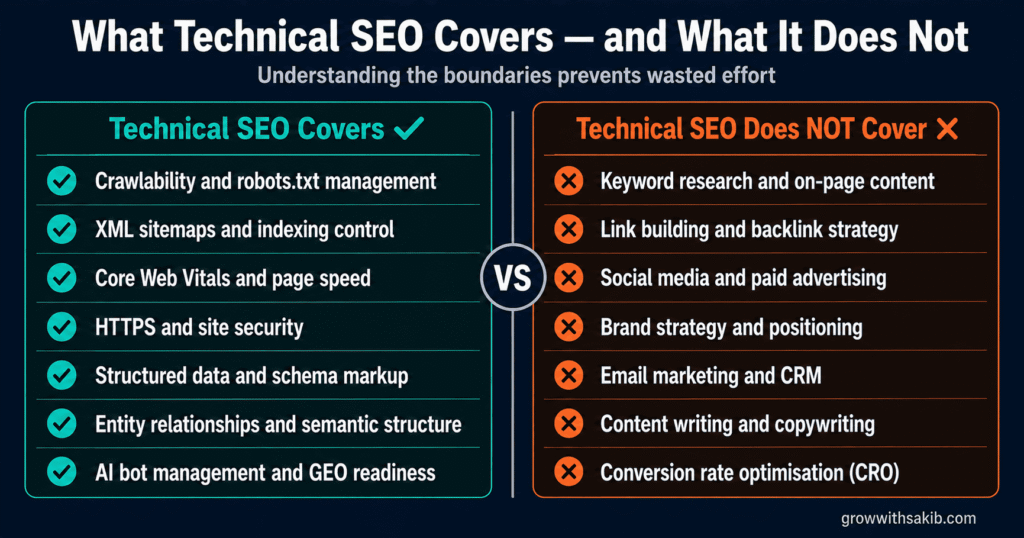
| Technical SEO covers | It does NOT cover |
|---|---|
| Crawlability and robots.txt management | Keyword research and on-page content |
| XML sitemaps and indexing control | Link building and backlink strategy |
| Core Web Vitals and page speed | Social media and paid advertising |
| HTTPS and site security | Brand strategy and positioning |
| Structured data and schema markup | Email marketing and CRM |
| Entity relationships and semantic structure | Content writing and copywriting |
| AI bot management and GEO readiness | Conversion rate optimisation (CRO) |
Core Technical SEO Strategies
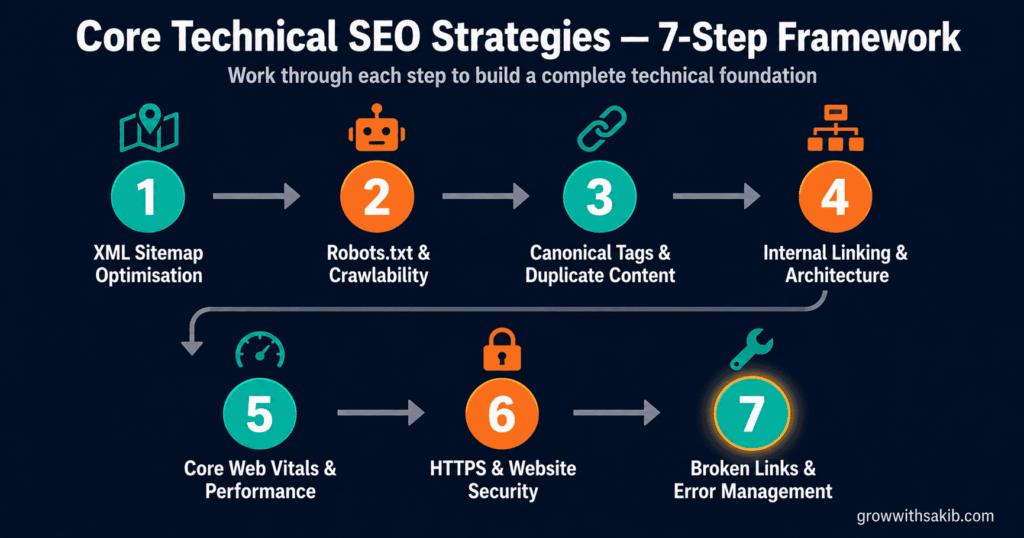
An XML sitemap tells search engines which pages exist on your site, how they are organised, and how frequently they change. As sites grow — adding blog posts, service pages, products, and media — organised sitemap structures become critical for efficient crawling and indexing.
Small sites can manage with a single sitemap file. Larger sites should use a sitemap index that splits content into separate files by type: posts, pages, products, and categories. This creates a cleaner hierarchy that improves crawl efficiency and makes it easier to diagnose indexing problems by content type.
What to do
- Go to yourdomain.com/sitemap.xml to verify your sitemap exists and is accessible
- Submit it in Google Search Console under Indexing → Sitemaps
- Check for errors: Google Search Console shows which URLs were submitted vs indexed — a large gap signals indexing problems
- Reference your sitemap in your robots.txt file with: Sitemap: https://yourdomain.com/sitemap.xml
- Exclude low-value pages — tag pages, author archives, and search result pages should be blocked from the sitemap
Robots.txt tells crawlers which pages they are allowed to access. A well-configured file focuses crawl budget on your most valuable pages while blocking admin areas, internal search results, staging environments, and other low-value sections.
In 2026, robots.txt has a new dimension: AI bot management. Search bots, AI training scrapers, and AI search retrieval agents all use different user agents — and you may want different rules for each.
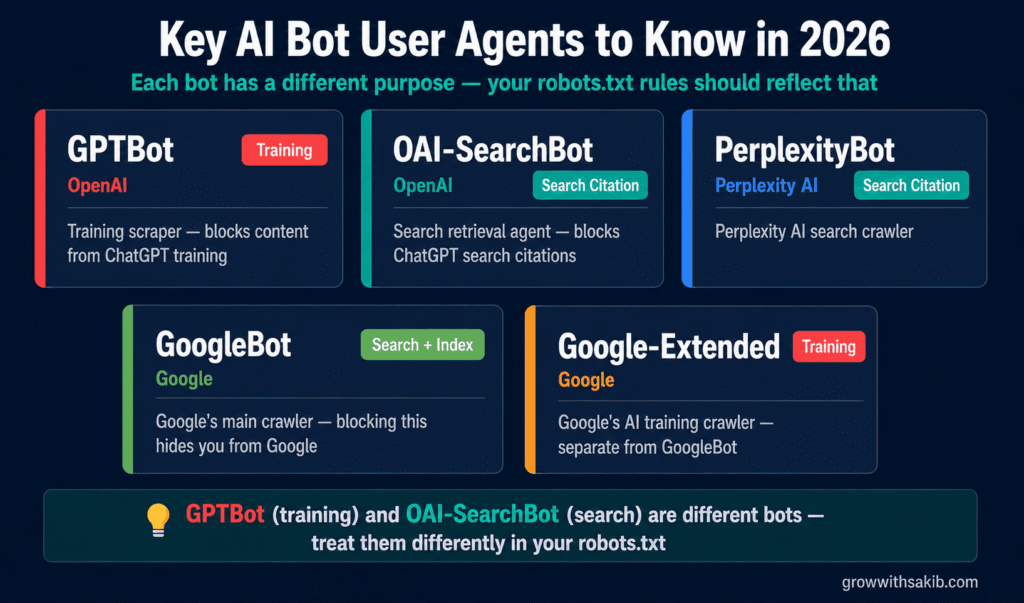
Key AI bot user agents to know
- GPTBot — OpenAI’s training scraper (blocks content from ChatGPT training)
- OAI-SearchBot — OpenAI’s search retrieval agent (blocks ChatGPT search citations)
- PerplexityBot — Perplexity AI search crawler
- GoogleBot — Google’s main crawler (blocking this hides you from Google)
- Google-Extended — Google’s AI training crawler (separate from GoogleBot)
What to do
- Visit yourdomain.com/robots.txt and read your current rules
- Check Google Search Console → Settings → Crawl Stats to see how Googlebot is spending its crawl budget
- Use Google’s robots.txt Tester in Search Console to test specific URLs against your rules
- Block: /wp-admin/, /wp-login.php, /internal-search/, /staging/, duplicate parameter URLs
- Allow: all important content pages, sitemap, and CSS/JS files Google needs to render your pages
Many websites unintentionally create duplicate content through URL parameters, HTTP vs HTTPS versions, WWW vs non-WWW variations, trailing slashes, printer-friendly pages, and session-based URLs. Without canonical tags, search engines may treat these as separate competing pages — splitting ranking signals across multiple versions.
A canonical tag consolidates those signals by pointing all duplicate URLs toward one preferred version. This helps search engines focus crawl budget, indexing resources, and ranking signals on the right page.
What to do
- Check your site for duplicate URL issues using Screaming Frog — filter for pages with duplicate content or missing canonicals
- Ensure every page has a self-referencing canonical tag pointing to its preferred URL
- On paginated content (/page/2, /page/3), avoid canonicalising all pages to page 1 — this can prevent inner pages from being indexed
- Verify canonicals are implemented in the HTML head, not in JavaScript — Googlebot may not execute JS-injected canonicals
- Check Google Search Console → Pages → Duplicate without user-selected canonical to find pages Google is auto-selecting a canonical for instead of using yours
Internal linking is one of the highest-impact technical SEO improvements available — and one of the most underused. When Felix Norton audited a client’s website after three months of publishing high-quality content with no traffic growth, he discovered the site had almost no internal links. Adding strategic internal links to high-priority content and product pages produced a 250% traffic increase within one week — without publishing a single new piece of content.
Principles of strong internal linking
- Link from high-authority pages to important pages: Your most-visited pages pass the most value through internal links. Use them to point to cornerstone content and service pages.
- Use descriptive anchor text: ‘Technical SEO guide’ is more useful than ‘click here’ for both users and search engines.
- Fix orphan pages: Pages with no internal links are effectively invisible to search engines. Use Screaming Frog to find them.
- Follow a logical hierarchy: Important pages should be reachable within 3 clicks from the homepage. Deeply buried pages receive less crawl attention.
- Link related content together: Topically connected pages should link to each other to establish semantic relationships.
What to do
- Crawl your site with Screaming Frog → filter for Orphan Pages (pages with no internal links)
- Review your top 10 most important pages — count how many internal links point to each
- Add internal links from your highest-traffic posts to your service pages and cornerstone content
- Audit anchor text — replace generic anchors (‘read more’, ‘click here’) with descriptive keyword-relevant text
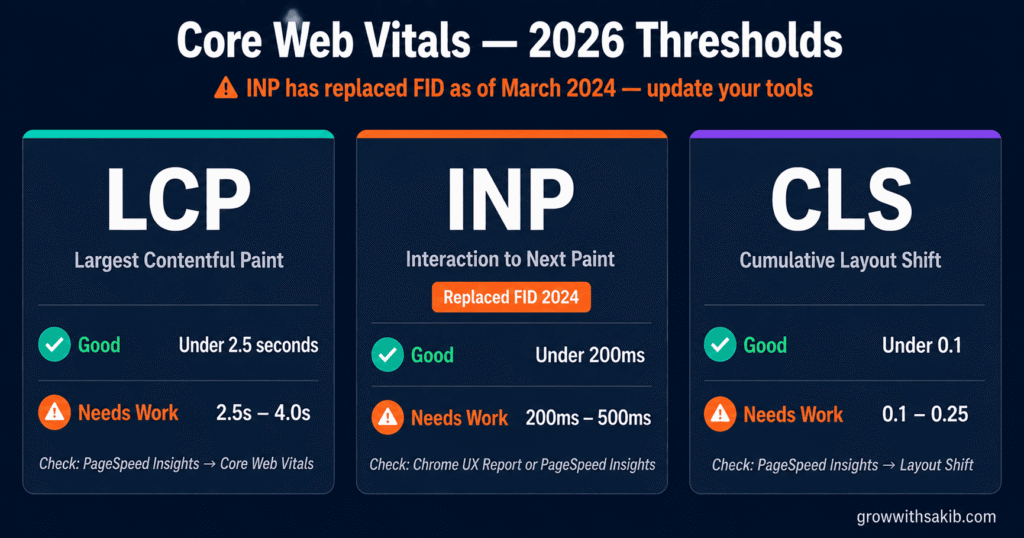
Core Web Vitals are Google’s official page experience metrics. They measure three dimensions of user experience: loading performance, interactivity, and visual stability. Google uses them as ranking signals — and they now apply to AI crawlers as well, which process pages more efficiently when performance is strong.
Important 2026 update: First Input Delay (FID) has been replaced by Interaction to Next Paint (INP) as Google’s interactivity metric. Any guide or tool referencing FID as a current metric is outdated. INP measures the full responsiveness of all user interactions, not just the first one.
| Metric | Good | Needs Work | How to check |
|---|---|---|---|
| LCP (Largest Contentful Paint) | Under 2.5s | 2.5s – 4.0s | PageSpeed Insights → Core Web Vitals section |
| INP (Interaction to Next Paint) | Under 200ms | 200ms – 500ms | Chrome UX Report or PageSpeed Insights |
| CLS (Cumulative Layout Shift) | Under 0.1 | 0.1 – 0.25 | PageSpeed Insights → Layout Shift section |
Most common performance problems and fixes
- Unoptimised images: Convert to WebP format, compress before uploading, and use lazy loading for below-fold images. Use Squoosh or ShortPixel.
- Render-blocking resources: JavaScript and CSS that load before page content delays LCP. Defer non-critical JS and inline critical CSS.
- Slow server response (TTFB): A Time to First Byte above 600ms drags down all other metrics. Upgrade hosting or implement server-side caching.
- No CDN: A Content Delivery Network (CDN) serves assets from servers closest to the user. Cloudflare’s free tier is a strong starting point.
- Layout instability (CLS): Reserve space for images and ads with explicit width/height attributes. Late-loading fonts and embeds are common CLS culprits.
Google announced HTTPS as a ranking signal in 2014. By 2026 it is not a differentiator — it is a baseline requirement. Websites still running on HTTP display ‘Not Secure’ warnings in all major browsers, which reduces user trust before they even engage with your content.
What to do
- Verify your SSL certificate is active and not expired — check at ssllabs.com/ssltest
- Confirm all pages load on HTTPS and that HTTP URLs redirect (301) to HTTPS versions
- Check for mixed content: pages loading over HTTPS but referencing HTTP resources (images, scripts). Use the browser console or Screaming Frog to find them
- Ensure your canonical tags and sitemap reference HTTPS URLs — not HTTP
Broken links, redirect chains, 404 errors, and soft 404s waste crawl budget, frustrate users, and signal poor site maintenance to search engines. The December 2025 Google Rendering Update made this more urgent: Google has clarified that pages returning non-200 status codes (4xx or 5xx) may now be excluded from the rendering queue entirely — meaning Googlebot may not process the page at all.
What to do
- Crawl your site with Screaming Frog → filter by Status Code → look for 404s, 301 chains, and 5xx errors
- Fix redirect chains: A → B → C should become A → C directly. Each redirect hop wastes crawl budget
- Replace or remove broken external links — they pass no value and signal neglect
- Set up Google Search Console alerts for crawl errors under Indexing → Pages → Not indexed
- Check for soft 404s: pages that return a 200 status but display ‘no results’ or empty content. Google Search Console reports these separately
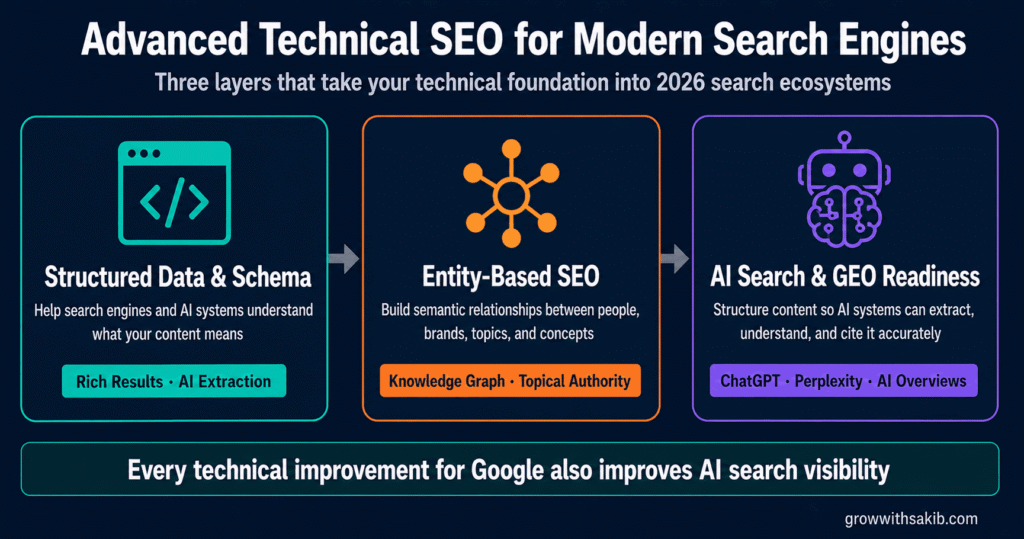
Advanced Technical SEO for Modern Search Engines
Structured data provides machine-readable context about your content. Instead of relying on search engines to infer what a page is about from visible text alone, schema markup explicitly communicates the meaning, type, and relationships of your content.
In 2026, structured data matters for two search ecosystems — traditional search (rich results, enhanced SERP features) and AI search (where schema helps AI engines extract and cite specific facts accurately).
Schema types with the highest impact
- Article / BlogPosting: Author, date, headline — builds E-E-A-T signals for content pages
- Organization: Connects your site to your brand entity. Critical for AI systems that build knowledge graphs.
- FAQ: FAQ schema earns rich results in Google and helps AI systems extract Q&A content for direct answers
- HowTo: Step-by-step content marked with HowTo schema is easier for AI to extract and cite
- Product: Price, availability, reviews — essential for ecommerce visibility
- LocalBusiness: Name, address, hours, phone — critical for local search and map visibility
- BreadcrumbList: Shows site hierarchy in search results and helps AI understand content structure
What to do
- Implement schema using JSON-LD in the page head (not Microdata or RDFa — JSON-LD is Google’s recommended format)
- Validate every schema implementation at search.google.com/test/rich-results — this shows exactly what Google sees
- Check Google Search Console → Enhancements section for schema errors and warnings
- Add Organization schema to your homepage with your brand name, logo, URL, and social profiles
- Add Author schema to all blog posts — connect author names to real people with credentials
Modern search engines no longer treat pages as collections of keywords. They identify entities — real-world concepts such as people, organisations, products, locations, and technologies — and map the relationships between them. This is how Google’s Knowledge Graph works, and it is how AI systems build contextual understanding of web content.
What entities are and why they matter
An entity is anything with a distinct, identifiable existence — a person, a brand, a product, a location, a concept. When search engines recognise the entities in your content and how they relate to each other, they build a clearer, more confident understanding of what your site is about.
For example: an article discussing Technical SEO that also clearly references Google Search Console, Core Web Vitals, XML Sitemaps, and Screaming Frog creates a rich entity cluster around the topic — far stronger than a page that simply repeats the keyword ‘technical SEO’ without contextual depth.
How to optimise for entities
- Build entity consistency: Use the same name for your brand, people, and products across your site, Google Business Profile, LinkedIn, and Wikipedia (if applicable).
- Connect entities explicitly: Use schema markup to create machine-readable links between entities — Author to Organisation, Product to Brand, Article to Author.
- Reference authoritative entities: Citing named tools, platforms, research papers, and organisations strengthens the semantic context of your content.
- Build topical depth: Search engines associate entities with subject areas through consistent publishing. A site that consistently covers technical SEO entities builds stronger topical authority than one covering technical SEO occasionally alongside unrelated topics.
- Use natural entity relationships: Don’t force entity mentions — write content that naturally includes the tools, people, and concepts relevant to each topic.
Generative Engine Optimisation (GEO) is the practice of structuring content so AI-powered search systems can accurately understand, extract, and cite it. The good news: every technical SEO improvement you make for Google also benefits AI search visibility. They are not separate strategies.
| Technical SEO improvement | AI search benefit |
|---|---|
| Fix crawlability issues | AI bots can access and index your content |
| Implement structured data | AI engines understand content meaning and context |
| Improve page speed | AI crawlers process your pages more efficiently |
| Build entity authority | AI systems cite your brand more frequently |
| Fix heading hierarchy | AI extracts answers from properly structured sections |
| Add BLUF formatting | AI Overviews pull answers that appear at the top of sections |
BLUF formatting for AI citation
BLUF stands for ‘Bottom Line Up Front.’ It means answering the question in the first sentence of each section, then expanding with evidence and context. AI systems extract content at the passage level — they pull specific paragraphs, not whole articles. A section that buries its main answer at the end is harder to extract accurately.
Technical requirements for AI readiness
- Allow AI search bots in robots.txt: OAI-SearchBot (ChatGPT), PerplexityBot, and GoogleBot must be allowed to crawl for AI citation visibility
- Ensure JavaScript-rendered content is accessible: AI crawlers vary in JS execution capability. Critical content should be in server-rendered HTML, not JavaScript-only
- Implement llms.txt (emerging standard): A plain-text file at yourdomain.com/llms.txt describing your site’s structure and key content — similar to robots.txt but for LLMs
- Use clean heading hierarchy: H1 → H2 → H3 in logical order helps AI systems identify topic structure and extract section-level answers
- Add definition-style formatting: Clear definitions at the start of sections (‘Technical SEO is…’) improve extraction accuracy
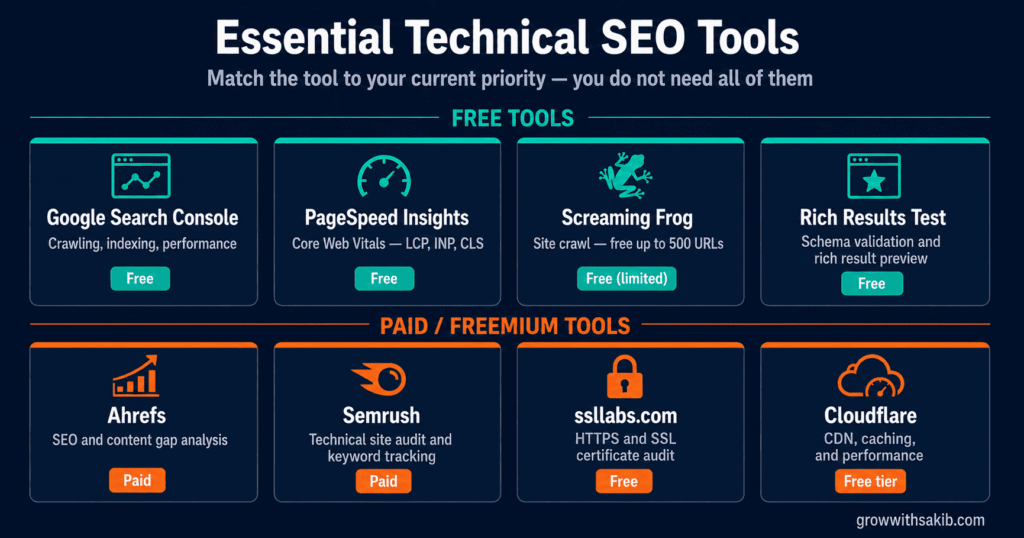
Essential Technical SEO Tools
You do not need all of these. Match the tool to your current priority from the section above.
| Tool | Best for | What to check | Free/Paid |
|---|---|---|---|
| Google Search Console | Crawling, indexing, performance | Coverage errors, Core Web Vitals, schema validation, sitemap status | Free |
| PageSpeed Insights | Core Web Vitals | LCP, INP, CLS scores with field data and fix recommendations | Free |
| Screaming Frog | Site crawl and audit | Broken links, orphan pages, redirects, canonicals, duplicate content | Free up to 500 URLs |
| Ahrefs | SEO and content gaps | Keyword rankings, backlinks, content gaps, site audit | Paid |
| Semrush | Technical site audit | Site health score, crawl issues, keyword tracking | Paid (free trial) |
| Rich Results Test | Schema validation | Validates structured data, previews rich result eligibility | Free |
| ssllabs.com | HTTPS audit | SSL certificate strength, mixed content issues, expiry | Free |
| Cloudflare | Performance and CDN | Global CDN, caching, DDoS protection, Core Web Vitals improvement | Free tier available |
Best Practices for Long-Term Technical SEO
Technical SEO is not a one-time setup. Sites evolve — new pages, plugins, design changes, and search engine updates introduce new issues continuously. Long-term visibility depends on consistent monitoring rather than periodic fixes.
Build a monthly technical health routine
- Google Search Console review (weekly): Check Coverage for new indexing errors, Core Web Vitals for regressions, and Manual Actions for penalties
- Crawl audit (monthly): Run Screaming Frog once a month to find new broken links, redirect chains, and orphan pages before they accumulate
- Core Web Vitals check (monthly): Run PageSpeed Insights on your key landing pages — not just the homepage. Performance regressions often appear on inner pages first
- Schema validation (quarterly): Run the Rich Results Test on all schema-marked pages after any site updates or plugin changes
- Full technical audit (quarterly): Comprehensive review covering all elements in this guide, plus any new Google Search Central documentation updates
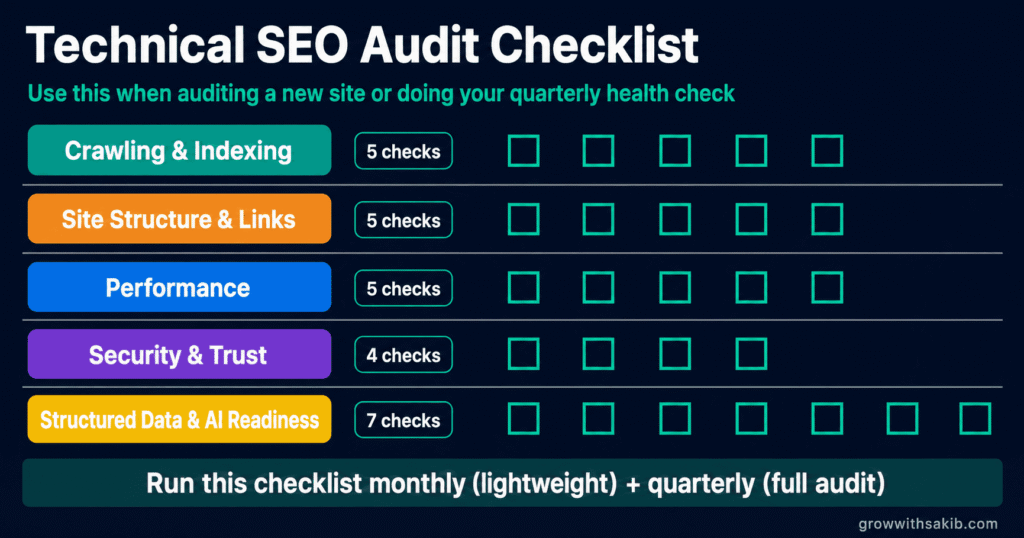
Technical SEO Audit Checklist
Use this checklist when auditing a new site, reviewing an existing site, or doing your quarterly health check.
Crawling and indexing
| Check this | Tool to use |
|---|---|
| ☐ Sitemap submitted and accepted in Google Search Console | Google Search Console → Sitemaps |
| ☐ Robots.txt allows Googlebot and important AI crawlers | yourdomain.com/robots.txt + GSC robots.txt tester |
| ☐ No important pages accidentally blocked by robots.txt | GSC robots.txt tester + Screaming Frog |
| ☐ Crawl budget not wasted on low-value pages | GSC → Settings → Crawl Stats |
| ☐ All important pages are indexed (not excluded or noindexed) | GSC → Pages → Indexed |
Site structure and links
| Check this | Tool to use |
|---|---|
| ☐ No orphan pages (pages with zero internal links) | Screaming Frog → filter Orphan Pages |
| ☐ Important pages reachable within 3 clicks from homepage | Screaming Frog → crawl depth report |
| ☐ No redirect chains longer than one hop (A→B→C should be A→C) | Screaming Frog → filter Redirects |
| ☐ No 404 errors on internal links | Screaming Frog → filter 4xx Status Codes |
| ☐ Canonical tags present and pointing to correct preferred URLs | Screaming Frog → Canonicals filter |
Performance
| Check this | Tool to use |
|---|---|
| ☐ LCP under 2.5 seconds on key landing pages | PageSpeed Insights |
| ☐ INP under 200ms (replaces FID as of March 2024) | PageSpeed Insights / Chrome UX Report |
| ☐ CLS under 0.1 on all pages | PageSpeed Insights → Layout Shift section |
| ☐ Images compressed and in WebP format | PageSpeed Insights → Opportunities section |
| ☐ CDN in place for static asset delivery | PageSpeed Insights → Reduce server response time |
Security and trust
| Check this | Tool to use |
|---|---|
| ☐ SSL certificate valid and not expiring within 30 days | ssllabs.com/ssltest |
| ☐ All pages load on HTTPS (no HTTP versions accessible) | Screaming Frog → filter HTTP URLs |
| ☐ No mixed content errors (HTTP resources on HTTPS pages) | Browser console → Network tab |
| ☐ Canonical tags and sitemap reference HTTPS URLs | Screaming Frog → Canonicals |
Structured data and AI readiness
| Check this | Tool to use |
|---|---|
| ☐ Organization schema on homepage with logo and social profiles | Rich Results Test |
| ☐ Article / BlogPosting schema on all blog posts with Author | Rich Results Test |
| ☐ FAQ schema on pages with Q&A content | Rich Results Test + GSC → Enhancements |
| ☐ No schema errors in Google Search Console | GSC → Enhancements section |
| ☐ AI search bots allowed in robots.txt (OAI-SearchBot, PerplexityBot) | yourdomain.com/robots.txt |
| ☐ BLUF formatting used — main answer in first sentence of each section | Manual content review |
| ☐ H1→H2→H3 heading hierarchy logical and consistent | Screaming Frog → Headings filter |
Technical SEO is the infrastructure that makes everything else work. Content strategy, link building, and brand building all depend on a foundation that allows search engines and AI systems to access, render, understand, and trust your site.
In 2026, that foundation covers more ground than it did two years ago. The December 2025 Google Rendering Update, the shift from FID to INP, AI bot governance, and GEO readiness are all now part of what a complete technical SEO strategy requires.
The businesses that invest consistently in clean technical foundations — not as a one-time project but as ongoing maintenance — compound their search visibility over time. Every new page they publish gets crawled faster, indexed more reliably, and cited more accurately in both traditional and AI search.
Start with the checklist. Fix what is broken. Then maintain what you have built.
Frequently Asked Questions
Does perfect technical SEO guarantee higher Google rankings?
No. Technical SEO removes barriers that prevent your content from being found and evaluated — but it does not guarantee top rankings. Search engines also weigh content quality, search intent match, topical authority, backlinks, and E-E-A-T signals. Strong technical SEO is necessary but not sufficient on its own.
What is the most important technical SEO factor in 2026?
Crawlability is still the foundation — if Googlebot cannot access and render your pages, nothing else matters. After that, Core Web Vitals (particularly INP following its 2024 promotion to primary metric) and structured data have the highest impact. For AI search visibility, structured data and clean heading hierarchy are the most direct levers.
What changed in technical SEO in late 2025 and 2026?
Three significant changes: First, Google’s December 2025 Rendering Update clarified that pages returning non-200 HTTP status codes may be excluded from the rendering queue entirely — making status code hygiene more urgent. Second, INP (Interaction to Next Paint) has fully replaced FID (First Input Delay) as the interactivity Core Web Vital. Third, AI bot governance in robots.txt has become strategically important as AI search platforms distinguish between training scrapers and search retrieval agents.
How often should I run a technical SEO audit?
A lightweight monthly check using Google Search Console and PageSpeed Insights, plus a comprehensive crawl-based audit quarterly using Screaming Frog. After any major site change — new theme, plugin updates, migration, or redesign — run an immediate audit. Problems introduced by site changes are much easier to fix immediately than months later.
What is the difference between technical SEO and GEO?
Technical SEO optimises site infrastructure for search engine crawling, indexing, and ranking. GEO (Generative Engine Optimisation) optimises content structure and formatting so AI-powered search systems can extract, understand, and cite it. In 2026, they are increasingly the same strategy — a technically sound site with clear entity relationships, structured data, and BLUF-formatted content performs well in both traditional and AI search.
Which technical SEO tool should I start with if I have no budget?
Google Search Console is the highest-value free tool available — it shows exactly which pages Google has indexed, which have errors, Core Web Vitals field data, schema validation, and manual penalty notifications. Pair it with PageSpeed Insights for performance and the Rich Results Test for schema. These three free tools cover the majority of critical technical issues for most sites.