Your competitor is telling you their entire paid strategy right now, for free. Every ad they run on Facebook and Instagram is public — the copy, the creative, how long it’s been live. Most businesses never look.
The Meta Ad Library is the tool that shows you. This guide covers how to use it for real competitor research — not just browsing, but reading a rival’s strategy and applying it to your own.
This expands Step 3 and the tools section of our complete guide to competitor research. The pillar covers the wider research process; here we go deep on this one free tool.
What Is the Meta Ad Library?
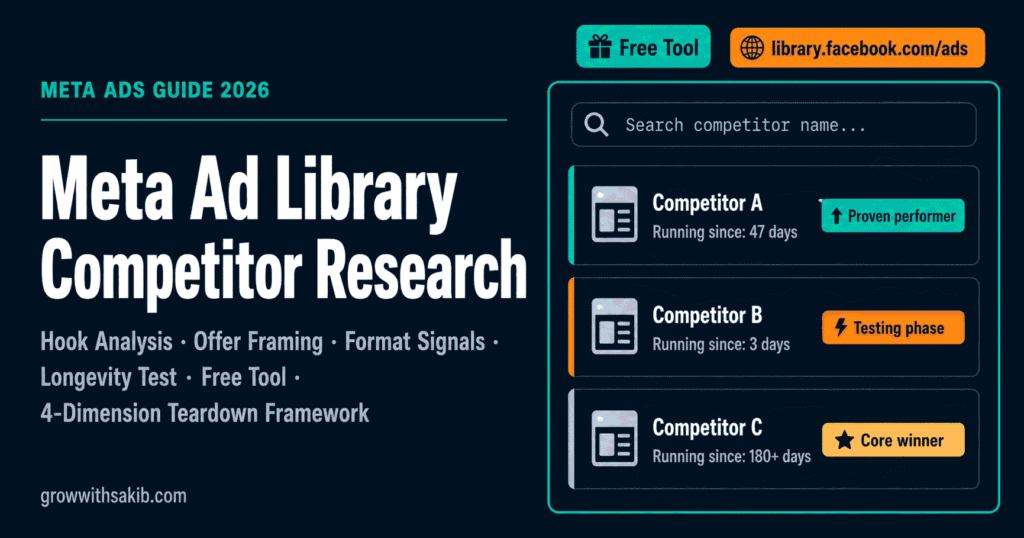
The Meta Ad Library is a public transparency tool that lets anyone see the ads a business is running across Meta’s platforms. According to Meta’s own description, it shows ads currently active across Facebook, Instagram, Messenger, and the Audience Network, with details on the advertiser and where the ad runs.
Meta launched it in 2018 — originally called the Ad Archive — in response to political-ad transparency concerns after the Cambridge Analytica fallout. It later expanded to cover all ad categories. The point was transparency for researchers and journalists; for marketers, it doubles as the best free competitive-intelligence asset in paid social.
You don’t need an ad account, and you don’t need to log in for most of it. It’s genuinely free.
How to Search the Meta Ad Library (Step by Step)
Go to the Meta Ad Library at facebook.com/ads/library, then follow these steps.
Step 1: Set country and category
Pick the country your competitor targets — ads differ by market, so the wrong country shows irrelevant creative. Keep the category on “All ads” for standard commercial research.
Step 2: Search by advertiser or by keyword
Searching by Page name is the fastest way to study one specific brand — it returns everything that advertiser is running. Searching by keyword finds ads across many advertisers that mention a term, which is how you scan a whole category for angles — a natural complement to competitor keyword analysis when you want to match organic keyword patterns to paid ad creative.
Step 3: Use the two search operators almost nobody uses
Most people type a word and stop. Two operators sharpen results dramatically:
- Quotation marks: wrap a phrase in quotes to match it exactly. “free shipping” returns only ads with that exact phrase, not ads mentioning “free” and “shipping” separately.
- Pipe ( | ): put | between brand names to run an OR search. Searching nike | adidas | puma pulls ads from all three at once — perfect for scanning a full competitor set in one go.
Step 4: Apply filters
Click Filters to narrow by platform (Facebook vs Instagram), media type (image, video, carousel), language, active status, and impressions by date. Stacking country + platform + date range is how you pull clean insights in minutes instead of scrolling for an hour.
Step 5: Open Ad Details
Click any ad to see the full copy, watch the video creative, view the landing-page link, and spot the different versions a brand is testing. That last part matters — multiple variants of one ad means they’re actively optimising it.
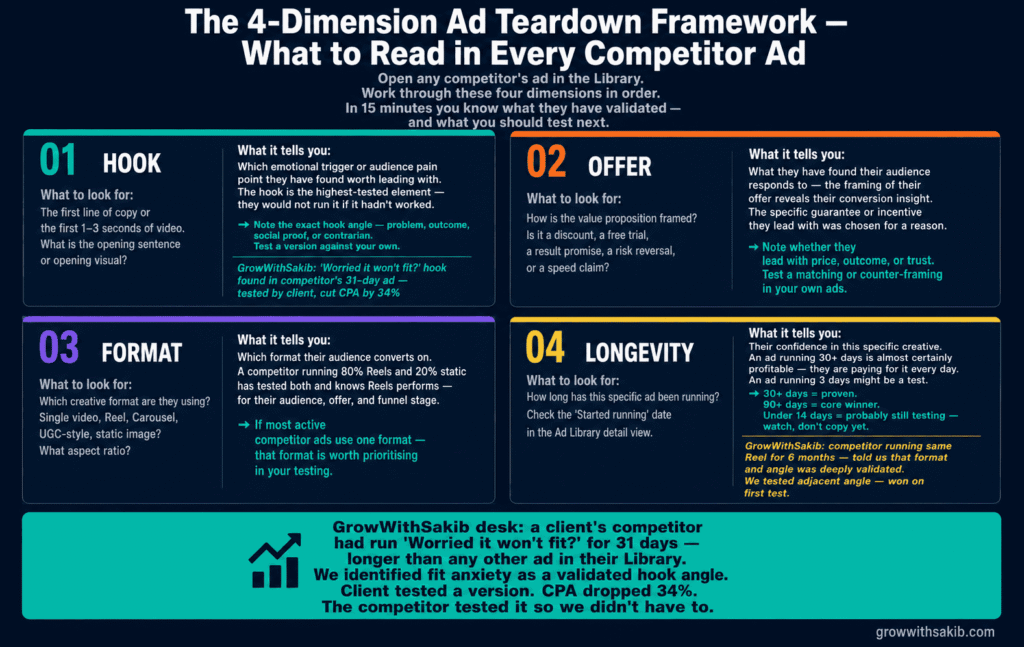
How to Read a Competitor’s Ads (The Teardown)
Finding ads is easy. Reading them is the skill. For each competitor, look for patterns across these four things rather than judging single ads.
| What to read | What it tells you |
|---|---|
| The hook (first line / first 3 seconds) | The pain point or desire they lead with |
| The offer | How they frame value — discount, free trial, bundle |
| The format | Whether video, static, or carousel wins for them see Meta ad formats to understand why each format performs differently by placement |
| Ad longevity | Which ads are proven (long-running) vs tests |
When the same hook or offer shows up across several of a competitor’s long-running ads, that’s their validated message — not a guess. Cross-reference it against competitor analysis tools for a complete picture of their paid and organic strategy. Feed those patterns into a competitor SWOT analysis so the insight sits alongside the rest of your research instead of in a screenshot folder.
Mobile vs Desktop: Use Each for a Different Job
The practical split that pros use: mobile is your capture device, desktop is your analysis device.
When you spot a competitor’s ad in your own feed, jump to the library on mobile, confirm it’s running, and screenshot it. Do the real teardown later on desktop, where the filters and side-by-side comparison are far easier to work with. Trying to do deep analysis on a phone just wastes time.
What You Can’t See (Be Honest About the Limits)
The Ad Library is powerful but not all-seeing. For standard commercial ads, you cannot see targeting details like interests, age, lookalikes, or custom audiences — Meta deliberately hides them. You also can’t see spend, impressions, or conversion data for normal ads.
The one exception is the EU and UK, where the Digital Services Act forces Meta to show the targeting parameters an advertiser chose. Everywhere else, you infer the audience from the creative and copy rather than seeing the actual setup.
So treat the library as a window into a competitor’s creative and messaging, not their full media plan. For the parts it can’t show — pricing, reviews, organic search — pair it with the rest of your competitor research toolkit. It’s one input, not the whole picture.
Common Mistakes to Avoid
- Judging single ads. Look for patterns across many ads, not one clever creative.
- Ignoring longevity. A long-running ad is your best free signal of what converts.
- Searching the wrong country. Ads differ by market; set the country to your competitor’s target.
- Assuming you see everything. Targeting and spend are hidden outside the EU/UK.
- Copying creative outright. Borrow the strategy and angle, not the exact ad — that’s both ineffective and risky. Instead, use competitor insights to brief your own UGC ad creative with a differentiated angle.
Frequently Asked Questions
How do you use the Meta Ad Library for competitor research?
Go to facebook.com/ads/library, choose your competitor’s target country, and search their Page name. Filter to active ads, then study the copy, creative, and how long each ad has run. Long-running ads usually signal what’s working. Read patterns across many ads rather than judging a single creative.
Is the Meta Ad Library free?
Yes, completely. The Meta Ad Library is a free public transparency tool, and you don’t need an ad account or even a login for most of it. Meta built it so researchers, journalists, and the public could see what ads are running. For marketers, that makes it the best free competitive-intelligence asset in paid social.
Can you see competitor ad targeting in the Ad Library?
Not for standard commercial ads — Meta hides targeting like interests, age, lookalikes, and custom audiences. The exception is the EU and UK, where the Digital Services Act requires Meta to show the targeting an advertiser chose. Everywhere else, you infer the audience from the ad’s creative and copy instead.
How can you tell which competitor ads are working?
Use ad longevity as a proxy. Brands quickly kill ads that don’t convert, so an ad running for many weeks or months is usually a proven winner being scaled. New creatives may just be tests. The library shows no spend or performance data, so longevity is the closest free signal you’ll get.
What’s the difference between the Facebook Ads Library and Meta Ad Library?
They’re the same tool. Meta renamed Facebook to Meta as the parent company, so “Facebook Ads Library” and “Meta Ad Library” refer to the same public database of ads running across Facebook, Instagram, Messenger, and the Audience Network. The official URL is facebook.com/ads/library.
Can you search multiple competitors at once?
Yes — use the pipe operator. Typing several brand names separated by | (for example nike | adidas | puma) runs an OR search and returns ads from all of them in one view. Combined with country and date filters, it’s the fastest way to scan an entire competitor set for shared angles and offers.
How far back does the Meta Ad Library go?
You can filter ads by impressions and date back to July 2018, when the tool launched, but no earlier. For standard ads, the archive mainly reflects active and recently active campaigns. Political and social-issue ads are kept longer and include extra detail like spend ranges and funding sources in the Ad Library Report.
Key Takeaways
- The Meta Ad Library is a free, public database of every ad running across Meta’s platforms.
- Search by Page name to study one brand; use the pipe ( | ) operator to scan several at once.
- Wrap phrases in quotes for exact-match keyword searches.
- Ad longevity is your best free signal — long-running ads are usually proven winners.
- You can’t see targeting or spend for standard ads, except in the EU and UK under the DSA.
- Use mobile to capture ads you spot, desktop to do the real analysis.
- Read patterns across many ads — hook, offer, format — not single creatives.
- Borrow a competitor’s validated strategy and angle, never copy their exact ad.