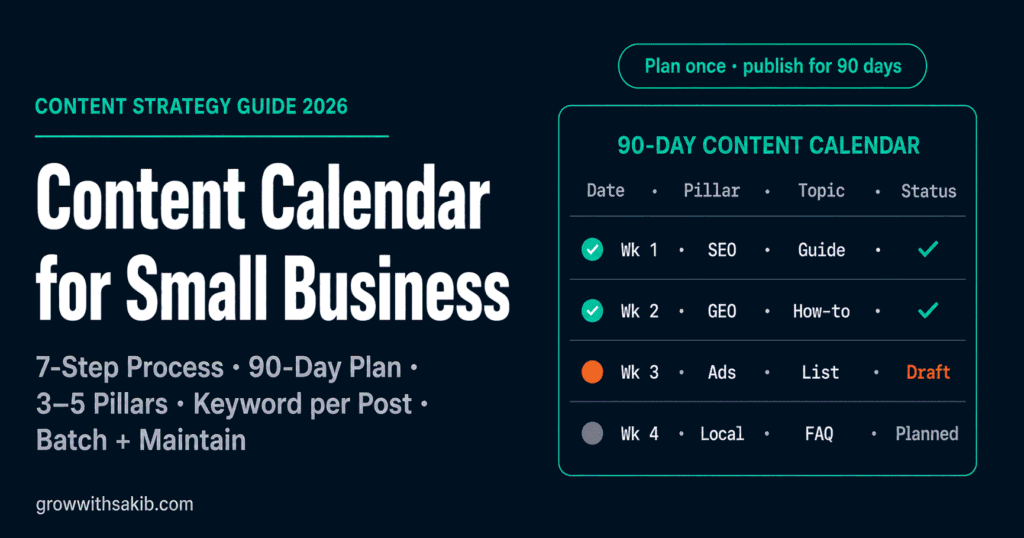
Posting whenever you remember, scrambling for ideas at the last minute, then going quiet for three weeks – that’s how most small business content dies. A content calendar fixes it. It turns “what should I post today?” into a plan you made once and simply follow, so you stay consistent even when client work and life get in the way.
This is the full how-to, with a free downloadable template. It’s the practical build for step nine of the content strategy for small business guide on GrowWithSakib, where the calendar is shown as a weekly table. Here we turn that table into a repeatable 90-day process you can run in a single sitting.
Why a Content Calendar Matters
A content calendar does four things that transform a small business’s marketing:
- Ends the daily scramble – you decide what to publish once, in advance, instead of inventing something under pressure every day.
- Creates consistency – audiences and search engines both reward a steady cadence. Going silent then flooding feeds erodes trust; reliable publishing builds it.
- Supports SEO – a steady stream of keyword-targeted content is the operational backbone of search rankings, which reward fresh, regular publishing.
- Connects strategy to execution – it’s where your goals and topics become actual scheduled work, turning a plan into published pieces.
It’s also proven practice. The Content Marketing Institute consistently finds that businesses which plan and document their content in advance report far more marketing success than those winging it – and a calendar is how you plan in advance. This is the execution layer of the difference between content strategy and marketing on GrowWithSakib.
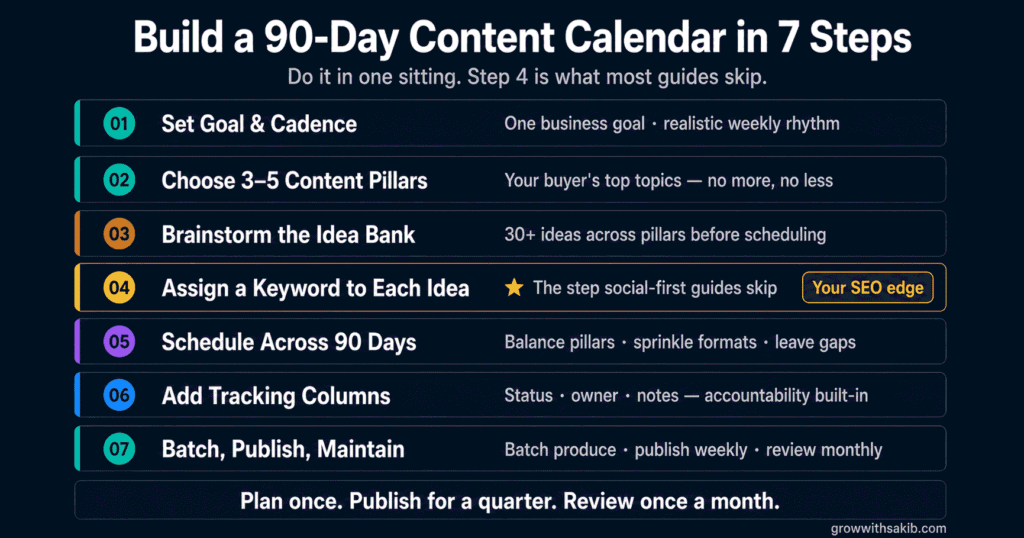
The 7-Step Process to Build Your 90-Day Calendar
Step 1: Set Your 90-Day Goal and Cadence
Start with one primary goal for the quarter (traffic, leads, authority) from your content marketing goals on GrowWithSakib, then pick a cadence you can actually sustain. Be honest: one solid blog post a week plus a couple of social posts beats an ambitious daily plan you abandon by week three. Sustainable always wins – you can scale up once the habit sticks.
Step 2: Choose Your Content Pillars
Content pillars are the 3-5 core themes you’ll create around all quarter – the topics that represent your expertise and your audience’s interests. They keep your calendar focused and stop random posting. A marketing agency’s pillars might be SEO, content strategy, and paid ads. Rotate through them so your audience gets variety, and let each pillar map toward a content cluster on GrowWithSakib.
Step 3: Brainstorm Topics Into an Idea Bank
Under each pillar, list every topic idea you can – questions customers ask, problems you solve, comparisons, how-tos. Keep a running idea bank (a spare tab or a phone note) so you’re never staring at a blank page. Draw real topics from People Also Ask, your inbox, and your content audience profile on GrowWithSakib. Aim for more ideas than you need – a full bank makes scheduling easy.
Step 4: Assign a Keyword to Each Topic
This is the step social-first guides skip, and it’s where the SEO value lives. Give each topic a primary keyword it targets, using a free tool like Google Search Console, Google Keyword Planner, or Ubersuggest to find terms with real search demand. One topic, one focus keyword. This ensures every piece is written to be found, not just to fill a slot – the foundation of writing a blog post that ranks on GrowWithSakib.
Step 5: Schedule Topics Across 90 Days
Now place your topics onto specific publishing dates across the 13 weeks. Rotate through your pillars for variety, and line content up with anything time-sensitive – launches, seasonal moments, promotions. Leave 10-20% of the calendar open for timely, react-to-the-moment content. Don’t over-plan the fine detail three months out; lock in the next few weeks firmly and pencil in the rest.
Step 6: Add Tracking Columns
A calendar isn’t just dates – it’s a workflow. Add columns to track each piece from idea to published: a status column (Idea, Drafting, Review, Scheduled, Published), an owner (even if it’s always you), and a notes column for internal links, CTAs, or reminders. Now you can see at a glance what’s done, what’s in progress, and what’s coming.
Step 7: Batch, Publish, and Maintain
Work in batches – write several pieces in one focused session rather than one a day; it eliminates the daily decision drain. Publish on schedule, and once a month, review what worked, refresh the plan, and top up your idea bank. Multiply each published post further with the content repurposing approach on GrowWithSakib. That review loop is what turns consistency into a lasting habit.
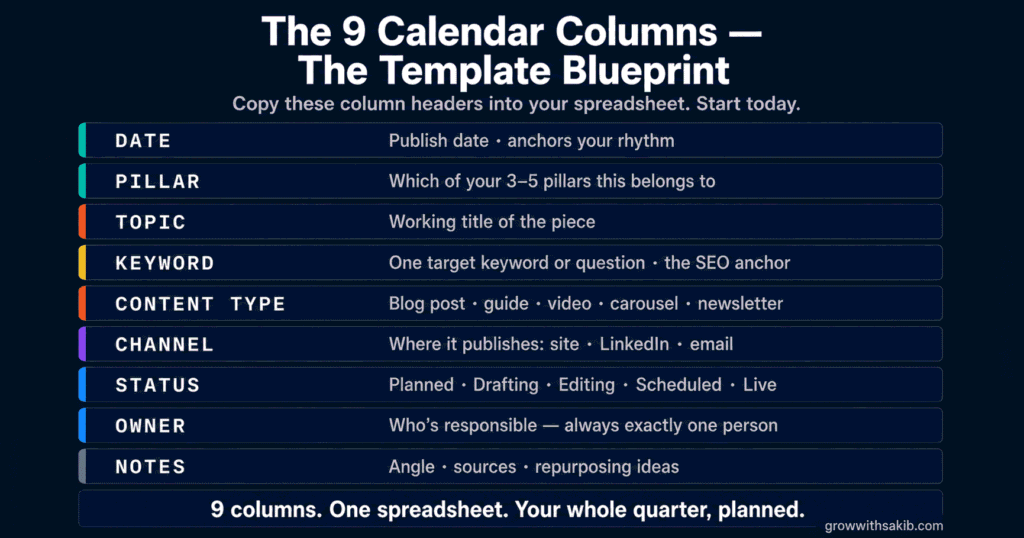
Your Content Calendar Template: The Columns
Here’s the exact structure – the same columns as the downloadable template. Each earns its place:
| Column | What It Holds | Why It Matters |
|---|---|---|
| Week / Date | The publishing date | Anchors the schedule and cadence |
| Content Pillar | Which core theme it serves | Keeps variety and focus |
| Topic / Title | The working headline | The actual piece to create |
| Primary Keyword | The target search term | Ensures it’s written to be found |
| Content Type | Blog, email, video, carousel | Plans format variety |
| Channel | Where it publishes | Blog, newsletter, LinkedIn, etc. |
| Status | Idea to Published | See progress at a glance |
| Owner | Who’s responsible | Accountability, even solo |
| Notes / Links | Internal links, CTA, reminders | Everything needed to execute |
A Filled 90-Day Example (First Few Weeks)
Here’s what the first weeks of a filled calendar look like for a small marketing business, rotating through three pillars:
| Week / Pillar | Topic | Keyword | Status |
|---|---|---|---|
| 1Week / Content Strategy | How to set content marketing goals | content marketing goals | Published |
| 2Week / SEO | SEO for small business: a starter guide | seo for small business | Scheduled |
| 3Week / GEO | How to get cited by ChatGPT | get cited by ChatGPT | Drafting |
| 4Week / Content Strategy | How to build a content audience profile | content audience profile | Idea |
| 5Week / SEO | How to write a blog post that ranks | write a blog post that ranks | Idea |
| 6Week / GEO | What is generative engine optimization? | generative engine optimization | Idea |
Notice the pattern: one pillar per week on rotation, a keyword on every row, and a status you can scan. Repeat that logic across all thirteen weeks and your quarter is planned.
Maintaining Consistency (a Plan, Not a Prison)
A calendar only works if you keep it alive. A few honest guardrails:
- Start small and sustainable – a realistic plan you keep beats an ambitious one you abandon after two weeks. Build the habit first, scale later.
- It’s a plan, not a prison – leave room to swap in timely content when something relevant happens. Rigid calendars miss opportunities.
- Keep a buffer – batch a few pieces ahead so a busy week doesn’t break your streak. A small backlog is your safety net.
- Review monthly – spend thirty minutes each month checking what performed, refreshing the plan, and refilling the idea bank. That loop is the whole system.
Track which pieces actually drive results with the guide to tracking results on GrowWithSakib, and let that data shape the next quarter’s calendar. Consistency plus a monthly course-correction is how small businesses out-publish bigger, busier competitors.
Common Content Calendar Mistakes
| Mistake | Why It Hurts | Do This Instead |
|---|---|---|
| Over-ambitious cadence | Abandoned after two weeks | Start with a sustainable schedule |
| No keyword per topic | Content isn’t written to be found | Assign a target keyword to each row |
| Planning every detail 90 days out | Rigid and stale by publish time | Lock a few weeks; pencil the rest |
| No idea bank | Scrambling for topics | Keep a running list of ideas |
| No status tracking | Lose track of what’s done | Add a status column |
| No buffer content | One busy week breaks the streak | Batch a few pieces ahead |
| Set and forget | Calendar goes stale | Review and refresh monthly |
Frequently Asked Questions
1. How do I create a content calendar for my small business?
Build it in seven steps: set a 90-day goal and a sustainable publishing cadence, choose 3-5 content pillars, brainstorm topics into an idea bank, assign a target keyword to each topic, schedule the topics across your 90-day calendar, add tracking columns (status, owner, notes), then batch and maintain with a monthly review. Use a simple spreadsheet with columns for date, pillar, topic, keyword, content type, status, and notes – or start from a ready-made template.
2. What should a content calendar include?
At minimum: the publishing date, the content pillar or theme, the topic or title, the target keyword, the content type, the channel, a status (idea, drafting, review, scheduled, published), an owner, and a notes column for internal links and CTAs. These columns capture both what to publish and the workflow to get it done. Start with this simple set and add columns only if you genuinely need them – an over-complex calendar is one you’ll abandon.
3. How far in advance should I plan my content?
Ninety days (one quarter) is the sweet spot for most small businesses – far enough to be strategic, close enough to stay realistic. Plan the themes and topics for the full quarter, but only lock in the fine detail for the next few weeks; pencil in the rest so you can adapt. If ninety days feels overwhelming, start with six weeks and build from there. The goal is a roadmap, not a rigid contract.
4. How often should a small business publish content?
Publish as often as you can sustain, not as often as you think you should. For many small businesses, one solid blog post a week plus two or three social posts is a realistic, effective starting cadence. Consistency matters far more than volume – publishing twice a week reliably beats daily posting that collapses after a fortnight. Pick a schedule you can keep even in a busy week, then scale up once the habit is established.
5. What tool should I use for a content calendar?
A simple spreadsheet is all you need to start – Google Sheets or Excel handles everything, is free, and is easy to update. Notion and Trello work well too if you prefer boards, and dedicated tools like Asana add automation for teams. But don’t let tool-shopping delay you: start with a spreadsheet template, build the habit, and only upgrade when a free tool genuinely limits you. The system matters far more than the software.
6. What are content pillars?
Content pillars are the 3-5 core themes your business consistently creates content around – the topics that represent your expertise and matter to your audience. For a marketing agency, they might be SEO, content strategy, and paid ads. Pillars keep your calendar focused and stop random, scattered posting, and rotating through them gives your audience variety. Each pillar can also anchor a content cluster of related articles, building topical authority over time.
7. How do I stay consistent with my content calendar?
Three habits keep a calendar alive: start with a cadence you can genuinely sustain, batch several pieces in one session so you build a buffer, and run a short monthly review to refresh the plan and refill your idea bank. Treat the calendar as a flexible plan, not a rigid prison – leave room to swap in timely content. The businesses that stay consistent aren’t the most ambitious; they’re the ones with a realistic, maintained system.
8. Do I need a content calendar if I’m a one-person business?
Especially if you’re solo. When you wear every hat, marketing is the first thing that slips – a calendar creates accountability by turning a vague intention into a scheduled commitment. It also removes the daily ‘what should I post?’ decision that drains your limited time, and lets you batch work efficiently. Far from being extra overhead, a content calendar actually saves a solo owner time and makes consistent publishing possible despite a packed schedule.
Key Takeaways
- A content calendar turns ‘what should I post today?’ into a plan you make once and follow, ending the daily scramble and building consistency.
- Build your 90-day calendar in seven steps: set goal and cadence, choose pillars, brainstorm topics, assign keywords, schedule, add tracking, then batch and maintain.
- Choose 3-5 content pillars and rotate through them for focus and variety, letting each map toward a content cluster.
- Assign a target keyword to every topic – this is the SEO step social-first guides skip, and it ensures each piece is written to be found.
- Include columns for date, pillar, topic, keyword, content type, channel, status, owner, and notes – the free template has all of them.
- Plan themes for the full quarter but lock fine detail only a few weeks out, and leave 10-20% open for timely content.
- Consistency beats volume: a sustainable cadence you keep beats an ambitious one you abandon after two weeks.
- Keep it alive with batching, a content buffer, and a 30-minute monthly review – a calendar is a plan, not a prison.