Your CPA doubled last month. Now you are staring at Ads Manager with forty things you could change and no idea which one is the problem. So you do what most people do: you change a bit of everything — new creative, tweaked audiences, adjusted budgets — and hope something works. A week later you cannot tell what helped, what hurt, or whether you fixed anything at all.
This is the trap most account audits fall into. They treat the audit as a checklist to grind through rather than a diagnosis to perform. A checklist tells you to check forty things. A diagnosis tells you which one is actually broken.
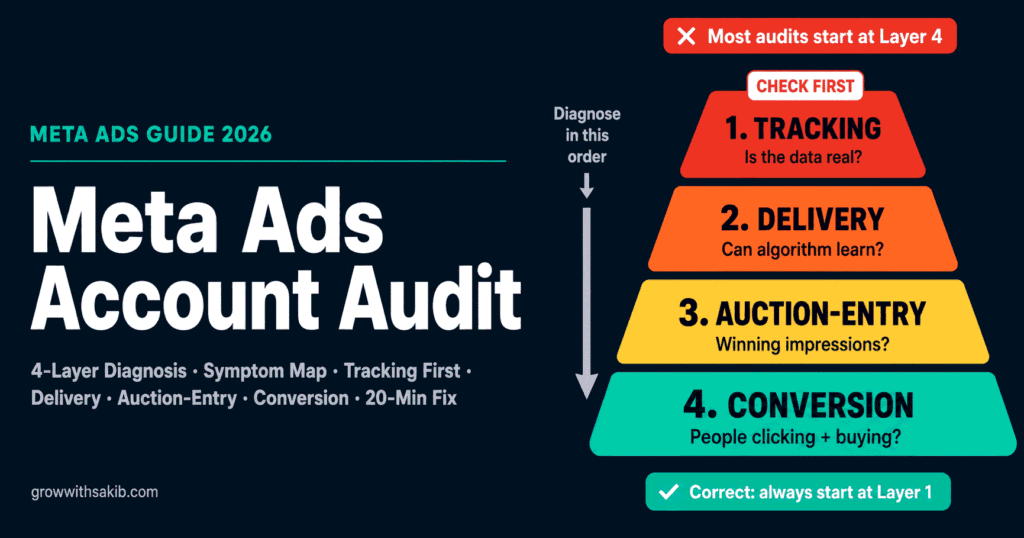
This guide gives you the diagnostic method — grounded in the complete Meta Ads framework — so you learn to read the symptom and trace it to the single funnel layer that owns it. It turns a four-hour checklist into a twenty-minute diagnosis.
Audit as Diagnosis, Not Checklist: The Funnel-Layer Method
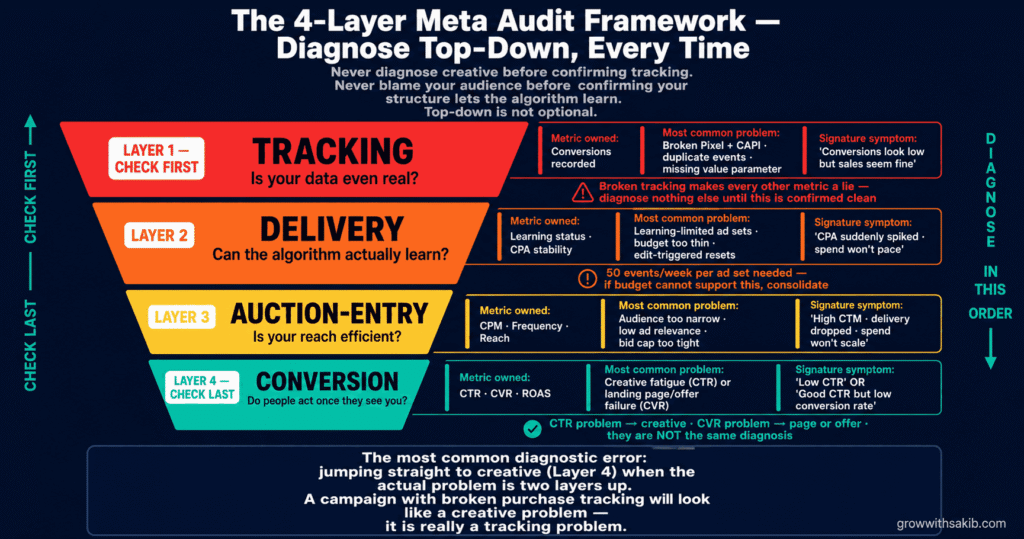
The reason most audits waste time is that they have no order of priority. A 100-point checklist treats a permissions setting and a broken purchase event as equally urgent. They are not. The diagnostic method fixes this by organising every possible problem into four funnel layers, each of which owns specific metrics.
The four layers, in diagnostic order
- Tracking layer (diagnose first, always). Is the data you are looking at even real? Broken tracking makes every other metric a lie. If your Pixel and CAPI are not firing correctly, you cannot trust anything downstream — so you verify this before touching anything else.
- Delivery layer. Is the account structured so the algorithm can learn? This is where learning-limited ad sets, fragmented structure, and budget-too-thin problems live. A campaign that cannot exit the learning phase will underperform no matter how good the creative is.
- Auction-entry layer. Is your ad winning impressions efficiently? CPM and reach problems live here — audience sizing, bid strategy, and creative-driven relevance that determines your cost to enter the auction.
- Conversion layer. Once people see and click, do they convert? This is creative resonance (CTR), landing page and offer (CVR), and the message-match between them.
Start With the Symptom: The Metric-to-Layer Map
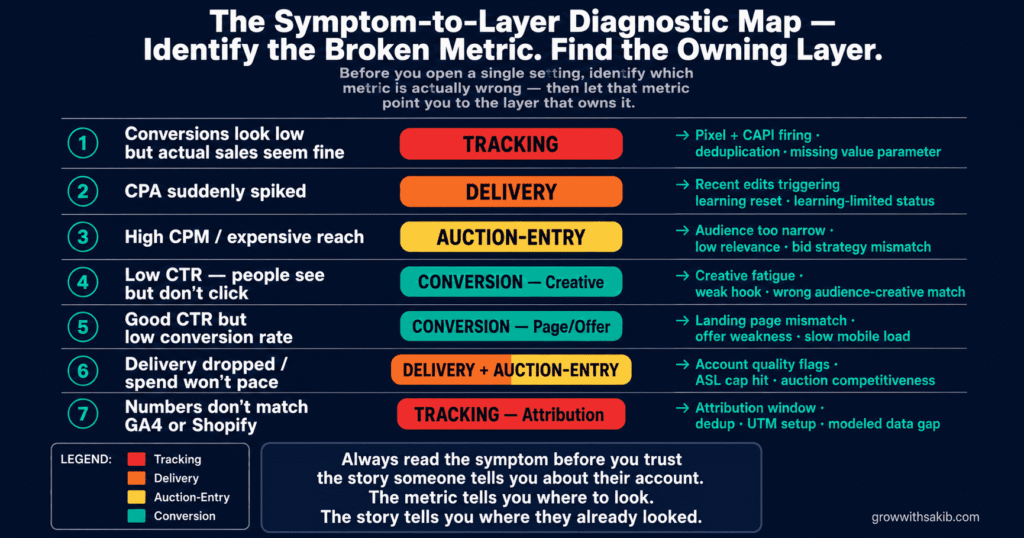
A diagnosis starts with the symptom. Before you open a single setting, identify which metric is actually wrong — then let that metric point you to the layer that owns it. This single step saves hours of checking things that are working fine.
1. Conversions look low but sales seem fine
- The Symptom (broken metric): Conversions look low but sales seem fine
- Most Likely Layer: Tracking
- What to Check First: Pixel + CAPI firing, deduplication, missing value parameter
2. CPA suddenly spiked
- The Symptom (broken metric): CPA suddenly spiked
- Most Likely Layer: Delivery
- What to Check First: Recent edits triggering learning reset; learning-limited status
3. High CPM / expensive reach
- The Symptom (broken metric): High CPM / expensive reach
- Most Likely Layer: Auction-entry
- What to Check First: Audience too narrow; low relevance; bid strategy mismatch
4. Low CTR (people see, don’t click)
- The Symptom (broken metric): Low CTR (people see, don’t click)
- Most Likely Layer: Conversion (creative)
- What to Check First: Creative fatigue; weak hook; wrong audience-creative match
5. Good CTR but low conversion rate
- The Symptom (broken metric): Good CTR but low conversion rate
- Most Likely Layer: Conversion (page/offer)
- What to Check First: Landing page mismatch; offer weakness; page load/UX
6. Delivery dropped / spend won’t pace
- The Symptom (broken metric): Delivery dropped / spend won’t pace
- Most Likely Layer: Delivery / auction-entry
- What to Check First: Account quality flags; ASL cap; auction competitiveness
7. Numbers don’t match GA4 / Shopify
- The Symptom (broken metric): Numbers don’t match GA4 / Shopify
- Most Likely Layer: Tracking / attribution
- What to Check First: Attribution window, dedup, UTM setup, modeled data
As AdManage’s 2026 audit framework frames it, a good audit tells you what is actually broken, what is just noisy, and what to fix first — so your CPA drops or you can scale without the account turning into a mess. The symptom map is how you separate the broken from the noisy before you spend any time fixing.
Layer 1 — Tracking: Is Your Data Even Real?
Every audit starts here, because broken tracking makes every other number untrustworthy. If conversions are not recorded correctly, the algorithm optimises toward the wrong signal and your reports lie to you. Confirm tracking integrity before diagnosing anything else.
The tracking checks that matter most
- Pixel and CAPI both firing, with deduplication. Both should fire for each event with a shared event_id so Meta does not double-count. Verify with the Meta Pixel Helper and Events Manager. Our Conversions API setup guide covers the full configuration.
- No duplicate events. As AdStellar warns, a Purchase event firing on the confirmation page, thank-you page, and a redirect without dedup makes Meta count one sale as three — inflating reported ROAS to triple reality. Check Events Manager for suspiciously high event counts.
- Value parameter present on purchase events. A Purchase event missing its value parameter means Meta cannot calculate ROAS at all. You will optimise toward conversions you cannot value.
- Event Match Quality at 8 or higher. EMQ measures how well your events match to Meta users. Per No Fluff’s hygiene checklist, accounts with strong signal scores often see 15-20% lower CPAs. Send hashed first-party data — email, phone, city — to raise it.
- Domain verified and Aggregated Event Measurement configured. Required for iOS attribution. Without domain verification, your attribution for iOS users degrades further.
- UTM parameters on every ad. As The Snow Media’s checklist notes, without UTMs you cannot cross-reference Meta’s self-reported numbers against GA4. Use utm_source, utm_medium, utm_campaign, and utm_content consistently.
Layer 2 — Delivery: Can the Algorithm Actually Learn?
Once you trust your data, the next layer is structure. A huge share of underperformance is not a creative or audience problem at all — it is a structural problem that prevents the algorithm from ever learning properly. The signature is the learning phase.
Diagnosing learning-limited
As AdManage documents, a healthy account structure is consolidated enough to produce roughly 50 optimisation events in the week after the last significant edit. If too many ad sets are stuck in ‘Learning’ or ‘Learning Limited,’ your structure is fragmented — you have spread budget across so many ad sets that none of them individually reaches the 50-events-per-week threshold to exit the learning phase.
The maths is simple. As The Snow Media explains, if your CPA is around £30, an ad set needs roughly £1,500 per week (about £214 per day) to generate 50 conversions and exit learning. If you are running eight ad sets on a budget that can only support two at that threshold, all eight stay learning-limited and all eight underperform.
The structural checks
- Count learning-limited ad sets. If more than a couple are stuck, your structure is too fragmented. Consolidate.
- Check budget-per-ad-set against your CPA. Each ad set needs roughly 50x your CPA per week to exit learning. If it cannot, merge ad sets or cut the weak ones.
- Look for edit-triggered resets. Frequent significant edits — budget changes above 20%, audience changes, creative swaps — repeatedly reset learning, as covered in our Meta ads scaling guide.
- Review naming conventions. As The Snow Media recommends, a consistent structure like ‘Objective | Audience | Offer | Date’ saves hours during diagnosis. If you cannot tell what a campaign is testing from its name, you cannot audit it efficiently.
Layer 3 — Auction-Entry: Why Is Your Reach So Expensive?
If tracking is clean and structure lets the algorithm learn, but your CPM is high and reach is expensive, the problem is in the auction-entry layer. This is about how efficiently your ad wins impressions — and the causes are usually audience sizing, relevance, or bid strategy.
Diagnosing high CPM and weak delivery
- Audience too narrow. Very narrow audiences pay punishing CPMs — as covered in the Meta Custom Audiences guide, correct audience sizing and exclusion strategy directly affects your CPM.
- Low ad relevance. Meta’s Ad Relevance Diagnostics — quality, engagement-rate, and conversion-rate rankings — directly affect your auction cost. A below-average quality ranking means you pay more for the same placement. Check these rankings on ads where CPM is high.
- Bid strategy mismatch. A Cost Cap or Bid Cap set too low for current market conditions tells the algorithm to find conversions at a price that does not exist, choking delivery. Check your cap against the CPAs you are actually seeing.
- Account quality flags. Check Account Quality for restrictions or policy notifications. An account-level quality issue suppresses delivery across everything, independent of any single campaign’s setup.
Layer 4 — Conversion: Do People Act Once They See You?
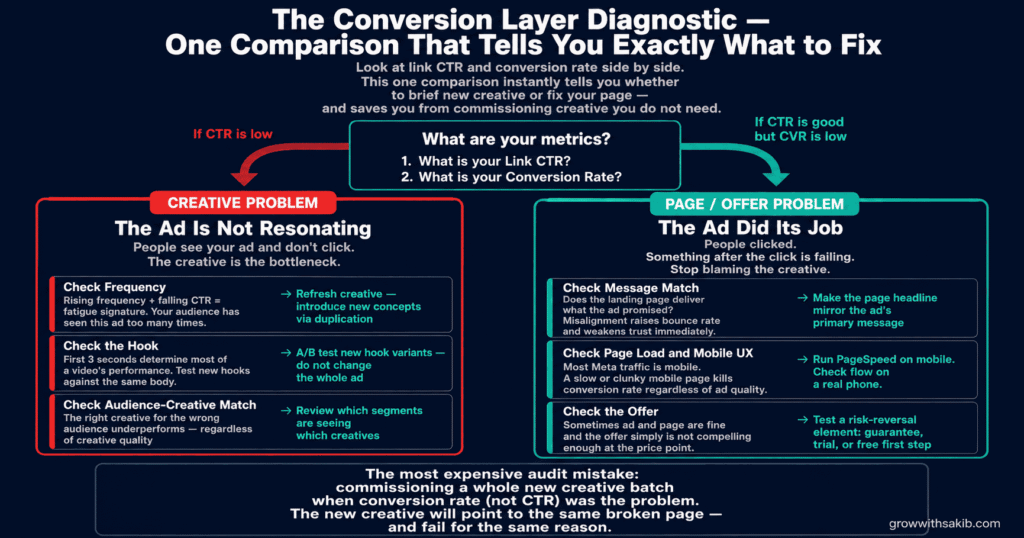
The final layer is where most people wrongly start. Conversion problems split cleanly into two sub-diagnoses, and the metric tells you which one you have: low CTR is a creative problem; good CTR with low conversion rate is a page or offer problem.
Low CTR: the creative is not resonating
If people see your ad and do not click, the creative is the bottleneck. The usual cause is fatigue. As No Fluff’s hygiene guide documents, a CTR decline after frequency reaches 5-7 indicates audience fatigue — they have seen the ad too many times. Monthly creative refreshes in agency audits increased CTR by around 25% and lowered CPA, because novelty bias keeps the message effective longer.
- Check frequency. Rising frequency with falling CTR is the classic fatigue signature. Refresh creative — the UGC ads guide covers the fastest way to produce authentic, low-fatigue creative that extends campaign longevity.
- Check the hook. The first 3 seconds determine most of a video’s success. Test new hooks against the same body, as covered in our Meta Ads A/B testing guide.
- Check audience-creative match. The right creative for the wrong audience underperforms — use the Meta Ads creative testing framework to match concept angles to audience segments by funnel stage.
Good CTR, low conversion rate: the page or offer is failing
If people click but do not convert, the ad did its job and the breakdown is after the click. The creative is fine — stop blaming it.
- Check message match. As No Fluff notes, misalignment between the ad’s promise, tone, and CTA and the landing page raises bounce rate and weakens trust. The page must deliver what the ad promised.
- Check page load and mobile UX. Most Meta traffic is mobile. A slow or clunky mobile page silently kills conversion rate regardless of ad quality.
- Check the offer. Sometimes the ad and page are fine and the offer simply is not compelling enough. This connects to Meta Ads cost benchmarks — if your competitors are offering more value at a similar price point, that difference shows up as low CVR regardless of creative quality.
Turning the Audit Into a Routine
A diagnostic audit is what you run when something breaks. But the best accounts audit on a schedule, catching problems before they become expensive. A light routine prevents most of the emergencies that trigger a full diagnosis.
When to run an audit
As OptiFOX’s audit guide lays out, a Meta ads audit is essential in several scenarios: after taking over an account, before proposing a new strategy, during quarterly reviews, when performance suddenly drops (to identify root causes including learning-phase resets), before major launches, and after receiving account quality notifications.
The audit cadence
| Frequency | What to Check | Layer Focus |
|---|---|---|
| Weekly | Event Match Quality, frequency, learning-limited status, spend pacing | Tracking + Delivery |
| Monthly | Creative refresh review, relevance diagnostics, CTR/CVR trend | Conversion |
| Quarterly | Full four-layer audit, account structure, audience overlap, naming | All layers |
| On performance drop | Symptom map → trace to owning layer → diagnose | Wherever the symptom points |
| On account quality flag | Account Quality status, policy compliance, delivery restrictions | Auction-entry |
6 Audit Mistakes That Lead to Fixing the Wrong Thing
Mistake 1: Starting with creative
Creative is the most visible layer, so it is where everyone starts — and usually the wrong place. A tracking or structure problem masquerades as a creative problem (low recorded conversions) constantly. Diagnose top-down: tracking, delivery, auction-entry, then conversion. Reach creative last, not first.
Mistake 2: Trusting metrics before confirming tracking
Every metric downstream of broken tracking is a lie. If you diagnose CPA, CVR, or ROAS before confirming your Pixel and CAPI are firing cleanly with deduplication, you are diagnosing fiction. Confirm the data is real before you analyse it.
Mistake 3: Changing many things at once
When you change creative, audiences, and budgets simultaneously, you cannot tell what fixed the problem — or what made it worse. Diagnose to a single root cause, change that one thing, and measure — the Meta Ads Guide covers the campaign management principles that keep accounts stable between audit cycles. Auditing and optimising are not the same as flailing.
Mistake 4: Confusing the broken metric with the noisy metric
Not every metric that moved is the problem. As AdManage stresses, a good audit separates what is broken from what is merely noisy. A CTR that dropped 2% is noise; conversions that dropped 50% is broken. Diagnose the broken metric and ignore the noise.
Mistake 5: Ignoring account-level health
Auditing individual campaigns while ignoring Account Quality flags, Account Spending Limits, and Business Manager permissions misses problems that suppress everything at once. Check the account level before the campaign level — an account-wide restriction makes every campaign diagnosis irrelevant.
Mistake 6: Auditing only when something breaks
A reactive-only audit means you always diagnose problems after they have cost you money. A light weekly check on tracking and delivery health catches most issues while they are small. The cheapest audit is the one that prevents the emergency.
Frequently Asked Questions
How do I audit my Meta ads account?
Audit by diagnosis, not checklist. Start with the symptom — identify which metric is actually wrong — then trace it to the funnel layer that owns it: tracking, delivery, auction-entry, or conversion. Always diagnose top-down: confirm tracking is real before trusting any other metric, and confirm your structure lets the algorithm learn before blaming audience or creative. As OptiFOX’s framework puts it, the audit is the diagnostic phase before treatment.
Why is my Meta campaign suddenly underperforming?
The most common causes, in diagnostic order: a recent edit triggered a learning-phase reset (delivery layer), a tracking break is mis-recording conversions (tracking layer), creative fatigue after rising frequency (conversion layer), or an account quality flag suppressing delivery (auction-entry). Start by identifying which metric broke — low recorded conversions point to tracking, a CPA spike right after an edit points to a learning reset, falling CTR points to creative fatigue.
What should a Meta ads audit check first?
Tracking, always. Broken tracking makes every other metric untrustworthy, so there is no point analysing CPA or ROAS until you have confirmed your Pixel and Conversions API are firing correctly with event deduplication, your purchase events include the value parameter, and your Event Match Quality is 8 or higher. Only once the data is real can you trust any downstream diagnosis.
How do I know if my account structure is the problem?
Check how many ad sets are stuck in ‘Learning’ or ‘Learning Limited.’ As AdManage notes, a healthy structure produces roughly 50 optimisation events per ad set in the week after the last edit. If many ad sets are learning-limited, your budget is spread too thin across too many ad sets — none reaches the threshold to exit the learning phase. Consolidate into fewer, better-funded ad sets.
What is Event Match Quality and why does it matter?
Event Match Quality (EMQ) measures how well your conversion events match to Meta user profiles, scored 0-10. As No Fluff documents, accounts with strong signal scores often see 15-20% lower CPAs, because better matching means the algorithm optimises on more accurate data. Aim for 8 or higher by sending hashed first-party parameters — email, phone, city — in your CAPI events. Low EMQ is a common, fixable cause of underperformance.
How often should I audit my Meta ads account?
Run a light tracking-and-delivery check weekly, a creative and conversion review monthly, and a full four-layer audit quarterly. Beyond the schedule, audit whenever performance suddenly drops, before a major launch, after taking over an account, and after any account quality notification. As OptiFOX recommends, routine audits catch small problems before they become expensive emergencies.
Why don’t my Meta conversions match Shopify or GA4?
This is usually a tracking or attribution issue, not an audit failure. Duplicate events inflate Meta’s numbers; missing value parameters break ROAS; and Meta’s attribution windows and modeled data differ structurally from GA4 and Shopify. Check for event deduplication and UTM consistency first, then understand that the systems measure different things — full detail is in our attribution guide. Some gap is normal; a large gap signals a tracking break to fix.
Key Takeaways
- Audit by diagnosis, not checklist. Start with the broken metric and trace it to the funnel layer that owns it — tracking, delivery, auction-entry, or conversion — instead of grinding through 100 undifferentiated points.
- Diagnose top-down, always. Confirm tracking is real before trusting any metric, and confirm structure lets the algorithm learn before blaming audience or creative. Reach creative last, not first.
- Broken tracking makes every other number a lie. Verify Pixel + CAPI deduplication, the value parameter, and Event Match Quality of 8+ before analysing anything downstream.
- Learning-limited ad sets are a structural symptom. If many ad sets cannot reach ~50 events per week, your budget is spread too thin. Consolidate into fewer, better-funded ad sets.
- Read the conversion layer with one comparison: low CTR is a creative problem; good CTR with low conversion rate is a page or offer problem. This single check prevents commissioning creative you do not need.
- Separate the broken metric from the noisy one. A 2% CTR wobble is noise; a 50% conversion drop is broken. Diagnose the break and ignore the noise.
- Check account-level health before campaign-level detail. Account Quality flags, spending limits, and permissions can suppress everything at once, making campaign diagnosis irrelevant.
- The cheapest audit prevents the emergency. A weekly ten-minute tracking-and-delivery check catches most problems while they are small, weeks before they surface as a CPA spike.