Few things are more stressful than watching money leave your ad account with nothing coming back. You check the dashboard, see disappointing numbers, and face a wall of possible causes — targeting, creative, budget, tracking, the algorithm, the landing page — with no idea which one is actually the problem.
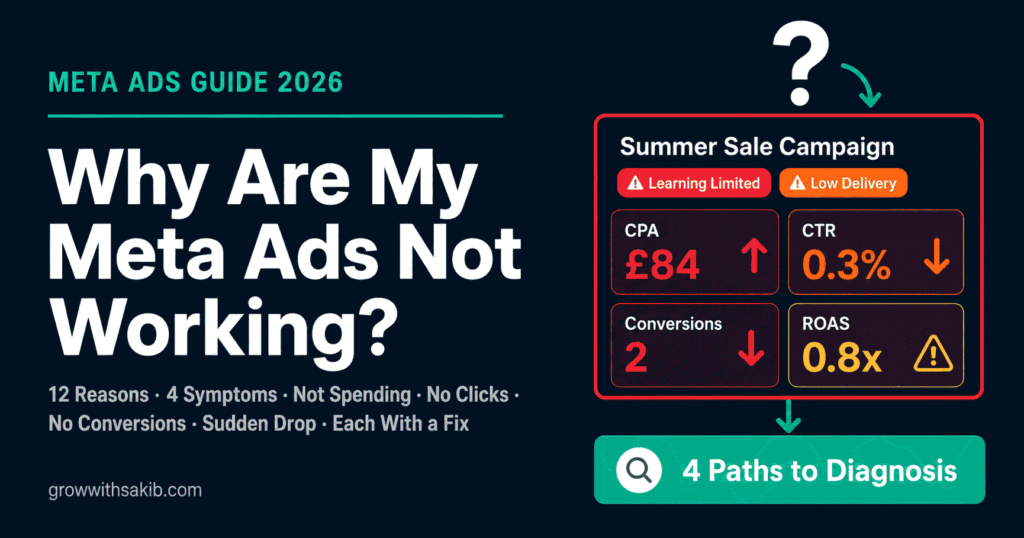
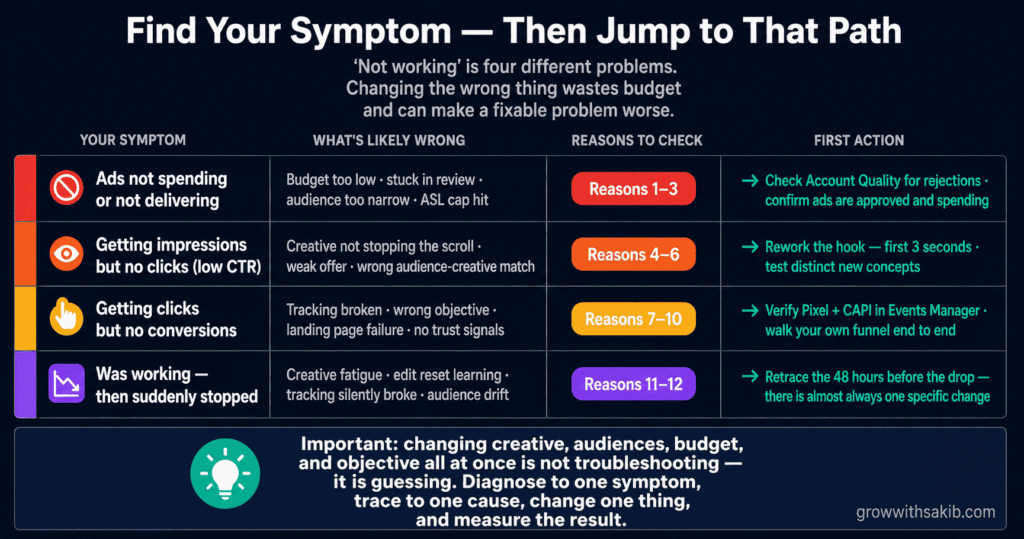
Most troubleshooting guides hand you a flat list of ten reasons and let you guess. This one is different. ‘Not working’ is not one problem — it is four different problems, each with its own diagnostic path, and you can tell them apart by the single symptom on your screen.
Start with what you actually see: are your ads not spending? Getting seen but not clicked? Clicked but not converting? Or did they work and then suddenly stop? Find your symptom below, and jump to the reasons and fixes that match it — all grounded in the complete Meta Ads framework. Each reason comes with a concrete fix — and an honest note on when your ads are not actually broken at all.
Start Here: Find Your Symptom
Before you change anything, identify which of the four failure types you actually have. Changing the wrong thing wastes budget and can make a fixable problem worse. Match your symptom to its section below.
| Your Symptom | What’s Likely Wrong | Jump To Reasons |
|---|---|---|
| Ads not spending / not delivering | Budget too low, stuck in review, audience too narrow, ASL cap | Reasons 1-3 |
| Impressions but no clicks (low CTR) | Creative not resonating; wrong audience-creative match | Reasons 4-6 |
| Clicks but no conversions | Tracking broken, wrong objective, landing page, no trust layer | Reasons 7-10 |
| Was working, then stopped | Creative fatigue, learning reset from an edit, tracking break | Reasons 11-12 |
Symptom A: Your Ads Aren’t Spending or Delivering
If your campaign is live but barely spending or showing almost no impressions, the problem is upstream of performance entirely — the ads are not getting into the auction. Three causes account for almost all of it.
Reason 1: Your budget is too low for the algorithm to learn
When your spend is too low, Meta cannot gather enough data to deliver consistently. As Bïrch documents, without sufficient conversion volume, campaign results suffer regardless of creative quality or setup. An ad set needs roughly 50 conversions per week to exit the learning phase, and a budget too small to produce them leaves the campaign stuck and underdelivering.
Reason 2: Your ad is stuck in review or was rejected
An ad that will not spend is often simply not approved. It may be in review (especially new accounts), or rejected for a policy issue you were not clearly notified about — restricted-category wording, prohibited claims, or a non-compliant landing page.
Reason 3: Your audience is too narrow or your bid cap too low
A tiny audience or an artificially low bid/cost cap chokes delivery. As covered across the cluster, very narrow audiences pay punishing CPMs and often barely deliver, and a cost cap set below what the auction actually costs tells Meta to find conversions at a price that does not exist.
Symptom B: Impressions But No Clicks (Low CTR)
If your ads are being seen — racking up impressions — but almost nobody clicks, the problem is the creative. People are scrolling past. The ad is not stopping them, speaking to them, or reaching the right them.
Reason 4: Your creative isn’t stopping the scroll
In 2026, creative is the single biggest lever in Meta ads, and a weak ad fails no matter how good the targeting is. As the productpreneur diagnostic and the broader 2026 consensus hold, a strong creative with a clear hook will outperform a perfectly segmented campaign with weak creative every time. If the first second doesn’t earn attention, nothing else matters.
Reason 5: Your offer or copy isn’t compelling
Sometimes the visual stops the scroll but the message doesn’t earn the click. A vague value proposition, no clear benefit, or a weak offer leaves the viewer with no reason to act. As WordStream-cited analysis via The Brand Amp notes, weak creative and unclear messaging are among the most common conversion killers.
Reason 6: Wrong creative for the audience (or wrong audience)
Great creative aimed at the wrong people still fails. If your ad speaks to one audience but Meta is showing it to another — or your targeting drifted — CTR collapses because the message and the viewer do not match.
Symptom C: Clicks But No Conversions
This is the most frustrating symptom and the most commonly misdiagnosed. People click — so the ad and targeting are working — but they don’t convert. The break is after the click, or in the data that records it. Four causes dominate.
Reason 7: Your conversion tracking is broken
If conversions are happening but not recorded, the algorithm optimises toward the wrong signal and your reports look empty. As Bïrch documents, conversion tracking is the backbone of effective Meta advertising — an outdated setup, a misplaced Pixel, or cross-domain gaps break it. As RedTrack notes, when events are mis-recorded the algorithm learns from the wrong actions, so it never finds your real buyers.
Reason 8: You chose the wrong campaign objective
Meta’s algorithm is extremely literal. As Marketing Movement explains, if you tell it to optimise for traffic, it finds people who click links; if you optimise for engagement, it finds people who like and comment — neither necessarily converts. A business wanting sales but running a Traffic or Engagement objective gets clicks and likes, not customers. Meta is doing exactly what you asked; you asked for the wrong thing.
Reason 9: Your landing page is the bottleneck
The ad did its job; the page didn’t. A slow, confusing, or mismatched landing page kills conversions regardless of ad quality. As LeadEnforce notes, the landing page, the offer, and the post-click experience all impact performance as much as the ad itself. Message mismatch between ad and page is a silent conversion killer.
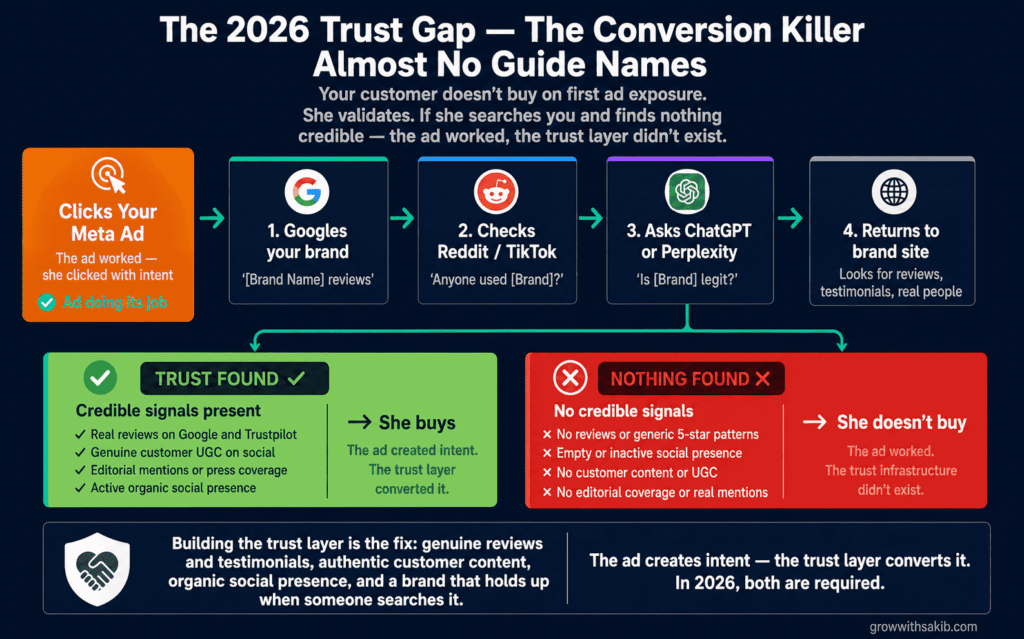
Reason 10: The buyer can’t find any trust signals (the 2026 gap)
This is the cause almost no competitor names, and in 2026 it is decisive for considered purchases. As the productpreneur diagnostic documents, your customer doesn’t buy on first ad exposure — she validates. She Googles your brand, checks TikTok and Reddit, asks ChatGPT or Perplexity whether you’re worth it. If those searches return nothing credible — no organic content, no real community discussion, no editorial mentions — she doesn’t buy. The ad worked; the trust infrastructure didn’t exist.
Symptom D: Your Ads Were Working, Then Suddenly Stopped
A different problem entirely. When a previously profitable campaign declines, you are not looking for a setup error — you are looking for what changed. Two causes account for most sudden declines.
Reason 11: Creative fatigue — your audience has seen it too often
The most common cause of a gradual decline. As RedTrack documents, frequent ads convert poorly and drive up costs as Meta charges more to deliver overexposed creative to saturated audiences. When frequency climbs and CTR falls together, your audience has simply seen the ad too many times. Creative fatigue cycles are faster in 2026 than they used to be.
Reason 12: A recent edit reset learning, or your tracking quietly broke
Two culprits behind a sudden drop. First, a significant edit — a budget change over ~20%, an audience or creative swap — can reset the learning phase, causing days of volatile delivery. Second, a website or theme update may have silently broken your Pixel or CAPI, so conversions stopped being recorded even though they’re still happening. As the productpreneur diagnostic notes, a sudden drop’s likely candidates are creative fatigue, an algorithmic reset from a recent change, a tracking break, or audience drift.
When Your Ads Aren’t Actually Broken
Sometimes the honest answer is that nothing is wrong — you are reacting to noise, not a real problem. Over-tinkering with a healthy campaign is itself a common cause of failure, because constant edits reset learning and never let the algorithm stabilise.
- It’s too early to judge. A campaign in the Meta ads learning phase needs at least 50 conversion events per week before results stabilise — judging performance before that produces misleading signals.
- Your spend is too low for meaningful data. A few pounds a day cannot produce statistically meaningful results. Low volume looks like failure but is really just insufficient data.
- You’re measuring the wrong number. Platform ROAS overstates and understates in ways covered in our Meta Ads attribution guide.
- The result is actually fine for your benchmarks. Compare against your Meta Ads Guide benchmarks and your own historical account performance before declaring the campaign broken.
Frequently Asked Questions
Why are my Meta ads not working?
Meta ads typically fail for one of four reasons, identified by symptom: they aren’t delivering or spending (setup, budget, or approval), they get impressions but no clicks (creative), they get clicks but no conversions (tracking, objective, landing page, or trust), or they were working and suddenly stopped (fatigue, a learning reset, or a tracking break). As Marketing Movement notes, they’re almost always fixable once you identify which symptom you have.
Why are my Facebook ads not spending?
Three common causes: your budget is too low for the algorithm to gather data, your ad is stuck in review or was rejected for a policy issue, or your audience is too narrow (or your bid cap too low) to win the auction. Check Account Quality and delivery status first for rejections, then confirm your budget can support roughly 50 conversions per week per ad set, and broaden a too-narrow audience.
Why do my Meta ads get clicks but no conversions?
The break is after the click or in your data. The four usual causes are broken conversion tracking (so sales aren’t recorded), the wrong campaign objective (optimising for traffic instead of conversions), a slow or mismatched landing page, or — the 2026 cause competitors miss — no trust signals when the buyer Googles you. Verify your Pixel and Conversions API first, since every other metric depends on accurate tracking.
Why did my Facebook ads suddenly stop working?
When a working campaign declines, look for what changed. The most common causes are creative fatigue (check whether frequency is rising while CTR falls), a recent significant edit that reset the learning phase, a tracking break from a website or theme update, or Advantage+ Audience drifting from your ideal customer. Retrace the 48 hours before the drop — there’s usually one specific change behind it.
How long before I know if my Meta ads are working?
Give a campaign at least the learning phase — roughly 50 conversions per ad set, often 5-7 days — before judging. As Bïrch notes, insufficient conversion volume affects results regardless of setup quality. Judging in the first few days means judging incomplete data, and reacting too early with edits resets learning and makes things worse. Give it time and enough budget to gather meaningful data.
Can wrong campaign objective cause ads to fail?
Yes — it’s one of the most common hidden causes. As Marketing Movement explains, Meta’s algorithm is literal: a Traffic objective buys clicks, an Engagement objective buys likes, and neither necessarily converts. If you want sales or leads, use a Sales/Conversions objective optimised for that specific event. Meta delivers exactly what you optimise for, so optimising for the wrong action produces the wrong result.
Should I just delete a campaign that isn’t working?
Not before diagnosing it. Deleting and restarting loses accumulated learning and often recreates the same problem. Identify the actual cause first — symptom by symptom — and apply the specific fix. If the issue is a learning reset from over-editing, duplicating to a clean state can help, but a systematic Meta ads account audit will find the actual root cause before you delete anything.
Key Takeaways
- ‘Not working’ is four different problems. Start with the symptom you see — not spending, no clicks, no conversions, or a sudden drop — and diagnose down that specific path instead of guessing across ten generic reasons.
- Check that your ads are actually spending first. A surprising share of ‘failing’ campaigns were never approved or are starved of budget across too many ad sets. Confirm approval and delivery before touching creative or targeting.
- No clicks is a creative problem. If ads get impressions but no clicks, rework the hook and offer and test distinct concepts. In 2026, strong creative beats perfect targeting with weak creative.
- Clicks but no conversions usually means broken tracking or the wrong objective. Verify Pixel and CAPI in Events Manager, confirm you’re optimising for the conversion event you actually want, and check the landing page.
- In 2026, the buyer validates you elsewhere. If someone Googles your brand mid-funnel and finds nothing credible, they don’t buy — the ad worked, the trust layer didn’t. Build reviews, organic presence, and real customer content.
- A sudden drop means something changed. Retrace the 48 hours before the decline: creative fatigue, an edit that reset learning, a tracking break, or audience drift. Find the one change rather than overhauling everything.
- Sometimes nothing is broken. It may be too early, the spend too low for meaningful data, or you may be measuring the wrong number. Compare against real benchmarks before reacting.
- Don’t change everything at once. Reactive over-editing resets learning and manufactures failure. Diagnose to one cause, change one thing, and let it stabilise.