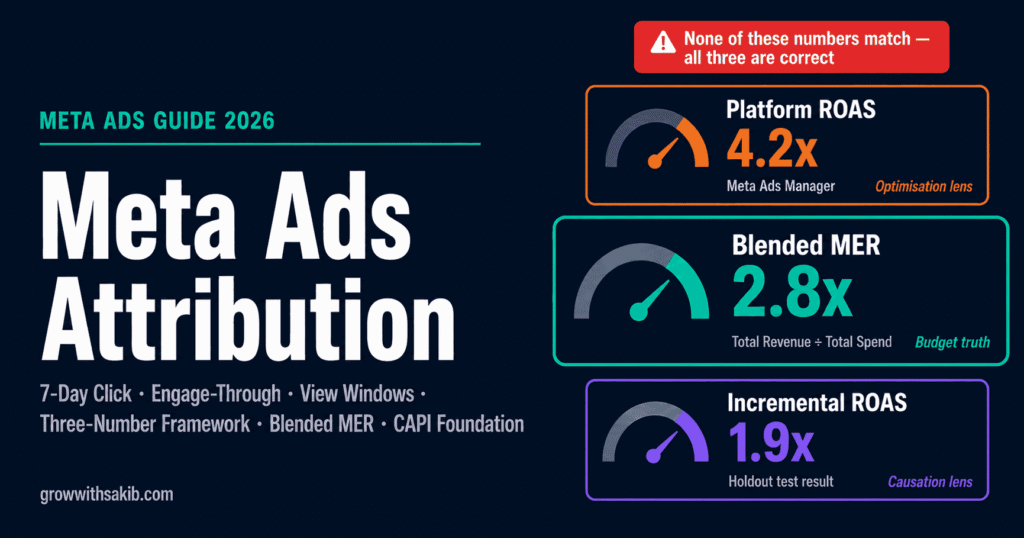
Your Meta dashboard says your campaign did 4x ROAS. Your Shopify revenue says otherwise. Your GA4 says something different again. None of the three numbers match, and you are supposed to make budget decisions based on them.
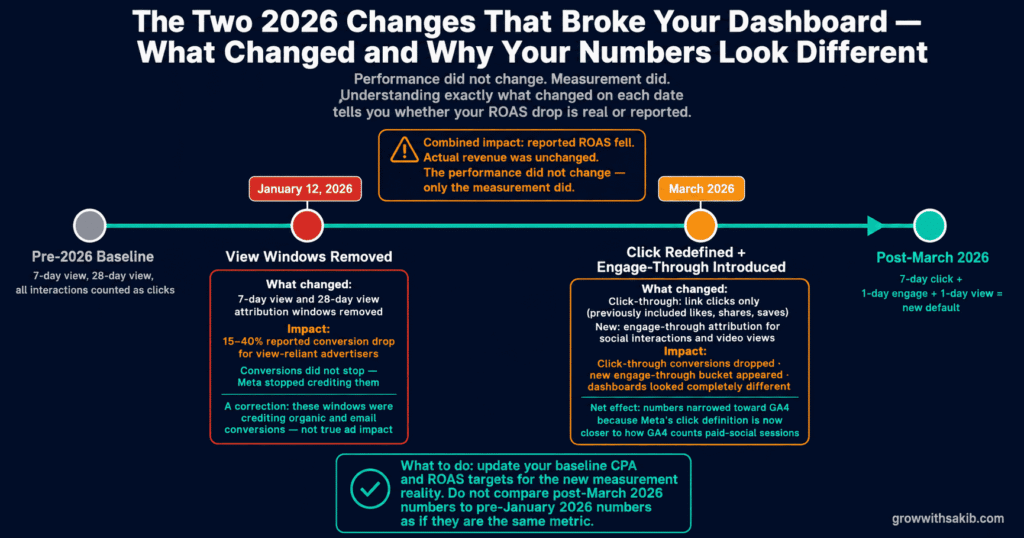
This is the central problem of Meta advertising in 2026, and it got dramatically worse this year. In January, Meta removed the view-through attribution windows that had been propping up reported conversions. In March, it redefined what counts as a click. Advertisers watched their reported ROAS drop overnight while their actual revenue stayed flat — the performance did not change, only the measurement did.
This guide explains what attribution actually measures, what changed in 2026 and why your numbers look different, which attribution window to use for your business, whether to trust incremental attribution, and — most importantly — how to read your ROAS in a way that leads to correct budget decisions rather than expensive mistakes — all within the complete Meta Ads framework.
How Meta Attribution Works: Windows, Action Types, and Credit
Attribution combines three components to decide which ad gets credit for a conversion. Understanding each one is the foundation for reading your reports correctly.
The attribution window
An attribution window is the timeframe after an interaction during which Meta will credit your ad with a conversion. As Zentric Digital’s 2026 attribution guide explains, if you use a 7-day click window, a conversion counts if the person clicked your ad within the last 7 days before converting. A longer window captures more conversions — including slower, more considered purchases — while a shorter window captures only fast converters, which directly affects how Meta Custom Audiences built from your converter segments are sized and optimised.
The action type: click, engage, or view
Meta credits three different kinds of interaction, and in 2026 the definitions changed significantly:
- Click-through: the person clicked your ad and later converted. As of March 2026, this means a genuine link click only — not a like, share, or save.
- Engage-through (new in 2026): the person engaged with your ad — liked, shared, saved, or watched the video — and later converted, without necessarily clicking the link.
- View-through: the person saw your ad without interacting and later converted. The longer view windows were removed in January 2026; only a 1-day view remains by default.
The credit priority order
When multiple action types could claim the same conversion, Meta applies a priority order. As Zentric documents, click-through gets credit first, then engage-through, then view-through. So if someone clicked your ad and also saw it earlier, the click gets the credit. This priority order matters because it determines which campaigns appear to be driving results.
What Changed in 2026: The Two Updates That Broke Your Dashboard
If your reported conversions dropped this year and you could not figure out why, two specific platform changes are almost certainly the cause. Neither was loudly announced. Both fundamentally altered what your numbers mean.
January 2026: view-through windows removed
On January 12, 2026, Meta removed the 7-day view and 28-day view attribution windows. As Zentric Digital reports, some advertisers lost 30-40% of their reported conversions overnight because those conversions had been falling outside the shorter windows that remained. The conversions did not stop happening — Meta simply stopped crediting the ones that depended on long view-through windows.
This change was, in a sense, a correction. As Ryze AI’s analysis notes, with iOS 14.5 and Safari’s Intelligent Tracking Prevention already limiting cookie tracking, the longer view windows had become increasingly hollow — capturing credit for conversions that organic channels, email, or direct visits actually drove. Removing them made reported numbers lower but more honest.
March 2026: the click redefinition and engage-through
In March 2026, Meta overhauled how conversions get counted. As Ryze AI documents, previously Meta counted any interaction with an ad unit as a click — likes, shares, saves, comment reads, and profile visits all qualified equally for the 7-day click window. After March, click-through attribution tracks genuine link clicks only.
To capture the social interactions that no longer count as clicks, Meta introduced engage-through attribution. As Dataslayer’s explanation describes it, engage-through captures likes, shares, saves, and video views as a separate, shorter-window attribution type. The net effect: reported click-through conversions dropped, a new engage-through bucket appeared, and dashboards looked completely different from the month before.
Why Your Meta ROAS Never Matches Shopify or GA4
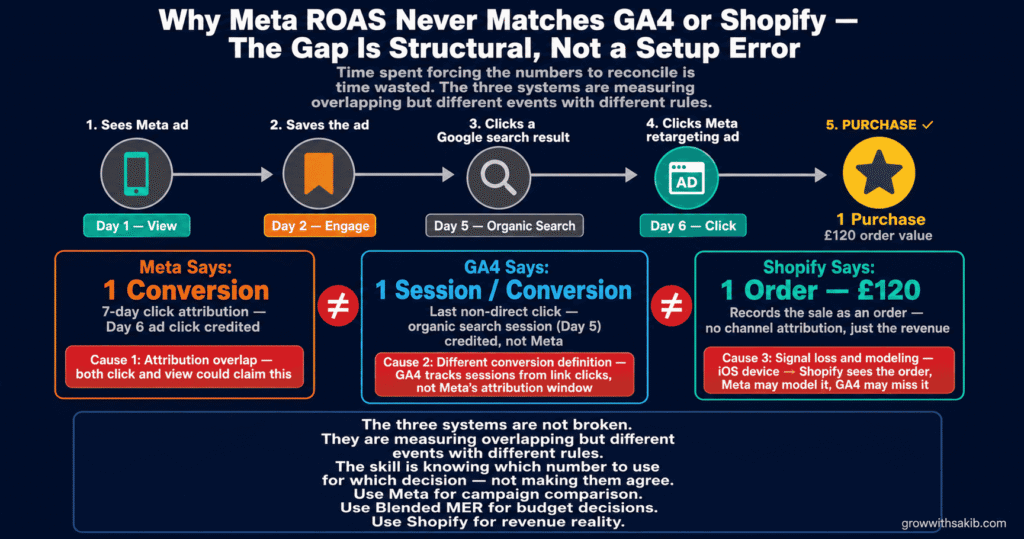
This is the most common frustration in Meta advertising, and the explanation is structural — not a bug in your setup. Three causes create the gap, and understanding them tells you why trying to make the numbers match is the wrong goal.
Cause 1: attribution overlap
The same conversion can be counted under multiple attribution types simultaneously. As TheOptimizer’s attribution breakdown explains, someone who saw your ad, saved it, and clicked the link generates one purchase but could be counted across view, engage, and click buckets. Meta and GA4 also overlap with each other — both can claim the same sale because each thinks its touchpoint drove it.
Cause 2: different definitions of a conversion
Meta and GA4 measure fundamentally different things. As TheOptimizer notes, GA4 tracks sessions that begin with a click to your website, while Meta tracks conversions within its attribution window regardless of what happened in between. GA4 uses a data-driven model with a long lookback for most channels; Meta uses 7-day click plus 1-day engage plus 1-day view. They are measuring overlapping but different events with different rules.
Cause 3: signal loss and modeling
Since iOS 14.5, a large share of conversions are invisible to direct tracking and must be modeled (estimated) by Meta. As Lionel Fenestraz’s attribution models guide documents, Without CAPI an account loses 25-30% of its conversion data before any analysis begins. Meta fills these gaps with modeled conversions; GA4 fills them differently or not at all. Two systems modeling missing data with different methods will never agree.
Which Attribution Window Should You Use?
The right attribution window depends on your business model, sales cycle, and what you are optimising for. The window is not just a reporting choice — it changes how the algorithm finds customers, so the decision matters more than most advertisers realise.
| Business Type | Recommended Window | Why |
|---|---|---|
| E-commerce, impulse / low-AOV | 7-day click, 1-day view | Captures the short consideration cycle; the standard default for product sales |
| E-commerce, considered / high-AOV | 7-day click (consider engage-through) | Longer consideration justifies capturing more touchpoints; high AOV means each conversion matters |
| Lead generation | 1-day click | Conservative — leads convert fast or not at all; avoids crediting ads for unrelated later conversions |
| Subscription / SaaS trials | 7-day click | Trial signups happen within the click window; downstream conversion tracked separately in CRM |
| Long sales cycle B2B | 7-day click + CRM matching | Meta’s window cannot capture a 60-day cycle; supplement with CRM-based attribution, and consider Meta Ads for local business campaigns where shorter consideration cycles align better with Meta’s attribution windows. |
| Brand / awareness | Compare standard vs incremental | Awareness effects are hard to attribute; incremental testing reveals true lift |
As Ryze AI’s attribution settings guide recommends, 7-day click with 1-day view is the right default for most product sales, while 1-day click suits lead generation where you want conservative, fast-converter-focused reporting. If you want your Meta numbers to sit closer to GA4, switching to 1-day click only removes most of the view and engage credit — at the cost of making the algorithm less effective for longer consideration cycles.
Incremental Attribution: Powerful, but Read It With Scrutiny
In 2025 Meta introduced incremental attribution, and it is the most genuinely useful — and most easily misread — measurement tool in Ads Manager. As Adsuploader’s incremental attribution guide describes, you enable it in the Compare Attribution Settings menu under Advanced Options, and you can view incremental data from April 2025 onward.
What incremental attribution measures
Incremental attribution uses holdout testing: a portion of your audience (around 15%) is withheld from seeing your ads, forming a control group. Meta compares conversion rates between those who saw ads and those who did not, and reports only the difference — the conversions that genuinely would not have happened without the ad. As Jordan Glickman’s incrementality analysis puts it, this surfaces the gap between credit attribution (the ad was present near a conversion) and incrementality (the ad actually caused the conversion).
This distinction matters most for retargeting. A retargeting ad shown to someone already planning to buy will claim credit for a conversion that would have happened anyway. Incremental attribution strips that false credit away and shows you what your ads actually changed.
Why you should read Meta’s incremental numbers with scrutiny
Meta markets incremental attribution aggressively, claiming over 20% improvement in incremental conversions in its own testing. Independent analysis is more cautious. As Zentric’s testing summary reports, Seer Interactive tested incremental attribution across six accounts and $1.05M in spend: Meta reported 87% of conversions were incremental, but cross-referenced against GA4, only 67% were — a 20-percentage-point gap.
The most sobering data point comes from marketing mix modeling. As Lionel Fenestraz’s models analysis cites, an analysis of 792 marketing mix models found true incremental ROAS of approximately 1.9x for prospecting and 3.6x for retargeting — against the 8x that Meta’s platform reported. The platform consistently overclaims, and even its incremental tool overclaims relative to independent measurement.
Why CAPI Is Now the Foundation of Attribution
Every attribution setting you choose sits on top of your tracking infrastructure. If that infrastructure is incomplete, no window or model can fix it — you are optimising on partial data. In 2026, the Conversions API is no longer optional.
As DOJO AI’s attribution analysis states plainly, running CAPI and Pixel together is now mandatory; Pixel-only tracking is broken. The Meta Pixel relies on browser-side tracking that iOS, Safari, and ad blockers increasingly prevent. The Conversions API sends conversion data server-to-server, capturing events the browser misses. According to Meta’s own documentation, CAPI recovers 15-30% of events lost to iOS 14.5+ browser restrictions.
The setup that makes attribution trustworthy
- Run Pixel and CAPI together with deduplication. Both should fire for each event, with a shared event_id so Meta does not double-count. Our Meta Conversions API setup guide covers the full technical configuration.
- Verify Event Match Quality (EMQ). EMQ measures how well your events match to Meta users. Higher EMQ means better attribution and better optimisation. Send hashed first-party data — email, phone, name — to raise it.
- Use Advanced Matching. Pass additional customer parameters to improve match rates, directly improving how many conversions Meta can attribute correctly.
- Verify your domain and configure Aggregated Event Measurement. Required for iOS 14.5+ attribution. Without domain verification, your attribution for iOS users degrades further.
How to Actually Read Your ROAS: The Three-Number Framework
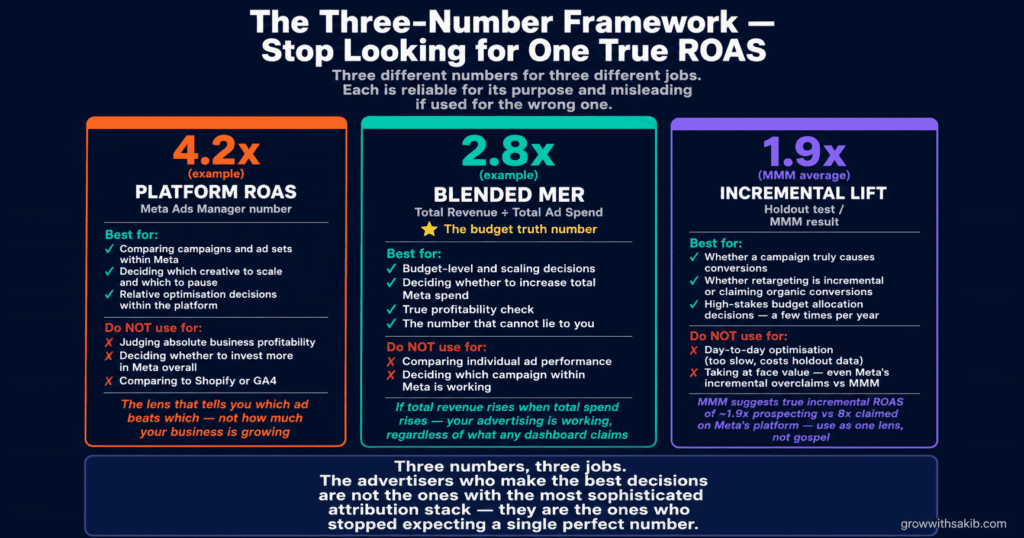
Here is the resolution to the whole attribution problem. Stop trying to find the one true number. Instead, use three different numbers for three different jobs. Each is reliable for its purpose and misleading if used for the wrong one.
Number 1: Platform ROAS — for optimisation and relative comparison
Meta’s reported ROAS is most useful as a relative signal. It tells you which campaigns, ad sets, and creatives are performing better than others within the platform, using a consistent measurement. Use it to decide which ad to scale and which to pause — comparisons within Meta, measured the same way, are valid even if the absolute number is inflated, as the Meta Ads Guide covers in the campaign optimisation framework.
Do not use platform ROAS as the absolute truth of your business profitability. It overclaims, especially for retargeting, and it cannot see the conversions that organic or other channels actually drove.
Number 2: Blended ROAS (MER) — for budget truth
Blended ROAS — total revenue divided by total ad spend across all channels, also called Marketing Efficiency Ratio (MER) — is the number that cannot lie to you. It does not care about attribution windows, view-through credit, or platform overclaiming. It is simply: did total revenue go up when total spend went up?
Use blended ROAS for budget-level decisions. If you increase Meta spend by £10,000 and total business revenue rises by £40,000, your Meta spend is working — regardless of what any platform dashboard claims — and the same blended measurement approach applies when tracking the cost of your Meta Ads against total business revenue. This is the metric to anchor scaling decisions to, as covered in our guide to scaling Meta ads.
Number 3: Incremental lift — for the questions that matter most
When you need to know whether a specific campaign is genuinely causing conversions — rather than claiming credit for conversions that would have happened anyway — run a holdout test or use Meta’s incremental attribution with appropriate scrutiny. This is the most expensive number to obtain and the most honest. Reserve it for high-stakes decisions: whether retargeting is incremental, whether a brand campaign is working, whether a channel deserves its budget.
| The Number | Best For | Do NOT Use For |
|---|---|---|
| Platform ROAS (Meta) | Comparing campaigns/ads within Meta; optimisation decisions | Judging absolute business profitability |
| Blended ROAS / MER | Budget-level decisions; scaling; true profitability | Comparing individual ad performance |
| Incremental lift | Whether a campaign truly causes conversions | Day-to-day optimisation (too slow, costs holdout data) |
6 Attribution Mistakes That Lead to Bad Budget Decisions
Mistake 1: Trusting platform ROAS as absolute truth
Meta’s reported ROAS overclaims — often substantially, especially for retargeting campaigns where marketing mix modeling suggests platform numbers can be 2-4x inflated. Treating it as the literal truth of your profitability leads to over-investing in channels and campaigns that claim credit for organic conversions. Use it for relative comparison; anchor real decisions to blended MER.
Mistake 2: Trying to make Meta match GA4
The two systems measure different things with different rules and different modeling. They will never match, and the gap is not an error. Time spent forcing reconciliation is time wasted. Understand what each measures and use each for its strength.
Mistake 3: Changing attribution windows to make dashboards look better
The window shapes optimisation, not just reporting. Switching to a longer window to ‘show more conversions’ retrains the algorithm and changes who it targets. Pick a window that matches your real sales cycle and keep it stable.
Mistake 4: Running Pixel without CAPI
Pixel-only tracking loses 25-30% of conversions to browser and iOS restrictions before analysis even begins. Every attribution decision you make on Pixel-only data is built on a quarter-missing foundation. CAPI is mandatory in 2026, not optional.
Mistake 5: Ignoring duplicate events and missing value parameters
Duplicate Purchase events inflate ROAS by 2-3x; a missing value parameter makes ROAS uncalculable — the full event configuration and deduplication setup is covered in the Meta Pixel setup guide. These silent tracking errors corrupt every downstream number. Audit your event setup with the Meta Events Manager test tool before trusting any attribution report.
Mistake 6: Taking incremental attribution at face value
Incremental attribution is more honest than standard attribution, but independent testing shows even Meta’s incremental numbers overclaim relative to GA4 cross-checks and marketing mix modeling. Use it as one lens among several, not as the final word. Cross-check against blended metrics and, for big decisions, your own holdout tests.
Frequently Asked Questions
What is Meta Ads attribution?
Meta Ads attribution is the system that decides which conversions get credited to your ads, combining an attribution window (the timeframe a conversion counts within), an action type (click-through, engage-through, or view-through), and a credit model. As the Meta Business Help Center documents, the 2026 default is 7-day click, 1-day engage-through, 1-day view. Attribution determines which campaigns look profitable, so it shapes every budget decision.
Why doesn’t my Meta ROAS match Shopify or GA4?
Because the systems measure different things. As TheOptimizer explains, Meta credits conversions within its attribution window regardless of the path, while GA4 tracks sessions that begin with a link click and Shopify counts actual orders. Attribution overlap, different conversion definitions, and different modeling of iOS-lost data make the gap structural. The numbers are not supposed to match — use each for what it measures best.
What changed with Meta attribution in 2026?
Two major changes. As Zentric Digital documents, on January 12, 2026 Meta removed the 7-day and 28-day view windows, cutting reported conversions 15-40% for view-reliant advertisers. Then in March 2026, Meta redefined click-through to count link clicks only (not likes or shares) and introduced engage-through attribution for social interactions. Reported ROAS dropped while actual revenue stayed flat — only the measurement changed.
What attribution window should I use?
For most product sales, 7-day click with 1-day view is the standard, as Ryze AI recommends. For lead generation, 1-day click is more conservative and appropriate. Long B2B sales cycles need 7-day click supplemented with CRM matching, since Meta’s window cannot capture a 60-day cycle. Remember the window shapes algorithm optimisation, not just reporting — match it to your real sales cycle and keep it stable.
What is engage-through attribution?
Engage-through is an attribution type Meta introduced in March 2026 to capture social interactions — likes, shares, saves, and video views — that previously counted as clicks. As Dataslayer explains, when Meta redefined click-through to mean link clicks only, engage-through became the bucket for non-click engagement, with a shorter window (1 day by default). It signals genuine interest but is less reliably incremental than a true link click.
Should I trust Meta’s incremental attribution?
Use it, but with scrutiny. Incremental attribution measures true lift via holdout testing, which is more honest than standard attribution. But independent testing by Seer Interactive found Meta reported 87% of conversions as incremental versus 67% when cross-referenced with GA4. Marketing mix modeling suggests true ROAS is far below platform claims. Treat incremental as one useful lens, cross-checked against blended metrics — not as absolute truth.
Do I really need CAPI for attribution?
Yes, without exception in 2026. As DOJO AI states, Pixel-only tracking is broken — it loses 25-30% of conversions to iOS and browser restrictions before analysis begins. The Conversions API sends data server-side, recovering 15-30% of otherwise-lost events per Meta’s documentation. Run Pixel and CAPI together with event deduplication, verify Event Match Quality, and use Advanced Matching for trustworthy attribution.
Key Takeaways
- Meta attribution combines a window, an action type, and a credit model. The 2026 default is 7-day click, 1-day engage-through, 1-day view — and the window shapes algorithm optimisation, not just reporting.
- Two 2026 changes broke most dashboards: the January removal of view windows (15-40% reported conversion drop) and the March click redefinition plus new engage-through attribution. Performance did not change — measurement did.
- Your Meta ROAS will never match GA4 or Shopify, and that is structural. Attribution overlap, different conversion definitions, and different modeling of iOS-lost data make reconciliation impossible by design.
- Use three numbers for three jobs: platform ROAS for comparing campaigns within Meta, blended ROAS (MER) for budget and scaling decisions, and incremental lift for whether a campaign truly causes conversions.
- Incremental attribution is more honest but still overclaims. Independent testing shows Meta’s incremental numbers run ~20 points above GA4 cross-checks. Use it as one lens, not gospel.
- CAPI is mandatory in 2026. Pixel-only tracking loses 25-30% of conversions before analysis. Run Pixel and CAPI together with deduplication, and verify Event Match Quality.
- Pick an attribution window that matches your real sales cycle and keep it stable. Changing it to make a dashboard look better retrains the algorithm and changes who Meta targets.
- Blended ROAS (MER) is the number that cannot lie. If total revenue rises when total spend rises, your advertising is working — whatever the platform dashboard claims.