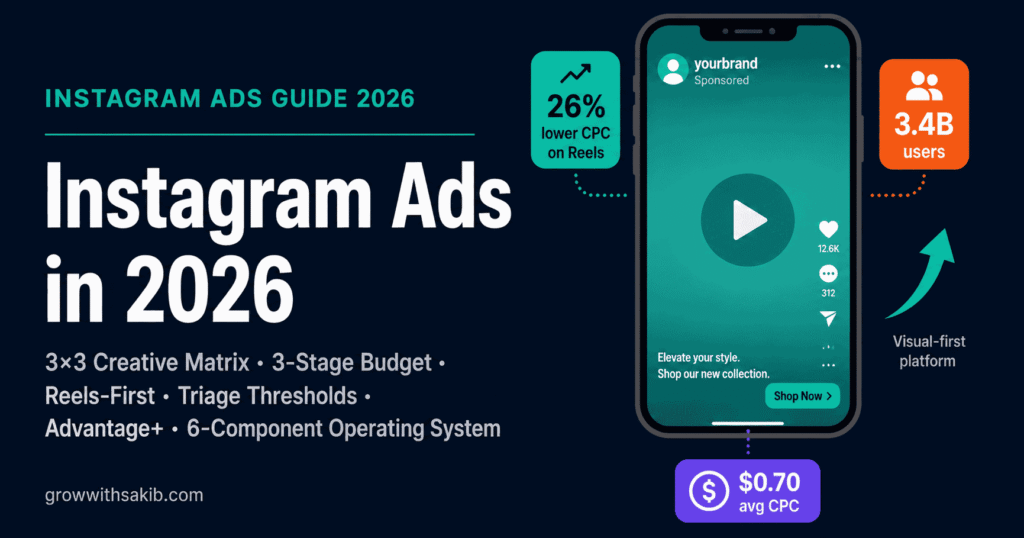
Most Instagram Ads guides are written for direct-to-consumer brands with $5,000+/month budgets, dedicated creative teams, and in-house developers. That’s not most small businesses. This playbook is built for the realistic constraints: limited budget, no media buying team, no full-time content production, and a need for results inside 90 days.
You’ll learn the 6-component Operating System that takes you from ‘I’ve never run an ad’ to ‘I have a profitable Instagram Ads engine’: budget framework, creative test matrix, Advantage+ vs Manual decision tree, 90-day roadmap, diagnostic triage, and the honest scenarios where Instagram Ads are the wrong choice.
This article is the Instagram Ads chapter of the broader Meta Ads Guide on GrowWithSakib, which covers Facebook and Instagram advertising together. For the cross-platform strategy, see the pillar guide. This page goes deep on Instagram-specific tactics.
Why Instagram Ads in 2026?
Instagram remains one of the highest-engagement paid channels for small businesses. According to Statista’s Instagram ad revenue analysis, Instagram ad revenue exceeded $70 billion in 2024 — and the platform’s monthly active user base now sits at well over 2 billion globally.
For small businesses specifically, three reasons make 2026 a strong year for Instagram Ads:
- AI does the heavy lifting — Advantage+ campaigns now handle audience targeting, placement allocation, and budget distribution automatically. You don’t need a media buyer to get reasonable results.
- Mobile-native, vertical-first — Over 90% of Instagram usage happens on mobile, meaning vertical-video creative meets your audience where they are.
- Discovery commerce works — Instagram Shops, product tags, and native checkout have turned the platform into a real commerce engine, not just a brand awareness channel.
What Do Instagram Ads Cost in 2026?
According to Hootsuite’s 2025 Instagram Ads benchmark data, global 2025 averages landed around $1.31 CPC (cost per click) and $15.26 CPM (cost per thousand impressions). These figures vary widely by industry, audience, season, and ad quality — see the Meta Ads cost guide for the full industry-by-industry CPA and CPM breakdown.
| Metric | 2025–2026 Range (Global Avg) | Realistic Small Business Range |
| CPC | $0.50 – $3.00 | $0.80 – $2.50 |
| CPM | $8 – $25 | $10 – $20 |
| CPL (Cost per Lead) | $5 – $50+ | $10 – $30 (after optimisation) |
| CTR (Click-Through Rate) | 0.7% – 1.5% | 0.8% – 1.4% |
| ROAS (commerce) | 1.5x – 5x+ | 2x – 4x sustainable |
The 6 Instagram Ad Formats (and When to Use Each)
Instagram has six main ad formats across four placements (Feed, Stories, Reels, Explore). Most small businesses overcomplicate this — you need only one or two formats to start. The Meta Business Help Center provides the official format specifications.
| Format | Best For | Placement | Aspect Ratio |
| Photo (single image) | Simple offers, product features, brand awareness | Feed, Explore | 1:1 or 4:5 |
| Video (single) | Short product demos, testimonials, brand stories | Feed, Explore | 4:5 or 1:1 |
| Carousel | Multi-product showcases, step-by-step processes, before/after | Feed, Explore | 1:1 (locked) |
| Stories | Time-sensitive offers, full-screen engagement, polls/interactions | Stories | 9:16 |
| Reels | Discovery, high-engagement video, organic-feel creative | Reels feed | 9:16 |
| Shopping (product tags) | E-commerce conversion, catalogue ads | Feed, Stories, Reels, Shop | Variable |
Practical recommendation for most small businesses: start with Reels (9:16 vertical video) + Carousel (1:1) as your two formats. Reels deliver discovery; Carousel handles product depth. Add Stories later when you have remarketing audiences large enough to be worth targeting.
Instagram Ad Specs in 2026
Spec compliance is the floor, not the strategy. But getting them wrong wastes budget through poor delivery or auto-cropping. Here are the dominant specs for 2026.
| Placement | Dimensions | Aspect Ratio | Max File Size | Max Length |
| Feed (square) | 1080 × 1080 px | 1:1 | 30 MB image / 4 GB video | 60 min video |
| Feed (portrait) | 1080 × 1350 px | 4:5 | 30 MB image / 4 GB video | 60 min video |
| Stories | 1080 × 1920 px | 9:16 | 30 MB image / 4 GB video | 60 sec recommended |
| Reels | 1080 × 1920 px | 9:16 | 4 GB video | Up to 90 sec recommended |
| Carousel cards | 1080 × 1080 px | 1:1 | 30 MB per card | 2–10 cards |
Critical UI safe zones for Stories and Reels: the top 250 pixels and bottom 250 pixels of the 1920px canvas are reserved for Instagram’s interface (profile, CTA button, captions). Keep all text and key visuals between y=250 and y=1670. Otherwise your CTA gets hidden behind the swipe-up area.
The Small Business Instagram Ads Operating System
Most articles list ‘best practices’. Best practices without a structure produce inconsistent results. The Operating System is six interconnected components — each independently useful, but built to work together over your first 90 days.
| Component | What It Does |
| 1. Budget Framework | Decides how much to spend and when to scale |
| 2. Creative Test Matrix | Systematically finds your winning ad in fewer iterations |
| 3. Advantage+ vs Manual Decision Tree | Chooses the right campaign type for your stage |
| 4. First-90-Days Roadmap | Maps week-by-week what to do, in what order |
| 5. Diagnostic Triage | Tells you when to pause, scale, or pivot — with thresholds |
| 6. When Instagram Ads Are Wrong | Honest counter-perspective: when not to spend |
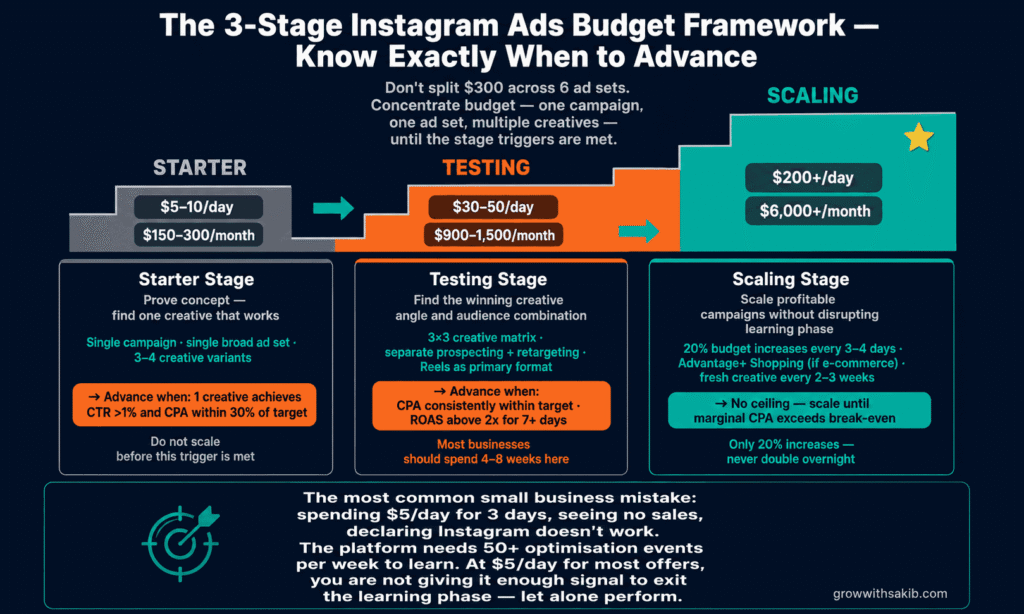
Most articles tell you Meta’s minimum is $5/day. Technically true, useless practically. Real Instagram Ads progression has three stages, each with specific budget ranges and triggers to move up.
| Stage | Daily Budget | Total Monthly | What You’re Doing | Trigger to Next Stage |
| 1. Starter | $5–10/day | $150–300 | Learning the platform; testing one creative angle | Finding any ad with CPC under $2 + clear engagement |
| 2. Testing | $30–50/day | $900–1,500 | Running the Creative Test Matrix; finding winners | 1+ ad with ROAS above 1.5x or CPL below target |
| 3. Scaling | $200+/day | $6,000+ | Scaling winners; expanding to new creative + audiences | Sustained ROAS or CPL at scale |
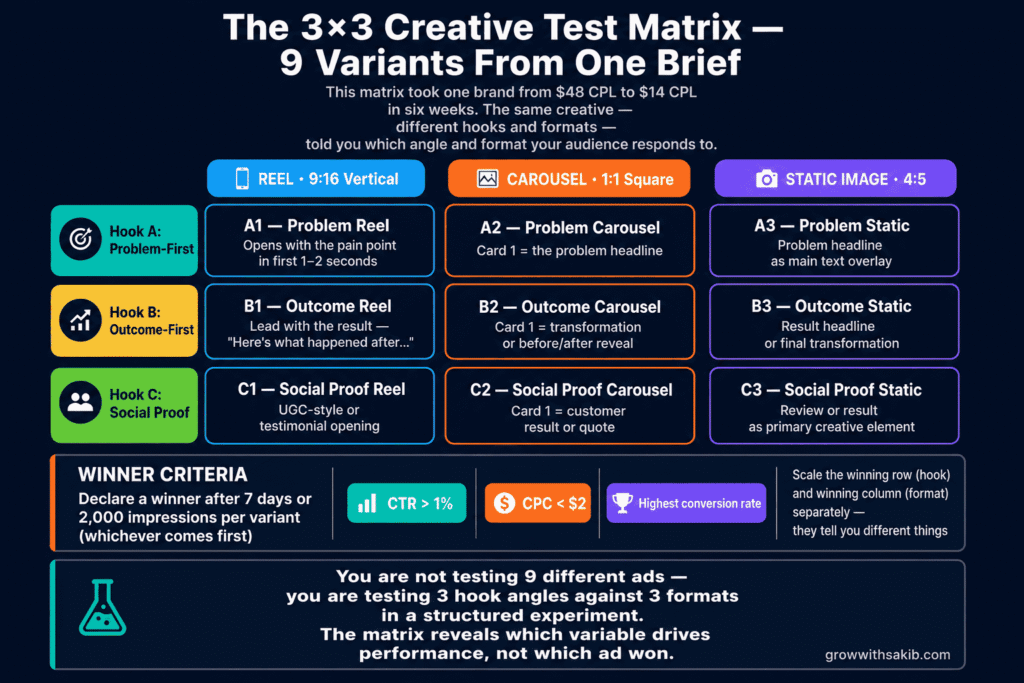
Most failures on Instagram Ads aren’t targeting failures — they’re creative failures. In 2026, with broad targeting now the default, your creative IS your targeting.
The Matrix: 3 hook angles × 3 formats = 9 ad variants per testing cycle.
| Hook Angle | Reel (9:16 video) | Carousel (1:1, 4-6 cards) | Static Image (4:5) |
| Problem-first | Variant 1 | Variant 2 | Variant 3 |
| Outcome-first | Variant 4 | Variant 5 | Variant 6 |
| Social proof-first | Variant 7 | Variant 8 | Variant 9 |
How to Run the Matrix
- Launch 9 variants in one campaign at $30–50/day total
- Let them run for 5–7 days minimum — don’t touch anything during learning
- Evaluate at day 7: which 2–3 variants have CTR > 1% and CPC < $2?
- Kill the bottom 6 variants
- Scale the top 2–3 by duplicating into a new Advantage+ campaign at higher budget
Why hooks matter more than format: the first 1–2 seconds determine 70%+ of completion rate — see the full Meta Ads creative testing guide for the concept-vs-variation framework that scales this matrix. A problem-first hook (“Tired of [pain]?”), an outcome-first hook (“What if you could [outcome]?”), and a social proof hook (“How 200+ [audience] are [outcome]”) test three fundamentally different angles for the same offer.
Meta’s Advantage+ campaigns use AI to handle targeting, placement allocation, and budget distribution automatically. For most small businesses in 2026, Advantage+ outperforms manual — but not always. According to Meta’s official Advantage+ documentation, Advantage + Shopping Campaigns are designed to maximise conversions through automated audience selection.
The Decision Tree
| Your Situation | Use Advantage+ | Use Manual | Why |
| E-commerce, $50+/day budget, Pixel + CAPI installed | ✅ Yes | Advantage+ Shopping is specifically built for this | |
| Lead gen, $30+/day budget, established offer | ✅ Yes | Advantage+ Sales / Leads handles broad targeting well | |
| Brand awareness or top-of-funnel only | ✅ Yes | Manual gives more control over impression strategy | |
| Very niche local audience (single city) | ✅ Yes | Manual location targeting is more precise | |
| Less than $20/day budget | ✅ Yes | Advantage+ needs spend to learn; manual handles tiny budgets better | |
| Compliance-sensitive (housing, finance, employment) | ✅ Yes | Special ad categories require manual controls |
Default rule: if you have a working offer, a tracking setup (Pixel + CAPI), and $30+/day, use Advantage+. The algorithm in 2026 outperforms most manual targeting strategies for conversion campaigns.
The first 90 days of Instagram Ads decide whether you build a sustainable channel or quit thinking the platform ‘doesn’t work for my business’. Here’s the week-by-week breakdown.
| Weeks | Phase | Daily Budget | Focus |
| 1–2 | Setup | $0 (no live ads yet) | Install Pixel + CAPI; create assets; build landing page; set up Ads Manager; one starter creative |
| 3–4 | Starter | $10/day | Run one ad, one audience. Watch what happens. Learn the platform. |
| 5–8 | Testing | $30–50/day | Run the 3×3 Creative Test Matrix. Identify 2–3 winning variants. |
| 9–12 | Early Scaling | $60–100/day | Scale winners. Begin retargeting. Add second offer. |
Weeks 1–2: Setup (no spend)
Before you spend a dollar, build the infrastructure. Inside the Meta Ads Manager:
- Install the Meta Pixel on your website
- Set up the Conversions API (CAPI) — required for accurate iOS attribution
- Verify your domain in Meta Business Settings
- Configure your priority conversion events (Purchase, Lead, AddToCart, etc.)
- Build a dedicated landing page for the ad campaign (not your homepage)
- Produce 2 creative assets minimum: one Reel and one Carousel
Weeks 3–4: Starter ($10/day)
Run one Advantage+ campaign with broad targeting and your two creatives. Don’t optimise. Don’t tweak. Just observe. The point is to see how Instagram’s algorithm responds to your specific offer and audience.
Weeks 5–8: Testing ($30–50/day)
Launch the 3×3 Creative Test Matrix. By end of week 6, you should have identified 2–3 winning creative variants. At end of week 8, those winners should be cleared for scaling.
Weeks 9–12: Early Scaling ($60–100/day)
Take your winners and duplicate them into a new Advantage+ campaign at higher budget. Don’t increase the original campaign’s budget more than 20% per week — that resets the learning phase. Begin retargeting using website visitors and video viewers as custom audiences.
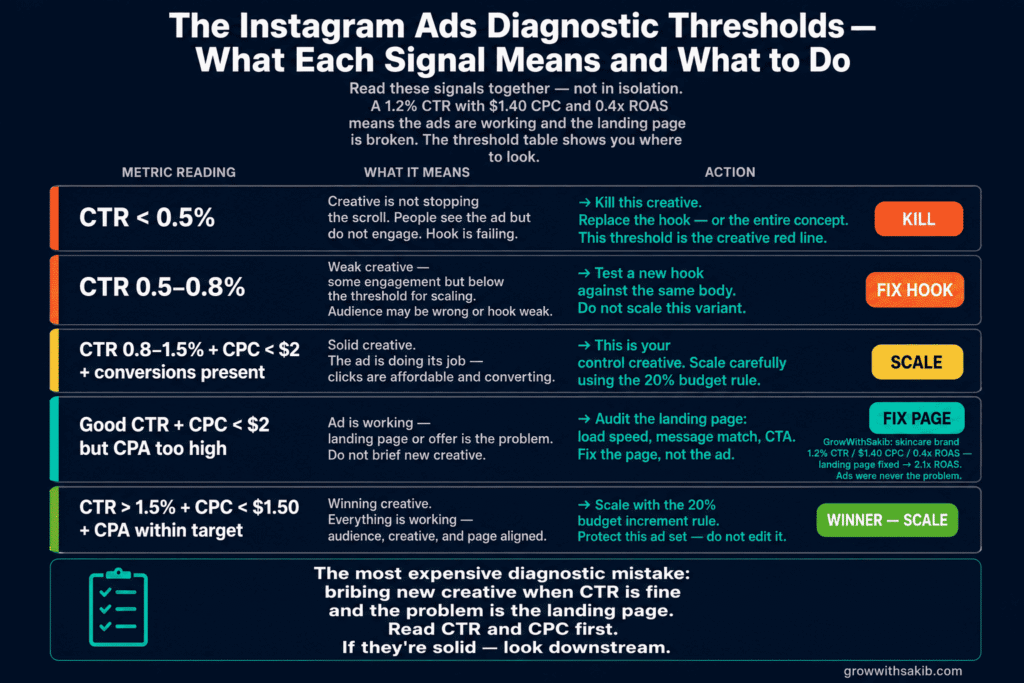
Most small businesses make decisions on Instagram Ads emotionally. They check the dashboard hourly, panic when CPC spikes for 4 hours, and pause campaigns the moment results dip. Here’s the systematic triage.
The 5-7 Day Rule
Never make major decisions in the first 5-7 days of a new campaign or significant change. Meta’s learning phase needs that window to find your audience. Touching the campaign during learning restarts it.
Triage Thresholds (After 7+ Days)
| Signal | What It Means | Action |
| CTR < 0.5% | Creative is failing — wrong hook or wrong audience | Kill the ad. Replace with new creative angle. |
| CTR 0.5–0.8% + CPC > $3 | Creative works for some but not most | Test 2 new variants based on what’s working |
| CTR 0.8–1.5% + CPC < $2 + zero conversions | Click traffic is fine; landing page or offer fails | Audit landing page first. Don’t blame the ad. |
| CTR 1%+ + CPC < $2 + conversions present | Winning variant | Scale by 20% per week; never more |
| Sudden 30%+ CPM rise overnight | Audience saturation or seasonal competition | Refresh creative or wait 3-5 days before reacting |
Most articles recommend Instagram Ads to everyone. They shouldn’t. Six scenarios where Instagram Ads will burn small business budget:
- 1. Your offer is unvalidated. If you’ve never made a sale through any channel, Instagram Ads won’t manufacture demand. Validate first.
- 2. Your average customer value is under $30. CPL of $10–30 with low LTV crushes margins. Either raise prices, build repeat-purchase economics, or use cheaper channels.
- 3. Your landing page can’t convert organic traffic. Paid traffic doesn’t convert better than organic — usually worse. Fix the page first.
- 4. Your audience is hyper-local with low Instagram penetration. Older B2B buyers, certain trades, or geographic niches with low Instagram use don’t justify the budget.
- 5. You can’t produce vertical video. In 2026, static-only creative on Instagram Ads underperforms badly. If you can’t (or won’t) produce video, the platform isn’t right.
- 6. Your monthly budget is under $300. Below this, you cannot run the Creative Test Matrix meaningfully. Either save up to $1,500/quarter or use a different channel.
For the broader cross-channel question, see the SEO vs paid ads guide on GrowWithSakib which covers when to choose SEO over paid social entirely.
How to Set Up Your First Instagram Ad (Step by Step)
Once you’ve worked through the Operating System above, here’s the actual click-through to launch your first ad. You’ll need a Facebook Page linked to your Instagram business account and a payment method.
- Go to Meta Ads Manager and click Create
- Choose your Campaign Objective: Sales (for e-commerce), Leads (for service businesses), or Engagement (for content tests)
- Decide between Advantage+ Shopping Campaign (recommended for most small businesses) or Manual Sales Campaign if you fit the manual criteria
- Confirm Special Ad Category if relevant (housing, finance, employment, social issues)
- Set your Daily Budget — $30 for testing per the Operating System
- Configure your Audience (Advantage+ defaults to broad; Manual needs your targeting parameters)
- Set Placements to Advantage+ Placements (let Meta optimise)
- Upload your Creative (start with your first Reel or Carousel from the 3×3 matrix)
- Add your Primary Text, Headline, CTA, and Landing Page URL
- Review and Publish — your ad enters review (usually under 24 hours)
What Changed in 2026: Three Things to Know
1. Conversions API (CAPI) Is Non-Negotiable
With iOS privacy restrictions and the death of third-party cookies, the browser-only Meta Pixel misses up to 30–50% of conversions. The Meta Conversions API documentation lets you send conversion events directly from your server to Meta — restoring attribution accuracy.
Setup paths by platform:
- WordPress: PixelYourSite or Meta’s WooCommerce plugin
- Shopify: native Meta Conversions API integration in Settings
- Custom site: server-side via Google Tag Manager or Stape
2. Broad Targeting Beats Detailed Targeting
Until 2023, detailed interest targeting was the standard. In 2026, broad targeting + strong creative outperforms detailed targeting in most cases. Meta’s AI now finds your audience better than you can — provided you give it enough conversion data and good creative.
3. AI-Generated Creative Variants
Meta’s AI creative tools can now generate ad variants, suggest hooks, and produce simple video edits. For small businesses, these tools accelerate the 3×3 Test Matrix significantly. Treat AI-generated creative as a starting point, not the final asset.
Common Instagram Ads Mistakes
| Mistake | Why It Fails | What to Do Instead |
| Touching campaigns during learning phase | Resets Meta’s optimisation; wastes the first week’s data | Leave campaigns alone for 5–7 days minimum after launch or major changes |
| Splitting small budgets across many ad sets | Each ad set gets too little data to optimise meaningfully | Consolidate into 1–2 ad sets at $30–50/day |
| Static images only | In 2026, static creative underperforms vertical video by 30–50%+ | Lead with Reels (9:16); add Carousel and Static as supporting formats |
| Landing page is your homepage | Homepages have 5+ competing CTAs — paid traffic needs focus | Build a dedicated landing page with one primary CTA |
| Ignoring CAPI setup | Missing 30–50% of conversion data; algorithm optimises blind | Set up CAPI in week 1, before any spend |
| Detailed interest targeting on small budgets | Audience too narrow; algorithm starves; CPC spikes | Use broad targeting on Advantage+ and let the AI work |
| Quitting after 2 weeks of ‘bad’ results | Most accounts need 4–6 weeks to find the winning creative | Commit to a full 90-day cycle before judging the channel |
| Boost button instead of Ads Manager | Boost gives you almost no control or optimisation | Always use Meta Ads Manager — the Boost button is a beginner trap |
Honest Limitations of Instagram Ads in 2026
Every channel has trade-offs. The honest ones for Instagram Ads:
- CPCs and CPMs trend upward year over year — what worked at $0.80 CPC three years ago now costs $1.50+. Sustainable ROAS requires constant creative refresh.
- Attribution is harder than it looks — even with CAPI, multi-touch attribution is imperfect. Don’t make decisions on single-day data.
- Creative fatigue is faster than ever — winning ads typically last 4–8 weeks before performance decays. Plan for continuous creative production.
- Algorithm changes are constant — what worked in Q1 may stop working in Q3. Treat your strategy as iterative, not fixed.
- Not every business model fits — high-consideration B2B, niche local services, and ultra-low-margin products often don’t justify Instagram Ad economics.
For complementary work that compounds Instagram Ads results, see the broader Meta Ads Guide pillar on GrowWithSakib for the cross-platform strategy, and the SEO vs paid ads guide for channel-mix decisions.
Frequently Asked Questions
1. How much do Instagram Ads cost in 2026?
Instagram Ads in 2026 typically cost $0.50–$3.00 per click and $8–$25 CPM, with averages around $1.31 CPC and $15.26 CPM per Hootsuite’s 2025 benchmark data. Costs vary significantly by industry, audience, season, and ad quality. Most small businesses should expect $10–30 cost per lead after 4–6 weeks of optimisation.
2. What’s the minimum budget to run Instagram Ads?
Meta’s official minimum is $5/day, but realistic minimum for meaningful results is $10–30/day. Below $300/month total, you cannot run a proper Creative Test Matrix or generate enough conversion data for Advantage+ campaigns to optimise. If your monthly budget is below $300, consider saving up to $1,500/quarter or use a different channel until budget allows.
3. Are Instagram Ads worth it for small businesses?
Yes — for most small businesses with a validated offer, customer value above $30, ability to produce vertical video creative, and a budget of at least $300/month. Instagram Ads underperform for unvalidated offers, ultra-low-margin products, hyper-local audiences with low Instagram penetration, and businesses without conversion-ready landing pages. The 6-component Operating System helps determine fit before committing budget.
4. How do I set up Instagram Ads step by step?
Connect your Instagram business account to a Facebook Page, open Meta Ads Manager, click Create, choose your campaign objective (Sales, Leads, or Engagement), select Advantage+ or Manual, configure budget and targeting, upload creative, write ad copy, and publish. The first ad enters review (usually under 24 hours). Set up Meta Pixel and Conversions API before launching for accurate tracking.
5. What’s the difference between Advantage+ and Manual campaigns?
Advantage+ campaigns use AI to automatically handle targeting, placement allocation, and budget distribution. Manual campaigns give you control over each setting. For most small businesses in 2026 with $30+/day budgets, conversion goals, and Pixel + CAPI tracking, Advantage+ outperforms manual. Use manual for very small budgets, hyper-local targeting, brand awareness only, or compliance-sensitive categories like housing or finance.
6. What ad format works best on Instagram?
Reels (9:16 vertical video) perform best for discovery and engagement in 2026. Carousels (1:1) excel at product depth and multi-step explanations. Stories work well for retargeting warm audiences. Most small businesses should start with Reels + Carousel as their two-format core, adding Stories once they have retargeting audiences large enough to be worth targeting separately.
7. How long until Instagram Ads start working?
Expect 5–7 days of learning phase before Meta’s algorithm optimises delivery. Profitable results typically appear after 4–6 weeks of systematic creative testing using the 3×3 Matrix. Sustainable scaling begins around week 9–12. Quitting before week 6 usually means quitting before finding what works. Commit to a 90-day cycle before judging whether Instagram Ads fit your business.
8. Do I need the Conversions API (CAPI)?
Yes — in 2026, CAPI is essentially non-negotiable. iOS privacy restrictions and third-party cookie removal cause the browser-only Meta Pixel to miss 30–50% of conversion events. Meta’s Conversions API documentation lets you send conversion data server-side, restoring attribution accuracy. Setup paths exist for Shopify (native), WordPress (PixelYourSite, WooCommerce plugin), and custom sites (Google Tag Manager or Stape).
Key Takeaways
- Instagram Ads in 2026 cost roughly $1.31 CPC and $15.26 CPM globally, with $10–30 cost per lead achievable for small businesses after optimisation.
- Use the 3-Stage Budget Framework: $5–10/day Starter, $30–50/day Testing, $200+/day Scaling — with clear triggers between stages.
- Run the 3×3 Creative Test Matrix (3 hooks × 3 formats = 9 variants) per testing cycle. Most failures are creative failures, not targeting failures.
- For most small businesses with $30+/day budgets and Pixel + CAPI installed, Advantage+ Shopping or Sales campaigns outperform manual targeting in 2026.
- Never touch campaigns during the 5–7 day learning phase. Use the Diagnostic Triage thresholds (CTR, CPC, conversions) to make decisions on data, not emotion.
- Lead with Reels (9:16) and Carousel (1:1) as your two core formats. Static-only creative underperforms by 30–50% in 2026.
- Conversions API (CAPI) is non-negotiable. Without it, you miss 30–50% of conversions and the algorithm optimises blind.
- Instagram Ads are wrong for: unvalidated offers, customer value under $30, broken landing pages, hyper-local low-IG-penetration audiences, video-incapable businesses, or sub-$300/month budgets.