The promise of Meta Lead Ads is real: lower friction means higher form completion rates, lower cost per lead, and no dependency on a landing page or website — and they are one of the highest-leverage formats within the complete Meta Ads framework. In 2026, they remain one of the most cost-efficient lead capture tools on the platform.
But in 2026, they also have a well-documented quality problem that most guides refuse to address honestly. The Andromeda algorithm update of late 2024 pushed Meta’s system to optimise aggressively for completion volume — creating an epidemic of accidental submissions, pre-filled forms completed by people who barely noticed they were doing it, and leads who genuinely cannot remember submitting anything.
This guide covers both sides. How to use Meta Lead Ads correctly, how to build the system around them that determines whether they generate revenue or noise, and when a landing page is actually the right choice despite the higher friction.
How Meta Lead Ads Work: The Mechanics Behind the Form
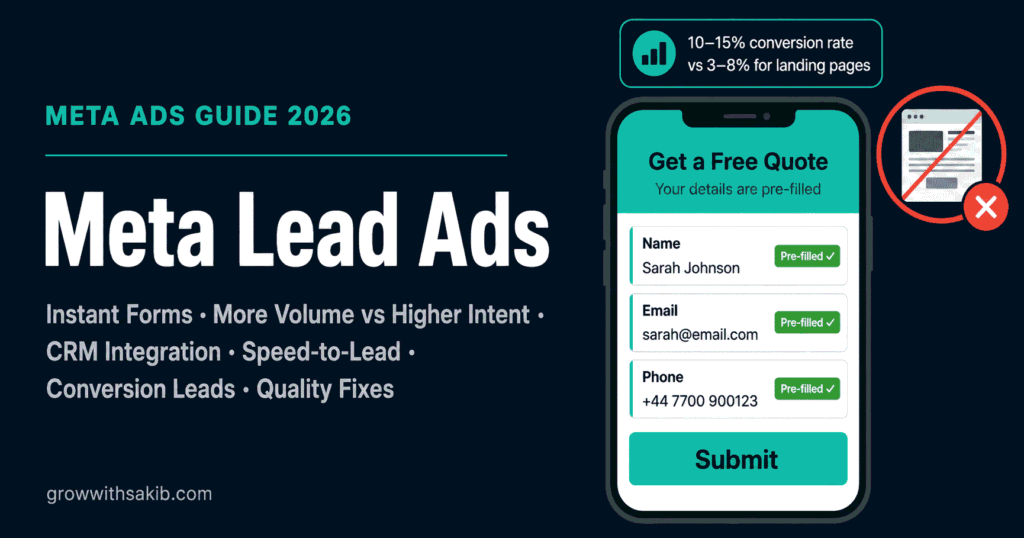
When a user clicks a Meta Lead Ad, a native form called an Instant Form opens directly within Facebook or Instagram. The form pre-fills contact fields — name, email, phone — using data from the user’s Meta profile. The user reviews the pre-filled information, answers any custom questions you have added, and taps submit.
The lead data is captured by Meta and made available in three ways: downloaded as a CSV from Ads Manager, delivered in real time via a CRM integration or webhook, or accessed through the Meta Lead Ads API. The form itself is configured separately from the ad creative and can be reused across multiple campaigns.
What makes Instant Forms different from standard conversion campaigns
A standard conversion campaign sends the user to your website, where they complete a form you control. The experience requires the user to leave the app, wait for your page to load, and manually type their information. This friction filters out low-intent users but also loses a significant percentage of genuinely interested prospects who simply abandon the process.
Instant Forms remove that friction entirely. The form opens in under a second, the user’s information is already filled in, and submission takes two taps. The result is a dramatically higher form completion rate — but also a higher rate of low-intent and accidental submissions, which is the core challenge the rest of this guide addresses.
| Dimension | Meta Instant Forms | Website Conversion Campaign |
|---|---|---|
| User experience | Form opens inside the app, pre-filled | User leaves app, manual form fill on your site |
| Form completion rate | 10-15% of ad clickers | 1-5% of landing page visitors (cold traffic) |
| Lead quality | Lower — friction reduction admits accidental submissions | Higher — friction filters for genuine intent |
| Setup complexity | Low — form built inside Ads Manager | Higher — requires landing page, pixel, and CRM |
| CRM integration | Native integrations + webhook + API | Standard website form-to-CRM flows |
| Best for | Volume-first, B2C, short sales cycles | Quality-first, B2B Meta campaigns, considered purchases |
| CPL (typical) | Lower raw CPL | Higher raw CPL — but often lower cost per qualified lead |
Choosing the Right Form Type: More Volume vs Higher Intent
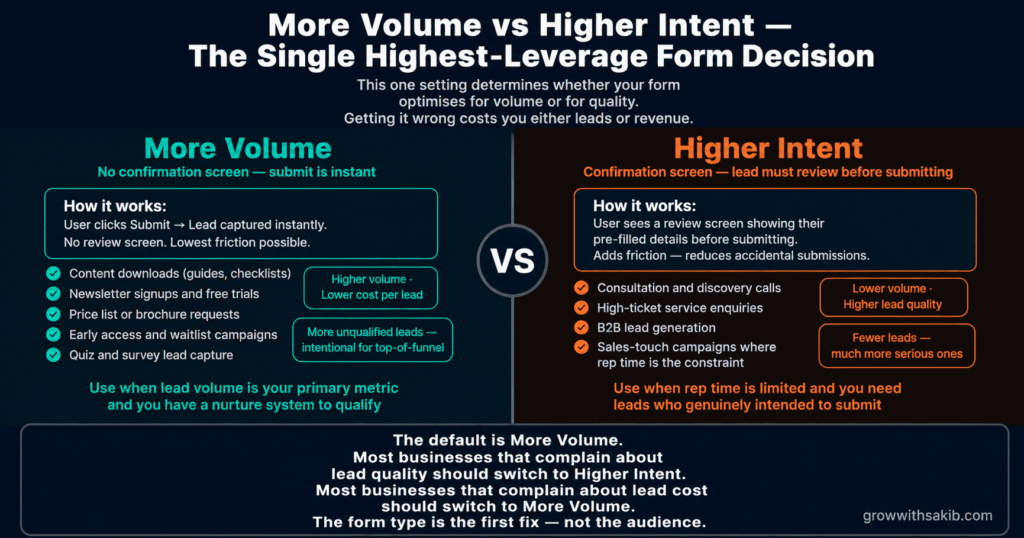
Meta Instant Forms come in two types, documented in the official Instant Forms help article: More Volume and Higher Intent. The choice between them is the single highest-leverage decision you make at form-design time — and most advertisers default to whichever they set up first without understanding the downstream implications.
More Volume forms
More Volume forms are optimised for completion rate. They present the pre-filled contact fields immediately, include minimal additional questions, and allow submission without a confirmation step. The user can complete and submit in under five seconds.
As documented by Wevion’s 2026 lead ads guide, More Volume forms submit as soon as the user taps the submit button — there is no review screen. This creates the ‘fat finger’ problem: users who accidentally tap or who barely engaged with the ad can submit a lead without any meaningful intent. In 2026, following the Andromeda algorithm update, this problem has become more acute because Meta aggressively optimises toward users most likely to complete the form — which increasingly means users who complete it automatically.
Higher Intent forms
Higher Intent forms add a review screen between the form completion and submission. The user must see a summary of their answers and actively tap a confirmation button to submit. This single additional step reduces form volume — typically by 20–40% — but significantly improves the quality of leads who do submit.
Higher Intent forms also support the ‘intro’ screen (where you explain your offer before the form appears), custom open-ended questions that cannot be pre-filled automatically, and a customised completion screen with a link to your website or a specific CTA.
| Use Case | Recommended Form Type | Reason |
|---|---|---|
| Content downloads (guides, whitepapers, reports) | More Volume | High volume needed; qualification happens via content interest; follow-up is automated |
| Event registrations (webinars, workshops) | More Volume | Broad appeal; lower-stakes commitment; volume metric |
| Newsletter signups | More Volume | Subscription intent is inherently low-stakes; any filter is counterproductive |
| Service enquiries (home services, local trades) | Higher Intent | Sales follow-up required; accidental submissions waste sales team time; confirmation signals genuine interest |
| B2B demo or consultation requests | Higher Intent | High-value outcome; qualification essential; each lead requires significant sales resource |
| Quote requests (insurance, finance, real estate) | Higher Intent | Considered purchase; lead expects follow-up; accidental submission causes serious brand damage |
| Appointment bookings | Higher Intent + qualifying questions | Maximum intent filter needed; time is wasted on no-show leads from low-intent submissions |
The 2026 Lead Quality Problem — and How to Fix It
Meta lead ads in 2026 have a quality problem that most guides understate. It is real, it is systematic, and it is partially a platform-level issue created by the aggressive volume-optimisation built into the Andromeda algorithm update.
What is actually happening
As documented by LeadGen Economy’s April 2026 analysis, the January 2026 Andromeda update and the push for Advantage+ Leads created a specific pattern: Meta’s algorithm is optimising for form completion at the expense of submission intent. More Volume forms are now so frictionless that they are effectively accidental in some cases. Users browse, their thumb moves, the form submits. They receive your follow-up call and genuinely cannot remember filling out anything.
This is not a bug in your campaign setup. It is the logical outcome of a platform optimising for a metric (form completions) that does not perfectly correlate with the business metric you actually care about (qualified leads).
Five structural fixes that work in 2026
- Switch to Higher Intent forms for any sales-touch campaign. The confirmation step filters accidental submissions without a complete redesign. This is your fastest fix.
- Add custom qualifying questions that require deliberate answers. ‘What is your current monthly marketing budget?’ cannot be pre-filled and requires genuine consideration. One well-chosen question reduces low-intent submissions significantly.
- Pre-qualify with your ad creative. Use ad copy and visuals that make clear what happens after submission. If the ad says ‘A sales consultant will call you within 2 hours’ and shows a person on the phone, fewer people tap without genuine intent. Your creative is the first quality filter.
- Implement Conversion Leads optimisation via CAPI. This is covered in full in Section 5. In short: feeding downstream conversion data back to Meta tells the algorithm to find users who qualify and convert, not just users who tap. It is the most impactful systemic fix.
- Add a disqualifying condition in your form. A question like ‘What is your annual revenue?’ with options including ‘Under £10,000’ allows you to automatically filter out leads below your minimum threshold during form submission review. Meta allows conditional logic in Instant Forms to skip or end the form based on answers.
Meta Lead Ads vs Landing Pages: The Decision Framework
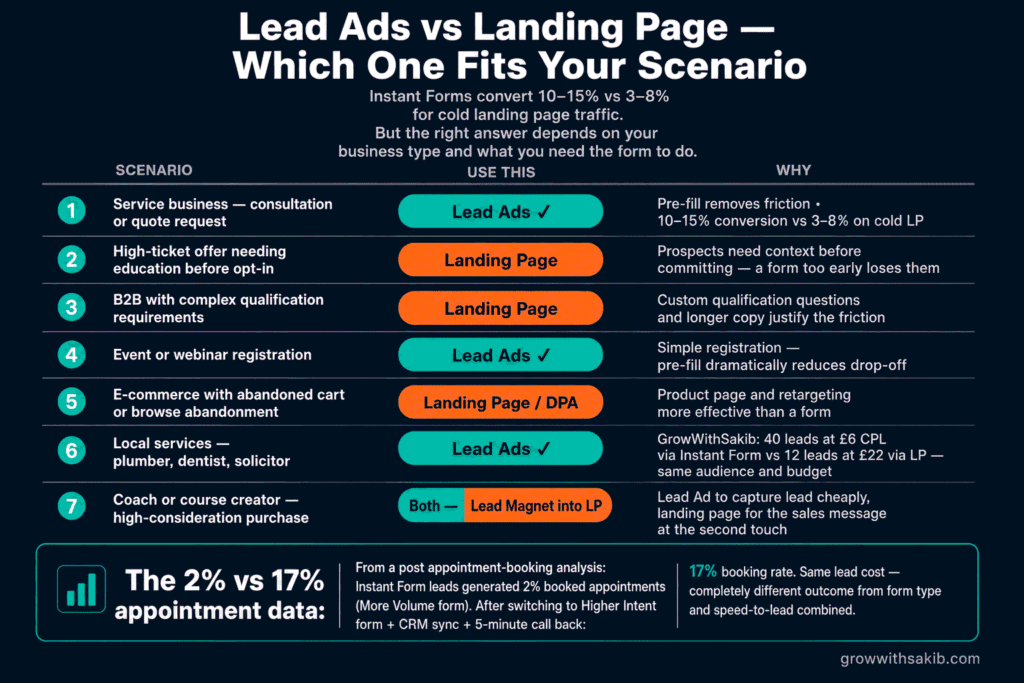
The lead ads vs landing page debate is often framed as volume vs quality. That framing is too simple. The correct question is: what is the cost per qualified outcome, not the cost per raw lead?
The data that reframes the debate
The Involve Digital B2B lead generation benchmark report documents a striking comparison: Meta Instant Forms convert to appointment at approximately 2% — meaning 1 in 50 lead ad submissions becomes a sales conversation. Landing page leads from the same campaigns convert to appointment at approximately 17% — meaning 1 in 6. The raw CPL for the landing page leads is 3-5x higher. But the cost per qualified appointment is actually lower via landing page for high-consideration B2B categories because the intent filter is so much stronger.
Separately, Click Here Digital’s March 2026 analysis found that advertisers running both Instant Forms and website forms in parallel achieved an average 60% lower cost per lead and 125% increase in lead volume compared to website forms alone — suggesting the optimal strategy for many businesses is not ‘one or the other’ but a structured combination of both.
| Scenario | Best Choice | Reason |
|---|---|---|
| B2C, broad audience, high-volume offer (freemium app, newsletter, content) | Lead Ads (More Volume) | Volume matters; qualification happens downstream or not at all; CPL advantage is decisive |
| Local services (trades, cleaning, fitness) | Lead Ads (Higher Intent) | Short sales cycle; phone-first follow-up; pre-filled contact info is valuable; qualification by geography |
| B2B SaaS, mid-market ($5k-50k contract) | Landing Page + retargeting Lead Ads | Landing page qualifies intent; Lead Ads used for top-of-funnel content offers only |
| B2B professional services, high-ticket ($50k+) | Landing Page primary | Sales cycle is long and complex; each lead receives significant sales resource; raw CPL cost is irrelevant |
| Event registrations (webinars, workshops) | Lead Ads (More Volume) | Low-stakes commitment; automation handles nurturing; volume matters for event fill rate |
| Real estate enquiries | Lead Ads (Higher Intent) OR Landing Page | Depends on property type and price point; luxury properties warrant landing page quality filter |
| Insurance and finance leads | Landing Page | Regulatory considerations; qualification depth matters; high-intent leads justify landing page friction |
Conversion Leads: The Most Underused Meta Lead Ads Feature in 2026
Most advertisers who run Meta Lead Ads optimise for Leads — raw form submissions. That tells Meta to find users most likely to complete the form. It does not tell Meta anything about whether those users actually become customers.
Conversion Leads is a different optimisation goal that tells Meta to find users most likely to become qualified leads downstream — not just form completers. It requires CRM integration and a Conversions API connection, but the performance improvement is significant enough to be the single most impactful structural change available to most lead ad campaigns.
How Conversion Leads works
When you switch your lead generation campaign optimisation from Leads to Conversion Leads, you are telling Meta’s algorithm to optimise for a downstream event that you define — typically ‘qualified lead’, ‘opportunity created’, or ‘appointment booked’ — rather than raw form submissions. This requires sending those downstream events back to Meta via the Conversions API, which receives the data from your CRM when a lead progresses to the relevant stage.
The result: Meta’s algorithm retrains on the pattern of users who became qualified leads, not just users who filled in the form. As Wevion’s 2026 benchmark data documents, advertisers switching to Conversion Leads optimisation typically see 30-50% improvement in lead quality with only a 10-20% increase in CPL. The net cost per qualified lead falls substantially.
How to set up Conversion Leads
- Step 1: Connect your CRM to Meta via CAPI. This is a separate setup from standard web CAPI. It requires connecting your CRM — HubSpot, Salesforce, Pipedrive, or similar — to Meta so that lead status updates in your CRM trigger events back to Meta. As of April 2026, Meta added one-click HubSpot and Zapier integrations that removed the developer dependency that previously made this setup difficult for smaller teams. See our Meta Conversions API setup guide for the full technical setup.
- Step 2: Define your qualifying event. Decide what constitutes a ‘qualified lead’ in your pipeline — this might be a lead that has been called and confirmed interest, an opportunity created in your CRM, or an appointment booked. This event is what you will fire via CAPI when a lead reaches that stage.
- Step 3: Switch your optimisation goal. In Ads Manager, in the ad set optimisation settings, change the goal from Leads to Conversion Leads. Select the downstream event you configured via CAPI as the conversion goal.
- Step 4: Allow sufficient data accumulation. Conversion Leads optimisation requires approximately 50 qualifying events per week to exit the learning phase and optimise reliably — the same threshold as other conversion campaigns. See our guide to the Meta ads learning phase for how to manage this period.
- Step 5: Monitor both CPL and cost per qualified lead. Your CPL will rise when you switch to Conversion Leads. This is expected and correct. The metric to watch is cost per qualified lead — which should fall by 20-40% as the algorithm improves its targeting.
Designing Your Instant Form for Maximum Quality
The form design determines the quality ceiling of every lead ad campaign. Even with Conversion Leads optimisation and Higher Intent form type, a poorly designed form produces poor leads. Here are the elements that matter most.
The intro screen: your last chance to pre-qualify
The intro screen appears before the questions section of your Instant Form. Most advertisers either skip it or fill it with generic brand copy. This is a missed opportunity.
The intro screen is where you set precise expectations about what happens after submission. ‘A member of our team will call you within 24 hours to discuss your project’ is dramatically more effective than ‘We’ll be in touch.’ Users who do not want to receive a call within 24 hours will not submit. Users who do submit have accepted that expectation.
- Include: what the offer is, what happens after submission, and how quickly they will hear from you. If there is a price point involved, mention it. Friction before the form is your friend.
- Avoid: vague brand promises, excessive copy, or anything that could apply to any business in your category. Specificity pre-qualifies.
Question design: the minimum viable qualification set
Each additional form question reduces your completion rate. As a rough guide from
Wevion’s lead form analysis, every additional field reduces the completion rate by approximately 5-10%. The question set discipline: only ask questions that genuinely change how you handle the lead.
- Good qualifying questions: What is your current [problem/situation]? What is your timeline for making a decision? What is your budget range? How many employees does your company have? What is your postcode/city? (for location-specific services)
- Poor qualifying questions: Your name (pre-filled), your email (pre-filled), how did you hear about us? (better asked on a thank-you page), questions where you will accept any answer anyway.
- Format: Multiple choice where possible — it keeps completion fast and your data clean. Open-ended only when the free-text response genuinely matters (e.g. ‘Describe your current situation in a few words’).
The completion screen: do not waste the post-submission moment
The completion screen appears after the user submits the form. Most advertisers leave it at the default. A well-designed completion screen serves three purposes: confirms what the user has done, sets expectations for next steps, and provides an immediate next step (link to your website, book a call, watch a video) for the highest-intent users who want to act immediately.
According to Meta’s Instant Forms documentation, you can configure a custom headline, description, and call-to-action button linking to any URL. Use it. The completion screen user is your hottest lead at their peak intent — give them somewhere to go immediately.
CRM Integration: Why Leads Sitting in Ads Manager Is a Revenue Leak
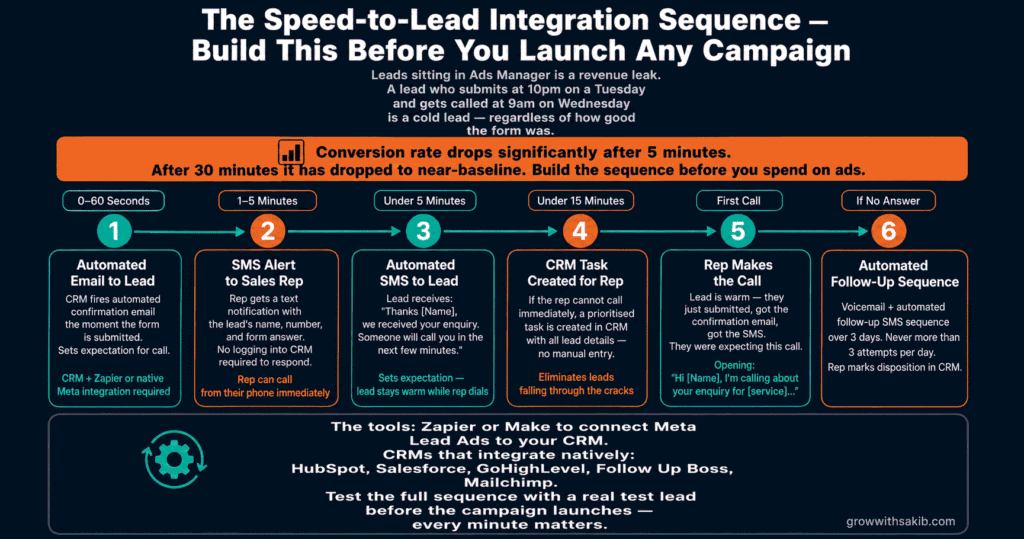
Every minute a lead sits in Ads Manager or a shared inbox is a minute of decaying intent. Meta Lead Ads produce their best conversion rates when the lead is contacted within five minutes of submission. Most businesses do not achieve this without deliberate automation.
The speed-to-lead mechanism
The five-minute rule is not arbitrary. As documented by LeadSync’s 2026 best practices analysis, the mechanism is this: when someone submits a lead form, they are often simultaneously considering multiple providers. They may have already submitted forms with two or three competitors. The first person to respond captures disproportionate attention — and intent fades quickly once they have moved on to the next task in their day. Contacts made within 5 minutes achieve dramatically higher conversion rates than contacts made 30 minutes later, and by the time hours have passed, conversion rates have collapsed.
This is not a follow-up speed problem — it is a systems problem. Building a manual follow-up process and trying to make it fast enough is the wrong approach. The correct approach is automation.
The integration sequence to build before launching
- Real-time lead delivery (0-60 seconds): Set up a native CRM integration or webhook so leads arrive in your CRM the moment they submit. Never download CSV manually — the same systems discipline that makes SEO for small business compound is what separates ad campaigns that scale from ones that stay manual.
- Automated email confirmation (0-60 seconds): Trigger an immediate confirmation email to the lead. This serves two purposes: it confirms their submission and starts building trust while they are still on Meta’s platform.
- SMS notification to sales rep (1-5 minutes): Alert the relevant salesperson or team member via SMS the moment a lead arrives. An SMS is seen in seconds; an email notification may not be seen for an hour.
- Automated SMS to the lead (under 5 minutes): Send a brief, conversational SMS to the lead: ‘Hi [First Name], thanks for your enquiry — [Name] from [Company] will be in touch shortly.’ This pre-empts the call and reduces the ‘cold call feeling.’
- CRM task for sales rep (under 15 minutes): Create a task in the CRM with the lead details and a reminder to call. Do not rely on memory or inbox scanning.
- First outbound call (under 60 minutes for B2C; under 2 hours for B2B): Make the first contact attempt. Log the outcome. If no answer, trigger a follow-up sequence.
Native integrations vs webhook vs CAPI
Meta offers three paths for CRM integration:
- Native CRM integrations (HubSpot, Salesforce, Mailchimp, and others via Meta’s partner integrations — expanded to one-click in April 2026): the simplest option for supported CRMs. Set up once, leads flow automatically.
- Webhook integration: Meta sends an HTTP POST request to a URL you configure when a new lead is submitted. Your CRM or automation tool (Zapier, Make) receives the data and routes it. More flexible than native integrations; requires minimal technical setup.
- Lead Ads API: Direct API access for custom integrations. Required when your CRM is not natively supported and you want maximum control over lead routing, deduplication, and field mapping.
Targeting Strategy for Meta Lead Ads
Lead ad targeting uses the same tools as any other Meta campaign — but the audience quality considerations are different. Because the form is low-friction, audience quality matters more for lead ads than for awareness or traffic campaigns. A cold, broad audience for an awareness campaign produces cheap impressions. The same cold, broad audience for a lead ad produces cheap completions — many of which are low-intent.
Audience quality hierarchy for lead ads
- Retargeting custom audiences (highest quality): website visitors, video viewers (75%+), existing email lists, previous form openers who did not submit. These audiences have demonstrated prior interest and produce the highest lead quality. See our custom audiences guide for how to build and segment them.
- Lookalike audiences built from high-quality seed data (very good): lookalikes from your customer list, your highest-converting lead list, or your 75% video viewers. Use top-20% LTV customers as the seed for the best results.
- Broad targeting with Advantage+ Audience (good — with caveats): Meta’s algorithm can find lead-likely users from a broad pool. The caveat: in 2026, Advantage+ Audience sometimes optimises for the easiest completions, which can mean the lowest-intent users — the full Advantage+ strategy is covered in the Meta Ads Guide. Use Higher Intent forms and Conversion Leads optimisation to counteract this tendency.
- Cold interest targeting (use with Higher Intent only): interest-based audiences for lead ads carry elevated risk of low-quality submissions. If you use interest targeting, Higher Intent form type and qualifying questions are essential.
Exclusions are mandatory
Always exclude existing customers from lead ad campaigns using a customer list custom audience. Showing lead generation ads to people who already bought from you is wasted spend and creates a confusing brand experience. As covered in our custom audiences guide, interest-based exclusions were removed in March 2025 — custom audience exclusions are the only mechanism remaining.
5 Meta Lead Ads Mistakes That Waste Budget and Damage Brand Trust
Mistake 1: Using More Volume forms for sales-touch campaigns
More Volume forms are appropriate for content downloads and newsletter signups where the bar for submission is intentionally low. For any campaign where a salesperson will contact the lead, More Volume forms generate a high volume of accidental submissions — people who receive an unexpected sales call with no memory of requesting it. The brand damage compounds over time.
Fix: Higher Intent for any campaign involving sales follow-up. No exceptions.
Mistake 2: Not connecting leads to a CRM in real time
Leads sitting in Ads Manager’s Leads Centre or in a CSV download queue lose value by the minute. By the time someone manually exports and contacts them, the intent window has closed. This is the single most common infrastructure gap in lead ad campaigns.
Fix: Set up real-time CRM integration before launching the campaign. Test it with a preview submission before going live.
Mistake 3: Optimising for CPL instead of cost per qualified lead
A £5 CPL sounds excellent until you discover that 10% of those leads qualify for a sales conversation. A £25 CPL from a landing page that qualifies at 50% produces better economics despite being 5x more expensive per form submission.
Fix: Track CPL and lead quality separately. Calculate cost per qualified lead — not just cost per submission. Switch to Conversion Leads optimisation via CAPI to make Meta’s algorithm optimise for the same metric you care about.
Mistake 4: Not pre-qualifying with ad creative
Your ad creative is the first quality filter before the form. Generic creative — ‘Get a free quote!’ with a stock photo — attracts everyone loosely in your category, including low-intent browsers who tap without thinking. Creative that sets precise expectations — who the offer is for, what happens next, what the outcome looks like — naturally pre-qualifies intent before the form opens.
Fix: Read our guide to Facebook ad copy to learn how to write creative that pre-qualifies intent before the form opens.
Mistake 5: Treating all leads equally in follow-up
Not every lead ad submission represents the same intent level. A user who submitted within 60 seconds of seeing the ad is behaviorally different from a user who saw the ad twice over three days before submitting. A user who answered a qualifying question indicating a large budget is different from one who selected the smallest option.
Fix: Segment your CRM follow-up by qualification signal. Hot leads — quick submission, qualifying answers that match your ICP — get called within 5 minutes. Leads with weak qualification signals get an automated email sequence first. Your sales team’s time is too valuable to treat all leads identically.
Frequently Asked Questions
What are Meta Lead Ads and how do they work?
Meta Lead Ads are a campaign format where users submit their contact information via a native form (called an Instant Form) that opens directly inside Facebook or Instagram — without visiting an external website. The form pre-fills contact fields from the user’s Meta profile. As documented in the Meta Business Help Center, Lead Ads are available as an objective choice in Ads Manager and can be connected to CRM systems via native integrations, webhook, or API.
What is the difference between More Volume and Higher Intent forms?
More Volume forms are optimised for completion rate — they have minimal questions, pre-filled fields, and submit immediately without a confirmation step. Higher Intent forms add a review screen where users must confirm their details before submission, reducing volume by 20-40% but significantly improving lead quality. As explained in Meta’s Instant Forms documentation, Higher Intent also supports custom questions and a customised intro screen. For any campaign with sales follow-up, Higher Intent is the correct choice.
Are Meta Lead Ads better than landing pages?
It depends on your objective. Meta Lead Ads typically produce 2-3x more leads at 30-50% lower CPL than landing page campaigns. However, as Involve Digital’s B2B benchmark research documents, Instant Form leads convert to sales appointments at approximately 2% vs 17% for landing page leads — making landing page leads cheaper per qualified outcome for high-consideration B2B categories. For B2C, content offers, and event registrations, Lead Ads usually win outright.
How quickly should I follow up on Meta leads?
Within five minutes is the benchmark. The mechanism: lead submitters are typically considering multiple providers simultaneously, and the first contact captures disproportionate attention before intent decays. Contact rates and conversion rates drop sharply after the first hour. Build automated follow-up — instant email to the lead, SMS notification to the sales team, automated SMS to the lead — before spending any budget, not after you have generated your first leads.
What is Conversion Leads optimisation?
Conversion Leads is a campaign optimisation goal that tells Meta to optimise for downstream conversion events — qualified lead, opportunity, appointment — rather than raw form submissions. It requires connecting your CRM to Meta via the Conversions API, which sends qualifying events back to Meta when leads progress in your pipeline. According to Wevion’s 2026 analysis, it typically produces 30-50% improvement in lead quality with only a 10-20% CPL increase — making it the single most impactful structural improvement available to most lead ad campaigns.
Why are my Meta lead ad contacts saying they never filled out a form?
This is a well-documented 2026 issue driven by Meta’s aggressive volume optimisation under the Andromeda algorithm update. More Volume forms are now so frictionless that accidental submissions are common — especially on mobile. The fixes: switch to Higher Intent forms (which require an explicit confirmation tap), add custom qualifying questions that require deliberate answers, use ad creative that explicitly states what happens after submission (so non-intended submitters self-filter), and implement Conversion Leads optimisation so Meta’s algorithm targets based on downstream intent rather than form completion propensity.
How do I connect Meta Lead Ads to my CRM?
Meta supports three integration paths as documented in the official Lead Ads setup guide. Native integrations connect directly to HubSpot, Salesforce, Mailchimp, and others via Meta’s partner program (expanded to one-click setup in April 2026). Webhook integration sends lead data to any URL you configure in real time. The Lead Ads API provides full custom access. Build and test your integration before launching — map every custom question field to a CRM property at setup time or the data is lost. Never rely on manual CSV downloads for active campaigns.
Key Takeaways
- Meta Lead Ads use Instant Forms that pre-fill contact data from Meta profiles, producing 2-3x higher completion rates than landing pages — but also higher rates of accidental submissions in 2026.
- More Volume forms are for content downloads and newsletters; Higher Intent forms are for any campaign with sales follow-up. This is not a preference — it is a structural requirement.
- The true cost metric is cost per qualified lead, not cost per form submission. A £5 CPL that qualifies at 10% is more expensive than a £25 CPL that qualifies at 50%.
- Conversion Leads optimisation via CAPI delivers 30-50% lead quality improvement with only 10-20% CPL increase — the highest-leverage single change available to most lead ad campaigns.
- Speed to lead is the most underinvested aspect of lead ad performance. Five minutes is the target; achieve it through automation before launch, not manual effort after.
- Build your CRM integration and test it before launching the campaign. Map every custom form field to a CRM property at setup time. Never download leads manually from Ads Manager for active campaigns.
- The hybrid approach — Lead Ads for top-of-funnel content offers, landing pages for high-intent conversion actions — outperforms either approach alone for businesses with sales teams and a longer consideration cycle.
- Ad creative is the first quality filter. Copy and visuals that explicitly state who the offer is for and what happens next pre-qualify intent before the form opens.