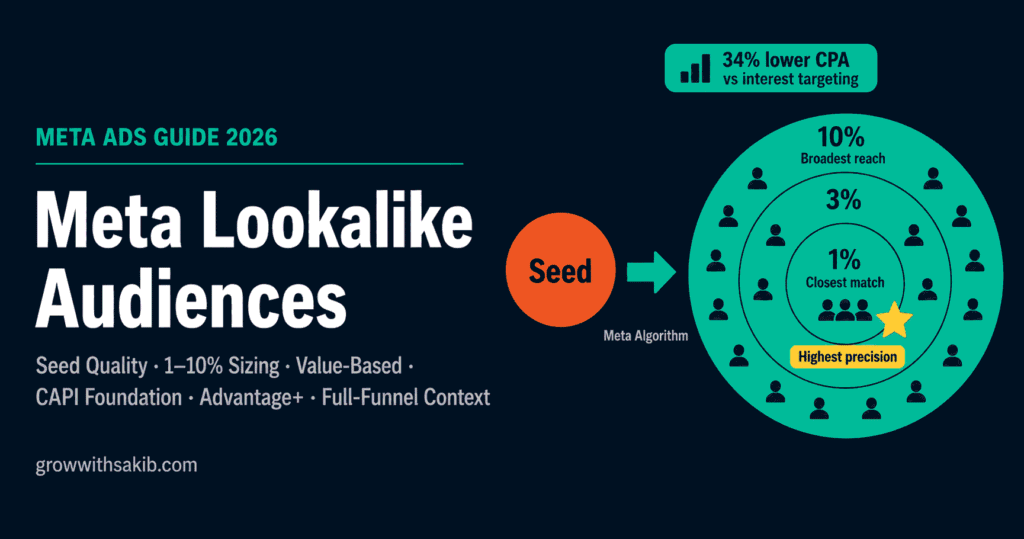
The promise of lookalike audiences has always been simple: show Meta who your best customers are, and it will find more of them. The reality in 2026 is more nuanced — and more powerful than most advertisers realise.
Most lookalike campaigns underperform not because the tool does not work, but because the data feeding it is wrong. A weak seed produces a weak lookalike, regardless of budget. A strong seed — high-quality, specific, and fresh — gives Meta exactly what it needs to find your next best customers at scale.
This guide covers everything that actually determines lookalike performance: seed quality, percentage sizing, value-based lookalikes, the Advantage+ relationship, and the refresh strategy that most advertisers skip entirely — all within the complete Meta Ads framework.
How Meta Lookalike Audiences Actually Work
Understanding the mechanism — not just the concept — is what separates effective lookalike strategy from guesswork.
When you create a lookalike, Meta runs a similarity computation against its entire user base in your target country. For every active user, it generates a similarity score based on hundreds of signals: demographics, interests, behavioural patterns, purchase history, device type, scroll behaviour, engagement patterns, and more. It then ranks all users by that score and slices off the top X percent — that is your lookalike audience.
A 1% lookalike is the densest 1% of users in your target country by feature similarity to your seed. As Adlibrary’s 2026 analysis explains, in the US this represents approximately 2.5 million people. A 10% lookalike extends to the 25 million users with the loosest similarity match. The percentage controls the quality-reach tradeoff.
What changed between 2022 and 2026
The lookalike mechanism itself has not changed. What changed is everything around it. Three major shifts reshaped how lookalikes perform:
- iOS 14.5 App Tracking Transparency: reduced deterministic off-platform event tracking, making Pixel-only seed audiences smaller and noisier — a gap that affects performance across Facebook vs Instagram ads differently depending on your audience demographic. Seeds built from Pixel events without CAPI may be missing 15–30% of qualifying events, as documented in Meta’s Conversions API guidance.
- Andromeda algorithm overhaul (2024–2025): Meta’s core ranking model became significantly better at finding similar users from broad targeting starting points, reducing the gap between a well-configured lookalike and the platform’s default behaviour.
- Advantage+ Audience launch and expansion: Meta’s AI targeting system replaced manual lookalike creation as the platform default for accounts with sufficient conversion history, as detailed in the Advantage+ Audience documentation.
Lookalike audiences are still effective in 2026 — but their role has shifted. They are most powerful as a precision prospecting tool for accounts where Advantage+ does not yet have enough signal, and as seed inputs that improve Advantage+ performance.
The Seed Audience: The Only Variable That Actually Determines Lookalike Quality
Every lookalike conversation eventually comes back to the same point: the algorithm cannot outperform the data you give it. A weak seed produces a weak lookalike. A strong, specific, behaviourally rich seed gives the algorithm the highest-quality pattern to match against.
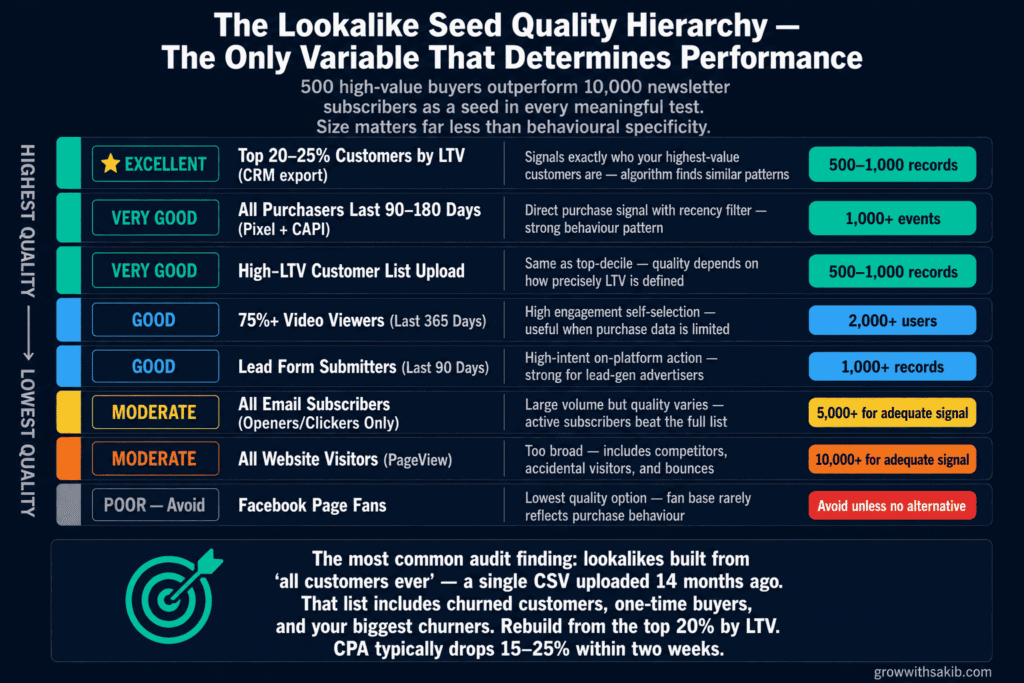
As Flighted’s 2026 lookalike guide confirms, 500 high-value purchasers outperform 5,000 random customers as a seed source in every meaningful test. Size matters far less than behavioural specificity.
The Seed Quality Hierarchy
| Seed Source | Quality Rating | Why | Minimum for Reliable Performance |
|---|---|---|---|
| Top 20–25% customers by LTV (CRM export) | Excellent | Signals exactly who your highest-value customers are — algorithm finds similar patterns | 500–1,000 records |
| All purchasers last 90–180 days (Pixel + CAPI) | Very Good | Direct purchase signal with recency filter; strong behaviour pattern | 1,000+ events |
| High-LTV customer list upload | Very Good | Same as top-decile; quality depends on how precisely LTV is defined | 500–1,000 records |
| 75%+ video viewers (last 365 days) | Good | High engagement self-selection; useful when purchase data is limited | 2,000+ users |
| Lead form submitters (last 90 days) | Good | High-intent on-platform action; strong for lead-gen advertisers | 1,000+ records |
| All email subscribers (openers/clickers only) | Moderate | Volume high but quality varies; active subscribers beat full list | 5,000+ for adequate signal |
| All website visitors (PageView) | Moderate | Too broad; includes competitors, accidental visitors, and bounces | 10,000+ for adequate signal |
| Facebook Page fans | Poor | Lowest quality option; fan base quality rarely reflects purchase behaviour | Avoid unless no alternative exists |
The Staleness Problem: Why Seed Recency Matters
A seed list of purchasers from the last 18 months contains significant signal decay. Customers who bought 15 months ago may have different behavioural characteristics from your current buyers. As Stackmatix’s 2026 strategy guide recommends, tighten your seed to 90–180 days to maintain behavioural relevance.
- Recommended seed refresh cadence for CRM lists: monthly for B2C businesses with high purchase frequency; quarterly for B2B.
- Pixel and engagement seeds: these update automatically as new events fire. The lookalike itself is rebuilt by Meta every 3–7 days using the current state of your seed audience.
- Symptom of a stale seed: gradually rising CPA despite stable creative and budget, with no obvious creative fatigue — the same gradual performance decay that appears when tracking SEO results reveals organic rankings dropping without a clear on-page cause. Rebuild the seed audience and recreate the lookalike.
Lookalike Percentage Sizing: The 1%–10% Decision Framework
The percentage slider in Ads Manager controls the quality-reach tradeoff — and the Meta ad format you pair with each percentage tier significantly affects whether the audience converts. Lower percentages produce closer matches to your seed but smaller audiences. Higher percentages produce larger audiences with looser similarity. Most advertisers pick a number without a framework. Here is the framework.
| Percentage | US Audience Size | Best For | When to Move Up |
|---|---|---|---|
| 1% | ~2.5 million users | Initial testing; highest precision; best CPA for performance campaigns | Once 1% is profitable and CPMs are rising due to frequency |
| 2–3% | ~5–7.5 million users | Scaling after 1% validation; maintaining CPA while increasing volume | When 1–3% range is saturating or budget requires more scale |
| 3–5% | ~7.5–12.5 million users | Mid-funnel awareness; accounts with higher budgets; markets with smaller 1% pools | After testing confirms acceptable CPA at this range |
| 5–10% | ~12.5–25 million users | Top-of-funnel reach campaigns; large budget accounts; international markets | When CPA targets allow for broader match; test before committing budget |
The progression is always the same: validate at 1%, expand to 2–3%, then 3–5% as needed. Never jump from 1% to 10% directly. As Stackmatix documents, jumping straight to 10% without validation means you are running an audience whose similarity to your seed has dropped significantly — performance approaches broad targeting without the intentionality of actually testing broad.
Should You Layer Interests on Top of a Lookalike?
No — in almost every case. Adding interest targeting on top of a lookalike restricts the audience to users who match both the lookalike similarity threshold AND the interest criteria. This makes your audience smaller and counteracts the machine learning optimisation that makes lookalikes valuable in the first place.
The exception: during the very earliest testing phase when a 1% lookalike in your market is too small to deliver efficiently. Adding a single broad interest layer can temporarily increase audience size enough to exit the learning phase. Remove it once the audience is generating sufficient conversion volume.
Value-Based Lookalike Audiences: The Most Underused Feature in Meta Advertising
Most advertisers create lookalikes that say ‘find more people like my customers.’ Value-based lookalike audiences say something far more specific: ‘find more people like my highest-value customers.’ The difference in prospecting ROAS can be significant.
Standard lookalikes treat all customers in your seed equally — a one-time buyer who spent £20 carries the same weight as a repeat buyer who has spent £2,000 across seven orders. Value-based lookalikes allow you to tell Meta which customers are worth more, and the algorithm weights the similarity computation accordingly.
How to Set Up a Value-Based Lookalike
The setup requires one additional step during your CRM export: including a value column alongside your contact identifiers. As documented in the Meta value-based lookalike audiences help article, the column must be labelled ‘value’ or ‘LTV’ and contain a numerical figure representing each customer’s value to your business — this could be total spend, average order value, or a manually assigned LTV estimate.
- Export your customer list from your CRM, sorted by the LTV or value metric you want to use.
- Include a ‘value’ column with a numerical figure for each customer. You do not need to include all customers — the top 20–25% by LTV is usually optimal.
Format the file according to Meta’s identifier requirements (SHA-256 hashed email, phone, etc.) as outlined in the
- In Ads Manager, go to Audiences > Create Audience > Custom Audience > Customer List.
- Upload your file. Meta will automatically detect the ‘value’ column and offer the option to create a value-optimised lookalike during the upload process.
- When creating the lookalike, select ‘Value’ from the source options. Set your percentage and target country as normal.
As Lionelz’s 2026 guide notes, value-based lookalikes are significantly underused — particularly in e-commerce stores with variable customer lifetime value. For businesses where the top 20% of customers generate 60–80% of revenue, this feature directly addresses the biggest inefficiency in standard lookalike creation.
The Tracking Foundation: Why CAPI Determines Lookalike Quality
This is the section most lookalike guides skip entirely — and it is probably the most important one for accounts that run Pixel-only tracking.
Your lookalike audience is only as good as the data flowing into your seed. If your seed is built from Pixel events, and your Pixel is missing 20–30% of purchase events due to iOS ATT restrictions and browser privacy features, your seed audience has 20–30% fewer high-intent signals than it should. The lookalike built from it reflects that gap.
The Conversions API solves this by sending conversion events directly from your server to Meta, bypassing browser restrictions entirely. As Meta’s official CAPI documentation confirms, CAPI recovers 15–30% of events lost to iOS tracking restrictions. For a purchase-event seed audience, this can meaningfully change the signal density — and therefore the quality — of every lookalike built from it.
Lookalike Audiences vs Advantage+ Audience: The 2026 Decision Framework
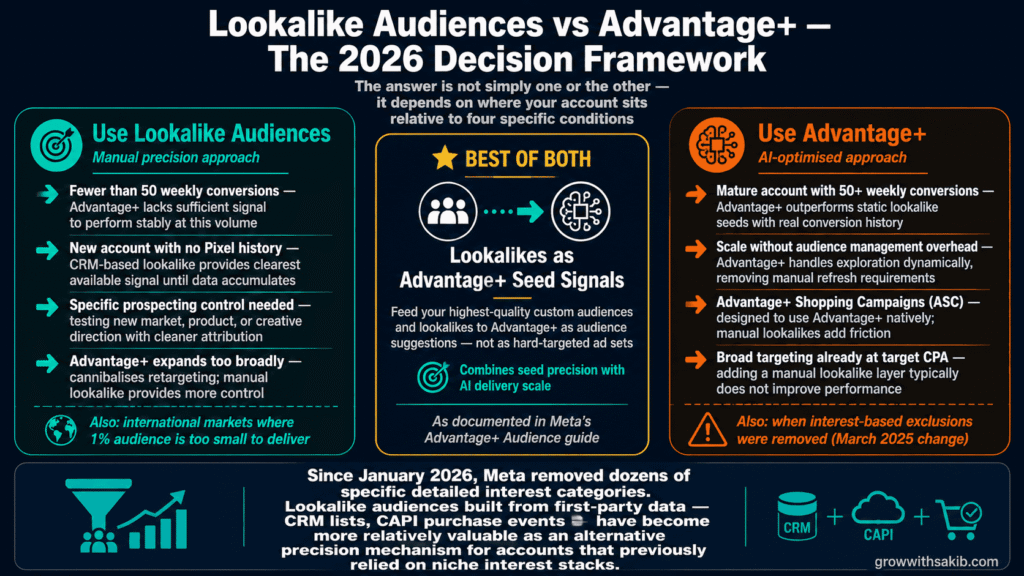
This is the question most Meta advertisers are wrestling with in 2026: should I build manual lookalike audiences or let Advantage+ handle prospecting automatically? The answer is not simply one or the other — it depends on where your account sits relative to four specific conditions.
When lookalike audiences win
- Low conversion volume accounts: if your account generates fewer than 50 conversions per week, Advantage+ Audience does not have enough signal to perform stably. As Conversios’s 2026 targeting guide documents, you need at least 50 weekly conversions for stable Advantage+ performance. Below this threshold, manual lookalikes from CRM data give the algorithm a more explicit starting point.
- New accounts without pixel history: a fresh account with no conversion data has nothing for Advantage+ to learn from. A strong CRM-based lookalike provides the clearest available signal until pixel data accumulates.
- Specific prospecting control needed: when testing a new market, a new product, or a new creative direction where you want to understand which audience is responding, manual lookalikes give you cleaner attribution than Advantage+ broad.
- When Advantage+ expands too broadly: in some accounts, Advantage+ delivers outside the intended prospecting segment and cannibalises retargeting audiences. A manual lookalike used as a hard-target provides more control over who sees prospecting creative.
When Advantage+ wins
- Mature accounts with 50+ weekly conversions: Advantage+ has enough real conversion data to outperform static lookalike seeds in most e-commerce and lead-gen contexts. As Adligator’s 2026 broad targeting analysis confirms, over-engineering audiences in high-signal accounts typically hurts performance.
- When you want scale without audience management overhead: Advantage+ handles audience exploration dynamically, removing the need to build, refresh, and test multiple lookalike percentages manually.
- For Advantage+ Shopping Campaigns (ASC): ASC is designed to use Advantage+ Audience natively. Adding manual lookalike targeting inside ASC introduces friction against the algorithm’s intended behaviour.
- When broad targeting is already performing: if broad targeting (no audience definition beyond location and age) is delivering your target CPA, adding a manual lookalike layer typically does not improve performance and may restrict the algorithm’s search space.
The best of both: lookalikes as Advantage+ seed signals
The most effective approach for many accounts in 2026 is to use both — but in a specific way. Rather than running manual lookalikes as standalone ad sets, feed your highest-quality custom audiences and lookalike audiences to Advantage+ as audience suggestions — a strategy covered in full in the Meta Ads Guide. As Meta’s Advantage+ Audience documentation explains, these suggestions guide the algorithm’s initial search without hard-constraining delivery.
This gives Advantage+ a stronger starting signal than broad targeting alone — effectively combining the precision of your seed data with the scale and real-time optimisation of AI delivery. The algorithm uses your lookalike as a hint, not a cage.
Step-by-Step: How to Create a Meta Lookalike Audience
The mechanics are straightforward. The strategy behind them — what you have read so far — is what makes the difference.
- Step 1: Build your seed custom audience first. In Ads Manager, go to Audiences > Create Audience > Custom Audience. Choose your source type — Customer List, Website (Pixel events), or Engagement. Ensure your seed meets the minimum quality thresholds covered in Section 2. The Meta Business Help Center custom audiences guide covers the technical setup for each source type.
- Step 2: Create the lookalike from your seed. With your custom audience saved, go to Audiences > Create Audience > Lookalike Audience. Select your source audience from the dropdown. The source must have at least 100 people, though 1,000+ is strongly recommended for reliable performance.
- Step 3: Choose your target country. The lookalike is built within the country or countries you specify. For international campaigns, build separate lookalikes per market rather than one global lookalike — behavioural patterns differ by market.
- Step 4: Set your percentage. Start at 1% unless your market is too small to generate sufficient delivery at that size. Use the framework in Section 3 to determine your starting point.
- Step 5: Name it descriptively. Use a naming convention you will still understand in six months. Example: ‘LAL — Top 20% LTV Customers — UK — 1%’ tells you the source, seed type, market, and percentage at a glance.
- Step 6: Allow up to 24 hours for population. Meta typically populates lookalike audiences within a few minutes, but full population can take up to 24 hours according to the official documentation.
5 Common Lookalike Audience Mistakes — and How to Fix Them
Mistake 1: Using all customers as the seed with no LTV filter
Uploading your entire customer database as a single seed tells the algorithm to find people similar to your average customer — which includes your least valuable customers, your one-time buyers, and your biggest churners. The lookalike produced is a statistical blend of all of them.
Fix: export only the top 20–25% of customers by lifetime value or purchase frequency. If you cannot segment by LTV, use recent purchasers (last 90–180 days) as a proxy for engaged, higher-intent buyers.
Mistake 2: Building lookalikes from Pixel-only seeds without CAPI
A seed audience built from Pixel purchase events without CAPI is missing 15–30% of qualifying events due to iOS ATT restrictions. The algorithm is pattern-matching against an incomplete picture of who your buyers actually are.
Fix: configure Meta Conversions API alongside your Pixel before building purchase-event seeds. Verify both are firing in Events Manager and that deduplication is set up correctly to avoid double-counting events.
Mistake 3: Jumping directly to 5–10% without validating at 1%
Starting at a broad percentage skips the validation step. You are spending budget to find loosely similar users before confirming the seed and creative combination actually converts tightly similar ones.
Fix: always validate at 1% first. Confirm cost-per-result is within target before expanding to 2–3%, then 3–5%. The expansion path should be driven by performance data, not impatience.
Mistake 4: Using the wrong bid strategy for the lookalike tier
The appropriate bid strategy varies by lookalike percentage — and directly determines the cost of your Meta Ads per result at each funnel stage. As Stackmatix’s 2026 guide documents, highest value or ROAS bidding works well for 1–3% lookalikes from purchasers, where conversion intent is high. Cost Cap is more appropriate for 5–10% lookalikes from leads or engaged visitors, where conversion probability is lower and volume is the primary objective.
Fix: match your bid strategy to the intent level of the seed source, not just the percentage. Mismatched bid strategies cause the algorithm to either underspend (if caps are too tight) or overspend on low-quality conversions.
Mistake 5: Never refreshing the seed audience
Lookalike audiences are rebuilt every 3–7 days by Meta — but they rebuild against the same seed custom audience. If your seed custom audience has not been refreshed in six months, the lookalike is rebuilding from stale data.
For CRM-based seeds: refresh the uploaded customer list monthly at minimum. For Pixel and engagement seeds: these update automatically, but check periodically that the qualifying events are still firing correctly and that audience size has not collapsed due to tracking issues.
Lookalike Audiences in a Full-Funnel Context
Lookalike audiences are prospecting tools — they belong at the top and middle of the funnel, not at the bottom. Understanding where they fit alongside your custom audiences and retargeting audiences prevents overlap and budget waste.
| Funnel Stage | Audience Type | Lookalike Role | Exclusions to Apply |
|---|---|---|---|
| TOFU — Cold Prospecting | 1–3% lookalike from top LTV customers or purchasers | Primary prospecting vehicle — find new users similar to best buyers | Exclude all custom audiences: website visitors, engaged users, existing customers |
| MOFU — Warm Prospecting | 3–5% lookalike or Advantage+ with lookalike suggestion | Wider reach for consideration-stage content; lower bid pressure | Exclude bottom-funnel custom audiences: ATC, checkout, purchasers |
| BOFU — Retargeting | Custom audiences (website visitors, ATC, checkout) | No lookalike role here — use first-party custom audiences only | Exclude purchasers; include only non-converted warm segments |
| Advantage+ as seed layer | Custom audiences + lookalikes as audience suggestions | Feed both as Advantage+ suggestions; let AI distribute optimally | Apply customer suppression at account level for ASC |
Frequently Asked Questions
Are Meta Lookalike Audiences still effective in 2026?
Yes — but their role has shifted. They are most effective as a precision prospecting tool for accounts with fewer than 50 weekly conversions (where Advantage+ lacks sufficient signal), as a clean testing mechanism for new markets, and as audience suggestions that improve Advantage+ performance. The Meta Lookalike Audiences documentation confirms the feature remains fully supported. Seed quality now matters more than ever — a strong CRM seed outperforms weak pixel-based seeds even at identical percentages.
How many people do I need in my seed audience?
Meta’s technical minimum is 100 people, but as Adlibrary’s 2026 analysis documents, practical thresholds are: 1,000+ for usable signal, 5,000–10,000 for reliable performance, and 25,000+ before diminishing returns set in. Below 1,000, broad targeting or Pixel-event seeds typically outperform CRM list seeds because the algorithm has insufficient data to identify meaningful patterns.
What percentage lookalike audience should I use?
Start at 1% for the highest precision and lowest CPA. Once 1% is performing profitably and CPMs are rising due to frequency, expand to 2–3%, then 3–5% as needed. Avoid jumping directly to 10% — similarity to your seed drops significantly at that range and performance approaches broad targeting without the intentionality of actually testing broad. In smaller markets (UK, Australia), you may need to start at 2–3% to build a deliverable audience size.
What is a value-based lookalike audience?
A value-based lookalike weights the similarity computation toward your highest-value customers rather than treating all customers equally. You upload a customer list with an additional ‘value’ or ‘LTV’ column, and Meta’s algorithm prioritises matching against the highest-value records. As documented in the Meta value-based lookalike help article, this feature is available when uploading a customer list and selecting ‘Value’ as the optimisation option. It is the most underused feature in Meta advertising for e-commerce brands with variable customer lifetime value.
Should I use lookalike audiences or Advantage+ Audience?
Use both strategically. Lookalike audiences typically outperform Advantage+ when your account has fewer than 50 weekly conversions, when you are entering a new market, or when you need precise control over prospecting audience composition. Advantage+ typically outperforms manual lookalikes in mature accounts with rich conversion history. The most effective 2026 approach is feeding high-quality custom audiences and lookalikes to Advantage+ as audience suggestions — combining the precision of your seed data with the scale of AI delivery, as described in the Advantage+ Audience documentation.
How often should I refresh my lookalike audience?
The lookalike audience itself is automatically refreshed by Meta every 3–7 days based on the current state of your seed custom audience. Your responsibility is to keep the seed fresh. For CRM-based seeds: refresh the uploaded list monthly (quarterly for B2B). For Pixel and engagement seeds: these update automatically, but verify tracking health monthly to ensure events are still firing correctly. A rising CPA with no obvious creative fatigue is often a sign of seed staleness — rebuild the custom audience and recreate the lookalike.
Why is my lookalike audience not performing?
The most common causes, in order of frequency: (1) weak seed — the source audience is too broad, includes low-value customers, or is stale; (2) tracking gaps — Pixel-only tracking is missing iOS events, degrading seed quality (fix with Conversions API); (3) no exclusions — the lookalike is delivering to existing customers or warm audiences; (4) wrong percentage — jumping to 5–10% without validating at 1% first; (5) mismatched bid strategy — using Cost Cap when Highest Value would be more appropriate for a purchase-seed lookalike.
Key Takeaways
- Seed quality is the only variable that fundamentally determines lookalike performance. Budget, percentage, and creative all matter less than the specificity and recency of your source audience.
- Top 20–25% of customers by LTV consistently outperforms all customers as a seed. 500 high-value buyers beat 10,000 newsletter subscribers in every meaningful comparison.
- CAPI is foundational, not optional, for Pixel-event seeds. Missing 15–30% of purchase events means your seed — and therefore your lookalike — is built on incomplete data.
- Value-based lookalike audiences are the most underused feature in Meta advertising. If your top 20% of customers generate 60–80% of revenue, standard lookalikes are systematically targeting the wrong people.
- Always validate at 1% before expanding to broader percentages. The expansion path should be driven by performance data, not impatience.
- Lookalike audiences work best as Advantage+ seed signals in 2026. Feed your highest-quality custom audiences and lookalikes to Advantage+ as suggestions — not as standalone hard-targeted ad sets.
- Exclusions are mandatory on all lookalike prospecting ad sets. Running lookalikes without excluding custom audiences means paying to reach existing customers and warm audiences at cold-prospect prices.
- Lookalikes are most valuable for accounts under 50 weekly conversions. Above that threshold, Advantage+ typically finds equivalent or better prospecting performance with less manual management overhead.