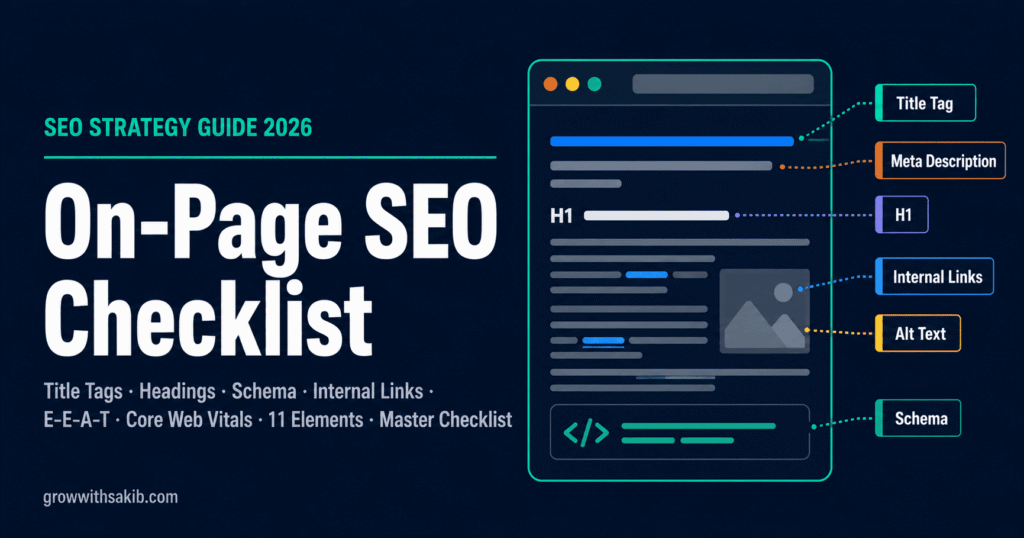
There is a predictable moment in every SEO audit I run. I pull up a client’s highest-priority page — the one they have invested the most time and hope into — and within two minutes I have found the same pattern of fixable problems that are collectively preventing it from ranking. A title tag that buries the keyword. A heading structure that confuses Google’s topic understanding. Internal links that point nowhere relevant. Images with no alt text. A meta description that reads like it was written as an afterthought.
None of these are difficult to fix. Together, they are the difference between a page that ranks and a page that sits on page 4 while a competitor’s thinner content appears in the top 3. On-page SEO is entirely within your control — which makes getting it right a competitive advantage that most businesses consistently fail to use.
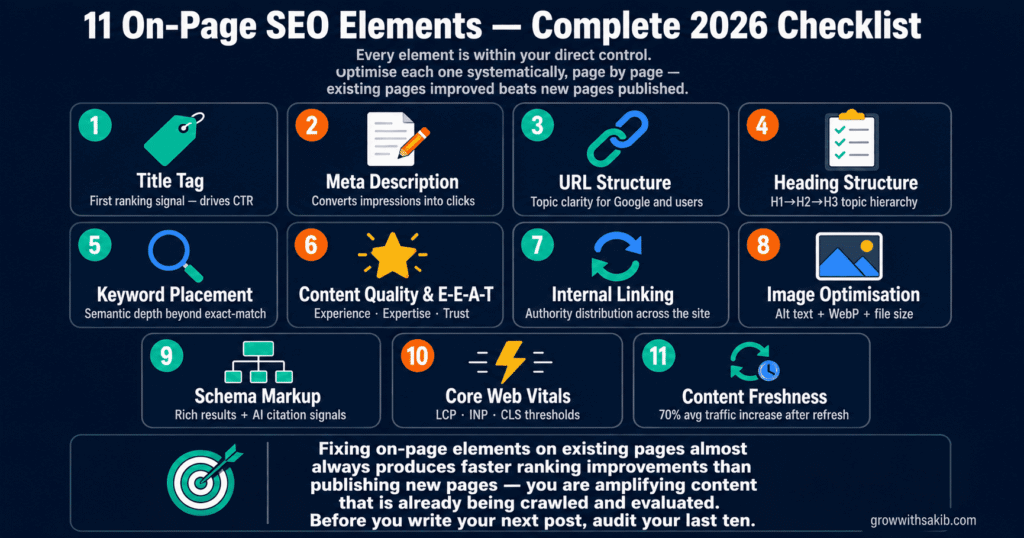
This checklist covers every element, with specific rules rather than vague guidance, before-and-after examples that show exactly what good looks like, and explanations of why each element matters — not just that it does.
What On-Page SEO Is — and What It Is Not
On-page SEO is the optimisation of the elements that exist on and within a specific web page — the signals you control directly that help search engines understand what the page is about, who it is for, and why it deserves to rank.
It is distinct from technical SEO (site infrastructure, crawlability, page speed) and off-page SEO (backlinks, brand mentions, external authority). On-page SEO sits between those two layers — it is the content and structural optimisation that converts a technically sound, externally authoritative page into one that Google can confidently match to a search query, and forms one pillar of the complete SEO for small business framework.
| On-page SEO (what this checklist covers) | What it does NOT cover |
|---|---|
| Title tags, meta descriptions, URL structure | Technical SEO — site speed, crawlability, XML sitemaps |
| Heading hierarchy (H1, H2, H3) | Off-page SEO — backlinks, external authority |
| Keyword placement and semantic depth | Social media presence |
| Internal linking and anchor text | Paid advertising |
| Image optimisation and alt text | Google Business Profile |
| Schema markup and structured data | Link building strategy |
| E-E-A-T signals and content quality | Domain authority |
| Core Web Vitals page experience elements | Server configuration |
Before You Optimise Anything: The Foundation Check
Every on-page optimisation decision starts with two questions that most guides skip over. Without clear answers to both, every optimisation decision that follows is guesswork.
Question 1 — What is the primary keyword for this page?
Every page should have one primary keyword — the single query you most want this page to rank for. Not three. Not a list. One. Secondary keywords support the primary one, but there should be no ambiguity about which keyword this page is designed to serve.
If you cannot answer this in five seconds, the page lacks a strategic foundation and no amount of on-page optimisation will compensate. Determine the primary keyword from your keyword research before touching any on-page element. See the GrowWithSakib Keyword Research Guide for the full process.
Question 2 — Does this page match the search intent for that keyword?
Google the keyword and look at the top 5 organic results. What format are they in? Blog posts, service pages, comparison articles, tools, or product pages? If your page is a different format from what currently ranks, Google has already told you what format satisfies the intent for this keyword — and your page is fighting against the algorithm’s understanding rather than working with it.
Element 1: Title Tag
The title tag is the clickable headline that appears in Google search results. It is the first thing a searcher reads when deciding whether to click your result — and one of the strongest on-page signals Google uses to understand a page’s primary topic.
Two things matter about a title tag: does it clearly communicate the page’s primary keyword, and does it make a searcher want to click it over the nine competing results on the same page? Both matter. A title that ranks but does not get clicked produces the same result as a title that does not rank at all.
Title tag rules
- Length: Keep title tags between 50–60 characters (or under 600px width). Google typically displays approximately 600 pixels on desktop. Titles that exceed this get truncated — and truncation always cuts the least important part, which is often your brand name or differentiating phrase.
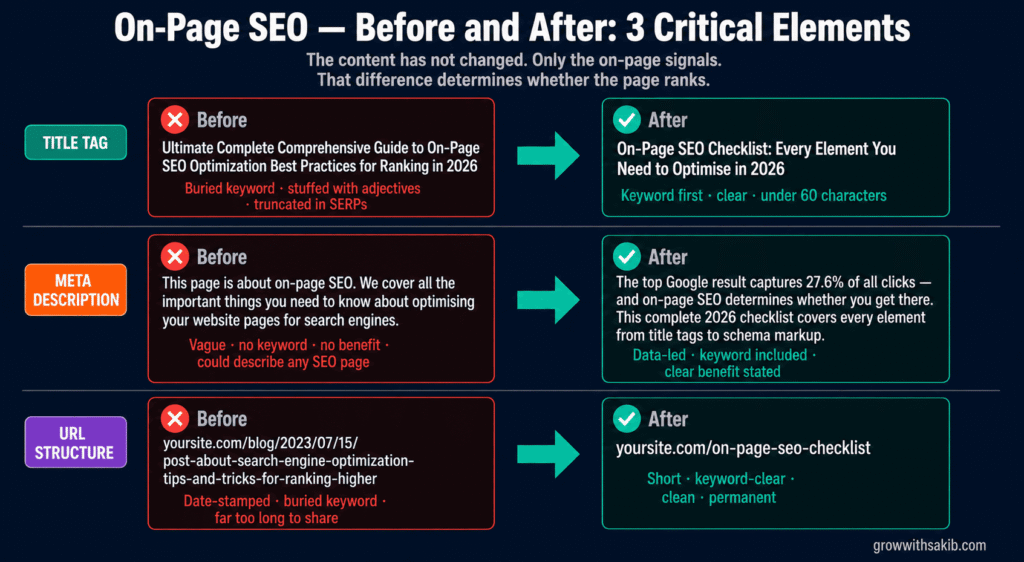
- Primary keyword placement: Place your primary keyword as close to the beginning of the title as possible. ‘On-Page SEO Checklist: Complete Guide for 2026’ outperforms ‘Complete Guide for 2026: On-Page SEO Checklist’ — the keyword lands before the reader scans away.
- One title per page: Never use the same title tag on two pages. Duplicate titles create cannibalization signals and confuse Google’s understanding of which page is the primary resource for a topic.
- Do not keyword stuff: ‘On-Page SEO Checklist — On-Page SEO Guide — On-Page SEO Tips 2026’ reads as spam and is treated as such. One clear, useful title with the keyword naturally included.
Title tag checklist
| What to do | Why it matters |
|---|---|
| ☐ Primary keyword appears in the first 60 characters | Front-loaded keywords receive stronger weighting as topic signals |
| ☐ Total character count is 50–60 characters (test in a title tag preview tool) | Titles beyond 600px are truncated in SERPs — truncated titles lose click intent |
| ☐ Title is unique — no other page on your site uses the same title tag | Duplicate titles create cannibalization and confuse crawlers |
| ☐ Title does not contain keyword repetition or stuffing | Stuffed titles are treated as spam — one clear keyword instance is sufficient |
| ☐ Title would make a searcher want to click it over competing results | CTR matters as much as ranking, which you can measure directly in Google Search Console |
Element 2: Meta Description
Meta descriptions do not directly affect rankings. That much is established fact from multiple Google confirmations. What they do affect is click-through rate — and click-through rate does influence rankings. A page with a strong meta description that earns significantly more clicks than its ranking position would normally suggest receives a positive engagement signal.
More practically: your meta description is your 155-character advertisement in Google’s search results. It is the text that converts a search impression into a website visit. Treating it as a formality — filling it with generic text or leaving it empty and letting Google auto-generate it — is one of the most straightforward missed opportunities in on-page SEO.
Meta description rules
- Length: 140–160 characters. Google displays approximately 920 pixels (roughly 155–160 characters) on desktop. Mobile shows less. Aim for 150 characters as your target — enough to be informative, short enough to display fully on mobile.
- Include the primary keyword naturally: Google bolds search terms in meta descriptions when they match the query — this makes your result visually stand out. Include the keyword where it reads naturally, not forced.
- Communicate a clear benefit or answer: Tell the searcher what they will get if they click. ‘Learn how to…’ ‘Covers X, Y, and Z…’ ‘Step-by-step guide to…’ All communicate value before the click.
- Make it unique per page: Each page needs a unique meta description. Duplicate meta descriptions are flagged by Google Search Console as a quality issue.
- Do not include calls-to-action that promise things the page does not deliver: ‘Click here for instant results’ that leads to a blog post damages trust and increases bounce rate — which eventually damages rankings.
Meta description checklist
| What to do | Why it matters |
|---|---|
| ☐ Character count is 140–160 (test in a meta description preview tool) | Descriptions over 160 characters are truncated — losing your call-to-action |
| ☐ Primary keyword appears naturally in the description | Google bolds matching keywords — your result stands out visually to the searcher |
| ☐ Description clearly states what the page contains or what the reader gains | Vague descriptions do not differentiate your result from nine competitors |
| ☐ Description is unique — no other page uses the same meta description | Duplicate meta descriptions are a Search Console quality flag |
| ☐ No clickbait promises that the page content does not deliver | Trust damage from mismatch increases bounce rate and eventually suppresses rankings |
Element 3: URL Structure
A well-structured URL communicates topic context to both Google and users before they even reach the page. A poorly structured URL obscures topic context and creates confusion about what the page covers.
URL structure changes after a page has been live and indexed should be handled with extreme care — changing a URL without implementing a 301 redirect from the old URL to the new one will cause you to lose all ranking authority the original page had built. Get URL structure right at publication, and you rarely need to touch it again.
URL structure rules
- Include the primary keyword: Your URL slug should reflect the page’s primary topic. /on-page-seo-checklist communicates topic clearly. /blog/post-127 communicates nothing.
- Use hyphens, not underscores: Google treats hyphens as word separators. Underscores are treated as word joiners — ‘on_page_seo’ is read as one word ‘onpageseo’ rather than three separate words.
- Keep URLs short: Target under 60 characters where possible. Shorter URLs are easier to share, easier to remember, and less likely to be truncated in SERPs.
- Avoid date parameters in blog URLs: /blog/2022/04/on-page-seo-checklist creates problems — when you update the content, the URL becomes misleading. Use /blog/on-page-seo-checklist and update the content without touching the URL.
- Use lowercase only: URLs are case-sensitive. /On-Page-SEO-Checklist and /on-page-seo-checklist can be treated as different URLs by some servers, creating duplicate content issues.
URL checklist
| What to do | Why it matters |
|---|---|
| ☐ Primary keyword is included in the URL slug | URL communicates topic to both Google and users before page load |
| ☐ Hyphens used as word separators (not underscores or spaces) | Underscores are treated as word joiners — hyphens are treated as spaces |
| ☐ URL is under 60 characters and free of unnecessary parameters | Short, clean URLs are more shareable and less likely to be truncated |
| ☐ URL uses lowercase letters only | Case-sensitive URLs can create duplicate content issues on some servers |
| ☐ 301 redirect in place if URL was changed from a previously indexed version | Changed URLs without redirects lose all accumulated ranking authority |
Element 4: Heading Structure (H1, H2, H3)
Headings serve two masters simultaneously: they guide human readers through the content in a logical sequence, and they signal topic structure and hierarchy to Google’s crawlers. Both matter — but the order of priority has shifted. In 2026, headings that genuinely help readers navigate content are significantly more valuable than headings optimised primarily for keyword placement.
One H1 per page. No exceptions. Your H1 is the main topic statement of the page. Using two H1 tags sends a conflicting topic signal. Using zero H1 tags leaves Google without its primary on-page topic anchor.
The heading hierarchy that Google understands
| Heading level | Purpose | What it should contain |
|---|---|---|
| H1 (one per page) | Primary topic statement — the page’s main subject | The primary keyword, close to the beginning. Should closely mirror the title tag. |
| H2 (multiple) | Major section headers — primary subtopics | Secondary keywords and major topic divisions. Each H2 introduces a distinct idea. |
| H3 (multiple) | Subsection headers — supporting detail | More specific aspects within an H2 section. Can contain long-tail keyword variants. |
| H4–H6 (as needed) | Fine-grained organisation within complex sections | Use only when genuinely needed for navigation — not for keyword placement purposes. |
Heading checklist
| What to do | Why it matters |
|---|---|
| ☐ Page has exactly one H1 tag containing the primary keyword | Multiple H1 tags send conflicting topic signals to Google |
| ☐ H1 does not duplicate the title tag exactly (though they can be similar) | Exact duplicates miss the opportunity for additional keyword variation |
| ☐ H2 tags divide the page into logical, distinct major sections | H2s are the primary navigational structure — each should introduce a new idea |
| ☐ Heading hierarchy is never skipped (H1→H2→H3, never H1→H3) | Skipped heading levels break the structural logic that Google parses |
| ☐ Headings describe what the section actually contains (not vague labels like ‘Introduction’) | Descriptive headings help both readers and AI systems extract section-level answers |
Element 5: Keyword Placement and Semantic Depth
Keyword placement is the on-page element most misunderstood by both beginners (who ignore it) and intermediate SEOs (who over-apply it). The goal is not to repeat the primary keyword as many times as possible — Google’s NLP capabilities have made keyword density an increasingly obsolete metric. The goal is to signal topical relevance through natural, contextually appropriate keyword usage combined with semantic depth.
Where your primary keyword should appear
- In the first 100 words of the body content: Establish topical context immediately. Do not build to the keyword — state it.
- In at least one H2 heading: Confirms the page’s primary topic in the heading hierarchy.
- In the alt text of at least one relevant image: Provides an additional contextual signal through a different HTML element.
- Naturally throughout the body at a density that reads normally: For a 1,500-word article, 3–6 natural appearances of the primary keyword is appropriate. More than that begins to read as forced.
Semantic depth — what Google actually reads for relevance
Beyond the primary keyword, Google evaluates whether your page demonstrates genuine topical expertise by looking for related terms, entities, and concepts that a comprehensive resource on this topic would naturally include.
A page about ‘on-page SEO checklist’ that never mentions title tags, meta descriptions, or internal links is telling Google that it covers the topic superficially — regardless of how many times it repeats the exact phrase ‘on-page SEO checklist.’
Keyword and semantic checklist
| What to do | Why it matters |
|---|---|
| ☐ Primary keyword appears in the first 100 words of the body content | First 100 words carry disproportionate topical signal weight |
| ☐ Primary keyword appears in at least one H2 heading | Reinforces primary topic in the heading hierarchy |
| ☐ Related terms and supporting concepts appear naturally throughout content | Semantic depth demonstrates expertise beyond exact-match keyword repetition |
| ☐ No keyword stuffing — primary keyword appears naturally, not forced | Forced repetition reduces readability and is detected as manipulation |
| ☐ LSI (Latent Semantic Indexing) terms relevant to the topic are present | Related terminology confirms topical depth to Google’s NLP systems |
Element 6: Content Quality and E-E-A-T Signals
Content quality is the on-page element that has gained the most weight in Google’s algorithm over the past three years — and the one that most businesses still treat as secondary to technical optimisation. The reason is simple: technical optimisation is easier to measure and easier to implement than genuine content expertise. But in 2026, Google’s ability to evaluate content quality has reached the point where thin, generic content consistently underperforms — regardless of how technically clean the on-page implementation is.
E-E-A-T: what it means in practice for on-page content
Google’s quality evaluation framework — Experience, Expertise, Authoritativeness, and Trustworthiness — is not just assessed at the domain level. It is assessed at the page level through specific on-page signals.
- Experience: First-hand knowledge demonstrated through specific examples, named clients or projects, direct observations from real situations, and outcomes that require practical involvement to know. ‘In my experience auditing over 300 small business websites…’ is an experience signal. ‘Experts generally agree that…’ is not.
- Expertise: Depth of topic coverage, accuracy of technical claims, consistent correct terminology, and the ability to address nuance and edge cases that a surface-level understanding would miss.
- Authoritativeness: A named author with verifiable credentials, bylines that link to an author bio page with professional background, and citations to credible external sources within the content.
- Trustworthiness: Publication date and last-updated date visible, HTTPS site, contact information accessible, no misleading claims, and transparent disclosure of potential conflicts of interest — all of which directly affect how long SEO takes to produce results on new pages.
Content quality checklist
| What to do | Why it matters |
|---|---|
| ☐ Author name and bio are visible on the page with verifiable credentials | E-E-A-T signal — named expertise is more trustworthy than anonymous content |
| ☐ Publication date and last-updated date are both visible | Freshness signal — Google evaluates both when content was created and when it was maintained |
| ☐ Content covers the topic with genuine depth — not a surface-level overview | Thin content is consistently deprioritised in favour of comprehensive resources |
| ☐ At least 2–3 external citations link to credible, authoritative sources | Citations increase E-E-A-T trust signals and improve AI citation probability by up to 115% |
| ☐ Content includes specific examples, data points, or named real-world illustrations | Generic claims without evidence are indistinguishable from AI-generated filler |
| ☐ Content length matches the depth the topic requires (not padded for length) | Quality beats length — but a comprehensive topic requires comprehensive coverage |
| ☐ No factual errors, outdated claims, or information that contradicts established consensus | Inaccurate content damages E-E-A-T and drives high bounce rates from disappointed searchers |
Element 7: Internal Linking
Internal links are one of the highest-impact, lowest-effort on-page optimisation opportunities available — and one of the most consistently underdeveloped areas in small business websites. A Backlinko case study documented a 250% traffic increase within one week of adding strategic internal links — without publishing any new content or building a single new backlink. The content was already there. The connections between pages were not.
What internal links do
- Distribute authority across your site: Pages that have earned backlinks pass some of their authority to the pages they link to. A blog post with strong backlinks linking to a service page helps that service page rank — even without its own direct backlinks.
- Help Google understand your site’s topical structure: Internal links create a visible map of how your content relates. A page about keyword research linking to a page about on-page SEO communicates that these are related topics from the same source of expertise.
- Guide users to their next logical step: Internal links reduce bounce rates by giving readers a clear next destination. A reader who finishes an article and finds a relevant next article is more likely to stay — and engagement signals influence rankings.
Anchor text — the most mishandled internal link element
Anchor text is the clickable text of the internal link. Never use ‘click here,’ ‘read more,’ or ‘this article’ as anchor text. These tell Google nothing about the destination page. Descriptive anchor text — ‘our complete keyword research guide,’ ‘the technical SEO checklist,’ ‘how to set up your Google Business Profile’ — communicates the destination page’s topic and contributes to that page’s keyword relevance.
Internal linking checklist
| What to do | Why it matters |
|---|---|
| ☐ Every new page links to at least 2–3 existing pages on your site | Orphan pages (zero internal links) receive significantly less crawl attention |
| ☐ Existing high-authority pages link to your most important new content | Authority flows through internal links — direct it intentionally |
| ☐ All anchor text is descriptive — never ‘click here’ or ‘read more’ | Descriptive anchors communicate destination topic to both Google and readers |
| The pillar article links to this page, and this page links back to the SEO pillar | Topic cluster architecture requires bidirectional linking for full authority transfer |
| ☐ No broken internal links — all links resolve to live, relevant pages | Broken links waste crawl budget and damage user experience |
| ☐ Key pages are reachable within 3 clicks from the homepage | Deeply buried pages receive less crawl attention and lower priority |
Element 8: Image Optimisation
Images create two problems for SEO that most people do not consider together: they are invisible to Google without alt text, and they are the single largest contributor to slow page load times when unoptimised. Both problems have the same solution — systematic image optimisation applied at upload, every time.
Alt text — what it is and how to write it correctly
Alt text (alternative text) is the written description of an image stored in the HTML img tag. It serves three purposes: it tells Google what the image shows, it displays in place of the image if it fails to load, and it is read by screen readers for visually impaired users.
Alt text should describe what is in the image accurately and specifically. Where natural, include the page’s primary keyword — but never force it. An image of a keyword research spreadsheet on an on-page SEO guide does not need the alt text ‘on-page SEO checklist keyword research spreadsheet’ — that is keyword stuffing. ‘Screenshot of keyword research spreadsheet in Ahrefs’ is accurate, useful, and serves all three purposes effectively.
Image file size — the performance problem most people create
Unoptimised images are the most common cause of poor Core Web Vitals scores. A 4MB hero image uploaded directly from a camera without resizing or compression will destroy page load time regardless of how fast the hosting is. Convert images to WebP format — it typically reduces file size by 25–34% compared to JPEG and PNG with no visible quality reduction. Compress before uploading using ShortPixel, Squoosh, or TinyPNG.
Image optimisation checklist
| What to do | Why it matters |
|---|---|
| ☐ Every image has a descriptive alt text (not empty, not keyword-stuffed) | Google cannot see images — alt text is the only image content signal available |
| ☐ Image file name is descriptive (on-page-seo-checklist.jpg not IMG_4821.jpg) | File names provide an additional content signal before the image is even loaded |
| ☐ Images are compressed — file size under 100KB where possible | Large images are the most common cause of poor LCP Core Web Vitals scores |
| ☐ Images are in WebP format rather than JPEG or PNG | WebP is 25–34% smaller than JPEG/PNG at equivalent quality |
| ☐ Images are sized correctly for their display size (not 3000px for a 600px container) | Serving oversized images wastes bandwidth with no visual benefit |
| ☐ Lazy loading is enabled for images below the fold | Lazy loading improves initial page load time without affecting the visual experience |
Element 9: Schema Markup
Schema markup is structured data added to a page’s HTML that explicitly tells search engines what your content represents — not what you hope they infer. It is the difference between Google guessing that your page contains a recipe and Google knowing with certainty that it contains a recipe with specific ingredients, cooking time, and calorie count.
In 2026, schema markup serves two ecosystems simultaneously: traditional Google rich results (star ratings, FAQ dropdowns, How-To steps) and AI search systems that use structured data to extract and cite specific facts with greater accuracy. A broken or missing schema is not neutral — it is a missed opportunity that competitors with correct schema are actively exploiting.
The schema types with the highest impact for most pages
| Schema type | What it enables | Best for |
|---|---|---|
| Article / BlogPosting | Author, date, headline, publisher — E-E-A-T signals | All blog posts and editorial content |
| FAQ | Expandable FAQ dropdowns in search results — directly below your link | Pages with a Q&A or FAQ section |
| HowTo | Step-by-step process rich results with numbered steps | Tutorial and how-to guide content |
| Organization | Brand entity — connects your site to your company knowledge graph | Homepage and About page |
| BreadcrumbList | URL hierarchy displayed in search results — shows content structure | All pages within a site hierarchy |
| LocalBusiness | Name, address, hours, phone — local pack signals | Local service business pages |
| Product | Price, availability, reviews — product rich results | E-commerce product pages |
How to implement schema correctly
Use JSON-LD format — Google’s recommended implementation. JSON-LD is placed in the HTML head or just before the closing body tag. It does not interfere with visible page content and can be updated without changing the page design.
For WordPress sites, Rank Math and Yoast SEO both generate basic Article and FAQ schema automatically. For custom sites or more specific schema types, use Schema.org documentation and validate every implementation with Google’s Rich Results Test at search.google.com/test/rich-results.
Schema markup checklist
| What to do | Why it matters |
|---|---|
| ☐ Article or BlogPosting schema implemented on all blog and editorial content | Establishes E-E-A-T signals: author, date, publisher in structured form |
| ☐ FAQ schema added to all pages with a Q&A or FAQ section | FAQ schema enables expandable dropdowns in search results — increases SERP real estate |
| ☐ Organization schema on homepage with name, logo, URL, and social profiles | Brand entity signal — connects site to Google’s knowledge graph for your business |
| ☐ All schema validated with Google’s Rich Results Test (no errors) | Schema errors generate Search Console warnings and suppress rich results |
| ☐ BreadcrumbList schema implemented for pages within a site hierarchy | Breadcrumbs in SERPs improve CTR by showing content location to searchers |
Element 10: Core Web Vitals and Page Experience
Core Web Vitals are Google’s official page experience metrics — three measurements of real user experience that Google uses as ranking signals, covered in depth in the technical SEO strategies guide. They measure loading performance, interactivity, and visual stability. A page that fails Core Web Vitals on mobile is actively penalised relative to competitors who pass them, all other signals being equal.
The three metrics and their 2026 thresholds
| Metric | What it measures | Good threshold |
|---|---|---|
| LCP (Largest Contentful Paint) | Loading performance — how long until the largest visible element loads | Under 2.5 seconds |
| INP (Interaction to Next Paint) | Interactivity — how quickly the page responds to user input | Under 200ms (replaced FID in March 2024) |
| CLS (Cumulative Layout Shift) | Visual stability — how much content shifts during load | Under 0.1 |
The fastest Core Web Vitals fixes for most pages
- Image compression and WebP conversion: Unoptimised images are the most common LCP problem. Converting to WebP and compressing to under 100KB typically improves LCP by 0.5–1.5 seconds on its own.
- Explicit image dimensions: Images without explicit width and height attributes cause CLS — the page reflows when the image loads. Set width and height on every img element.
- Caching plugin (WordPress): WP Rocket or LiteSpeed Cache typically improves LCP by 0.3–0.8 seconds by serving cached versions of pages rather than generating them on every request.
- Defer non-critical JavaScript: JavaScript that blocks page rendering delays LCP. Defer scripts that are not needed for the initial page view.
Core Web Vitals checklist
| What to do | Why it matters |
|---|---|
| ☐ LCP score is under 2.5 seconds (check in PageSpeed Insights) | LCP is Google’s primary loading performance signal in local rankings |
| ☐ INP score is under 200ms — note: INP replaced FID in March 2024 | Guides referencing FID as a current metric are outdated — check INP |
| ☐ CLS score is under 0.1 (check in PageSpeed Insights) | Layout shifts frustrate users — Google penalises pages with high CLS |
| ☐ All images have explicit width and height attributes in the HTML | Missing dimensions cause layout shifts during load — directly impacts CLS |
| ☐ PageSpeed score above 70 on mobile (not just desktop) | Google uses mobile-first indexing — mobile score is what matters for rankings |
Element 11: Content Freshness and Regular Maintenance
Publishing a page and moving on is not an SEO strategy — it is a starting point. Pages that were optimised at publication and then never revisited progressively lose ground to competitors who update regularly. Content freshness is not about changing a date in the byline — it is about genuinely maintaining accuracy, relevance, and comprehensiveness as the landscape evolves.
When to update existing content
- When ranking data shows decline: If a page that was ranking positions 3–8 drops to positions 11–20, a content freshness update is often the fastest recovery lever.
- When statistics or data points become outdated: An article citing 2021 statistics in 2026 signals staleness to both readers and Google’s quality evaluators.
- When competitors have published comprehensive updates to their ranking pages: If the pages outranking you have been recently updated with new sections or data you do not cover, your page’s relative comprehensiveness has declined.
- When the search intent for the keyword has shifted: Regularly check the SERP for your target keywords — if the format of top results has changed (blog posts replaced by tools, or vice versa), your content format may need updating.
Content freshness checklist
| What to do | Why it matters |
|---|---|
| ☐ All statistics and data points have been checked for accuracy and currency | Outdated statistics are the most common freshness problem — and the easiest to fix |
| ☐ Published date and last-updated date are both visible on the page | Both signals matter — Google evaluates freshness relative to query recency expectations |
| ☐ External links have been checked — no broken outbound links | Broken outbound links signal neglect and waste the trust signal of external citations |
| ☐ New sections added for any major topic developments since publication | Comprehensiveness improvements consistently improve rankings more than cosmetic updates |
| ☐ Page has been re-submitted for indexing via Google Search Console after major updates | Submitting ensures Google recrawls quickly rather than waiting for the next scheduled visit |
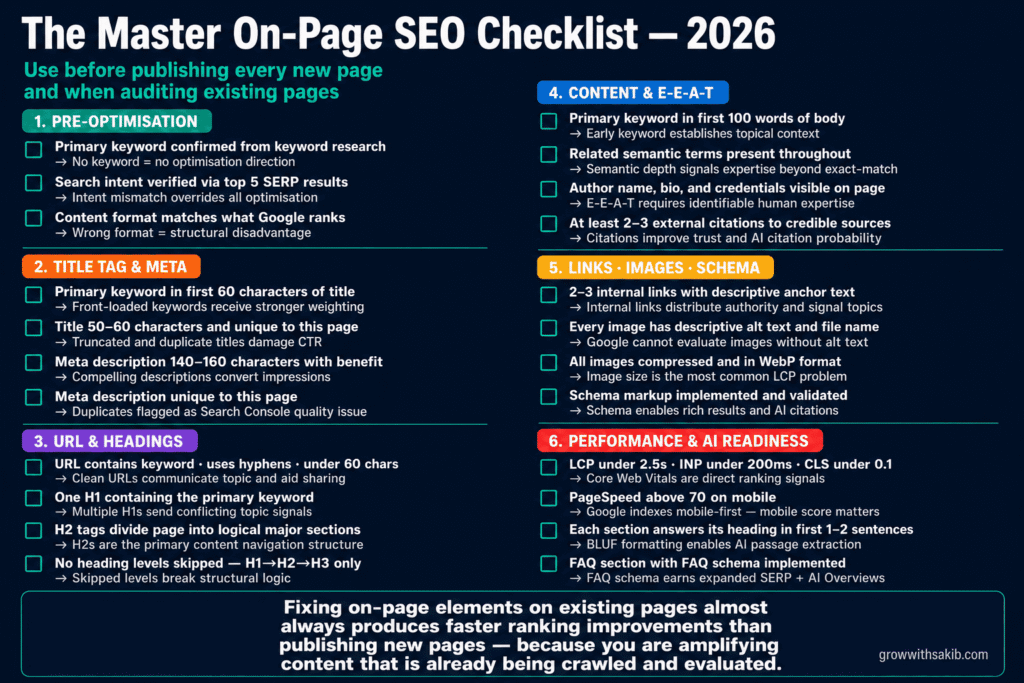
The Master On-Page SEO Checklist — Print Version
Use this consolidated checklist when optimising any new page before publication, or when auditing existing pages. Each item maps to a full section above for detailed guidance.
Pre-optimisation foundation
| What to do | Why it matters |
|---|---|
| ☐ Primary keyword is identified and confirmed from keyword research | No keyword = no optimisation direction |
| ☐ Search intent verified by reviewing top 5 SERP results manually | Intent mismatch overrides all other optimisation |
| ☐ Content format matches the format Google is currently ranking for this keyword | Wrong format = structural disadvantage regardless of content quality |
Title tag and meta description
| What to do | Why it matters |
|---|---|
| ☐ Primary keyword in first 60 characters of title tag | Front-loaded keywords receive stronger weighting |
| ☐ Title tag is 50–60 characters and unique | Truncated titles and duplicate titles both damage CTR |
| ☐ Meta description is 140–160 characters with keyword and clear benefit | Compelling meta descriptions convert impressions into clicks |
| ☐ Meta description is unique to this page | Duplicate meta descriptions are a Search Console quality flag |
URL and headings
| What to do | Why it matters |
|---|---|
| ☐ URL slug contains primary keyword, uses hyphens, and is under 60 characters | Clean URLs communicate topic and aid sharing |
| ☐ One H1 containing primary keyword | Multiple H1s send conflicting topic signals |
| ☐ H2 tags divide page into logical major sections | H2s are the primary content navigation structure |
| ☐ No heading levels skipped (H1→H2→H3 only) | Skipped levels break structural logic |
Content and E-E-A-T
| What to do | Why it matters |
|---|---|
| ☐ Primary keyword in first 100 words | Early keyword establishes topical context immediately |
| ☐ Related semantic terms and concepts present throughout | Semantic depth signals expertise beyond exact-match repetition |
| ☐ Author name, bio, and credentials visible | E-E-A-T requires identifiable human expertise |
| ☐ At least 2–3 external citations to credible sources | Citations improve trust and AI citation probability |
| ☐ Content is genuinely comprehensive — no major subtopics missing | Thin coverage consistently underperforms comprehensive resources |
Internal links, images, and schema
| What to do | Why it matters |
|---|---|
| ☐ 2–3 internal links to related pages with descriptive anchor text | Internal links distribute authority and signal topic relationships |
| ☐ Link from high-authority existing pages to this new page | Authority flows from existing strong pages — direct it intentionally |
| ☐ Every image has descriptive alt text and descriptive file name | Google cannot evaluate images without alt text |
| ☐ All images compressed and in WebP format | Image size is the most common LCP performance problem |
| ☐ Appropriate schema markup implemented and validated | Schema enables rich results and improves AI search citation accuracy |
Performance and AI readiness
| What to do | Why it matters |
|---|---|
| ☐ LCP under 2.5s, INP under 200ms, CLS under 0.1 (check PageSpeed Insights) | Core Web Vitals are direct ranking signals — failures carry ranking penalties |
| ☐ PageSpeed score above 70 on mobile | Google indexes mobile-first — mobile performance determines ranking impact |
| ☐ Each section answers its heading question in the first 1–2 sentences | BLUF formatting enables AI systems to extract and cite specific passages |
| ☐ FAQ section present with FAQ schema implemented | FAQ schema earns expanded SERP real estate and feeds AI Overview answers |
| ☐ Page submitted for indexing via Google Search Console | Fast indexing confirmation — do not wait for Google to discover by crawl alone |
The On-Page SEO Mistakes That Cost Rankings Every Day
| # / The mistake | What it costs | The fix |
|---|---|---|
| 01 Duplicate title tags across multiple pages | Google picks one page to rank — usually not the one you want | Write unique, keyword-specific title tags for every page |
| 02 Ignoring search intent — wrong content format | Page bounces immediately — Google interprets as poor quality match | Check SERP before writing — match format to what currently ranks |
| 03 Keyword stuffing in title, headings, and body | Identified as manipulation — ranking suppression or penalty | One natural keyword mention per element — write for humans |
| 04 Zero or generic alt text on all images | Images invisible to Google — missed contextual signals on every page | Descriptive alt text on every image, every time |
| 05 Internal links with generic anchor text | No topical signal passed to destination pages | Descriptive anchors that describe the destination page’s content |
| 06 No schema markup on eligible content | Missing rich results — competitors with schema occupy more SERP real estate | Implement FAQ, Article, and HowTo schema on all eligible pages |
| 07 Optimising once and never updating | Progressive ranking decline as content becomes stale | Quarterly content review — update data, add sections, fix broken links |
| 08 Failing Core Web Vitals on mobile | Direct ranking penalty relative to competitors who pass | PageSpeed audit monthly — fix images and caching first |
Frequently Asked Questions
How long does on-page SEO take to show results?
On-page optimisation changes are typically reflected in Google rankings within 2–8 weeks for pages that are already indexed and being crawled regularly. Title tag changes often show CTR improvements (via Google Search Console) within 2–4 weeks. Content improvements that add depth and freshness typically show ranking improvements over 4–12 weeks as Google recrawls and re-evaluates the updated page.
How many keywords should I optimise one page for?
One primary keyword per page, with multiple secondary and semantic keywords supporting it. The primary keyword is the single query you most want the page to rank for. Secondary keywords are related queries the page can naturally address within the same content. Trying to rank one page for multiple unrelated primary keywords creates focus problems — the page sends diluted signals for each and ranks strongly for none.
Should I optimise every page on my site?
Prioritise pages that are closest to revenue-generating outcomes first: service pages, product pages, and high-intent landing pages. Then optimise your highest-traffic blog content and cornerstone guides. Low-priority pages — privacy policy, terms of service, contact page — rarely need keyword-focused on-page optimisation. Work from highest business impact downward, not alphabetically or by publication date.
What is the difference between on-page SEO and technical SEO?
On-page SEO covers the elements that exist on and within a specific page — title tags, headings, content, internal links, schema markup, images. Technical SEO covers the site infrastructure that determines whether pages can be crawled, rendered, and indexed at all — site speed, robots.txt, XML sitemaps, HTTPS, mobile-first compliance, and canonical tag implementation. Both matter. Technical SEO creates the conditions. On-page SEO determines what Google finds when it arrives.
Can I do on-page SEO without paid tools?
Yes. Google Search Console shows which queries your pages rank for and their click-through rates — directly guiding optimisation priorities. Google’s free Rich Results Test validates schema. PageSpeed Insights evaluates Core Web Vitals for free. Screaming Frog crawls up to 500 pages free. Combined, these free tools surface the majority of on-page issues for most small business websites. Paid tools (Ahrefs, Semrush) add depth and efficiency but are not required to implement effective on-page SEO.
How does on-page SEO affect AI search results?
AI search systems like Google AI Overviews and ChatGPT extract content at the passage level — meaning specific paragraphs and sections, not entire pages. On-page SEO elements that most directly influence AI citation include: heading structure (68.7% of cited pages use logical H1→H2→H3 hierarchy), FAQ schema (directly feeds AI answer boxes), BLUF formatting in each section (answer the question in the first sentence), and E-E-A-T signals like author attribution and external citations.
The Bottom Line: On-Page SEO Is the Optimisation You Control Completely
Backlinks take months to earn. Domain authority takes years to build. Technical infrastructure often requires developer involvement. On-page SEO is the one layer of optimisation that you can implement entirely on your own, on any page, at any time — and that produces measurable ranking improvements consistently faster than any other SEO investment.
The businesses that rank consistently are not the ones with the most content or the most backlinks. They are the ones who treat every page as an asset worth optimising properly — clear title tags, accurate heading structures, genuinely comprehensive content, intentional internal linking, properly attributed images, and correct schema implementation.
At GrowWithSakib, on-page SEO audits are the starting point for every new client engagement — because the improvements are immediate, the results are measurable, and the foundation they create makes every other SEO investment more effective. Use the master checklist in this guide on your next five pages. Then use it on your existing pages. The results will tell you everything you need to know about whether your current on-page SEO is working as hard as it should be.This article is part of the GrowWithSakib SEO for Small Business Guide. Step 4 in the sequence covers on-page optimisation — apply keyword research first to ensure every on-page decision has a strategic foundation.