There is a format decision buried inside every Meta campaign that most advertisers make too quickly. They pick what they are comfortable making — usually a single image or a short video — launch it everywhere, and call the campaign ‘tested.’ What they are actually testing is one format against itself across different audiences. That is not a test. It is a bet.
In 2026, Meta’s advertising surface spans Facebook, Instagram, Messenger, Threads, WhatsApp, and the Audience Network. Each surface supports different formats. Each format is designed for a different job. And Meta’s algorithm delivers each one differently based on objective, placement, and the creative signals it receives.
This guide covers all nine active Meta ad formats — what each one does, exact specs, when to use it, when not to, and the performance data that should inform your choice. There is also a decision framework at the end that maps your campaign objective to the format most likely to achieve it.
Before You Look at Formats: The Mental Model That Changes Everything
Most format guides list formats as if they are self-contained options. Pick one, build it, launch it. The problem is that a Meta ad is not one thing — it is four stacked decisions that work together:
| Layer | What It Controls | Example |
| Campaign Objective | What Meta optimises toward | Sales, Leads, Awareness, Traffic, Engagement, App Promotion |
| Ad Format | The creative structure of your ad | Single Image, Video, Carousel, Collection, Lead Ad |
| Placement | Where on Meta’s surfaces the ad appears | Facebook Feed, Instagram Reels, Messenger Stories, Threads |
| Destination | Where the user lands after interaction | Website, Instant Form, Instant Experience, WhatsApp, App Store |
Format and placement interact. A Carousel ad on Instagram Feed behaves differently from the same Carousel on Facebook Stories. A Lead Ad delivers differently than an image ad with the same audience because the destination is different — one keeps the user inside Meta, one takes them to a landing page.
Keep this mental model in mind as you read through each format — it is the same framework used throughout the complete Meta Ads guide. The question is never ‘is this a good format?’ The question is ‘does this format match my objective, serve my placement, and lead users to the right destination?’
What Changed in 2026 (Format-Level Updates)
Several format and placement changes in the past six months affect how you build and deliver ads. If you set up creative templates in 2024, some of these may have invalidated them.
- Change: Instagram Explore feed removed – Date: January 2026 – What It Means for Your Creative: Ads that ran in the scrollable Explore feed now deliver through Reels. Explore Home (grid tile view) still exists — uses 1:1 format. Vertical creative became more important.
- Change: Threads ads rolled out globally – Date: January 2026 – What It Means for Your Creative: Threads now supports Image, Video, and Carousel ads. Specs mirror Instagram Feed: 1:1 or 4:5 recommended. CPMs are lower than Feed; good for cost-efficient awareness.
- Change: Stories + Reels safe zones unified – Date: March 2026 – What It Means for Your Creative: One safe zone template now covers Facebook Stories, Facebook Reels, Instagram Stories, and Instagram Reels. Keep critical content in the center 1080 x 1420 px area of your 9:16 canvas.
- Change: Collection format relocated – Date: March 2026 – What It Means for Your Creative: Collection is no longer visible in Ad Setup. Access it through Ad Creative > Format Display settings. No functionality changed — just moved.
- Change: Flexible Format removed from Ad Setup – Date: March 2026 – What It Means for Your Creative: CFlexible Format’s functions split across Format Display Options, Flexible Media, Placement Asset Customization, and Advantage+ Creative.
- Change: Reels post-loop ads removed – Date: November 2025 – What It Means for Your Creative: The post-loop placement is gone. The standard Reels overlay ad format remains.
- Change: Meta recommends 1440px resolution – Date: 2026 – What It Means for Your Creative: Meta now recommends 1440 x 1440 (square) and 1440 x 1800 (4:5 vertical) for sharper rendering on high-density screens. 1080 still works.
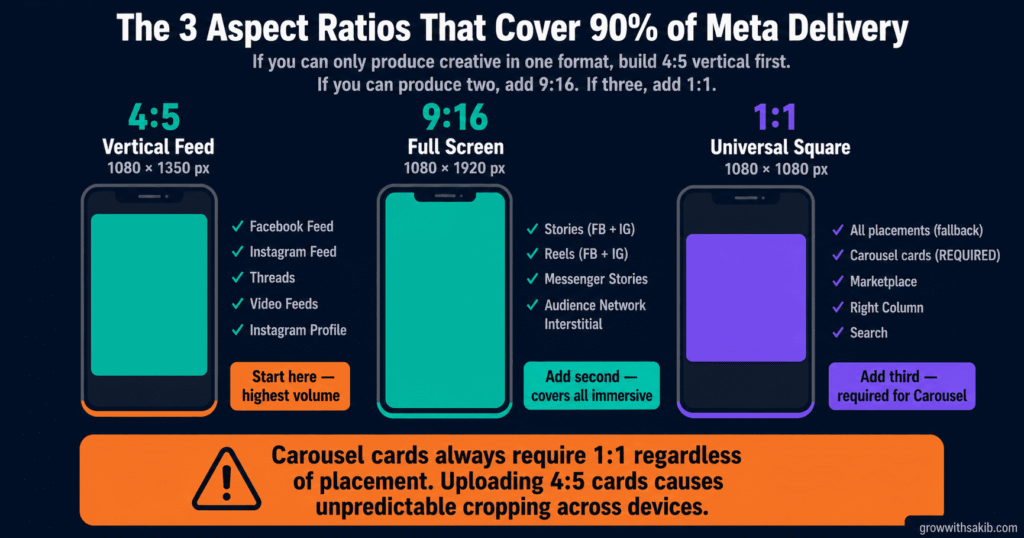
The Three Aspect Ratios That Cover 90% of Meta Delivery
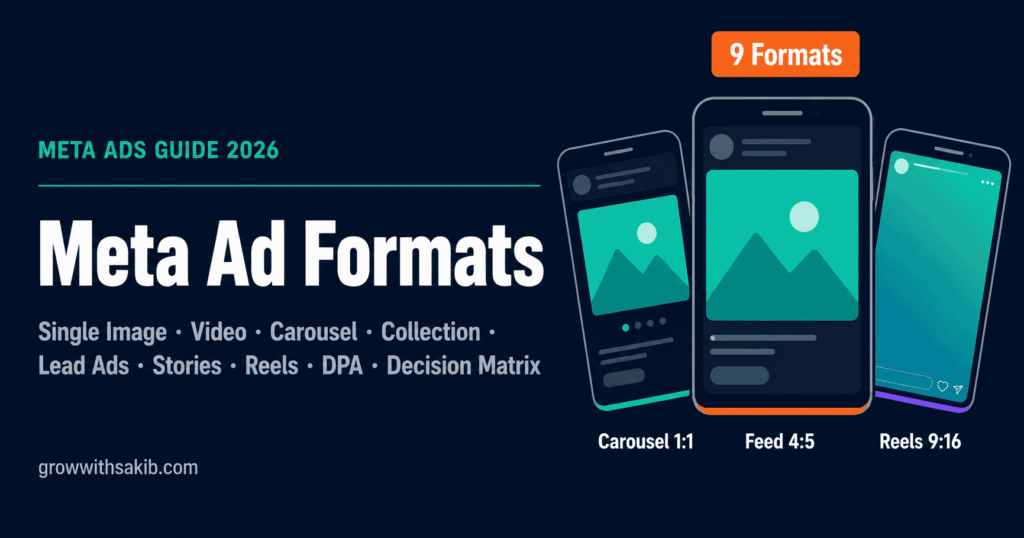
Before getting into individual formats, this is the most practical piece of technical knowledge in this guide. Meta has 20+ placements and nine format types. But three aspect ratios cover the vast majority of ad delivery:
- Ratio: 4:5 vertical – Dimensions: 1080 x 1350 px – Covers: Facebook Feed, Instagram Feed, Threads, Video Feeds, Instagram Profile – When to Use: Primary feed format. Takes up 25% more screen space than square on mobile. The default starting point for most campaigns.
- Ratio: 9:16 vertical – Dimensions: 1080 x 1920 px – Covers: Stories (FB + IG), Reels (FB + IG), Messenger Stories, Audience Network Interstitial – When to Use: Full-screen immersive formats. The only ratio that fills a phone screen completely.
- Ratio: 1:1 square – Dimensions: 1080 x 1080 px – Covers: All placements as fallback, Carousel cards (required), Marketplace, Right Column, Search – When to Use: Universal fallback. Works everywhere. Required for all Carousel cards regardless of placement.
If you can only produce creative in one format, build 4:5 vertical (feed-first). If you can produce two, add 9:16 for Stories and Reels. If you have three, add 1:1 for Carousel and fallback placements.
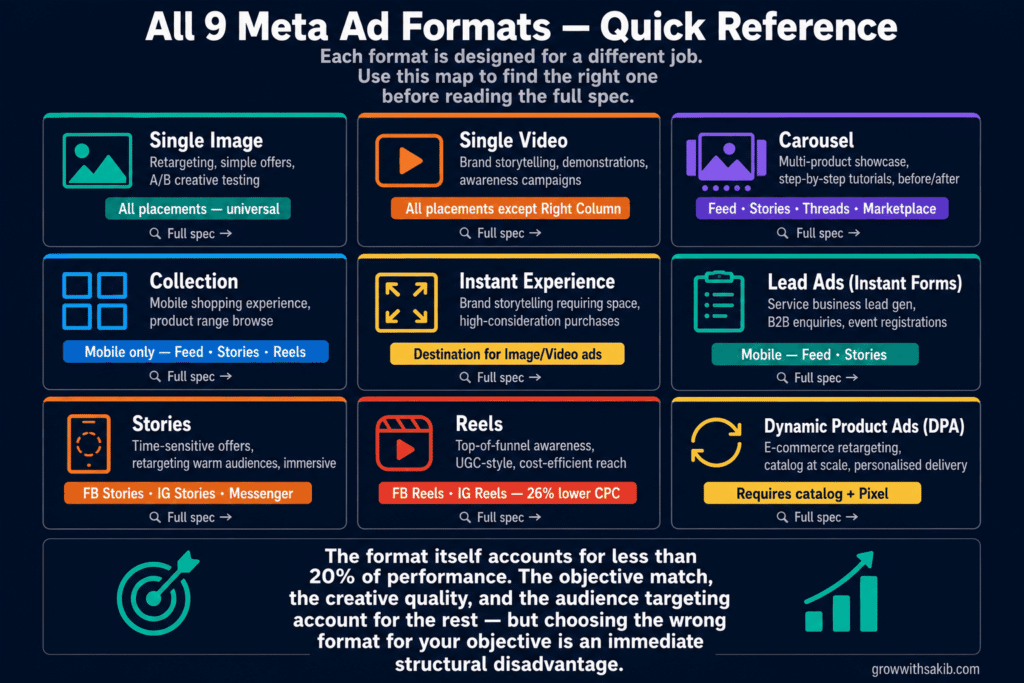
All Nine Meta Ad Formats — Explained, Specced, and Evaluated
- Recommended size: 1080 x 1350 px (4:5) for feed; 1080 x 1080 px (1:1) for Carousel/fallback
- File format: JPG or PNG (PNG for text-heavy or transparent elements)
- Max file size: 30 MB
- Aspect ratio: 4:5 (feed recommended), 1:1 (universal), 9:16 (Stories/Reels only)
- Primary text: 125 characters (truncates on mobile after this)
- Headline: 40 characters recommended
- Text overlay: No official limit, but heavy text suppresses delivery — keep visuals clean
One thing competitors miss when discussing single image ads: the 20% text rule is gone as an official restriction, but Meta’s algorithm still penalises image ads with heavy text overlays by reducing delivery reach. Keep text in the copy fields — primary text, headline, description — not baked into the image itself.
- Recommended size: 1080 x 1350 px (4:5) for feed; 1080 x 1920 px (9:16) for Stories/Reels
- File format: MP4 or MOV (MP4 preferred)
- Codec: H.264 video, AAC audio at 128kbps+
- Max file size: 4 GB (aim for under 1 GB for reliable processing)
- Max duration: Feed — up to 241 minutes; Stories — 120 seconds; Reels — 90 seconds
- Frame rate: 30fps or lower
- Captions: Strongly recommended (85% of Facebook videos watched without sound)
- Cards: 2 to 10 cards per carousel
- Card dimensions: 1080 x 1080 px (1:1) — always; no exceptions
- File formats: Images (JPG/PNG) or Videos (MP4/MOV) — can mix within one carousel
- Max image file size: 30 MB per card
- Max video duration per card: 240 minutes
- Each card has its own headline, description, and destination URL
- Primary text: 125 characters (shared across all cards)
- Placements: Feed (FB + IG), Threads, Stories, Marketplace, Messenger
- Hero image/video: 1080 x 1080 px (1:1) or 1080 x 1350 px (4:5)
- Hero video specs: H.264, MP4/MOV, up to 240 minutes
- Below the hero: 2–4 product images pulled automatically from your catalog
- Opens into: Instant Experience (full-screen browsable product gallery)
- Mobile only: This format does not deliver on desktop
- Requires: Product catalog connected to Meta Business Manager
- Placements: Facebook Feed, Instagram Feed, Facebook Stories, Reels, Marketplace, Search
- Note as of March 2026: Access via Ad Creative > Format Display settings (not Ad Setup)
- Opens from: Any standard ad format (Image, Video, Carousel) as the destination
- Outer ad specs: Standard image or video specs for your chosen placement
- Canvas components: Up to 20 components, 60 elements total
- Inner content: Images, videos, text, carousels, product sets, buttons
- Load time: Instant (loads within the app — no mobile browser handoff)
- Custom fonts: Not supported inside the canvas
- GIF in components: Renders as static image in most cases — test in preview
- Templates available: Storefront, Lookbook, Customer Acquisition, AR Experience
- Form placement: Mobile only (Facebook and Instagram feeds)
- Ad creative: Standard image or video specs for your chosen placement
- Form types: More Volume (minimal fields, high completion) or Higher Intent (review step, lower volume)
- Fields: Up to 15 questions; Meta pre-fills name, email, phone from user’s profile
- CRM integration: Zapier, HubSpot, Salesforce, and many others via Meta’s partner network
- Form lock: Published forms cannot be edited — duplicate and create a new version to change
- Placements: Facebook Feed, Instagram Feed, Stories, Marketplace
- Dimensions: 1080 x 1920 px (9:16) — full screen
- Image display duration: Up to 5 seconds by default
- Video duration: Up to 120 seconds
- Safe zone (unified March 2026): Keep critical content in center 1080 x 1420 px area
- Top 250 px: Reserved for profile icon, username, ‘Sponsored’ label — avoid placing content here
- Bottom 340–670 px: Reserved for CTA button, engagement icons — avoid placing content here
- Placements: Facebook Stories, Instagram Stories, Messenger Stories
- File formats: JPG/PNG (images), MP4/MOV (video)
- Dimensions: 1080 x 1920 px (9:16) — vertical only
- File format: MP4 or MOV
- Max duration: 90 seconds (15–30 seconds recommended for best completion rates)
- Max file size: 4 GB
- Safe zone: Identical to Stories (unified March 2026) — center 1080 x 1420 px area
- Format: Video only — no static images on Reels placements
- Placements: Facebook Reels, Instagram Reels
- Minimum resolution: 1080p
- Requires: Product catalog connected to your Meta Business Manager
- Requires: Meta Pixel with ViewContent, AddToCart, and Purchase events properly configured
- Creative format: Single image, Carousel, or Collection — all dynamically populated from catalog
- Product data pulled: Image, title, price, availability, description from your feed
- Audience options: Retargeting (pixel-based intent), Prospecting (broad catalog delivery), or both via Advantage+ Catalog
- Catalog update frequency: Hourly, daily, or real-time depending on feed setup
- Placements: Feed (FB + IG), Stories, Reels, Marketplace, Audience Network
Advantage+ Creative: What AI Does to Your Format Assets
This is the section almost every competitor misses. Advantage+ Creative is not a format — it is a layer that Meta applies on top of your existing format assets. Understanding it matters because it can change how your original creative looks and behaves across placements.
What Advantage+ Creative Does to Your Ads
When you enable Advantage+ Creative in Ads Manager, Meta’s AI is authorised to make automatic adjustments to your creative assets. This includes:
- Aspect ratio adaptation — Meta crops or scales your image or video to fit different placement ratios automatically. A 4:5 image may be delivered as 1:1 on Marketplace or 9:16 on Stories.
- Text overlay generation — Meta may add text from your primary text or headline directly onto your image.
- Image enhancements — brightness, contrast, and background adjustments applied automatically.
- Music addition (for video) — background music from Meta’s licensed library added to your video if you opt in.
- Animation — Meta may animate static images to create motion in certain placements.
This can be powerful for brands with strong creative assets and limited production capacity. It can also be alarming the first time you see your brand colours altered, your product isolated from its background, or your video playing with music you didn’t choose.
The practical approach: enable Advantage+ Creative on campaigns where you have strong original assets but limited production capacity for placement-specific variants. Keep it off (or selectively disabled) on campaigns where brand consistency is critical, or when running creative tests where you need to control exactly what each audience sees.
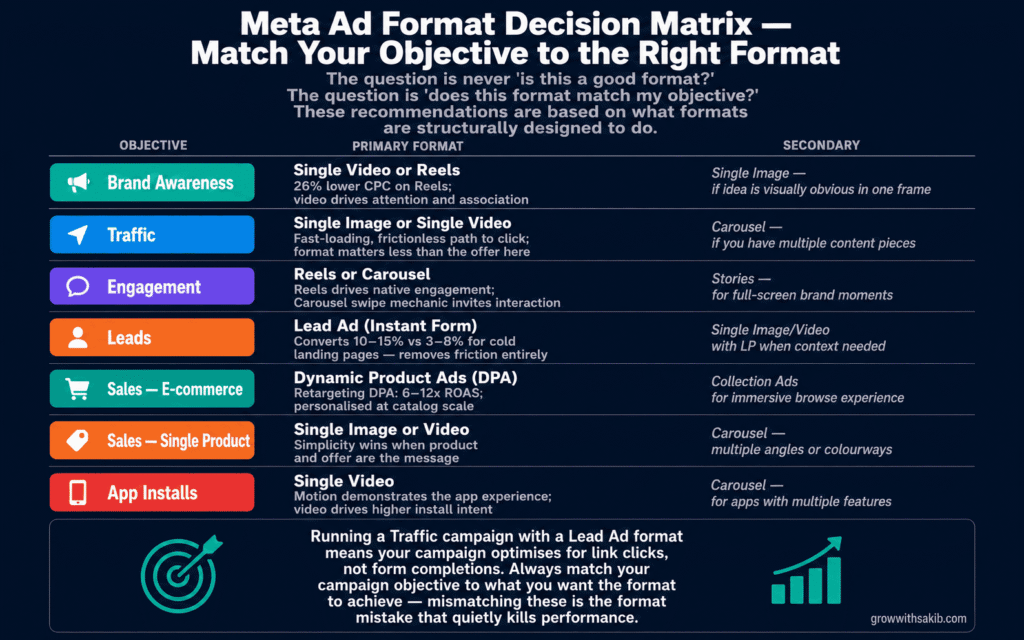
Format Decision Framework: Match Your Objective to the Right Format
This is the table that most guides avoid because it requires taking a position. These recommendations are based on what the formats are structurally designed to do and the performance patterns we observe consistently at GrowWithSakib — and sit alongside the campaign structure guidance in the Meta Ads playbook.
- Campaign Objective: Brand Awareness – Primary Format: Single Video or Reels – Why: Video drives attention and emotional association; Reels delivers 26% lower CPC for awareness – Secondary Option: Single Image for cost-efficiency when the idea is visually obvious in one frame
- Campaign Objective: Traffic – Primary Format: Single Image or Single Video – Why: Fast-loading, frictionless path to click; format matters less than the offer and landing page – Secondary Option: Carousel if you have multiple content pieces worth clicking through
- Campaign Objective: Engagement – Primary Format: Reels or Carousel – Why: Reels drives native content-style engagement; Carousel’s swipe mechanic invites interaction – Secondary Option: Stories for full-screen brand moments that prompt swipe-up
- Campaign Objective: Leads – Primary Format: Lead Ad (Instant Form) – Why: Removes landing page friction; Instant Forms convert at 10-15% vs 3-8% for cold landing pages – Secondary Option: Single Image/Video with landing page when offer requires context before commitment
- Campaign Objective: Sales (E-commerce, Catalog) – Primary Format: Dynamic Product Ads (DPA) + Advantage+ Catalog – Why: Personalised product delivery at catalog scale; retargeting DPA delivers 6-12x ROAS – Secondary Option: Collection Ads for immersive browse experience; Carousel for curated product sets
- Campaign Objective: Sales (Single Product, D2C) – Primary Format: Single Image or Video – Why: Simplicity wins when the product and offer are the message – Secondary Option: Carousel for showing multiple angles, colourways, or use cases of one product
- Campaign Objective: App Installs – Primary Format: Single Video – Why: Motion demonstrates the app experience; video drives higher install intent than static – Secondary Option: Carousel for apps with multiple distinct features to showcase
The Format Mistakes That Quietly Kill Campaign Performance
Using one format across all placements without customisation
Advantage+ Placements is Meta’s recommended approach, and for good reason — the algorithm finds efficient impressions across surfaces. But if your only creative is a 16:9 horizontal video, Meta cannot deliver it to Stories or Reels without cropping it into something unrecognisable. Set up Placement Asset Customisation to assign appropriate creative variants to each surface group: Feed (4:5), Stories/Reels (9:16), Messenger (1:1) — the same systematic approach that applies when building SEO for small business content tailored to different search intents.
Optimising the wrong objective with the wrong format
Running a Traffic campaign with a Lead Ad format means the form will still appear — but the campaign optimises for link clicks, not form completions. Meta will find people who click, not people who fill in forms. Always match your campaign objective to what you want the format to achieve. Lead formats need the Leads campaign objective.
Building Carousel cards at the wrong dimensions
Carousel cards must be 1:1 (1080 x 1080 px) regardless of where the carousel appears. Uploading 4:5 cards causes Meta to apply automatic cropping that renders unpredictably across devices. This is one of the most common creative production errors and one of the easiest to avoid — build all carousel card assets at square from the start.
Running DPA without fixing the catalog feed first
A Dynamic Product Ad is only as good as the catalog data behind it. Low-resolution product images, missing prices, incorrect stock availability, and mismatched content_ids between your pixel and your catalog all silently degrade DPA performance. Before optimising DPA audience or bid strategy, audit your catalog in Commerce Manager and fix feed quality issues — then ensure your Conversions API is active so DPA has complete purchase signal data to optimise from. The ad experience is built from your catalog data — if the data is poor, the ad is poor.
Placing important content outside the Stories/Reels safe zone
After March 2026, the Stories and Reels safe zones unified. The combined area excludes the top 250px (profile/sponsored UI) and the bottom 340–670px (CTA and engagement icons). Any text, logo, or call-to-action placed in these zones is hidden behind Meta’s UI elements on delivery. Use the Safe Zone Guardrail in Ads Manager preview before publishing any 9:16 creative.
Frequently Asked Questions
What is the best Meta ad format overall?
There is no universally best format — only the best format for a specific objective, audience, and placement combination. That said, if you are starting from zero, a 4:5 vertical single image or short video gives you the widest placement coverage at the lowest production cost. From there, expand into Carousel for product variety, Lead Ads for service businesses, and DPA for e-commerce with a catalog.
Do Meta ads and Facebook ads have different format requirements?
Meta Ads is the unified platform that includes Facebook, Instagram, Messenger, Threads, and the Audience Network. The formats themselves — image, video, carousel, etc. — are consistent across the platform. The specs vary by placement (Stories require 9:16; Feed prefers 4:5) but the format types are the same. When people say ‘Facebook ads’ vs ‘Instagram ads’ they are referring to placement targeting, not separate ad format systems.
What is the difference between a Collection ad and a Carousel ad?
Carousel is a scrollable sequence of individual cards — each with its own image or video, headline, and destination URL. It works on both desktop and mobile. Collection pairs a hero image or video with a product grid below it and opens into an Instant Experience — a full-screen, app-native browsing environment. Collection is mobile-only and requires a product catalog. Use Carousel when you want users to swipe through multiple offers or product angles. Use Collection when you want to create an immersive product browsing experience within the Meta app.
What aspect ratio should I use for Meta ads?
Build creative at three ratios to cover 90% of delivery: 4:5 (1080 x 1350 px) for Feed placements, 9:16 (1080 x 1920 px) for Stories and Reels, and 1:1 (1080 x 1080 px) for Carousel cards and as a universal fallback. If you can only produce one, 4:5 vertical covers Facebook Feed and Instagram Feed — the highest-volume placements for most campaigns.
Can I use the same creative for Facebook and Instagram ads?
Yes, the same creative can run on both. Meta’s Advantage+ Placements automatically delivers across both surfaces. However, top performance typically comes from platform-specific creative — Instagram Reels audiences respond better to native-looking vertical video; Facebook Feed audiences are more forgiving of different aesthetics. If your budget allows, create platform-specific variants. If not, build for Instagram first (more visually demanding) and the same creative will perform acceptably on Facebook.
What happened to Flexible Format in Meta Ads?
The Flexible Format toggle was removed from Ad Setup in March 2026. Its features were distributed across several places: Format Display Options, Flexible Media settings, Placement Asset Customisation, and Advantage+ Creative. The underlying functionality still exists — Meta’s AI can still adapt and resize creative assets across placements. The access path is simply different now. Check Ad Creative settings rather than the old Ad Setup toggle.
What is the character limit for Meta ad text?
Primary text: 125 characters display on mobile before truncation (up to 2,200 characters total, but only 125 shows without ‘See More’). Headline: 40 characters recommended, 255 characters max. Description: 30 characters recommended, 255 characters max. For Stories and Reels, visible copy area is limited by the safe zone — a short, bold headline in the center of the canvas is more effective than extended copy.