There is a moment every local business owner dreads: typing their business name into Google and seeing a competitor appear in the map results while they are buried on page two. The competitor’s website is not better. Their service is not superior. But their Google Business Profile is fully optimised — and yours is not.
I have audited hundreds of local business profiles over the years. The same pattern repeats constantly: a business invests in a website, runs some ads, posts on social media — and completely ignores the one piece of digital real estate that Google hands to every business for free. Your Google Business Profile is often the first and only thing a potential customer sees before deciding whether to call you.
In 2026, GBP has become significantly more powerful and significantly more complex. It now feeds directly into Google’s AI Overviews for local searches, influences voice search results, and carries ranking signals that no amount of website SEO can fully compensate for if they are missing. This guide covers everything — from claiming your profile correctly to the advanced optimisation tactics that separate the businesses in the top 3 from everyone else.
What Is Google Business Profile and Why Does It Dominate Local Search?
Google Business Profile (formerly Google My Business) is the free tool Google provides for businesses to manage how they appear across Google Search and Google Maps. When someone searches for a local service — ‘plumber near me,’ ‘best coffee shop in [city],’ ‘accountant open now’ — Google displays a map with three business listings above the organic search results. That is the Local 3-Pack, and it is where the majority of local search clicks go.
Getting into the Local 3-Pack is the primary goal of Google Business Profile optimisation. And unlike organic search rankings, where competing requires months of content and link building, GBP rankings respond to profile completeness, activity, and relevance signals — which means a well-optimised profile can outrank older, larger competitors within weeks.
| What GBP controls | What it affects |
|---|---|
| Your business name, address, phone number | Whether Google trusts your business is real and legitimate |
| Business categories (primary + secondary) | Which searches you appear for — the single biggest ranking lever |
| Photos and videos | Click-through rate, engagement signals, and first impressions |
| Reviews and your responses | Trust signals, conversion rate, and AI Overview inclusion |
| Posts, offers, and events | Engagement signals and visibility for time-sensitive searches |
| Q&A section | Featured snippets and direct answer visibility |
| Services and products | Additional search query matching and profile completeness |
How Google ranks GBP profiles — the three factors
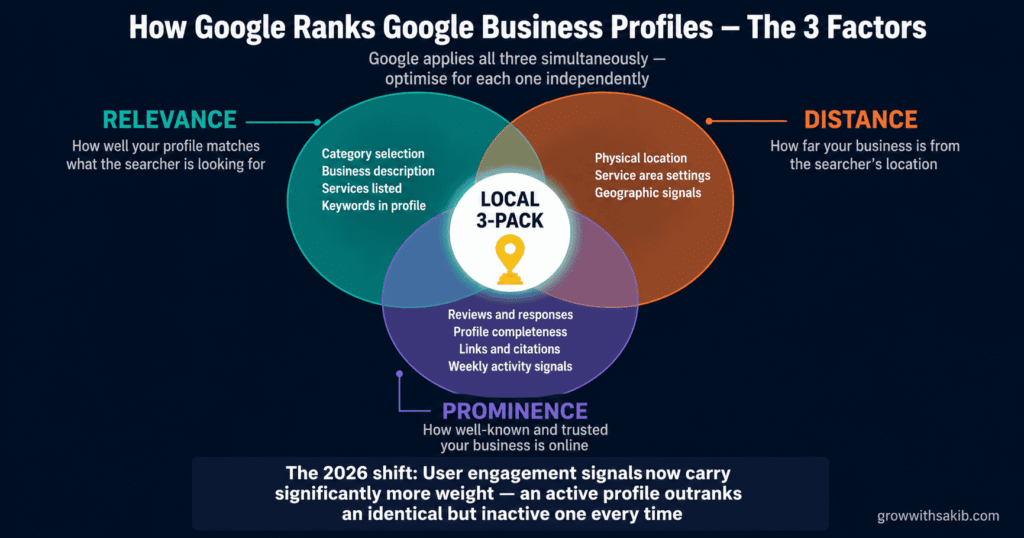
Google has publicly stated that local rankings are determined by three factors, applied simultaneously. Understanding what each one means practically is the foundation of any effective GBP strategy.
- Relevance: How well your profile matches what the searcher is looking for. Controlled primarily by your category selection, business description, services, and the keywords that appear naturally in your profile.
- Distance: How far your business is from the searcher’s location (or the location specified in the search). You cannot change your physical location — but your local SEO for small business strategy can influence how Google understands the geographic areas you serve.
- Prominence: How well-known and trusted your business is — based on links, citations, reviews, profile completeness, and your overall local SEO presence. This is the factor most influenced by ongoing optimisation effort.
Step-by-Step: Claiming, Verifying, and Securing Your Profile
Before optimisation, you need a claimed and verified profile. This sounds obvious — but I regularly audit businesses that have either never claimed their profile (meaning Google auto-generated one with incorrect information) or claimed it but never completed verification (meaning they have no control over what appears).
Go to Google Maps and search your exact business name and location. If a profile already exists — even one you did not create — do not create a new one. Duplicate profiles confuse Google, split your reviews, and can trigger a spam flag that suppresses both listings.
- Search your business name on Google Maps
- If a listing exists: click ‘Claim this business’ — Google will walk you through the verification process
- If no listing exists: go to business.google.com and create a new profile from scratch
- If you see a listing that says ‘Own this business?’ — that is an auto-generated listing waiting to be claimed
Verification has changed significantly. Video verification is now the default method for most new listings — replacing the old postcard method for the majority of businesses. This was introduced to combat the growing problem of fake listings and profile hijacking.
The video verification process requires you to record a single continuous take — without cuts or edits — that shows three things: your business signage (exterior or interior), your business interior showing it is a real operating location, and a live management action such as logging into the GBP dashboard on the premises.
For service area businesses (plumbers, electricians, consultants, cleaners — anyone who goes to the customer rather than the customer coming to them), you have two options: hide your address and specify your service areas by city, region, or postcode, or display your address if you have a legitimate physical location customers visit. Hiding your address is completely legitimate for service area businesses — do not feel pressured to display a home address.
Profile hijacking — where a third party claims ownership of your listing — is more common than most business owners realise. It happens most frequently to businesses that have claimed but not fully completed verification, and to businesses in competitive niches.
- Add at least two Profile Managers in addition to the primary owner — this prevents you from being locked out if one account has issues
- Enable two-factor authentication on the Google account linked to your GBP
- Check your profile monthly for unauthorised edits — anyone can suggest edits to your profile and Google sometimes applies them automatically
- Set up Google Alerts for your business name to catch any profile information changes quickly
Foundation Optimisation: Getting Every Field Right
Google’s 2025 core update specifically rewarded complete, accurate profiles and suppressed thin or outdated ones. Completeness is not optional in 2026 — it is a direct ranking signal. Work through every field in your GBP dashboard systematically.
Business name — exactness matters more than keywords
Your business name in GBP must match your real-world business name exactly — as it appears on your signage, letterhead, and legal registration. Do not add keywords to your business name. ‘Smith & Co Plumbing’ is correct. ‘Smith & Co Plumbing — Emergency Plumber London’ is keyword stuffing, violates GBP guidelines, and can result in your profile being suspended.
Google’s spam detection has become sophisticated enough to identify keyword-stuffed names and suppress them in rankings. Ironically, businesses that keyword-stuff their name often rank lower than competitors with clean, guideline-compliant names.
Categories — the single biggest ranking lever in your GBP
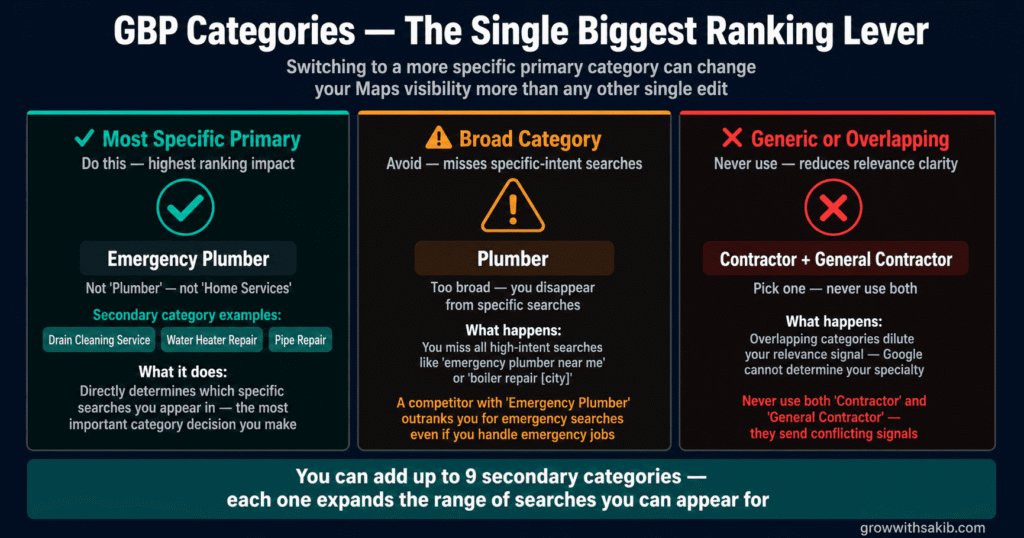
Your primary category is the most important decision in your entire GBP setup. Switching from a broad category to a more specific one can change your Maps visibility more than any other single edit. A law firm categorised as ‘Law Firm’ will be outranked by a competitor categorised as ‘Personal Injury Attorney’ for personal injury searches — even if the first firm handles personal injury cases.
You can add up to nine secondary categories. Each one expands the range of searches you can appear for. Take time to research every applicable category before finalising your selection.
| Category strategy | What it does | Example |
|---|---|---|
| Most specific primary category | Directly determines which searches you appear in | ‘Emergency Plumber’ not ‘Plumber’ not ‘Home Services’ |
| Complementary secondary categories | Expands search visibility without diluting primary | ‘Drain Cleaning Service’, ‘Water Heater Repair’, ‘Pipe Repair’ |
| Avoid generic or overlapping categories | Reduces relevance signal clarity | Never use both ‘Contractor’ and ‘General Contractor’ — pick one |
Business description — keywords without stuffing
Your business description (750 character maximum) is read by Google’s algorithm to understand what your business does and serves — but it is also read by potential customers deciding whether to click. Write it for humans first, with natural keyword inclusion second.
Include your primary service or product, your geographic service area, what makes you different from competitors, and one specific outcome or benefit you deliver. Do not include links, promotional claims (‘best in the city’), or keyword repetition.
Phone number, website, and hours — precision counts
- Phone number: Use a local number wherever possible — it reinforces local trust signals. Avoid tracking numbers that swap dynamically — they can create citation inconsistency issues that silently damage your local rankings.
- Website URL: Link to the most relevant page for the customer taking action from your GBP. For a single-location business, this is usually your homepage. For multi-location businesses or specific service campaigns, consider linking to a location-specific or service-specific landing page.
- Hours: Keep hours scrupulously accurate and update them for holidays, special closures, and seasonal changes. A customer who arrives at your business based on incorrect GBP hours is a lost customer and a negative review waiting to happen. Google now flags profiles with suspected incorrect hours.
- Attributes: The attribute options vary by business category. Common ones include payment methods, accessibility features, whether appointments are required, outdoor seating, and Wi-Fi availability. Complete every attribute that applies — they appear in search results and influence searcher decisions.
NAP consistency — the detail that silently kills local rankings
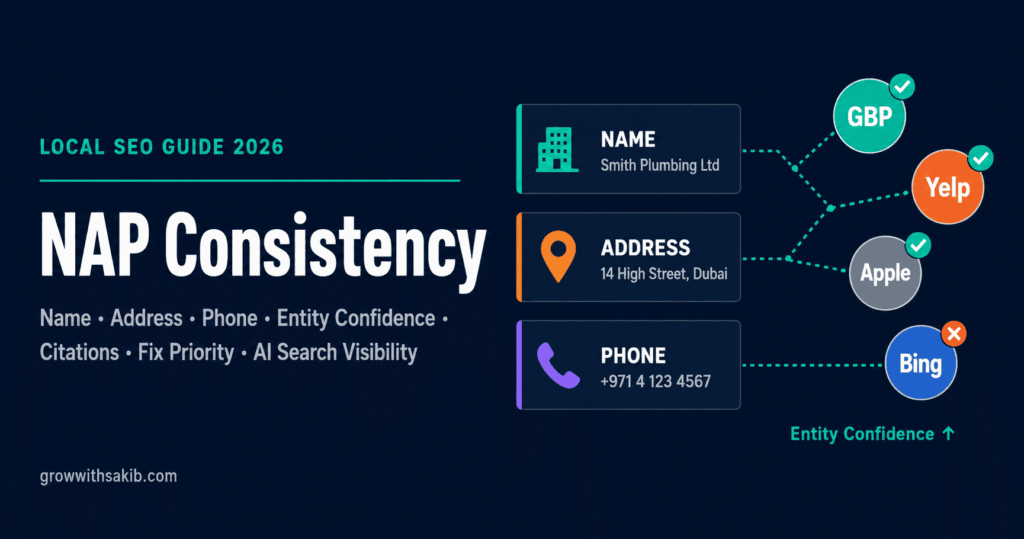
NAP stands for Name, Address, Phone number. Your NAP consistency must be maintained — character by character — everywhere it appears online: your website, GBP, social profiles, directories, review platforms, and any other citation. Even seemingly minor inconsistencies — ‘Street’ vs ‘St’, ‘+1’ vs the area code without prefix, ‘Suite 4’ vs ‘#4’ — send conflicting signals to Google about whether these are the same business or different ones.
Photos and Visual Content: The Trust Signal Most Businesses Ignore
Profiles with photos receive significantly more clicks and direction requests than profiles without them. This is not a correlation — it is causation. Photos serve two functions simultaneously: they are an engagement signal that Google’s algorithm uses as a proxy for profile quality, and they are a trust signal that potential customers use to decide whether your business looks legitimate and professional.
The photo strategy that actually moves rankings
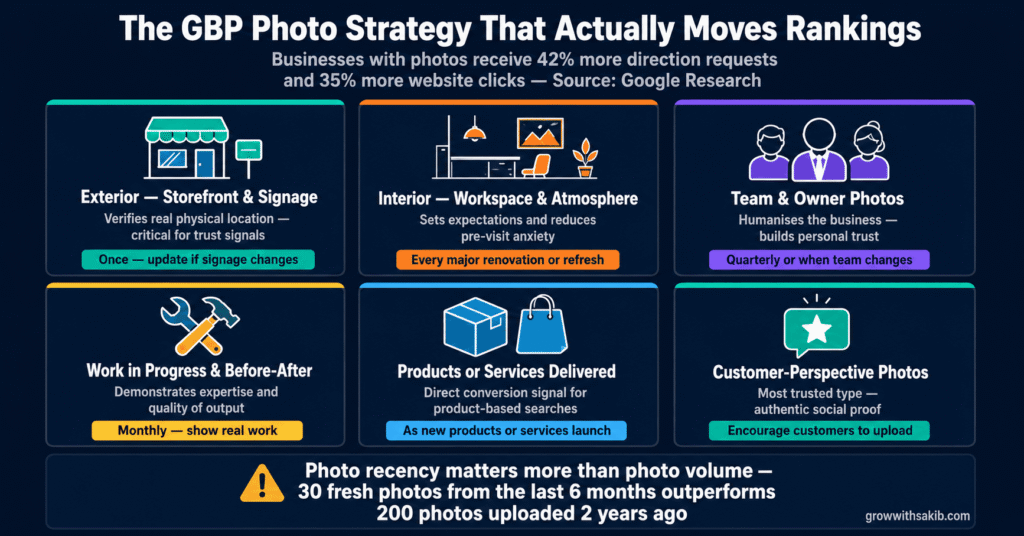
The businesses with the strongest visual presence on GBP are not the ones with the most photos — they are the ones with the most relevant, recent, and diverse photos. Google evaluates photo freshness as an activity signal. A profile with 200 photos uploaded two years ago is often outranked by a competitor with 30 photos uploaded consistently over the past 6 months.
| Photo type | What it communicates | Upload frequency |
|---|---|---|
| Exterior (storefront, signage) | Verifies real physical location — critical for trust | Once, update if signage changes |
| Interior (workspace, atmosphere) | Sets expectations and reduces pre-visit anxiety | Every major refresh or renovation |
| Team / owner photos | Humanises the business — builds personal trust | Quarterly or when team changes |
| Work in progress / before-after | Demonstrates expertise and quality of output | Monthly — show real work being done |
| Products or services delivered | Direct conversion signal for product-based searches | As new products launch or services change |
| Customer-perspective photos | Most trusted type — authentic social proof | Encourage customers to upload their own |
Video — the underused GBP feature with outsized impact
GBP allows video uploads up to 30 seconds and 75MB. Video is significantly underused — most businesses in any local market have zero or one video on their profile. This creates a direct competitive opportunity for any business willing to invest 20 minutes in recording a short walkthrough, product demo, or team introduction.
Technical requirements: 1080p minimum resolution, 30 seconds maximum, MP4 format preferred. The video should be stable, well-lit, and genuinely useful — a shaky phone tour of your office communicates the opposite of professionalism. A steady, well-lit 20-second introduction to your team or your work process communicates competence and trustworthiness.
Reviews: Your Single Most Powerful Ranking and Conversion Signal
Reviews are the element of GBP optimisation that most businesses know they should be managing — and most are managing badly. Not because they are not trying, but because they are using the wrong approach. Asking for reviews sporadically, hoping satisfied customers will leave them organically, produces inconsistent results. Building a systematic Google review acquisition process produces a compounding advantage that becomes increasingly difficult for competitors to close.
Why review volume, recency, and diversity all matter
Google’s local ranking algorithm evaluates three review dimensions independently:
- Volume: The total number of reviews. A business with 200 reviews outranks one with 20 in most cases — but only if the other signals are comparable.
- Recency: A business that received 5 reviews last week is ranked more favourably than one that received 200 reviews two years ago. Consistent, ongoing review acquisition outperforms periodic bursts.
- Diversity: Reviews from different Google accounts, posted at different times, from different locations carry more weight than clusters of similar reviews that suggest coordinated or artificial review generation.
How to build a review acquisition system
The businesses with the strongest review profiles are not the ones with the best service — they are the ones with the most systematic review process. Service quality creates the opportunity; the process captures it.
- Create your direct review link: Go to your GBP dashboard → Get more reviews → copy the direct link. Shorten it with bit.ly for easier sharing.
- Build review requests into your completion process: The best time to ask for a review is within 24–48 hours of delivering your service — when satisfaction is highest and the experience is fresh.
- Ask specifically and personally: ‘If you were happy with the job, I would genuinely appreciate a Google review — it makes a real difference for a small business. Here is the direct link.’ Personal requests convert dramatically better than generic ‘please leave us a review’ messages.
- Follow up once by text or email for customers who did not respond to the first ask — but only once. Repeated requests cross into harassment.
- Make it easy: the single biggest barrier to reviews is friction. Remove every obstacle — use your direct link, tell them it takes 2 minutes, and if relevant, give them a prompt (‘mention what you hired us for and how the job went’).
Responding to reviews — the practice that most businesses get wrong
Responding to every review — positive and negative — is a ranking signal and a conversion signal simultaneously. Google explicitly states that responding to reviews improves your business’s local ranking. And potential customers reading your review responses are evaluating how you handle both praise and criticism before deciding whether to contact you.
- Positive reviews: Thank the reviewer specifically — reference what they mentioned, not a generic ‘thank you for your kind words.’ One to two sentences is enough. Keyword-stuffing your review responses is a guideline violation and looks unnatural.
Negative reviews: Respond within 24 hours. Acknowledge the specific issue, apologise for the experience (not for the facts), and move the resolution offline (‘please contact us directly at [email/phone] so we can make this right’). Never argue, never be defensive, and never post the same response template across multiple negative reviews.
Google Posts: The Weekly Activity Signal Almost Nobody Uses
Google Posts are short-form content updates that appear directly on your GBP — visible in search results, on Maps, and within your Knowledge Panel. They function as a direct communication channel with potential customers at the exact moment those customers are deciding whether to engage with your business.
They are also a direct activity signal to Google’s algorithm. A profile that publishes posts consistently is treated as more active and relevant than an identical profile that does not. In a competitive local market where two businesses have similar categories, reviews, and completeness scores, consistent posting frequency regularly makes the difference in ranking position.
The four post types and when to use each
- What’s New posts: General updates about your business — announcements, behind-the-scenes content, team news, industry observations. Publish weekly. These are your baseline activity signal.
- Offer posts: Promotions, discounts, or seasonal deals with start and end dates. These display prominently and have a measurable impact on profile click-through rates for price-sensitive searches.
- Event posts: In-person or virtual events with specific dates. Used by retailers, service businesses hosting workshops, restaurants running special evenings.
- Product posts: Individual product showcases with photos, descriptions, and prices. Especially effective for retail businesses and product-based service providers.
What makes a GBP post actually drive clicks
Most GBP posts fail to generate engagement because they read like corporate announcements — generic, impersonal, and written for no one in particular. The posts that generate clicks feel like they were written by a real person who understands what the reader actually needs.
- Start with the customer’s problem or desire: ‘Struggling to keep your gutters clear through autumn?’ outperforms ‘We offer gutter cleaning services.’
- Include a specific, concrete detail: ‘We complete most residential gutter cleans in under 2 hours and leave no mess behind’ is more compelling than ‘professional and reliable service.’
- Use a genuine photo: Work in progress, your team, a real before/after. Stock photos perform poorly on GBP posts because they are visually indistinguishable from every competitor.
Include a clear call to action with your direct contact method: ‘Call us this week to book before the autumn rush begins — slots are filling fast.’
The Q&A Section: The Feature That Directly Feeds AI Overviews
The Q&A section on GBP allows anyone to ask questions about your business — and anyone to answer them. That last part is the problem most businesses do not know about. If you do not answer questions on your own profile, a random member of the public will — often incorrectly.
In 2026, the Q&A section has taken on additional importance: Google’s AI Overviews for local searches increasingly pull content directly from GBP Q&A sections to answer user questions without requiring a website visit. A well-populated Q&A section is not just a customer service tool — it is a direct pathway to AI Overview inclusion for local queries.
How to populate your Q&A proactively
Do not wait for customers to ask questions. Ask and answer your own most frequently asked questions before anyone else does. This is entirely permitted by Google’s guidelines — and it is the most effective way to control the information that appears on your profile.
- What are your hours? / What are your holiday hours?
- Do you offer free estimates or consultations?
- What areas do you serve?
- How quickly can you respond to a booking request?
- What payment methods do you accept?
- Are you licensed and insured? (critical for trades and home services)
- What makes you different from other [business type] in [area]?
Write answers that are specific, complete, and naturally include your primary service and location keywords. ‘Yes, we provide free estimates for all plumbing jobs across [city] and surrounding areas — just call us on [number] and we can usually schedule within 48 hours’ is a better answer than ‘Yes.’
Monitor and manage Q&A regularly
Anyone with a Google account can post an answer to a question on your profile. Set up notifications so you are alerted when new questions appear — then answer promptly and officially. You can also upvote your own answers (when logged in to your GBP account) to push your official response to the top.
If you see incorrect information in a Q&A answer from a third party, flag it for removal through the three-dot menu on the answer. Google does remove factually incorrect answers when the removal request is substantiated.
Services, Products, and Menu — How Profile Completeness Expands Your Search Visibility
Beyond your categories, the services and products sections of your GBP are the primary mechanism through which Google matches your profile to specific search queries. A plumber who lists ‘Emergency Plumbing,’ ‘Boiler Repair,’ ‘Drain Unblocking,’ and ‘Bathroom Fitting’ as separate services will appear in a far wider range of searches than a plumber whose profile simply says ‘plumbing services.’
Building your services section
- Use service names that match how customers search — not internal terminology. ‘Water Heater Repair’ not ‘Hydronic System Servicing.’
- Add a description to each service (up to 300 characters) that includes the outcome the customer receives, not just a description of what you do.
- Include pricing where possible — profiles with pricing information receive significantly higher intent clicks because the customer is pre-qualified before they contact you.
- Group related services into categories within the services section — this improves readability and gives Google additional structure for understanding your service range.
The attributes that most businesses miss
Attributes are the additional details that appear on your profile: ‘Women-owned,’ ‘LGBTQ+ friendly,’ ‘Veteran-led,’ ‘Accessible entrance,’ ‘Appointment required,’ ‘Online appointments,’ ‘Curbside pickup,’ ‘Free Wi-Fi.’ The available attributes vary by business category.
These matter for two reasons: they appear directly in search results and Maps listings, influencing whether a searcher chooses to contact you, and they are increasingly used by Google’s AI to surface businesses for filtered searches (‘accessible restaurants near me,’ ‘women-owned businesses in [city]’).
GBP Insights: How to Read Your Performance Data
Google Business Profile Insights provides data on how customers find and interact with your profile. Most business owners glance at the headline numbers once a month and draw no actionable conclusions. Used correctly, Insights data reveals exactly which search queries are driving profile views, which actions customers take after finding you, and where the gaps in your visibility are.
The metrics that actually matter
- Searches: The queries people used to find your profile. ‘Direct searches’ (your business name) vs ‘Discovery searches’ (category, product, or service) tells you how much of your traffic is brand awareness vs new customer discovery. A high direct-to-discovery ratio means you are not reaching enough new customers.
- Views: How many times your profile appeared in Search and Maps. Track this monthly to identify whether your optimisation activities are expanding visibility.
- Direction requests: People requesting directions to your location — high-intent local customers. A sudden drop in direction requests can indicate incorrect hours or address information.
- Calls: Calls placed directly from your GBP. This is the most direct conversion metric available. Track this monthly and compare to any profile changes you made — for a broader framework on tracking SEO results, there is a full guide here.
- Website clicks: Clicks through to your website from your profile. A high view-to-click ratio with a low calls ratio may indicate your profile is not compelling enough to drive direct contact.
2026 Updates: What Changed and What It Means for Your Profile
Google Business Profile is not a set-and-forget platform. Significant changes in 2025 and 2026 have altered what works — and made previously best-practice tactics either irrelevant or actively harmful.
Chat and Call History — removed July 2024
Important: Google removed Chat and Call History from Business Profiles as of July 31, 2024. Any guide recommending you ‘enable GBP chat’ is giving you outdated advice. Focus your conversion path on strong calls-to-action: call buttons, direction requests, booking links, and fast mobile landing pages.
Video verification — now the default
As covered in the setup section, video verification has replaced postcard verification as the default method for most new listings. This change is permanent and reflects Google’s efforts to reduce fake listings and profile spam. Plan your verification process accordingly — it requires physical presence at your business location.
User engagement signals — now weighted more heavily
Google’s 2025 algorithm update increased the weight given to user engagement signals: how often customers click your profile, how many direction requests and calls you receive, how frequently photos are viewed, and how quickly you respond to reviews. Active profile management is no longer just good practice — it is a direct ranking factor.
AI Overviews — GBP is now a direct source
For local searches, Google’s AI Overviews now pull content from GBP profiles — your description, Q&A answers, services, and attributes — to generate direct answers. A well-optimised GBP is no longer just a Maps ranking tool. It is also a source for AI-generated search answers that appear above all organic results. This makes the Q&A section, business description, and services list more important than ever.
The GBP Mistakes That Cost Local Businesses Rankings Every Day
| Mistake | What really happens | The fix |
|---|---|---|
| Keyword stuffing the business name | Profile suspended or suppressed — immediate ranking loss | Use only your real, legal business name — keywords go in description and services |
| Choosing a broad primary category | Missing all specific-intent searches — invisible to buyers | Research the most specific accurate category for your primary service |
| Ignoring reviews for weeks at a time | Lost rankings and lost conversions — every unanswered review signals neglect | Set up review notification emails — respond within 24 hours always |
| Inconsistent NAP across directories | Split citation signals — Google cannot confidently determine your location | Audit all citations with BrightLocal or Moz Local — fix top 20 directories first |
| Uploading only stock photos | Low engagement signals — profile looks generic and untrustworthy | Show real work, real team, real premises — authenticity outperforms polish |
| Never posting updates | Profile treated as inactive — lower prominence score vs active competitors | Publish at minimum one post per week — block 15 minutes on Monday morning |
| No Q&A content | Random incorrect answers from strangers — AI Overviews pull wrong information | Proactively ask and answer your 10 most common questions |
| Not specifying service areas | Missing searches from the surrounding area you actually serve | Add every city, town, and region you serve in the service area settings |
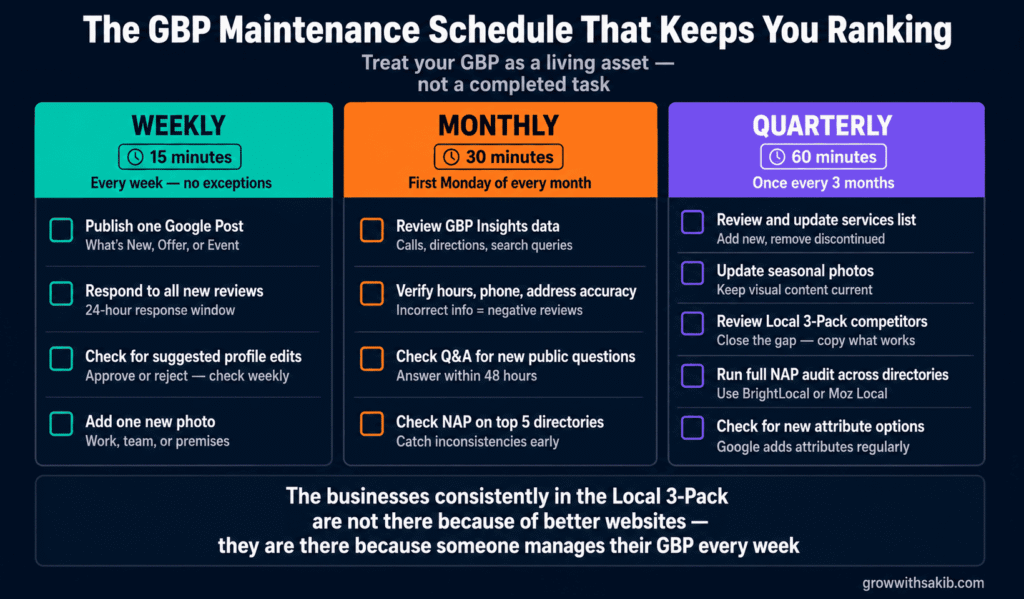
The GBP Maintenance Schedule That Keeps You Ranking
Optimising your GBP is not a one-time project. The businesses that consistently dominate the Local 3-Pack are the ones that treat their GBP as a living asset rather than a completed task.
Weekly (15 minutes)
| What to do | Why it matters |
|---|---|
| Publish one Google Post (What’s New, Offer, or Event) | Weekly posting is the most consistent ranking activity signal |
| Check for and respond to any new reviews | 24-hour response window — Google tracks response speed |
| Check for suggested edits to your profile — approve or reject | Unauthorised edits can change your category or contact information |
| Add one new photo (work, team, or premises) | Photo recency is an activity signal — fresh photos outperform old ones |
Monthly (30 minutes)
| What to do | Why it matters |
|---|---|
| Review GBP Insights — check calls, direction requests, and search queries | Monthly trends reveal what is working and what needs attention |
| Check that hours, phone, and address are still accurate | Incorrect information is the most common cause of negative reviews |
| Review Q&A for new questions from the public | Answer within 48 hours — public questions without answers hurt conversion |
| Check NAP consistency on your top 5 directories | Citation inconsistency accumulates — catch changes early |
Quarterly (60 minutes)
| What to do | Why it matters |
|---|---|
| Review and update your services list — add new, remove discontinued | Services list drives search query matching — keep it current |
| Update photos for any seasonal or product changes | Profile visual relevance matters — outdated photos create mismatched expectations |
| Review competitor profiles in the Local 3-Pack | Understand what they are doing that you are not — then close the gap |
| Run a full NAP audit across all directories | Quarterly audits catch inconsistencies before they compound into ranking issues |
| Check if new attribute options have become available for your category | Google adds new attributes regularly — unclaimed attributes are missed opportunities |
The Bottom Line: Your GBP Is Your Most Valuable Free Marketing Asset
Google gives every business in the world a piece of prime digital real estate on the most-used search engine on the planet — completely free. It appears above organic results, directly on Maps, in voice search results, and increasingly in AI-generated answers. Most businesses claim it once, fill in the basics, and then ignore it entirely.
That neglect is your opportunity.
The businesses consistently appearing in the Local 3-Pack are not there because they have better websites or bigger budgets. They are there because someone on their team — or someone they hired — treats the GBP as a living, active, regularly managed asset. They respond to reviews the same day. They post weekly. They add photos consistently. They have answered every common question in the Q&A section. They have chosen the most specific possible category. And they check their Insights monthly to understand whether their visibility is growing.
At GrowWithSakib, this is always Step 1 — because it is the highest-ROI local marketing activity available, it costs nothing except time, and the results it produces in 30–90 days consistently outpace what months of website SEO or paid advertising could achieve at the same investment level.
Start with the checklist in this guide. Fix what is incomplete. Build the weekly habits. And then watch what happens when Google’s algorithm notices that your profile is the most active, complete, and trustworthy in your local market.
Frequently Asked Questions
How long does it take for GBP optimisation to improve rankings?
Profile completeness improvements (adding missing information, uploading photos, filling in services) often show ranking changes within 2–4 weeks. Review acquisition produces more gradual improvement over 2–3 months as your review volume and recency signals build. Activity signals from posts and review responses compound over time — businesses that maintain consistent weekly activity for 3–6 months typically see the most significant ranking improvements.
Can I have multiple GBP profiles for different service areas?
You can have one GBP profile per legitimate physical location. If you have multiple offices or storefronts, each location can have its own profile. If you are a service area business serving multiple regions without a physical presence in each, you manage one profile and specify your service areas within it. Creating multiple profiles for the same location is against Google’s guidelines and risks all profiles being suspended.
What should I do about fake negative reviews?
Flag the review using the ‘Report review’ option within your GBP dashboard. Select the most relevant reason — ‘Off topic,’ ‘Conflict of interest,’ ‘Spam or fake.’ Google does remove reviews that clearly violate their guidelines, but the process can take weeks and is not guaranteed. While waiting, respond professionally and publicly to the review as if it were legitimate — potential customers reading it need to see how you handle disputes. For severe cases involving coordinated review attacks, Google’s small business support team can be reached through the GBP dashboard.
Does my GBP ranking affect my website’s organic rankings?
GBP rankings and organic website rankings are separate systems with separate ranking factors. However, they influence each other indirectly. A highly optimised GBP drives more traffic to your website, which improves engagement signals that influence organic rankings. Consistent NAP information between your GBP and website strengthens both. And website authority contributes to the ‘prominence’ factor in local rankings. The two systems are not independent — they compound when both are well optimised.
What is the difference between Google Business Profile and Google My Business?
They are the same product. Google rebranded Google My Business to Google Business Profile in November 2021. The functionality is identical — only the name changed. Any guide or tool that references ‘Google My Business’ or ‘GMB’ is referring to the same platform. The management interface was also simplified — you can now manage most profile settings directly from Google Search and Google Maps rather than needing to use a separate dashboard.
How do reviews affect my ranking in AI Overviews?
Google’s AI Overviews for local searches consider GBP review ratings, volume, and recency as credibility signals when determining which businesses to mention. A business with a high rating, substantial review volume, and recent consistent reviews is significantly more likely to appear in an AI Overview for relevant local queries than a business with few or outdated reviews. This makes review acquisition strategy directly relevant to AI search visibility — not just traditional Maps rankings.