Backlinks get all the attention, but the links you already control — the ones between your own pages — are one of the most underused levers in SEO. A deliberate internal linking strategy can lift rankings, get stranded pages indexed, and push authority exactly where you want it, all without earning a single new backlink.
Google’s own Search Advocate John Mueller has called internal linking one of the biggest things you can do to guide Google and visitors to the pages that matter, as Yoast documents in its internal linking guide. This article turns that idea into a concrete, repeatable system.
This is part of the broader small business SEO guide on GrowWithSakib. The pillar recommends internal linking as a core tactic; this article teaches the full method.
What Is an Internal Linking Strategy (and Why It Works)?
An internal link is any hyperlink from one page on your site to another page on the same domain. An internal linking strategy is the deliberate plan behind those links — deciding which pages link to which, with what anchor text, and in what structure.
Internal links do three jobs at once:
- Discovery — Google finds new pages by following links. A page with zero internal links pointing to it (an orphan) may never get crawled or indexed.
- Authority flow — links pass ‘link equity’ (a share of PageRank) between pages. Pages with more quality internal links pointing at them are seen as more important.
- Context — descriptive anchor text and topical proximity tell Google what a page is about and how your content relates.
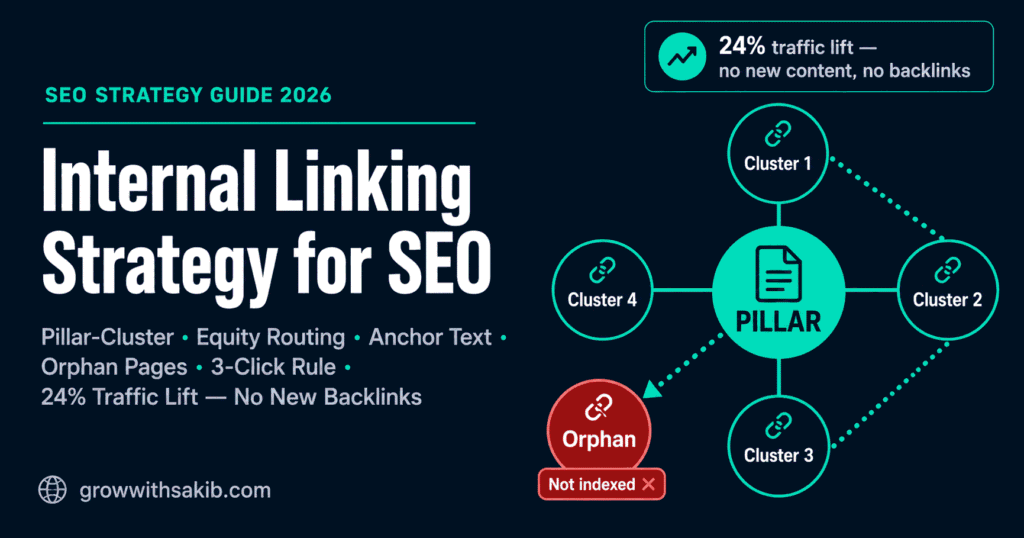
The evidence that this works on its own is strong. In a controlled split-test documented by seoClarity’s internal linking case study, an e-commerce brand added internal links from high-level pages to deeper category pages and saw a 24% increase in organic traffic to the test group — with no new content and no backlinks. The control group, left unchanged, didn’t move.
The 4-Layer Internal Linking System
Most guides give you a pile of tactics with no order. The result is random links that don’t add up to a structure. This system runs in four layers, in sequence — each one builds on the last.
| Layer | Goal | Core Action |
| 1. Architecture | A logical structure Google can map | Build a pillar-and-cluster model; keep key pages within 3 clicks |
| 2. Equity | Authority flows to money pages | Route links from your strongest pages to pages that need to rank |
| 3. Anchor | Context Google can trust | Use descriptive, varied anchor text — no spam |
| 4. Maintenance | The system stays healthy | Find orphans, fix broken links, add links to new content |
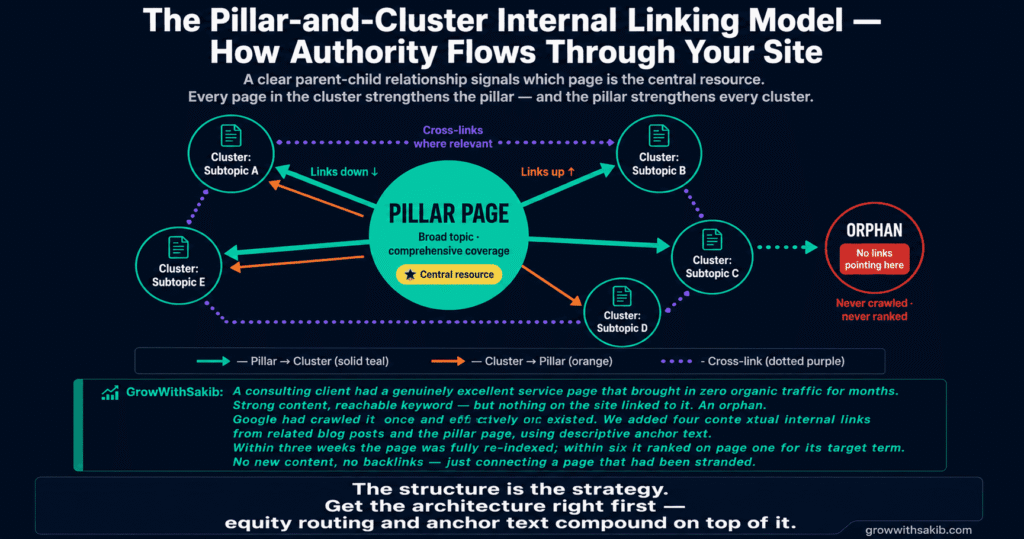
Layer 1: Architecture — The Pillar-and-Cluster Model
The pillar-and-cluster model is the backbone of modern internal linking. A pillar page covers a broad topic comprehensively. Cluster pages each cover one subtopic in depth. The structure is simple:
- Pillar links down to every cluster page
- Each cluster page links up to the pillar
- Cluster pages cross-link to each other where topics genuinely overlap
This mirrors how Google understands topical authority — a clear parent-child relationship signals which page is the central resource. For the strategy behind organising those clusters, see the guide to topical authority on GrowWithSakib.
The 3-Click Rule (and When It Actually Matters)
The 3-click rule says every important page should be reachable within three clicks from the homepage. It’s a useful guideline — but it’s not an absolute law. What Google actually cares about is crawl depth: how many links it must follow to reach a page.
For a small business site with a few dozen pages, the 3-click rule is easy to honour and worth following. For larger sites, the real goal is making sure no important page is buried behind many link-hops — even if a strict click count occasionally goes to four. Prioritise short, link-driven paths to your money pages over a rigid number.
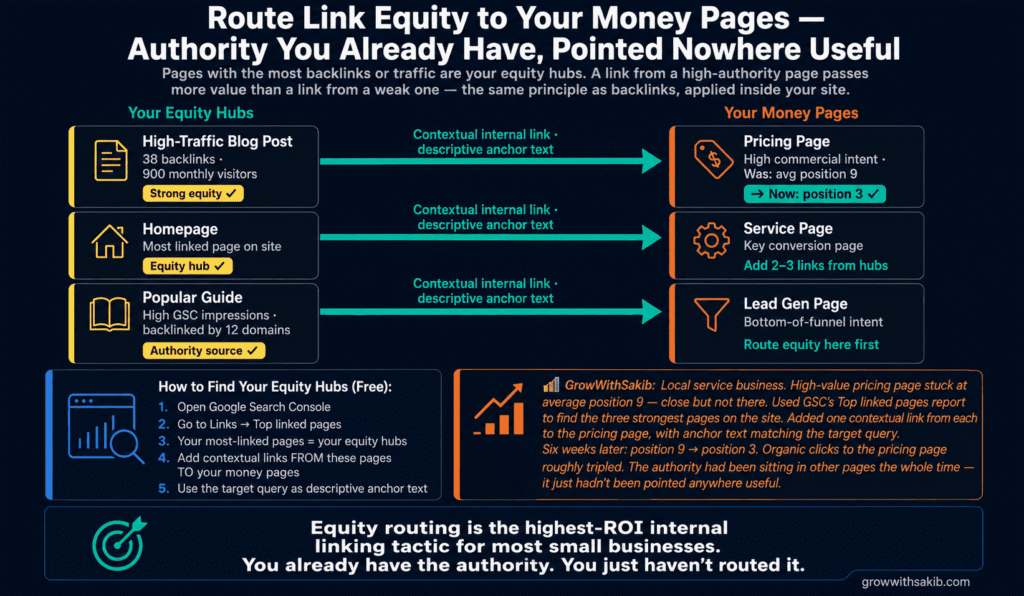
Layer 2: Equity — Route Authority to Your Money Pages
Not every page on your site carries equal authority. Your strongest pages — usually those with the most backlinks or the most traffic — hold the most link equity. The strategic move is to channel that equity toward your money pages: the service pages, product pages, or high-value content you most want to rank.
How to find your strongest pages free:
- Open Google Search Console and go to the Links report
- Under Top linked pages, see which of your pages have the most internal and external links pointing to them
- These are your equity hubs — the pages with authority to share
- Add contextual links from those strong pages to the money pages that need a boost
The mechanism is straightforward: a link from a high-authority page passes more value than a link from a weak one. This is the same principle behind backlinks, applied inside your own site. The guide to domain authority on GrowWithSakib explains how that authority builds in the first place.
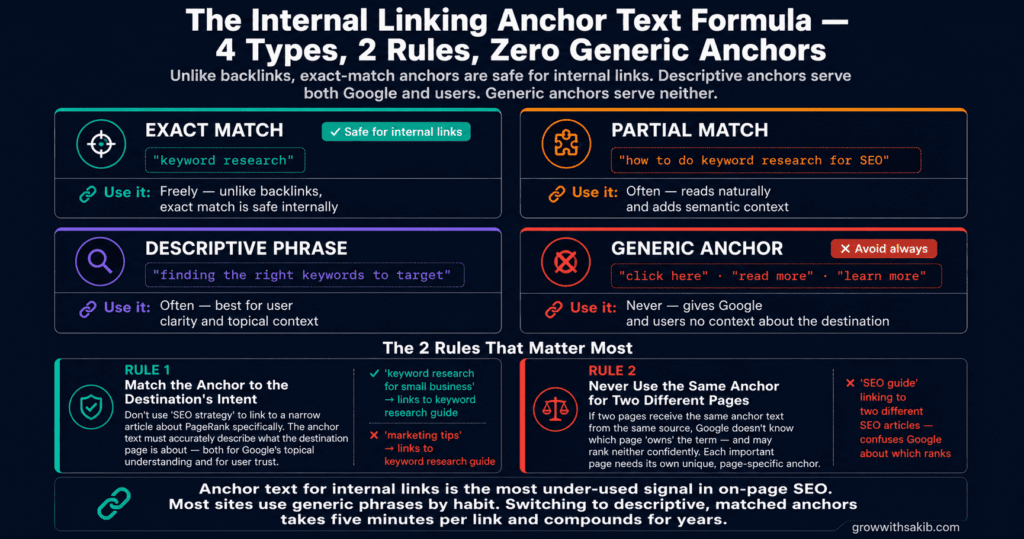
Layer 3: Anchor — The Anchor Text Formula
Anchor text is the visible, clickable words of a link. For internal links, the rules are different from backlinks. As Backlinko’s internal linking guide explains, Google recommends descriptive anchor text, and you can safely use some exact-match anchors internally that would look risky as backlinks.
A safe, effective internal anchor text mix:
| Anchor Type | Example (linking to a page on ‘keyword research’) | Use It |
| Exact match | “keyword research” | Freely — safe for internal links |
| Partial match | “how to do keyword research for SEO” | Often — reads naturally |
| Descriptive phrase | “finding the right keywords to target” | Often — best for user clarity |
| Generic (“click here”, “read more”) | — | Avoid — gives Google and users no context |
Two rules that matter most: first, the anchor should match the destination page’s actual topic and intent — don’t use ‘SEO strategy’ to link to a narrow PageRank article. Second, don’t use the same exact anchor to point at two different pages, which confuses Google about which page owns the term. For more on writing anchors and snippets that earn clicks, see the guide to SEO titles and meta descriptions.
Layer 4: Maintenance — Find Orphans and Keep It Healthy
An orphan page is a page with no internal links pointing to it. Orphans are invisible to Google’s normal crawl path, so they often go unindexed — which means they can’t rank no matter how good they are. Finding and rescuing them is the highest-ROI maintenance task in internal linking.
How to find orphan pages free (no paid tools):
- Get a full list of your URLs from your XML sitemap (usually /sitemap.xml or /sitemap_index.xml)
- In Google Search Console → Links → Internal Links, export the list of pages that receive internal links
- Compare the two lists: any URL in your sitemap but missing from the internal-links report is an orphan
- Add at least 2–3 contextual links to each orphan from relevant existing pages
Paid crawlers like Screaming Frog and Semrush’s Site Audit automate orphan detection and are worth it once your site grows past a few hundred pages — but the free sitemap-versus-GSC cross-check works perfectly well for most small businesses.
The ongoing maintenance habit: every time you publish a new page, add links to it from 2–3 relevant existing pages, and revisit older articles to link forward to the new one. Backlinko recommends doing this as part of a quarterly audit — find an old article, list everything published since, and add the links you missed.
How Many Internal Links Per Page? Avoiding Over-Linking
There’s no magic number, but more is not always better. Google can devalue excessive linking the same way it discounts keyword stuffing. When every other sentence is a link, each link passes less value and the reading experience suffers.
Practical guidance for a typical small business page:
- Aim for relevance over volume — 3–8 contextual links in a standard blog post is plenty; link only where it genuinely helps the reader, the same prioritisation principle covered in the keyword research guide for choosing which terms deserve a dedicated page.
- Put important links higher on the page — links near the top get more weight and more clicks
- Use dofollow links internally — never nofollow your own internal links, or you stop equity from flowing
- Don’t auto-generate links with plugins — they create spammy, exact-match anchors at scale and ignore which pages actually need equity
Honest Limits: What Internal Linking Can’t Do
Internal linking is powerful, but it’s one lever, not the whole machine. Be realistic about what it can and can’t do:
- It won’t replace backlinks — internal links redistribute the authority you already have; they don’t create new authority from outside. You still need quality backlinks to grow the total pool.
- It won’t fix weak content — linking to a thin or unhelpful page won’t make it rank. Internal links amplify good content; they can’t rescue bad content.
- It won’t override intent mismatch — if a page doesn’t match what searchers want, no internal link will force it to rank.
- Results take weeks, not days — re-crawling and re-ranking after a link change typically takes a few weeks. Don’t expect overnight movement.
Internal linking works best alongside the rest of your SEO. Pair it with the on-page SEO checklist on GrowWithSakib for the pages you’re linking to, and the guide to tracking SEO results to measure whether your link changes are moving the needle.
Common Internal Linking Mistakes
| Mistake | Why It Hurts | Do This Instead |
| Generic anchor text (“click here”) | Gives Google and users no context about the destination | Use descriptive anchors that name the destination topic |
| Leaving orphan pages | Pages don’t get crawled, indexed, or ranked | Cross-check sitemap vs GSC internal links; add links to orphans |
| Nofollowing internal links | Stops link equity from flowing between your pages | Always use dofollow for internal links |
| Auto-plugin link spam | Creates 1,000+ exact-match anchors that look spammy | Add links manually where they genuinely help |
| Same anchor to different pages | Confuses Google about which page owns the term | Use unique, page-specific anchor text |
| Linking only from new posts | Old pages hoard equity; new pages stay weak | Link from strong old pages to newer money pages |
| Burying money pages deep | Authority dilutes across many link-hops | Keep money pages within ~3 clicks of the homepage |
Once your internal structure is solid, the natural next step is earning the external authority that internal links then distribute. See the guide to domain authority on GrowWithSakib for how that outside authority is built and measured.
Frequently Asked Questions
1. What is an internal linking strategy in SEO?
An internal linking strategy is a deliberate plan for connecting the pages on your own website so authority flows to your most important pages and Google can find everything. It typically uses a pillar-and-cluster structure, routes link equity from strong pages to money pages, applies descriptive anchor text, and eliminates orphan pages — all to improve rankings and indexing without new backlinks.
2. How do internal links help SEO?
Internal links help SEO in three ways: they help Google discover and index pages, they pass link equity (a share of PageRank) to the pages they point to, and they give topical context through anchor text. Google’s John Mueller has called internal linking one of the biggest things you can do to guide Google toward your important pages.
3. What is the 3-click rule in SEO?
The 3-click rule suggests every important page should be reachable within three clicks from the homepage. It’s a useful guideline for keeping key pages shallow and easy to crawl, but it’s not an absolute law. What matters most is crawl depth — making sure no important page is buried behind many link-hops, even if a strict click count occasionally reaches four.
4. What are orphan pages and why are they bad?
An orphan page is a page with no internal links pointing to it. Because Google discovers pages by following links, orphans often go uncrawled and unindexed — so they can’t rank no matter how good the content is. Find them by comparing your XML sitemap against Google Search Console’s internal links report, then add 2–3 contextual links to each.
5. What anchor text should I use for internal links?
Use descriptive anchor text that matches the destination page’s topic. Unlike backlinks, exact-match anchors are safe for internal links, so you can link to a keyword research page using “keyword research” directly. Mix exact-match, partial-match, and natural descriptive phrases. Avoid generic anchors like “click here” and never use the same anchor to point at two different pages.
6. How many internal links should a page have?
There’s no fixed number, but relevance beats volume. For a typical blog post, 3–8 contextual links is plenty — link only where it genuinely helps the reader. Google can devalue excessive linking the way it discounts keyword stuffing, so avoid auto-plugins that generate hundreds of links. Place your most important links higher on the page, where they carry more weight.
7. Do internal links pass link equity?
Yes. Internal links pass link equity (a share of PageRank) from one page to another, as long as they’re dofollow. A link from a high-authority page passes more value than one from a weak page — which is why routing links from your strongest pages to your money pages is one of the most effective internal linking tactics. Never nofollow internal links, or equity stops flowing.
8. Can internal linking improve rankings without backlinks?
Yes, often significantly. In a controlled split-test documented by seoClarity, adding internal links from high-level pages to deeper pages produced a 24% organic traffic increase with no new content and no backlinks. Internal linking redistributes the authority you already have — but it works best alongside quality backlinks and strong content, not as a full replacement.
Key Takeaways
- An internal linking strategy deliberately connects your pages so authority flows to your most important pages and Google can find everything.
- Run the 4-Layer System in order: Architecture (pillar-cluster), Equity (route authority to money pages), Anchor (descriptive text), Maintenance (fix orphans).
- Internal links can lift rankings on their own — a controlled seoClarity split-test showed a 24% organic traffic increase with no new content or backlinks.
- Route link equity from your strongest pages (found in GSC’s Top linked pages report) to the money pages you most want to rank.
- Exact-match anchor text is safe for internal links — but keep anchors descriptive, varied, and matched to the destination’s topic.
- Find orphan pages free by cross-checking your XML sitemap against GSC’s internal links report, then add 2–3 contextual links to each.
- Keep important pages within roughly three clicks of the homepage; prioritise short link paths over a rigid click count.
- Internal linking amplifies good content and existing authority — it won’t replace backlinks, fix weak pages, or override search intent.