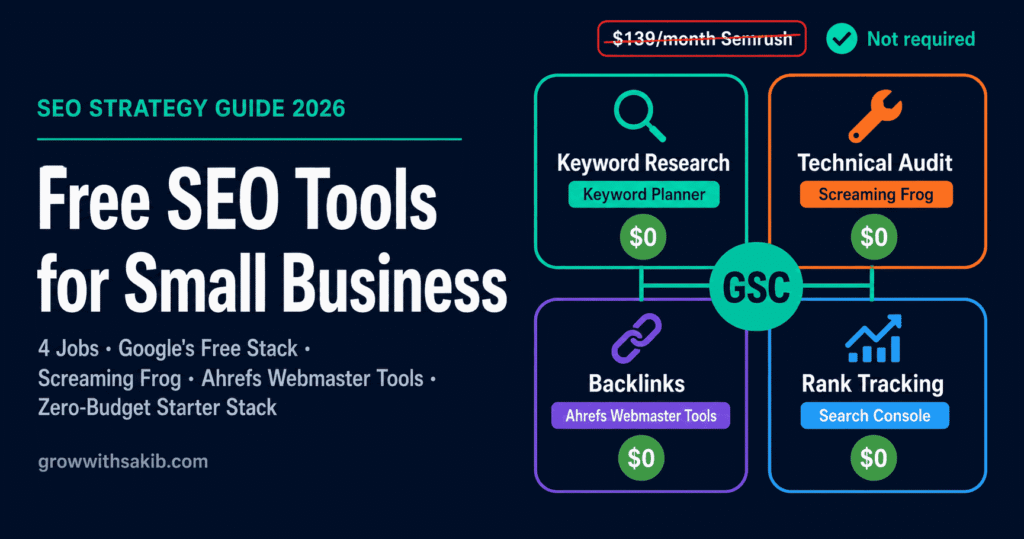
You don’t need a $139-a-month Semrush plan to rank. The biggest budget mistake small businesses make isn’t spending too little on SEO tools – it’s overspending on enterprise software they barely use. The free SEO tools for small business below cover every core job, and most owners never need to pay at all.
Here’s what most lists get wrong: they pad the count with “free trials” that expire in seven days, then bury the genuinely free tools in an alphabetical dump. This guide does it differently – organised by the four jobs SEO actually requires, with each tool’s real free limit and a clear signal for when paying finally makes sense. It consolidates every tool recommended across the small business SEO guide on GrowWithSakib and adds the ones it doesn’t mention.
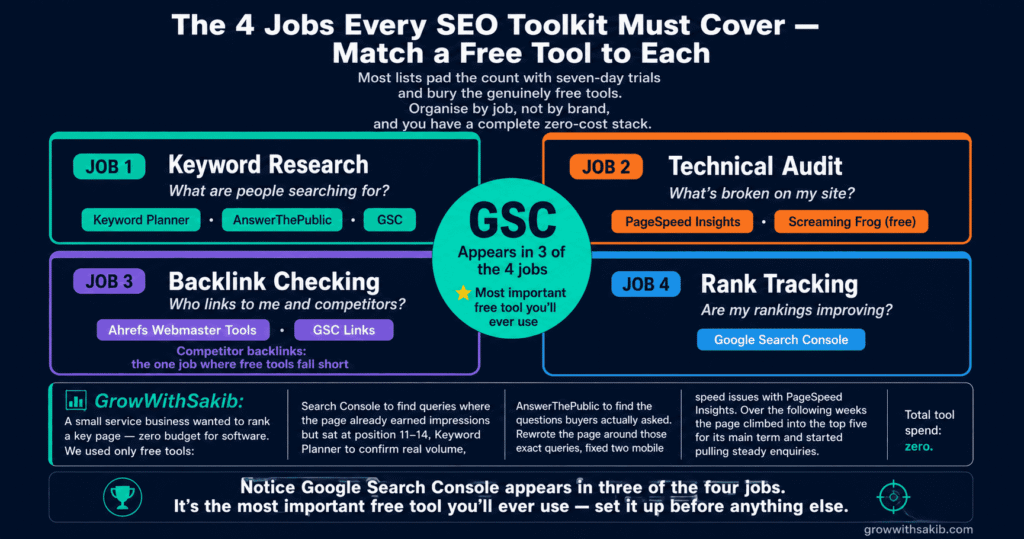
The Four Jobs Every SEO Toolkit Must Cover
Before tools, understand the jobs. Every SEO toolkit needs to handle four things. Match a free tool to each and you have a complete, zero-cost stack.
| The Job | What It Answers | Free Tool to Use |
| 1. Keyword Research | What are people searching for? | Keyword Planner, AnswerThePublic, GSC |
| 2. Technical Audit | What’s broken on my site? | PageSpeed Insights, Screaming Frog (free) |
| 3. Backlink Checking | Who links to me and competitors? | Ahrefs Webmaster Tools, GSC Links |
| 4. Rank Tracking | Are my rankings improving? | Google Search Console |
Notice Google Search Console (GSC) appears in three of the four. It’s the most important free tool you’ll ever use – so we start there.
The Google Free Stack (Start Here)
Google gives you, for free and forever, the most authoritative SEO data that exists – because it comes straight from Google. No other tool has this. Set up all four before you look at anything else.
Google Search Console – Your SEO Command Centre
Google Search Console shows you exactly how your site performs in Google: which queries bring impressions and clicks, your average position, which pages are indexed, and any technical or mobile issues Google finds. It’s the only tool showing your real Google data rather than an estimate.
| Detail | Value |
| Cost | Free forever (no paid tier) |
| Best use case | Find pages ranking position 8-20 and optimise them for quick wins |
| Free limit | 16 months of data; all features included |
| When to upgrade | Never – but pair with a keyword tool for search volume GSC doesn’t show |
The single most valuable move in GSC: open the Performance report, find queries where you rank just off page one, and improve those pages. The full method is in the Google Search Console keyword research guide on GrowWithSakib.
Google Analytics 4 – What Visitors Do Next
Google Analytics 4 tracks what happens after someone lands: which pages they visit, how long they stay, where they convert. GSC shows how people find you; GA4 shows what they do. Free forever, with generous limits for any small business.
Google Keyword Planner – Real Search Volumes
Google Keyword Planner gives you actual Google search volume ranges and keyword ideas. It’s built for Google Ads but free to use without spending a cent – you just need an Ads account. It’s the most authoritative free source of volume data, straight from Google.
PageSpeed Insights – Core Web Vitals Free
PageSpeed Insights scores your page speed and Core Web Vitals on mobile and desktop, with specific fixes. Since speed is a confirmed ranking factor, this is your free technical health check. Run it on your revenue pages, not just the homepage.
Job 1: Free Keyword Research Tools
Keyword research tells you what your customers type into Google. Beyond Keyword Planner and GSC, these free tools add question-level and long-tail depth.
AnswerThePublic – Questions People Actually Ask
AnswerThePublic takes a seed keyword and maps the real questions people search around it, grouped into what, how, why, and where. It’s gold for FAQ sections and blog topics that match voice search.
| Detail | Value |
| Cost | Free tier (limited daily searches) |
| Best use case | Generate FAQ questions and blog topics from one seed keyword |
| Free limit | A few searches per day on the free plan |
| When to upgrade | When you research keywords daily and hit the free search cap regularly |
Google Autocomplete and ‘People Also Ask’ – The Forgotten Free Tools
Your most underused free keyword tool is Google itself. Start typing a query and autocomplete suggests what real people search. Scroll to People Also Ask and Related searches for more. No login, no limit, straight from the source. For turning these into a strategy, see the long-tail keywords guide on GrowWithSakib.
Ubersuggest – Limited Free Searches
Ubersuggest offers a few free keyword searches a day with volume, difficulty, and content ideas. The free tier is capped but useful for spot-checks. Honest note: it’s freemium, not free-forever – the daily cap is low.
Job 2: Free Technical SEO Audit Tools
Technical audit tools find what’s broken: slow pages, broken links, missing tags, indexing problems. No single free tool does everything, so combine these.
Screaming Frog SEO Spider (Free) – The Crawler Professionals Use
Screaming Frog SEO Spider crawls your site like Google does and flags broken links, missing meta tags, duplicate content, redirect chains, and more. The free version crawls up to 500 URLs – plenty for most small business sites.
| Detail | Value |
| Cost | Free version (desktop app) |
| Best use case | Crawl your whole small site to find broken links and missing tags |
| Free limit | Up to 500 URLs per crawl |
| When to upgrade | When your site exceeds 500 URLs or you need scheduled crawls |
A practical tip: don’t try to fix everything. Crawl, then prioritise issues on your revenue pages first. The technical SEO guide on GrowWithSakib explains which issues actually move rankings.
Bing Webmaster Tools – Free Audit Bonus
Bing Webmaster Tools is the overlooked free tool. Beyond Bing performance data, it includes a free Site Scan that audits technical SEO, plus extra keyword data. Worth setting up especially for B2B and international sites.
Rich Results Test – Validate Your Schema
If you add structured data, Google’s Rich Results Test tells you free whether it’s valid and eligible for rich results. Essential for any local business or product page using schema.
Job 3: Free Backlink Checker Tools
Backlink tools show who links to you and your competitors – the foundation of off-site authority. Free backlink data is the most limited category, but these cover the basics.
Ahrefs Webmaster Tools – Free Backlinks for Your Site
Ahrefs Webmaster Tools gives you free backlink and site-health data for sites you verify ownership of. You get access to Ahrefs’ respected backlink index for your own domain at no cost – the best free backlink data available for your verified site.
| Detail | Value |
| Cost | Free (for verified sites) |
| Best use case | See your own backlink profile and find broken backlinks to reclaim |
| Free limit | Limited to sites you verify; capped reports vs paid Ahrefs |
| When to upgrade | When you need to analyse competitor backlinks you don’t own |
For competitor backlinks, free tools are genuinely limited – that’s the one job where paid tools (Ahrefs, Semrush) pull clearly ahead. Start with your own profile free, and learn the fundamentals in the link building guide on GrowWithSakib.
Google Search Console Links Report
GSC includes a free Links report showing your top linked pages, top linking sites, and most common anchor text. It won’t analyse competitors, but for understanding your own link profile it’s free and straight from Google.
Job 4: Free Rank Tracking Tools
Rank tracking shows whether your positions are improving over time. Dedicated free rank trackers are rare and limited – but you already have the best free option.
Google Search Console – Free Rank Tracking Built In
GSC’s Performance report shows your average position for every query over time. Filter by query or page, compare date ranges, and watch positions move. It’s not a dedicated rank tracker with daily alerts, but it’s free, accurate, and uses Google’s real data. For most small businesses it’s all the rank tracking you need.
To turn this into a proper tracking habit, see the guide to tracking SEO results on GrowWithSakib, which shows how to monitor progress without paying for a rank tracker.
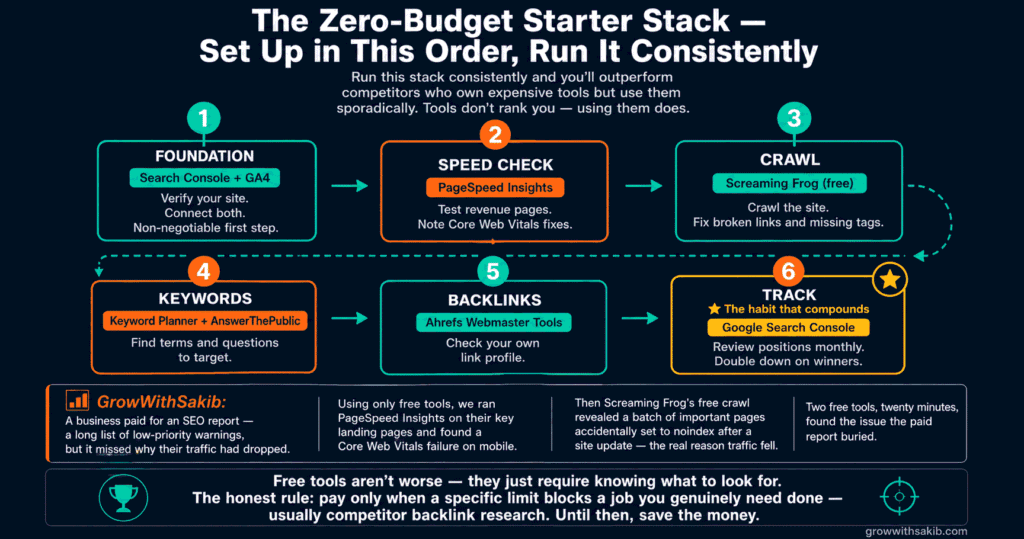
The Zero-Budget Starter Stack
Here’s how to assemble the free tools into a working system, in order. Set them up top to bottom and you have a complete SEO toolkit for zero cost.
| Step | Tool | What You Do |
| 1. Foundation | Google Search Console + GA4 | Verify your site; connect both. Non-negotiable first step |
| 2. Speed check | PageSpeed Insights | Test revenue pages; note Core Web Vitals fixes |
| 3. Crawl | Screaming Frog (free) | Crawl the site; fix broken links and missing tags |
| 4. Keywords | Keyword Planner + AnswerThePublic | Find terms and questions to target |
| 5. Backlinks | Ahrefs Webmaster Tools | Check your own link profile |
| 6. Track | Google Search Console | Review positions monthly; double down on winners |
Run that stack consistently and you’ll outperform most competitors who own expensive tools but use them sporadically. The tools don’t rank you – using them consistently does.
Honest Limits: What Free SEO Tools Can’t Do
Free tools cover the core jobs, but be realistic about where they stop:
- Competitor backlink analysis is limited – this is the clearest gap. Seeing who links to your competitors needs a paid tool like Ahrefs or Semrush.
- No bulk or automated reporting – free tools mean more manual work. Paid platforms automate audits, tracking, and client reports.
- Search volume is approximate – Keyword Planner shows ranges, not exact numbers, unless you run active ad spend.
- Daily caps on freemium tools – AnswerThePublic and Ubersuggest limit free searches, so heavy research hits walls fast.
- Free trials are not free tools – a 7-day Semrush trial isn’t a free tool; treat trials as test drives, not your stack.
The honest rule: free tools take you a very long way – often all the way for a local small business. Pay only when a specific limit blocks a job you genuinely need done, usually competitor backlink research or automated reporting. Until then, save the money. To weigh tools against other spend, see the guide to SEO versus paid ads on GrowWithSakib.
Common Free SEO Tool Mistakes
| Mistake | Why It Hurts | Do This Instead |
| Skipping Search Console | You miss your only real Google data | Set up GSC before any other tool |
| Mistaking trials for free tools | Your stack breaks when the trial ends | Build on free-forever and free-tier tools |
| Buying Ahrefs/Semrush too early | Money spent before you’ve outgrown free | Upgrade only when a free limit blocks a real job |
| Tool hoarding | Ten dashboards, no consistent use | Pick one tool per job; use them monthly |
| Fixing every audit warning | Time wasted on harmless notices | Prioritise issues on revenue pages first |
| Ignoring Bing Webmaster Tools | Missing a free audit + extra coverage | Set it up alongside GSC |
Frequently Asked Questions
1. What are the best free SEO tools for small business?
The best free SEO tools for small business are Google’s free stack – Google Search Console, Google Analytics 4, Keyword Planner, and PageSpeed Insights – plus AnswerThePublic for keyword questions, Screaming Frog’s free version for technical audits, Ahrefs Webmaster Tools for backlinks, and Bing Webmaster Tools for extra coverage. Together they handle keyword research, audits, backlinks, and rank tracking for zero budget.
2. Is Google Search Console really free?
Yes. Google Search Console is completely free forever, with no paid tier or trial. It shows your real Google performance data: which queries bring clicks, your average position, indexing status, and technical issues. It’s the single most important SEO tool any small business can use, and it costs nothing. Set it up before any other tool.
3. Can I do SEO for free without paid tools?
Yes, especially as a small or local business. Google’s free tools plus a few free specialists cover keyword research, technical audits, your own backlinks, and rank tracking. The main gap is competitor backlink analysis, which needs a paid tool. For most small businesses, a free stack used consistently is enough to rank well – consistency matters more than expensive software.
4. What free tool can replace Ahrefs or Semrush?
No single free tool fully replaces them, but a combination gets close. Use Google Search Console for performance and your own backlinks, Keyword Planner for search volume, Screaming Frog free for crawling, and Ahrefs Webmaster Tools for free backlink data on your own site. The one job free tools can’t match is analysing competitors’ backlinks at scale.
5. Are free SEO tools good enough to rank on Google?
Yes, for most small businesses. Free tools give you the same core data – real Google performance, keyword volumes, technical issues, and your backlinks. Ranking depends far more on consistent, quality content and a sound site than on owning premium software. Paid tools save time and add competitor depth, but they don’t contain a secret ranking ingredient that free tools lack.
6. What is the difference between a free tool and a free trial?
A free tool (free-forever or a free tier) costs nothing indefinitely, like Google Search Console or Screaming Frog’s free version. A free trial gives full access for a short window – often 7 to 14 days – then requires payment. Many lists count trials as free tools, which is misleading. Build your stack on genuinely free tools and treat trials as test drives only.
7. When should a small business upgrade to paid SEO tools?
Upgrade only when a specific free limit blocks a job you genuinely need. The clearest trigger is competitor backlink research, which free tools can’t do well. Other triggers: your site outgrows Screaming Frog’s 500-URL free crawl, you need automated reporting, or you research keywords daily and keep hitting freemium caps. Until a real limit stops you, free tools are enough.
8. Do I need to pay for keyword research?
No. Google Keyword Planner gives real Google volume ranges free, AnswerThePublic maps questions on a free tier, and Google autocomplete plus People Also Ask are unlimited and free. Combined with Search Console’s query data, these cover keyword research for most small businesses without any paid tool. Paid keyword tools add precision and speed, not fundamentally different data.
Key Takeaways
- You can cover every core SEO job – keyword research, technical audit, backlinks, rank tracking – for zero budget with free tools.
- Google’s free stack (Search Console, Analytics 4, Keyword Planner, PageSpeed Insights) is the foundation; set it up before anything else.
- Google Search Console is the single most important free tool – it shows your real Google data and handles three of the four SEO jobs.
- Organise tools by job, not by brand: match one free tool to keyword research, audit, backlinks, and rank tracking.
- Know the difference between free-forever, free-tier, and trial-only – don’t build your stack on a 7-day trial.
- The one job free tools can’t match is competitor backlink analysis – that’s the clearest reason to eventually upgrade.
- Screaming Frog free crawls up to 500 URLs and Ahrefs Webmaster Tools gives free backlink data for your own site.
- Tools don’t rank you – using a simple free stack consistently beats owning expensive software you rarely open.