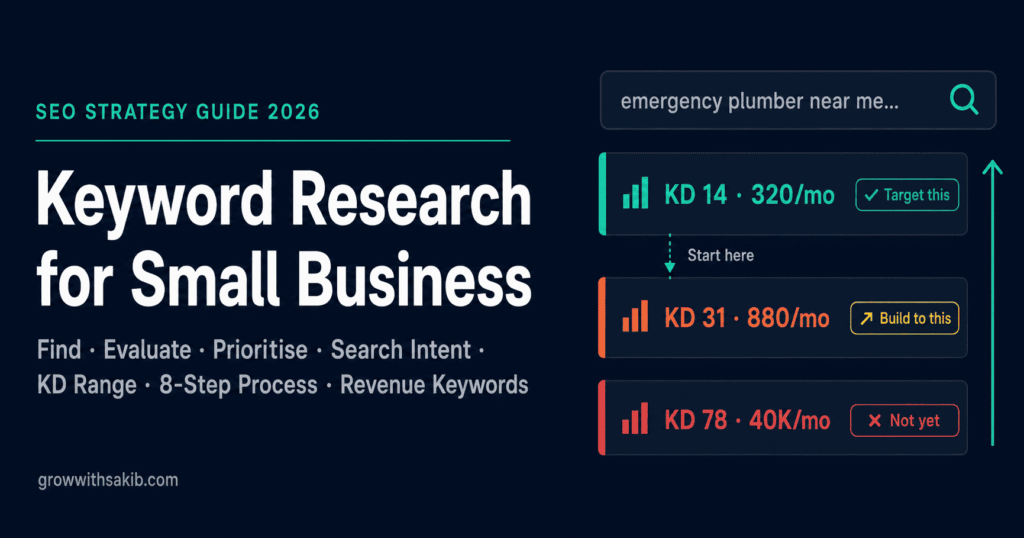
The conversation goes the same way almost every time. A small business owner tells me they have been publishing blog posts for six months, writing consistently, doing everything ‘right’ — and getting no traffic. When I pull up their keyword targeting, the problem is immediately obvious: they are competing for keywords that global brands with teams of SEO specialists have dominated for years. Every post they wrote was set up to fail before the first word was typed.
Keyword research is not a preliminary step you rush through before the ‘real’ work begins — it is the foundation of any effective SEO for small business strategy. It is the decision that determines whether your content has any chance of ranking — or whether it joins the 90% of web pages that receive zero traffic from Google. Getting it wrong does not just mean slower results. It means months of effort producing nothing.
This guide gives you the complete process — from finding your first seed keywords to building a prioritised content map. Not a surface-level overview, but the actual methodology, with specific tool walkthroughs, real examples from real businesses, and the nuanced judgements that separate effective keyword research from keyword collection.
What Keyword Research Actually Means in 2026
Keyword research is the process of identifying the specific words and phrases your potential customers type into search engines, then evaluating which ones are worth targeting based on search volume, competition level, searcher intent, and your realistic ability to rank.
What it is not: a process of finding the most-searched terms in your industry and writing content around them. That approach worked in 2012 when search was primarily about matching keywords. In 2026, it produces content that competes directly with industry giants — and loses.
Why small businesses require a different keyword strategy
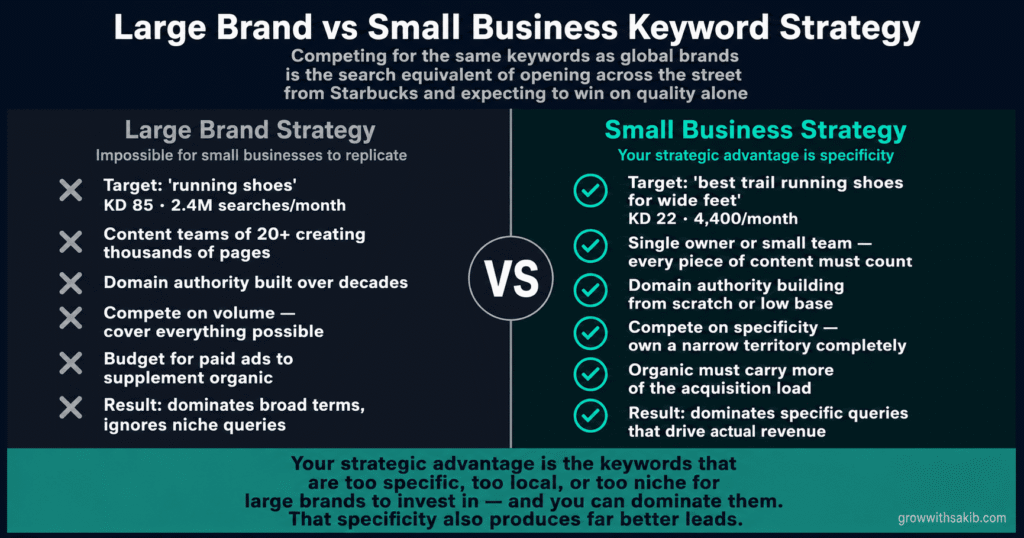
Large brands target high-volume, competitive keywords because they have the domain authority, content teams, and backlink profiles to compete for them. A new or small business website competing for the same keywords is the search equivalent of a local café opening across the street from a Starbucks and expecting to take their customers through sheer quality alone.
The strategic advantage available to small businesses is specificity. You can target the keywords that are too specific, too local, or too niche for large brands to invest in — and dominate them. That specificity also produces better leads, because a searcher typing ’emergency commercial refrigerator repair Chicago same day’ is a far better prospect than one typing ‘refrigerator repair.’
| Large brand keyword strategy | Small business keyword strategy |
|---|---|
| Target: ‘running shoes’ (KD 85, 2.4M searches/month) | Target: ‘best trail running shoes for wide feet’ (KD 22, 4,400/month) |
| Content teams of 20+ creating thousands of pages | Single owner or small team — every piece of content must count |
| Domain authority built over decades | Domain authority building from scratch or low base |
| Compete on volume — cover everything | Compete on specificity — own a narrow territory completely |
| Budget for paid ads to supplement organic | Organic must carry more of the acquisition load |
| Result: dominates broad terms, ignores niche queries | Result: dominates specific queries that drive actual revenue |
The Three Foundations You Must Understand Before Touching Any Tool
Every keyword research mistake I have seen comes from skipping one of these three foundational concepts. They are not complicated — but they are non-negotiable. Understand them before you open Ahrefs or Semrush, and your tool output will immediately make more sense.
Foundation 1 — Search intent: the most important keyword factor
Search intent is the reason behind a search query. Understanding intent is more important than any other keyword metric — including search volume and difficulty. A page that ranks #1 for a keyword but does not match the intent behind that keyword will have terrible engagement metrics, which eventually suppresses the ranking.
Google has become remarkably good at detecting mismatched intent. If searchers consistently leave your page quickly and return to the search results to click a competitor, Google interprets that as a signal that your content did not answer the query — and moves you down.
| Intent type | What the searcher wants | Best content format |
|---|---|---|
| Informational | Learning, understanding a concept, answering a question | How-to guides, explainers, tutorials, definition articles |
| Commercial | Researching options before making a purchase decision | Comparisons, reviews, ‘best X for Y’ roundups, buyer guides |
| Transactional | Ready to act — buy, book, hire, sign up | Service pages, product pages, landing pages with strong CTA |
| Navigational | Looking for a specific brand or website | Brand page, homepage — not typically a content opportunity |
| Local | Finding a service provider in a specific area | Location pages, Google Business Profile, local landing pages |
The practical test: before targeting any keyword, Google it yourself. Look at the first five organic results. Are they blog posts, product pages, comparison articles, or service pages? That tells you exactly what format Google believes matches the intent for that keyword — and what format your content needs to be.
Foundation 2 — Keyword difficulty: knowing which fights you can win
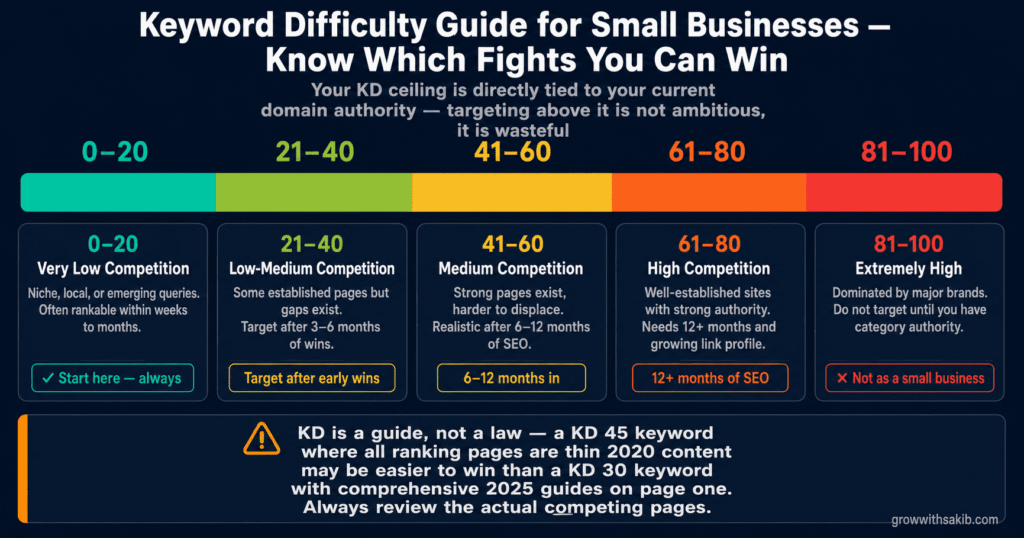
Keyword Difficulty (KD) is a score (typically 0–100) that estimates how hard it is to rank on the first page of Google for a given keyword. It is calculated based primarily on the strength of the pages currently ranking — their domain authority, backlink profiles, and content quality.
The critical rule for small businesses: your KD ceiling is directly tied to your current domain authority. Targeting keywords above your ceiling is not ambitious — it is wasteful. Every month spent creating content for keywords you cannot rank for is a month of compounding authority you could have built targeting keywords you can win.
| KD range | What it means | Small business approach |
|---|---|---|
| 0–20 | Very low competition — often niche, local, or emerging queries | Start here. These are your first rankings and your authority-building foundation. |
| 21–40 | Low-medium competition — some established pages but gaps exist | Target after 3–6 months of wins in the 0–20 range. Need solid on-page SEO. |
| 41–60 | Medium competition — strong pages exist, harder to displace | Realistic after 6–12 months and a growing backlink profile. |
| 61–80 | High competition — well-established sites with strong authority | Only realistic with 12+ months of consistent SEO and significant authority. |
| 81–100 | Extremely high — dominated by major brands | Do not target as a small business until you have category authority. |
Foundation 3 — Search volume: the number everyone over-values
Search volume is the estimated number of times a keyword is searched per month. It tells you the size of the potential audience — but it tells you nothing about whether those searchers are your customers, whether they convert, or whether you can reach them.
Small businesses consistently over-weight search volume in keyword selection. They target high-volume keywords they cannot rank for, while ignoring low-volume keywords that are perfectly matched to their service and would convert at rates the high-volume terms never could.
The 8-Step Keyword Research Process for Small Businesses
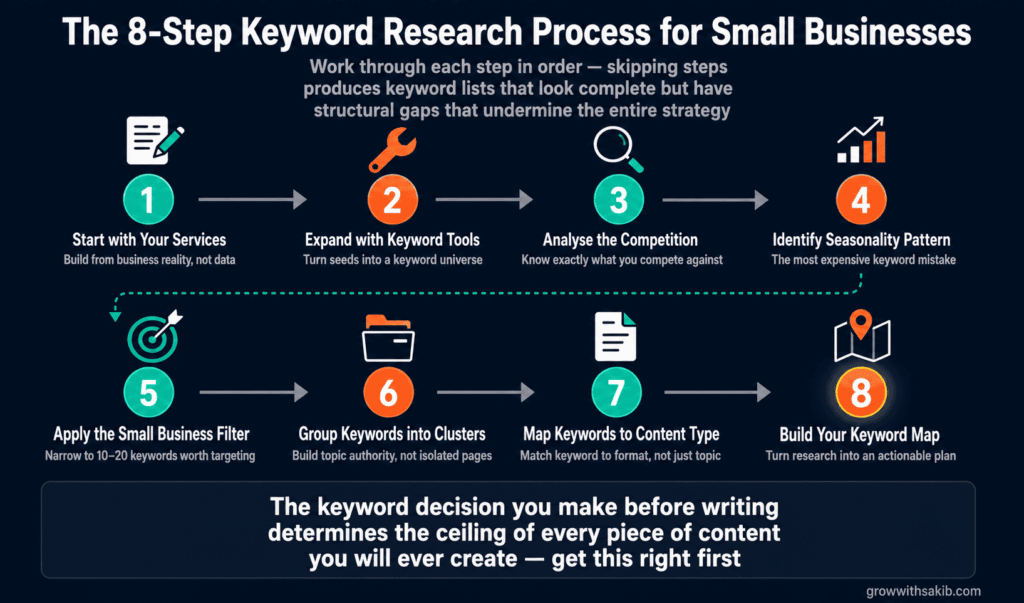
This is the exact process I use at GrowWithSakib when building keyword strategies for small business clients. Work through each step in order — skipping steps produces keyword lists that look complete but have structural gaps that undermine the entire strategy.
The most common keyword research mistake is opening a tool before thinking clearly about what the business actually does and who it serves. Keyword tools amplify your thinking — they do not replace it. Start with a clear list of what you offer.
Write down every service, product, problem you solve, and outcome you deliver. Be specific. A plumbing business does not just do ‘plumbing’ — it does emergency leak repairs, boiler servicing, bathroom installations, drain unblocking, and radiator flushing. Each one is a separate keyword territory with different intent, different competition, and different conversion potential.
- List every service or product you offer — be specific, not category-level
- List the problems each one solves, in the language your customers use (not your technical terminology)
- List the outcomes customers get — what changes in their life or business after working with you?
- List location modifiers — every city, region, or area you serve
- List the question formats — ‘how to’, ‘what is’, ‘best way to’, ‘cost of’, ‘near me’
That exercise produces your seed keyword list — the raw material for everything that follows.
Free tools (where to start)
- Google Keyword Planner (free with Google Ads account): Enter your seed keywords and get volume ranges and related keywords. Volume ranges are approximate — use them for direction, not precision.
- Google Search Console (free): If your site already exists and has any traffic, Search Console shows you the exact queries people are already using to find you. This is frequently the most valuable source of new keyword ideas — real search behaviour from your actual audience.
- Google autocomplete and People Also Ask (free): Type each seed keyword into Google and note every suggestion in the autocomplete dropdown. These are real search queries sorted by frequency. The ‘People Also Ask’ box reveals the questions Google is currently answering for that topic.
- AnswerThePublic (limited free): Visual map of every question format around your seed keywords. Excellent for finding informational keyword opportunities.
Paid tools (when you are ready to invest)
- Ahrefs: The most comprehensive keyword database available. Keyword Explorer gives volume, KD, click-through rate estimates, and SERP analysis. Most valuable for competitor analysis — enter any competitor’s domain and see every keyword driving their traffic.
- Semrush: Strong keyword gap analysis — compares your keyword profile against competitors to find terms they rank for that you do not. Excellent for finding quick wins in existing competitor territory.
- KWFinder by Mangools: The preferred tool for small businesses targeting low-competition local and niche keywords. Cleaner interface than Ahrefs, more affordable, and excellent at surfacing KD 0–30 opportunities that other tools miss.
A keyword’s KD score tells you the statistical difficulty of ranking. Looking at the actual competing pages tells you whether you can create something meaningfully better than what is currently there — which is ultimately the only thing that matters.
For every keyword you are seriously considering, open the Google results page and evaluate the top 5 organic results:
- Content quality: Is the existing content genuinely helpful, comprehensive, and current? Or is it thin, outdated, and poorly written? The quality gap is your opportunity.
- Content format: Are the results blog posts, service pages, videos, or tools? This tells you the intent Google is satisfying — and what format you need to produce.
- Domain authority: Are the ranking pages from global news sites and industry giants, or from mid-size blogs and local businesses? If local businesses rank on page one, you can too.
- Content freshness: When were the ranking pages last updated? A 2021 guide in a fast-moving topic area is vulnerable to a 2026 comprehensive update.
- Search features: Is the SERP crowded with ads, video carousels, featured snippets, and map packs? Heavy SERP features reduce the organic click-through rate even for page-one rankings — factor this into your opportunity assessment.
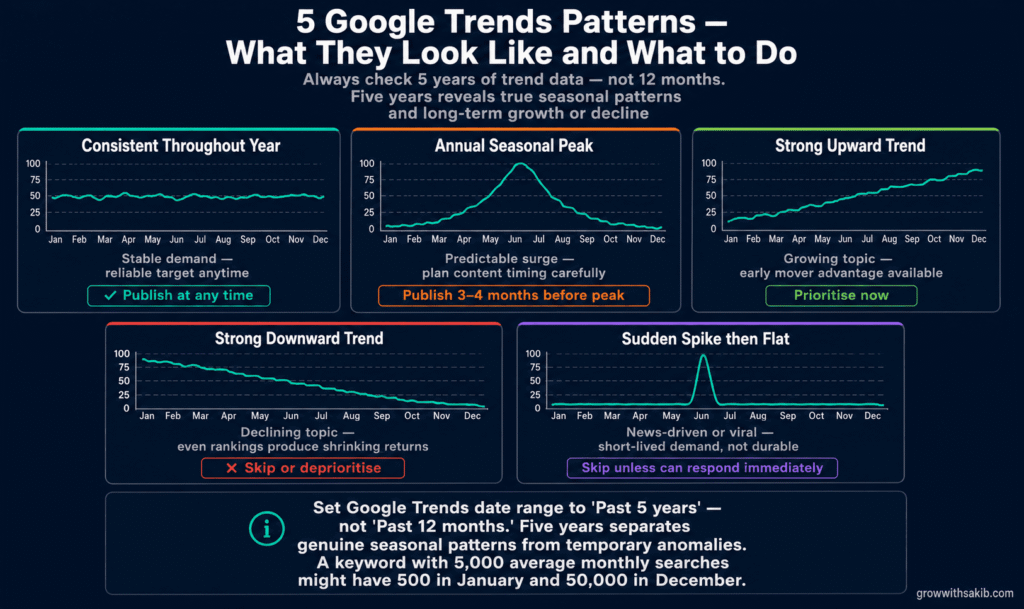
Keyword tools show average monthly search volume — calculated across 12 months of data. For many keywords, that average is profoundly misleading.
A keyword with 5,000 average monthly searches might have 500 searches in January through November and 50,000 searches in December. A business that builds an entire content strategy around that keyword based on the average number will be disappointed eleven months of the year — and unprepared for the one month when demand spikes.
How to check seasonality in Google Trends (step by step)
- Go to trends.google.com
- Enter your keyword in the search bar
- Set the date range to ‘Past 5 years’ — not ‘Past 12 months.’ Five years reveals true seasonal patterns vs temporary trends.
- Look for repeating annual peaks and troughs — these confirm seasonal patterns
- Look for a general upward or downward trend across all 5 years — this reveals whether the keyword is growing, stable, or declining
- Compare multiple keywords in the same chart to understand which seasonal topics peak at different times — this helps you plan content publication timing
| Trend pattern | What it means | Strategy implication |
|---|---|---|
| Consistent throughout the year | Stable demand — reliable target | Target and publish at any time — no specific timing advantage |
| Annual seasonal peak | Predictable surge — plan around it | Publish content 3–4 months before peak to allow ranking time |
| Strong upward multi-year trend | Growing topic — early opportunity | Prioritise now while competition is still developing |
| Strong downward multi-year trend | Declining topic — avoid investing heavily | Skip or deprioritise — even rankings will produce shrinking returns |
| Sudden spike then flat | News-driven or viral — short-lived | Generally not worth targeting unless you can respond immediately |
By this stage you have a long list of potential keywords — potentially hundreds. The filter process reduces that list to the 10–20 keywords that represent your highest-probability, highest-value targets. Apply these four filters in sequence:
- Relevance filter: Does this keyword reflect something a potential customer of mine would search? Remove anything that does not directly connect to a service you offer or a problem you solve.
- Intent filter: Does the search intent match what you can provide? If the SERP shows commercial intent and you were planning an informational post, either reconsider the format or remove the keyword.
- Difficulty filter: Is the KD within your realistic range given your current domain authority? For most new small business websites, this means KD 0–30 initially. Be ruthless — remove anything that exceeds your current ceiling.
- Volume filter: Is there enough search volume to justify the content investment? For highly commercial, high-converting keywords, even 30–50 searches/month can be worth targeting. For informational keywords, a minimum of 100–200 searches/month is usually the threshold for creating a dedicated piece.
What remains after these four filters is your priority keyword list — the specific terms you will create content around.
A keyword cluster is a group of related keywords that can be addressed by a single piece of content — because they share the same or very similar search intent. Instead of creating a separate page for every keyword variation, clustering allows you to create one comprehensive page that ranks for multiple related terms simultaneously. This is how small businesses compete with the content volume of much larger sites — depth over breadth.
How to build a keyword cluster
- Group keywords that share the same core topic (move-out cleaning) and the same intent type (informational + commercial)
- Identify the primary keyword — the one with the highest volume and most direct relevance — as the main target
- Identify all secondary keywords as supporting terms to be addressed naturally within the content
- Assign one piece of content to the cluster — a comprehensive guide, detailed service page, or in-depth article
- Plan internal links from the cluster page to related cluster pages and to your pillar article
Every keyword belongs in a specific type of content. Assigning the wrong content type to a keyword — even if the topic match is perfect — produces content that underperforms its potential because it mismatches the intent Google is satisfying.
| Keyword type | Optimal content format | Example |
|---|---|---|
| Informational — ‘how to’ / ‘what is’ | Comprehensive guide or tutorial (1,500–3,000 words) | ‘How to do keyword research for small business’ |
| Commercial — ‘best’ / ‘vs’ / ‘review’ | Comparison article or buyer guide | ‘Best keyword research tools for small business 2026’ |
| Transactional — ‘hire’ / ‘cost of’ / ‘near me’ | Service page or location page with clear CTA | ‘Keyword research service for small business’ |
| Local — ‘[service] + [city]’ | Local SEO landing page with local signals | ‘SEO services Manchester — GrowWithSakib’ |
| Problem-based — ‘why is X happening’ | Diagnostic guide with solution pathway | ‘Why my website is not getting traffic’ |
A keyword map assigns every target keyword to a specific piece of content on your website — either an existing page to be optimised or a new page to be created. It is the translation between keyword research and content strategy.
Your keyword map should capture for each target keyword: the primary keyword, supporting secondary keywords, the assigned URL (existing or planned), the content type, the intent, the priority score, and the publication or optimisation status.
Keyword Research for AI Search — The 2026 Addition
Traditional keyword research focuses on Google’s organic rankings. In 2026, a growing share of search queries are answered by AI systems like Google AI Overviews — ChatGPT, Perplexity, and Bing Copilot — that generate direct answers without sending users to websites. Keyword research for AI search requires a slightly different lens.
Keywords where AI search changes your strategy
- Question-format keywords: ‘How does X work?’ ‘What is the best Y for Z?’ ‘Why is X happening?’ These are the queries where AI Overviews most frequently generate direct answers. If you are targeting these, your content needs to be structured so AI systems can extract and cite specific passages — not just ranked on the page.
- Comparison keywords: ‘X vs Y’ queries are increasingly answered by AI with a generated comparison rather than a link to a comparison article. Your comparison content needs to state conclusions clearly and early — not build to a conclusion at the end.
- Definition keywords: ‘What is [term]?’ queries are almost always answered by AI directly. Target these for brand visibility (being cited in the AI answer) rather than click-through traffic.
How to optimise keyword-targeted content for AI citation
The Princeton GEO research (KDD 2024) tested nine content optimisation strategies for AI visibility. The findings are directly applicable to keyword strategy:
- Adding statistics increased AI citation probability by 41%: For every keyword you target, include at least one specific, sourced data point in the content. Not vague claims — specific numbers with named sources.
- Citing external authoritative sources increased AI citation probability by up to 115% for mid-ranked pages: Content that references and links to credible external sources is significantly more likely to be cited in AI-generated answers.
- Keyword stuffing decreased AI citation probability by 10%: Exact-match keyword repetition actively harms AI visibility. Write for meaning, not keyword frequency.
Keyword Research Tools: A Practical Comparison for Small Businesses
Every keyword research tool gives you access to similar underlying data — but they differ significantly in how they present it, what depth they offer, and what they cost. Here is an honest comparison for small businesses at different stages.
Google Keyword Planner
- Best for: Starting out — free
- Key feature: Search volume ranges and keyword ideas from Google’s own data
- Price: Free
- Free option? – Yes — free with Google Ads account
Google Search Console
- Best for: Monitoring existing traffic
- Key feature: Exact queries driving real traffic to your site — most accurate data available
- Price: Free
- Free option? – Yes — completely free
Google Trends
- Best for: Seasonality checks
- Key feature: Multi-year trend patterns, seasonal peaks, geographic interest
- Price: Free
- Free option? – Yes — completely free
AnswerThePublic
- Best for: Question keywords
- Key feature: Visual map of every question format around your topic
- Price: Freemium
- Free option? – 3 searches/day free
KWFinder (Mangools)
- Best for: Low-KD local keywords
- Key feature: Best for finding KD 0–30 opportunities — affordable, beginner-friendly
- Price: $29/month
- Free option? – 7-day trial
Ahrefs
- Best for: Deep competitor analysis
- Key feature: Largest keyword database, best SERP analysis, competitor keyword gaps
- Price: $99/month
- Free option? – Limited free tools
Semrush
- Best for: Keyword gap analysis
- Key feature: Competitor comparison, keyword gap finder, site audit
- Price: $129/month
- Free option? – 7-day trial
Ubersuggest
- Best for: Budget alternative to Ahrefs
- Key feature: Keyword ideas, difficulty scores, content gap analysis
- Price: $29/month
- Free option? – 3 searches/day free
The Keyword Research Mistakes That Waste the Most Time
01 The mistake – Chasing high-volume keywords above your KD ceiling
- What it costs you: Months of content effort producing zero rankings — all that time spent on unreachable targets
- The fix: Start with KD 0–30; build authority before moving to competitive terms
02 The mistake – Ignoring search intent
- What it costs you: Content that ranks briefly then drops — Google moves pages that do not satisfy intent
- The fix: Google the keyword first; match your content format to what already ranks
03 The mistake – Trusting average volume without checking seasonality
- What it costs you: Strategy built around keywords with inflated averages — traffic never arrives
- The fix: Check every keyword in Google Trends before committing to it
04 The mistake – Targeting broad keywords instead of long-tail
- What it costs you: Fighting global brands for terms that drive no conversions — lost before you start
- The fix: 3+ word, specific keywords with clear commercial or local intent
05 The mistake – Creating duplicate pages for related keywords
- What it costs you: Keyword cannibalization — pages compete against each other, both rank lower
- The fix: Cluster related keywords into one comprehensive page
06 The mistake – Researching once and never revisiting
- What it costs you: Stale keyword map — new opportunities missed, declining keywords still being targeted
- The fix: Review keyword strategy quarterly; check Search Console monthly
07 The mistake – Selecting keywords without checking the SERP
- What it costs you: KD score passes but ranking pages are far stronger than anticipated
- The fix: Always analyse the top 5 results manually before committing to any keyword
08 The mistake – Ignoring competitor keyword gaps
- What it costs you: Building from scratch when competitors have already mapped profitable territory
- The fix: Run a keyword gap analysis in Semrush or Ahrefs — their wins reveal your opportunities.
Frequently Asked Questions
How many keywords should a small business target?
Focus on 10–20 priority keywords to start — not hundreds. A small business or solo operator cannot create quality content around 200 keywords simultaneously. Ten well-researched, properly targeted keywords that each have dedicated, high-quality content will outperform 100 loosely targeted keywords spread across thin pages. Once you have consistent rankings for your first tier, expand to the next 10–20. Keyword research is iterative, not a one-time exercise.
Is it worth targeting keywords with only 50–100 monthly searches?
Absolutely — especially for transactional and local keywords. A keyword with 80 monthly searches that perfectly describes a high-value service you offer, in a location you serve, with a KD of 12 is worth a dedicated page. If even 5% of those 80 searchers convert into enquiries, that is 4 qualified leads per month from a page that took 4 hours to create and will compound in value for years. Revenue per search matters more than volume.
How do I find keywords my competitors are ranking for?
Enter any competitor’s domain into Ahrefs Site Explorer or Semrush Domain Overview. Both tools show you every keyword driving organic traffic to that domain, their ranking positions, and the estimated traffic per keyword. Filter by keywords in positions 4–20 — these are keywords your competitor ranks for but not strongly. These represent your most accessible competitive opportunities. Semrush’s Keyword Gap tool compares your domain directly against up to 4 competitors and highlights every keyword they rank for that you do not.
What is keyword cannibalization and how do I fix it?
Keyword cannibalization happens when two or more pages on your website target the same keyword or very similar keywords. Google then has to choose between them, often ranking neither as well as a single, stronger combined page would rank. The fix: identify cannibalising pages using Google Search Console (search for a keyword and note which pages Google is showing from your domain), then either merge the weaker page’s content into the stronger one and 301-redirect the merged URL, or differentiate the pages clearly enough that they target distinctly different intent.
How often should I update my keyword research?
Review your keyword strategy quarterly. Each quarter, check Google Search Console for new queries your site is already ranking for (often excellent low-effort opportunities), run a keyword gap analysis against your top competitors (their new rankings reveal emerging opportunities), and retire any keywords where the search trend is clearly declining. Monthly, check your rankings for primary keywords and note any significant movement that warrants investigation.
Can I do keyword research effectively without paid tools?
Yes — especially in the early stages. Google Keyword Planner provides search volume data. Google Search Console reveals real queries from your actual audience. Google Trends identifies seasonality. Google autocomplete and People Also Ask surface question keywords. AnswerThePublic maps question formats. Used systematically, these free tools can identify enough keyword opportunities to fill 12 months of content production. Paid tools become necessary when you want deeper competitive intelligence, more precise KD scores, and the ability to analyse competitor domains at scale.
The Bottom Line: Keyword Research Is Your Content Strategy Foundation
Every piece of content you create, every page you optimise, every blog post you publish — its potential ceiling is determined by the keyword decision you made before you wrote the first word, which is why keyword research sits at the core of the complete small business SEO guide. Get keyword research right, and average content can rank. Get it wrong, and exceptional content produces nothing.
The process in this guide — seed keywords to tool expansion to SERP analysis to seasonality checks to filtering to clustering to mapping — is not complex. But it requires patience and discipline that most small business owners underestimate. The temptation to target the most impressive-sounding keywords is powerful. The businesses that grow consistently through SEO are the ones that resist that temptation and target the keywords they can actually win.
Start with your services. Expand with free tools. Evaluate with SERP analysis. Filter ruthlessly. Cluster intelligently. Map deliberately. And then review quarterly — because search behaviour, competitive landscapes, and algorithm priorities all evolve. The keyword strategy that is optimal today will need adjusting in six months.For the broader SEO framework that keyword research feeds into, see the GrowWithSakib SEO for Small Business Guide. Keyword research is Step 3 in the sequence — but it shapes every step that follows.