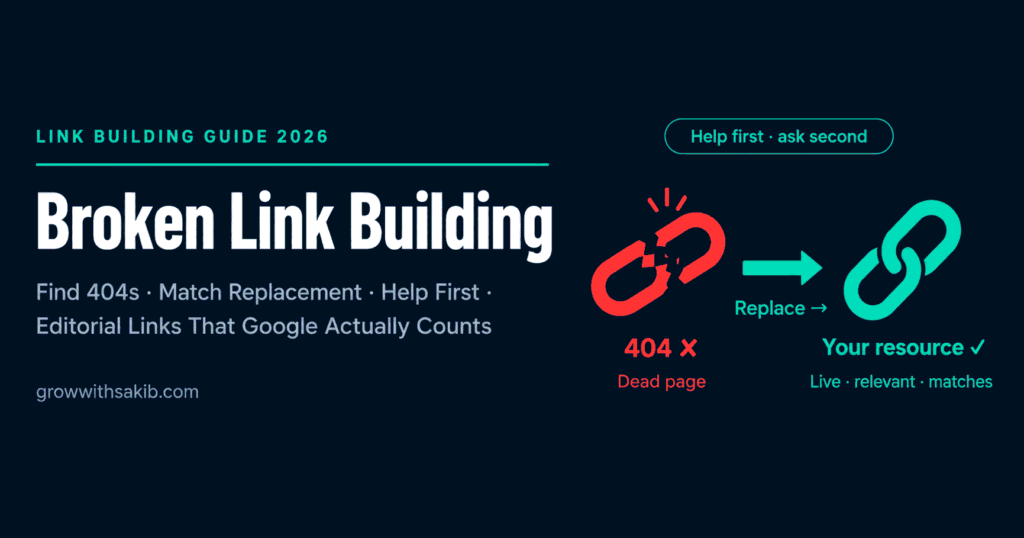
Most link building puts you in the awkward position of asking a stranger for a favour. Broken link building flips that entirely: you approach a site owner not to ask for something, but to give them something – a specific, useful piece of information about a fault on their site. The link is what happens next.
This is the full method behind Strategy 3 in the link building guide for beginners on GrowWithSakib – the prospecting methods, the qualification thresholds, the replacement content decision, and the exact outreach templates.
Why Broken Link Building Earns the Right Kind of Link
Before the mechanics, understand why this strategy is worth your time – because it produces a link that most tactics can’t.
What Is Broken Link Building?
Broken link building is the practice of finding hyperlinks on other websites that point to pages returning 404 errors – pages that no longer exist – then offering your own relevant content as the replacement. The site owner gets a fix for a real problem; you get a link.
The psychology is what makes it work: you open with something useful to them, not something you want from them. Nobody enjoys having broken links on their site. It looks careless, it frustrates readers, and most owners simply don’t know it’s happened.
Why Broken Links Exist – and Keep Multiplying
- Content deletion – pages get removed when they’re outdated, consolidated, or no longer relevant.
- Site restructuring – redesigns, CMS migrations, and rebrands change URLs, creating 404s for every page not properly redirected.
- Domain expiry – entire websites disappear when owners stop paying for hosting, breaking every link across the web that pointed to them.
- CMS and plugin errors – updates, theme changes, and plugin conflicts quietly produce 404s on pages that used to work.
Because the web is constantly adding, removing, and restructuring pages, new opportunities appear continuously. That makes broken link building a self-renewing strategy – the supply never runs out.
Which Broken Links Are Actually Worth Pursuing?
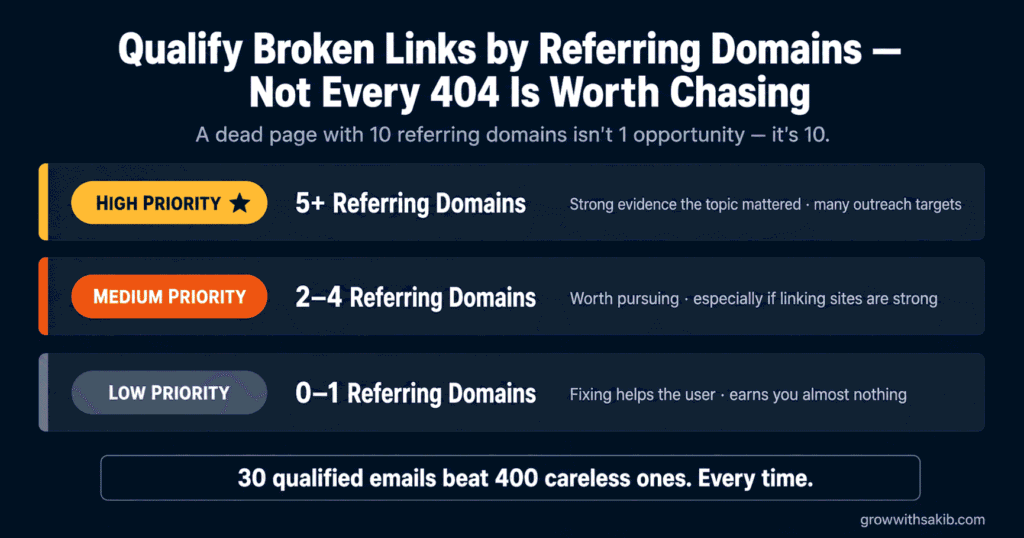
This is the real bottleneck. Finding broken links is easy; knowing which ones deserve an outreach campaign is what separates results from wasted evenings. The value of an opportunity depends on how many external sites link to the dead page:
| Priority | Broken Page | Verdict |
|---|---|---|
| High | 5 or more | Strong evidence the topic mattered; many sites to approach |
| Medium | 2 to 4 | Worth pursuing, especially if the linking sites are strong |
| Low | 0 to 1 | Fixing it helps the user but earns you almost nothing |
The insight most guides miss: when a dead page has ten referring domains, you don’t have one opportunity – you have ten. Every site linking to that dead page is a separate outreach target for the same replacement content. That’s where the leverage lives.
Four Ways to Find Broken Link Opportunities
These range from free-and-immediate to systematic-and-scalable. Start with Method 1 to learn the workflow, then graduate.
Method 1: The Check My Links Extension (Free, Start Here)
The Check My Links Chrome extension is free, scans any page you visit, and highlights broken links in red. It’s the fastest way to understand the whole strategy in ten minutes.
- Install Check My Links from the Chrome Web Store.
- Visit resource pages, link roundups, and ‘useful tools’ pages in your niche – they concentrate outbound links, so they concentrate broken ones.
- Run the extension. Broken links appear highlighted in red.
- Copy the broken URL, then paste it into the Wayback Machine (web.archive.org) to see what the page used to contain – this tells you what replacement content is needed.
- Record the host page, the broken URL, and the anchor text used.
Method 2: Ahrefs – Finding Dead Pages That Still Have Links
This is the most powerful method, and you don’t need a paid plan to start: Ahrefs Webmaster Tools is free and includes Site Audit, and Ahrefs also offers a free Broken Link Checker. For deeper prospecting, a paid Site Explorer plan unlocks the full workflow below.
Find broken pages on authority sites in your niche:
- Open Ahrefs Site Explorer and enter a relevant authority site (a competitor or an industry publication).
- Go to Pages -> Best by Links, then filter by HTTP code: 404.
- This lists every dead page on that domain, sorted by referring domains – the ones at the top have the most links pointing at content that no longer exists.
- For any page with 3+ referring domains, check the Wayback Machine to see what it covered, then decide whether you can replace it.
Find your competitors’ broken backlinks:
- In Site Explorer, enter a competitor’s domain.
- Go to Backlinks, then filter by Link type: Broken.
- Every result is a site that intended to link to your competitor’s content but now points at a 404. If you have the better replacement, that’s your opening.
Method 3: Wayback Machine Reverse Prospecting
This works in the opposite direction: start with a topic rather than a domain. Search your keyword and look for dead pages that used to rank; or, in Ahrefs Content Explorer, search your keyword and filter by a 404 response code. Then check the referring domains, and use the Wayback Machine to see exactly what the page contained before it vanished.
Method 4: Screaming Frog Site Audit
To sweep a specific high-authority site thoroughly, Screaming Frog’s SEO Spider crawls it and reports every broken link.
- Mode -> Spider, then enter the target domain.
- When the crawl finishes, open Response Codes -> Client Error (4xx).
- Filter by ‘External’ to see broken outbound links – links that site makes to pages that are now dead.
- Cross-reference each one in Ahrefs to count referring domains, and prioritise those with 3+.
The free version crawls up to 500 URLs – plenty for targeted prospecting. Beyond that, a licence is £199 per year (per Screaming Frog’s own pricing). For most beginners, the free tier is genuinely enough.
Creating the Replacement Content
Your replacement is the whole pitch. A webmaster who learns a link is broken will fix it – but whether they fix it with your link depends entirely on whether your page is a genuine substitute.
The Decision Tree
| Your Situation | What to Do |
|---|---|
| You already have relevant content | The ideal case – pitch it as-is. Zero extra work. |
| You have partial coverage | Expand your existing page to match the scope of what was lost, then pitch it. |
| You have nothing | Only create new content if the broken page has enough referring domains to justify it. Otherwise, skip it. |
What Makes a Replacement Genuinely Convincing
- Match the format – if the dead page was a comprehensive guide, offer a comprehensive guide, not a 400-word summary.
- Match the scope – the anchor text of the broken link tells you exactly what the linking author thought was there. Cover that.
- Add what the original lacked – updated data, better examples, clearer structure. Give the webmaster a reason to feel they’ve upgraded their page.
- Make sure it’s live, fast, and free – a slow page, or one behind a signup wall, is not a replacement anyone will link to.
The Outreach: Four Templates for Four Scenarios
Industry benchmarks for cold outreach response rates typically land in the 5-10% range – treat that as directional, not a promise. What lifts it is the framing: open with their problem, not your request.
Template 1: Help-First (highest response rate)
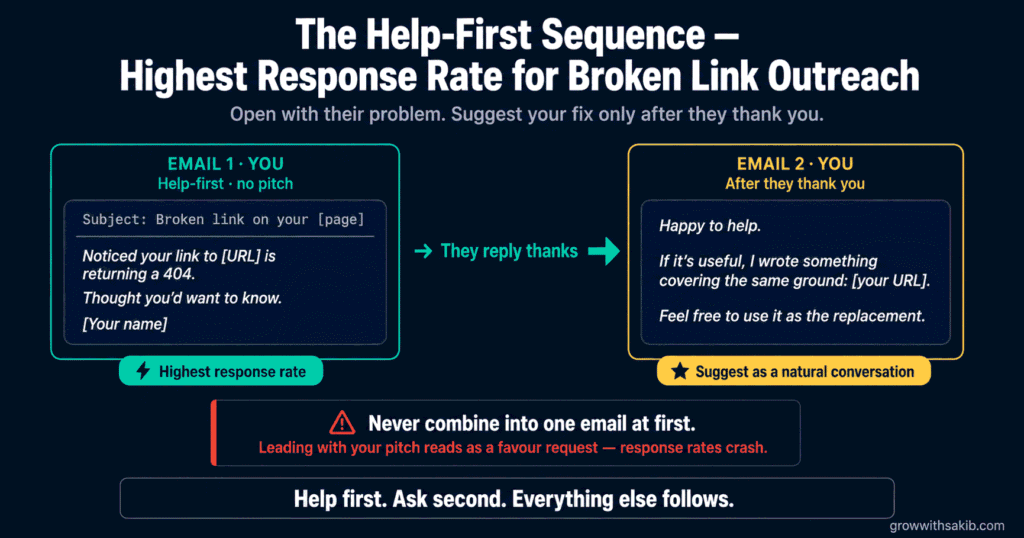
Mention the broken link and nothing else. No pitch. You are simply being useful – and that is exactly why people reply.
| Subject: Broken link on your [page topic] page Hi [Name], I was reading your [specific page title] and noticed one of the links is dead – the one pointing to [broken URL], under the anchor “[anchor text]”. It’s returning a 404. Thought you’d want to know. [Your name] |
Template 2: The Follow-Up After They Thank You
When they reply with thanks, then you suggest the replacement – as a natural part of a conversation, not a cold ask.
| Hi [Name], Happy to help. If it’s useful, I actually wrote something covering the same ground the old page did: [your URL]. Feel free to use it as the replacement, or not – either way, glad the broken link is on your radar. [Your name] |
Template 3: Combined (most efficient at scale)
When prospecting at volume, one email that does both is more efficient – slightly lower conversion, far less time.
| Subject: Broken link on your [page topic] page Hi [Name], Quick heads-up: on your [page title], the link to [broken URL] is returning a 404 – the page seems to have been taken down. I recently published a guide covering the same topic, if you need a replacement: [your URL]. Either way, wanted to flag the dead link. [Your name] |
Template 4: The Follow-Up (one only, 5-7 days later)
One follow-up. Shorter than the first. Then stop – a second chase costs you goodwill.
| Hi [Name], Just floating this up in case it got buried – the [anchor text] link on your [page title] is still 404ing. No reply needed. [Your name] |
The Monthly Workflow (About Three Hours)
| Stage | Time | What You Do |
|---|---|---|
| Prospecting | 60 min | Run one method – rotate between competitor 404s, resource-page scanning, and Content Explorer |
| Qualification | 30 min | Apply the thresholds. Drop anything under 3 referring domains or off-topic |
| Content assessment | 30 min | For each keeper: do you have it, can you expand it, or should you skip it? |
| Content prep | Varies | Expand or create, prioritised by referring domains |
| Outreach | 30-60 min | 20-30 personalised emails. Personalisation means naming the real page and anchor |
| Follow-up | 15 min | One follow-up a week later. Update the tracker |
Track every opportunity in a simple sheet: the host page, the broken URL, its referring domains, the contact, the date you emailed, the reply, and the outcome. Without a tracker you’ll email people twice and lose track of what worked. It’s the same discipline as the content calendar approach on GrowWithSakib – a small system beats a good memory.
Broken Link Building vs Guest Posting: When to Use Each
| Your Situation | Better Strategy | Why |
|---|---|---|
| You already have strong existing content | Broken link building | No new writing needed – just find the matches |
| You want an editorial link Google counts | Broken link building | The webmaster places the link themselves |
| You want brand exposure and a new audience | Guest posting | A byline reaches readers; the link is secondary |
| You have time to write but no authority yet | Guest posting | Builds visibility and author credibility |
| You want a repeatable monthly process | Broken link building | The supply of broken links is self-renewing |
They complement each other. But note the crucial difference covered in the guest posting guide on GrowWithSakib: a guest post link is one you place yourself, and Google devalues those. A broken link replacement is placed by the webmaster – which is why, link-for-link, this strategy punches harder.
Common Broken Link Building Mistakes
| Mistake | Why It Hurts | Do This Instead |
|---|---|---|
| Chasing every broken link you find | Wastes hours on links nobody points to | Qualify by referring domains (3+) |
| Sending obviously templated emails | Sub-1% response rates | Name the real page and the real anchor text |
| Offering a weak replacement | They fix the link – with someone else’s page | Match the format, scope, and depth of the original |
| Leading with your pitch | Reads as a favour request, not help | Lead with their broken link; pitch second |
| Chasing 400 opportunities at once | Volume destroys personalisation | 30 qualified, personalised emails beat 400 generic |
| Multiple follow-ups | Annoys a person who was doing you no harm | One follow-up, then stop |
| No tracking | Duplicate emails; no idea what worked | Keep a simple opportunity tracker |
Frequently Asked Questions
1. What is broken link building?
Broken link building is the practice of finding links on other websites that point to dead pages (404 errors), creating or identifying content on your own site that replaces what was lost, and emailing the site owner to tell them the link is broken while suggesting yours as the fix. It’s one of the few link building strategies where you lead by helping – you’re reporting a genuine fault on their site – and the link you earn is placed by the webmaster themselves.
2. How do I find broken links for free?
Install the free Check My Links Chrome extension, then visit resource pages, link roundups, and ‘recommended tools’ pages in your niche – these concentrate outbound links, so they contain the most broken ones. The extension highlights dead links in red. Ahrefs Webmaster Tools is also free and includes Site Audit, and Ahrefs offers a free Broken Link Checker. Screaming Frog’s free version crawls up to 500 URLs, which is plenty for targeted prospecting.
3. Do I need a paid Ahrefs subscription?
No, not to start. The Check My Links extension is free, Ahrefs Webmaster Tools is free and includes Site Audit, and Screaming Frog’s free tier crawls 500 URLs. A paid Ahrefs plan does make prospecting dramatically faster – filtering a competitor’s pages by 404 status and sorting by referring domains is the single most efficient method – but it’s an accelerator, not a requirement. Learn the workflow with free tools first.
4. Which broken links are worth pursuing?
Judge by how many external sites link to the dead page. Five or more referring domains is high priority – it’s strong evidence the topic mattered, and every one of those sites is a separate outreach target for the same replacement content. Two to four is worth pursuing, especially if the linking sites are strong. Zero or one referring domains is low value: fixing it helps the site’s users but earns you almost nothing.
5. What should my broken link outreach email say?
Lead with their problem, not your pitch. Name the specific page, quote the actual anchor text, and state that the link is returning a 404. The highest-response approach mentions the broken link and nothing else – no pitch at all – then suggests your replacement only after they reply with thanks. If you’re prospecting at volume, a combined email that flags the broken link and offers your resource in one go is more efficient, at a slightly lower conversion rate.
6. What response rate should I expect?
Industry benchmarks for cold outreach typically fall in the 5-10% range, and that’s a directional figure rather than a promise. What lifts it is genuine personalisation – naming the actual page and anchor text – plus qualifying hard so you only email people about broken links that genuinely matter. Thirty carefully targeted emails will consistently outperform four hundred generic ones, and take less time overall.
7. Does broken link building still work?
Yes, and for a structural reason: broken links accumulate on the web continuously. Every site migration, content deletion, and expired domain creates new opportunities, so the supply is self-renewing. More importantly, the link you earn is placed by the webmaster on their own editorial judgement – a genuine editorial vote, and exactly the kind of link Google counts, unlike links you place yourself in guest posts.
8. How do I find the site owner’s contact details?
Work through four options in order. Check the site’s Contact or About page first – many list an editor’s address directly. Look for the author’s byline and their personal site or social profile. Use a tool like Hunter.io to find the email pattern for the domain. As a last resort, use the site’s contact form, which is lower-response but still works. Always email a named person where you can; ‘Dear Webmaster’ rarely gets read.
Key Takeaways
- Broken link building means finding links to dead pages, offering a genuine replacement, and letting the webmaster place the link themselves.
- That last point is the whole advantage: the link is an editorial vote, not a self-placed link – which is exactly the kind Google counts.
- You don’t need paid tools to start: Check My Links is free, Ahrefs Webmaster Tools is free, and Screaming Frog’s free tier crawls 500 URLs (a licence is £199/year).
- Qualify hard: chase broken pages with 3+ referring domains. A dead page with ten referring domains isn’t one opportunity – it’s ten.
- Scan the link-dense pages: resource pages, link roundups, ‘recommended tools’ lists, and further-reading sections rot fastest.
- Your replacement must genuinely substitute the original – match its format, scope, and depth, and add something it lacked.
- Lead with their broken link, not your pitch. The help-first email (no pitch at all) gets the highest response; suggest your page after they reply.
- Send one follow-up, track everything, and run it monthly – the supply of broken links is self-renewing, so this compounds.