There is a moment every business owner hits when they realise that posting on Facebook for free is no longer moving the needle. The algorithm shows your posts to fewer people every year. Organic reach has been declining for over a decade. And the businesses that are consistently showing up in your feed — ahead of your content, in front of your customers — are the ones running paid ads.
That is not a coincidence. Meta’s advertising platform — spanning Facebook, Instagram, Messenger, and the Audience Network — reaches 3.43 billion people daily. More than 10 million businesses are actively advertising on it right now. The question is not whether Meta ads work. The question is whether you understand the platform well enough to make them work for your specific business.
This guide gives you that understanding. Not a surface-level overview, but the complete picture — how the auction works, how to structure campaigns, how to write creative that stops the scroll, how to measure what actually matters, and how the platform’s shift toward AI automation is changing the game for advertisers in 2026. Whether you are running your first campaign or trying to understand why your existing campaigns are underperforming, the principles in this guide will give you a framework that lasts. At GrowWithSakib, this is the foundation we build every client’s paid social strategy on.
What Are Meta Ads — And Why Do They Dominate Paid Social?
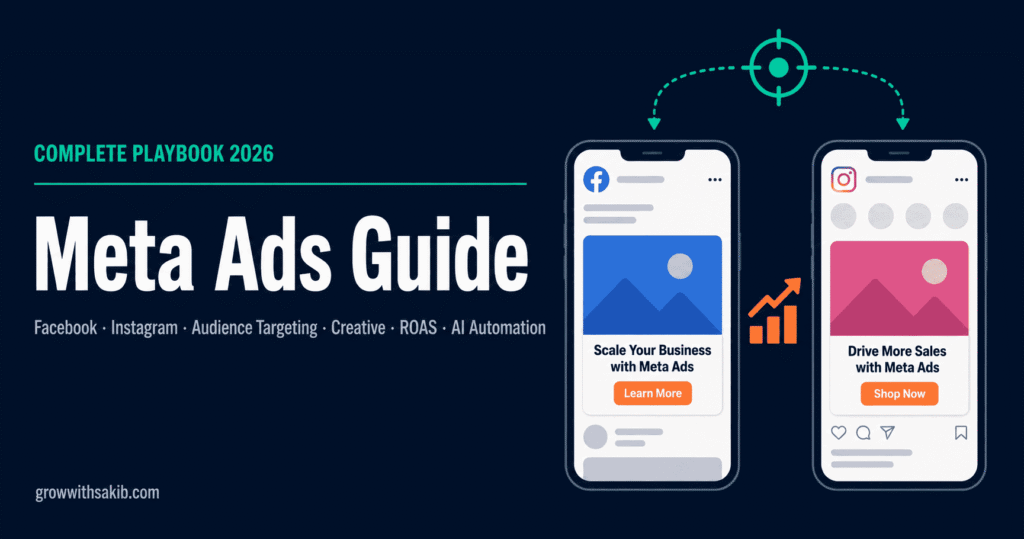
Meta Ads is the unified advertising system that runs across Facebook, Instagram, Messenger, WhatsApp, and the Audience Network (third-party apps and websites). When you create a campaign in Meta Ads Manager, you are simultaneously accessing all of these surfaces through a single interface.
The rebrand from ‘Facebook Ads’ to ‘Meta Ads’ happened in 2021 when Facebook the company became Meta. The product itself did not change — only the name. Most advertisers still use the terms interchangeably, and both refer to the same platform.
Why Meta Ads outperform most alternatives for most businesses
The honest answer is audience depth. Google Ads captures intent — it reaches people actively searching for something. Meta Ads capture attention — it reaches people based on who they are, what they care about, and how they behave, whether or not they are actively looking for your product right now. The Meta Ads vs Google Ads guide gives you the full data-backed comparison and the sequencing framework for which platform to prioritise first.
This makes Meta Ads particularly powerful for businesses that need to build awareness, educate their market, and create demand that did not previously exist. An e-commerce brand launching a new product category cannot wait for people to search for it. Meta puts it in front of the right people before they even know they want it.
| Meta Ads (Facebook & Instagram) | Google Ads (Search) |
|---|---|
| Reaches people based on who they are | Reaches people based on what they are searching |
| Creates demand for products people aren’t searching for yet | Captures demand that already exists |
| Visual, story-driven creative formats | Text-heavy search ads with limited visual |
| Avg CPC: $1.14 (2026) | Avg CPC: $2–$4+ for competitive keywords |
| Best for: awareness, e-commerce, lead gen, branding — and see the Facebook vs Instagram ads comparison for which platform to prioritise within Meta for each campaign type. | Best for: high-intent direct response, local services |
| 75%+ of global social ad budgets allocated here | Dominant for search-intent acquisition |
Meta Ads Manager vs Meta Business Suite — the difference that confuses every beginner
These are two different tools that beginners frequently mistake for each other.
- Meta Ads Manager: The full-featured campaign creation and management platform. This is where you build campaigns, define audiences, create ads, set budgets, and analyse performance. Every serious advertiser uses this as their primary tool.
- Meta Business Suite: A simplified dashboard for managing your Facebook Page and Instagram profile — posting content, responding to messages, and viewing basic insights. It has limited ad management functionality.
The rule is simple: use Meta Business Suite to manage your social presence; use Meta Ads Manager to run and optimise paid advertising campaigns.
The Foundation: Setting Up Before You Spend a Single Dollar
The most expensive mistake in Meta advertising is not targeting the wrong audience or running the wrong creative. It is spending money on ads before your tracking is properly set up. Every dollar you spend without proper tracking is a dollar spent blind — you have no idea what is working, what is wasting budget, or how to improve.
Set up the following in this exact order before running any campaign.
Step 1 — Meta Business Manager
Meta Business Manager (now called Meta Business Portfolio) is the container account that holds everything — your Facebook Page, Instagram account, ad account, pixel, product catalog, and team permissions. Think of it as the organisational backbone of your entire Meta advertising operation.
- Go to business.facebook.com and create your Business Manager account — the Meta Business Manager setup guide walks through every step including business verification and team permissions.
- Connect your Facebook Page and Instagram account
- Create an Ad Account within Business Manager
- Add team members with appropriate permission levels — Admin, Advertiser, or Analyst
- Complete business verification — required for higher spending limits and certain ad categories
Step 2 — Meta Pixel and Conversions API (CAPI)
The Meta Pixel is a piece of JavaScript code installed on your website that tracks visitor actions — page views, add-to-cart events, purchases, lead form completions. The Meta Pixel setup guide covers every installation method, event configuration, and the 2026 platform changes that affect tracking accuracy. It is the bridge between your website and your Meta ad account, allowing Meta’s algorithm to optimise toward the actions that matter to your business.Without it, you are paying for clicks with no way to know what those clicks actually did.
But the Pixel has a problem in 2026: iOS 14 changed everything. Apple’s App Tracking Transparency framework significantly reduced the data the Pixel can collect from iPhone users — which represent a massive share of Meta’s audience. The solution is the Conversions API (CAPI).
The Conversions API sends conversion data directly from your server to Meta, bypassing the iOS restrictions. It is not a replacement for the Pixel — it is a complement. The Conversions API setup guide covers all five implementation methods — from one-click to server-side GTM — including deduplication and GDPR compliance. Together, Pixel + CAPI gives you significantly more complete tracking than Pixel alone.
Step 3 — Facebook Page and Instagram professional account
Your ads run from your business Page and Instagram account. Both need to be professional accounts — not personal profiles. Make sure your Page has a complete profile picture, cover photo, business description, and contact information. Meta’s relevance systems use Page quality as a signal when evaluating your ads.
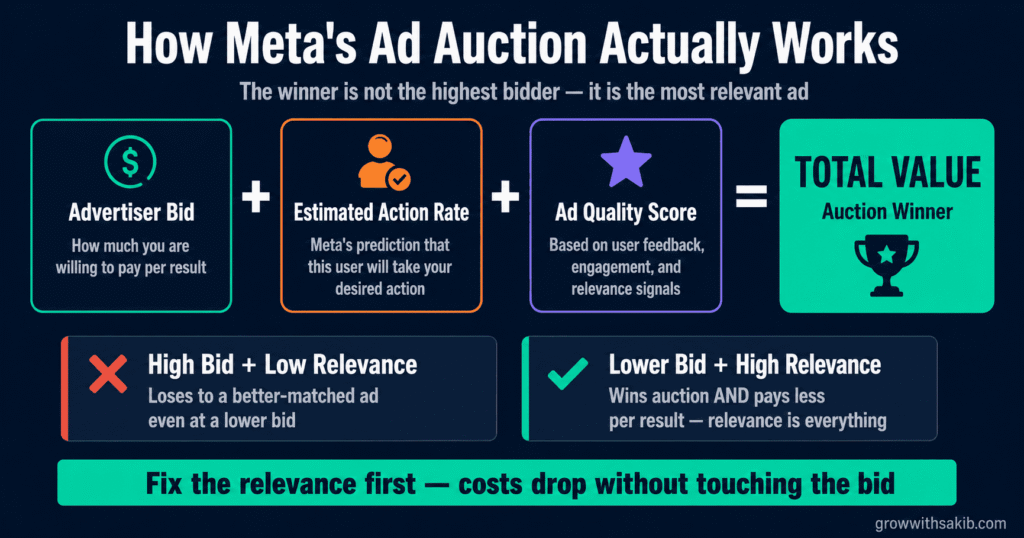
How Meta’s Ad Auction Actually Works
Most advertisers treat Meta’s ad auction as a black box — you put money in, ads come out, results vary. Understanding how the auction actually works is one of the biggest advantages you can have over competitors who do not.
Every time there is an opportunity to show an ad to a user, Meta runs an instantaneous auction among all advertisers targeting that person. The winner is not simply the highest bidder. Meta calculates a Total Value score for each competing ad:
This formula has a profound strategic implication: improving your creative quality and audience relevance reduces your effective cost per result even without increasing your bid. A well-targeted, high-quality ad costs less per conversion than a poorly targeted, low-quality ad bidding twice as much.
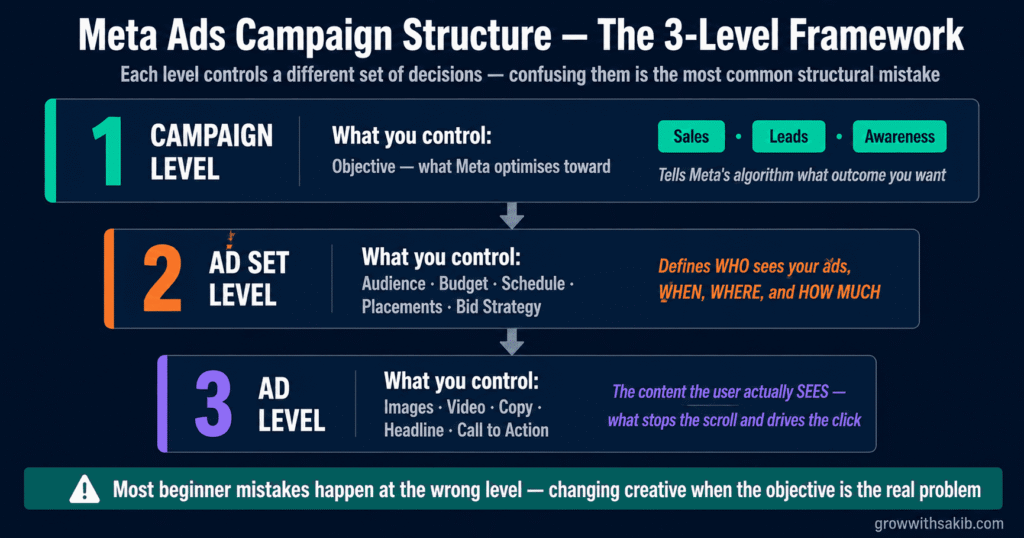
Campaign Structure: The Three-Level Framework
Meta campaigns are organised into three levels, each controlling a different set of decisions. Understanding what each level controls — and why — prevents the most common structural mistakes.
| Level | What you control | Strategic purpose |
|---|---|---|
| Campaign | Objective (what Meta optimises toward) | Tells Meta’s algorithm what outcome you want — leads, purchases, traffic, awareness |
| Ad Set | Audience, budget, schedule, placements, bid strategy | Defines who sees your ads, when, where, and how much you spend reaching them |
| Ad | Creative — images, video, copy, headline, CTA | The actual content the user sees — what stops the scroll and drives the click |
Choosing the right campaign objective
Your campaign objective is the most important decision you make when setting up a campaign. It tells Meta’s algorithm what outcome to optimise toward — and Meta will spend your budget finding people most likely to take that action.
Meta offers 6 core objectives in 2026 (simplified from the previous 11):
- Awareness: Maximise how many people see your ad. Best for brand building and entering new markets.
- Traffic: Drive clicks to your website, app, or landing page. Best for content promotion and early-funnel entry.
- Engagement: Maximise post interactions, Page follows, event responses, or message conversations.
- Leads: Collect contact information via Meta’s native lead forms or your website. Best for service businesses — including local businesses, for whom the Meta Ads for local business guide covers radius targeting, local objectives, and offline conversion tracking.
- App Promotion: Drive app installs and in-app actions.
- Sales: Drive purchases, add-to-carts, or other conversion events on your website. Best for e-commerce.
Advantage+ Campaigns — Meta’s AI automation in 2026
Advantage+ is Meta’s AI-driven campaign type that automates most of the decisions advertisers previously made manually — audience selection, placement, creative testing, and budget allocation. It represents the most significant structural shift in Meta advertising since the platform launched. In 2025, 82% of advertisers were already using Meta Advantage+ in some capacity.
The key question for beginners is not whether Advantage+ works — it often does, particularly for e-commerce. The question is when to use it versus manual campaigns, and what you give up when you hand control to the algorithm.
| Advantage+ (AI-automated) | Manual campaigns (full control) |
|---|---|
| Meta selects audience from broad parameters | You define specific audiences at the ad set level |
| AI tests placements automatically | You choose which placements to run |
| AI reallocates budget across creatives | You control budget per ad set |
| Best for: scaling e-commerce, broad products — see the Advantage+ Shopping Campaigns guide for readiness conditions, setup, and the migration framework from manual campaigns. | Best for: niche audiences, regulated industries, B2B |
| Faster to launch — less setup required | More time to set up — more insight into what works |
| 27% higher ROAS than manual bidding (Meta data) | More transparency and control over spend allocation |
Audience Targeting: How to Find the Right People
Audience targeting is where Meta advertising creates its most decisive advantage over other channels. The depth of behavioural, demographic, and interest data Meta holds on its 3 billion+ users is unmatched in digital advertising. The challenge is using that data intelligently — and understanding how targeting has changed since iOS 14.
The three audience types — and how to use each
Core audiences — interest and behaviour targeting
Core audiences let you define who sees your ads based on demographics (age, gender, location, language), interests (topics Meta infers from user behaviour), and behaviours (purchase behaviour, device usage, travel patterns). Note: regulated industries like real estate operate under Special Ad Category restrictions — the Meta Ads for real estate guide covers compliant targeting and the full lead generation playbook.
Interest targeting was significantly weakened by iOS 14 and subsequent privacy regulations that limited Meta’s ability to track user behaviour across third-party apps. In 2026, interest targeting is most effective for awareness campaigns — not conversion campaigns. For conversion-focused campaigns, broad targeting with Advantage+ audience has frequently outperformed detailed interest targeting by letting Meta’s machine learning find the converting users itself.
Custom audiences — retargeting people who already know you
Custom audiences are the highest-converting audience type available on Meta. They allow you to reach people who have already interacted with your business — website visitors, video viewers, Instagram engagers, customer email lists, and app users. The Meta Custom Audiences guide covers all eight source types, match rate optimisation, and the exclusion architecture most accounts get wrong.
- Website visitors: People who visited specific pages on your site — product pages, checkout page, blog content. Requires Meta Pixel.
- Customer lists: Upload your email list and Meta matches them to Facebook and Instagram profiles.
- Video viewers: People who watched a specific percentage of your video ads — a powerful warm retargeting pool.
- Social engagers: People who liked, commented, shared, saved, or clicked your Facebook or Instagram content.
Lookalike audiences — finding new people like your best customers
Lookalike audiences tell Meta to find new users who statistically resemble a source audience you define — your customer list, your best purchasers, or your highest-value website visitors. Meta’s algorithm analyses the characteristics of your source audience and finds people with similar behavioural patterns.
The most important variable in lookalike quality is your source audience. A lookalike built from your top 100 customers by lifetime value will significantly outperform a lookalike built from all website visitors. The Meta Lookalike Audiences guide covers seed selection, percentage sizing, value-based lookalikes, and the Advantage+ comparison for 2026. Invest in defining a high-quality seed audience before creating lookalikes.
The post-iOS 14 reality — why broad targeting often wins now
Before iOS 14, detailed interest targeting was highly effective because Meta had rich behavioural data from third-party app tracking. After iOS 14, that data became significantly degraded — particularly for iPhone users, who represent a disproportionate share of high-spending consumers.
The response from experienced Meta advertisers has been a counterintuitive shift: many now run broad targeting with no interest or demographic restrictions, trusting Meta’s machine learning to find converting users from the entire eligible population. This works because Meta’s algorithm has access to enormous amounts of first-party data (on-platform behaviour) that remains relatively intact post-iOS 14.
Ad Formats: Choosing the Right Creative Structure
Meta offers nine ad formats in 2026, each optimised for different objectives, placements, and creative strategies — the Meta ad formats guide covers every format with exact specs, use cases, and a complete objective-to-format decision matrix. Choosing the wrong format is not catastrophic — but choosing the right one meaningfully improves performance. Here is a clear-eyed breakdown of what each format does and when to use it.
| Format | Best for | Key spec to know |
|---|---|---|
| Single Image | Product showcases, simple offers, retargeting, brand awareness | 1080×1080px (feed) / 1080×1920px (Stories). Fastest to produce, most widely used. |
| Single Video | Storytelling, product demos, explainer content, Reels | Hook viewers in first 2 seconds. Design for sound-off. Under 15 seconds for Stories. |
| Carousel | Multiple products, step-by-step processes, before/after | Up to 10 cards. Each card can have its own link. Swipe behaviour signals interest. |
| Collection | E-commerce product browsing, catalogue shopping | Opens an Instant Experience. Requires product catalogue. Mobile only. For the full e-commerce campaign architecture, see the Meta Ads for e-commerce guide. |
| Stories | Full-screen immersive brand moments, time-sensitive offers | 9:16 ratio essential. Safe zone: keep text 14% from top and bottom. |
| Reels | High-reach, brand awareness, younger demographics | Reels daily watch time grew 35% YoY. Vertical 9:16. Audio-on environment. For the complete Instagram-specific playbook, see the Instagram Ads guide. |
| Instant Experience | Immersive brand storytelling, product showcases | Full-screen mobile experience. Loads instantly within Meta. Canvas-style. |
| Lead Ads | Lead capture without website visit | Pre-filled forms reduce friction. Strong for service businesses. The Meta Lead Ads guide covers both the quality problem with Instant Forms in 2026 and the CRM integration that turns form submissions into revenue. |
| Dynamic Ads | Personalised product retargeting at scale | Requires product catalogue. Automatically shows relevant products per user. |
The 65% rule — and why single image still dominates
Single image ads account for 65% of all Meta campaigns. That is not because they are the most creative format — it is because they are the most efficient. A great image with compelling copy outperforms average video in most conversion-focused campaigns. Beginners often assume video is always better. Experienced advertisers know the creative idea matters more than the format.
Creative strategy — what actually stops the scroll
The creative is the single highest-leverage variable in a Meta campaign. Targeting controls who sees your ad. The creative controls whether they stop scrolling, read it, and click. You can have perfect targeting and a weak creative and get nothing. You can have broad targeting and an exceptional creative and generate significant results.
After years of running and analysing paid social campaigns, these are the creative principles that consistently separate high-performing ads from average ones:
- The hook is everything: You have 1.7 seconds on average before a user scrolls past your ad in their feed. The Meta Ads creative testing guide covers the concept-vs-variation framework and the weekly testing loop that finds winners consistently. The first frame of your video or the dominant visual of your image must communicate something unexpected, specific, or directly relevant to the viewer’s situation — before they even read a word.
- Speak to one person: The best performing ad copy reads like it was written for a single specific person, not broadcast to millions. ‘Are you a freelance designer losing clients to agencies with bigger teams?’ outperforms ‘We help businesses grow their client base.’
- Design for sound-off: 85% of Facebook videos are watched without sound. Captions are not optional. The visual and text alone should convey the core message.
- Relevance over production value: A genuine testimonial filmed on an iPhone often outperforms a polished brand video. Authenticity signals credibility. High production value signals ‘advertisement.’ Users trust the former more.
- One clear action: Every ad should have a single, obvious call to action. Not ‘Learn More, Shop Now, or Sign Up’ — pick one and make it the obvious next step.
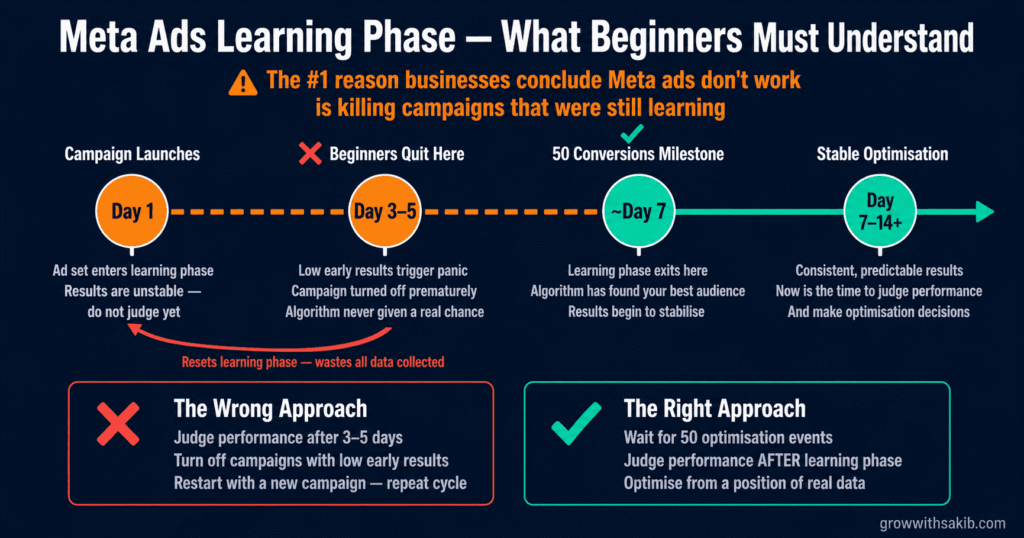
Budget, Bidding, and the Learning Phase
Budget decisions are where theory meets reality. Many businesses set budgets arbitrarily — based on what feels affordable rather than what the platform needs to optimise effectively. Understanding how Meta’s learning phase works transforms budget decisions from guesswork into strategy.
How the learning phase works — the concept that prevents most beginner failures
Every new ad set enters a learning phase when it launches. During this phase, Meta’s algorithm is exploring your audience to find the people most likely to take your desired action. Meta needs approximately 50 optimisation events per ad set per week to exit the learning phase and start delivering stable, optimised results.
This is the most important concept in Meta advertising that almost no beginner-facing guide explains properly. And not understanding it is the single most common reason businesses conclude that ‘Meta ads don’t work’ — when what they actually did was kill a campaign that was still learning.
Starter budget recommendations — what the platform actually needs
Every Meta ads guide talks about budgeting in the abstract. Here is a concrete framework based on what the learning phase actually requires:
| Business stage | Minimum monthly budget | What this funds |
|---|---|---|
| Testing phase | $300–$500/month | One campaign, one audience, 3–5 creative variations. Enough to gather data, not enough to scale. |
| Learning phase | $500–$1,500/month | Sufficient daily spend to reach 50 conversions per ad set within 7–14 days. Exits learning phase with actionable data. |
| Scaling phase | $1,500–$5,000+/month | Multiple ad sets, multiple audiences, proven creative scaled to broader targeting — the Meta Ads scaling guide covers the 20% budget rule, vertical vs horizontal scaling, and the creative pipeline that keeps performance stable. |
The minimum viable test: To meaningfully test a campaign, you need enough budget to generate approximately 50 conversion events within 7 days. If your target cost per conversion is $20, you need $1,000 in week one to generate meaningful data. If your target CPA is $5, $350 is sufficient. Budget backwards from your target CPA — not from what feels comfortable.
Bidding strategies — matched to your objective
- Lowest Cost (default): Meta spends your budget to get the most results at the lowest cost. Best for: learning phase, new campaigns, testing.
- Cost Cap: You set a target average cost per result. Meta optimises to stay at or near that number. Best for: scaling with a known profitable CPA.
- Bid Cap: You set the maximum you will bid in any auction. Reduces reach significantly. Best for: experienced advertisers with very specific CPA requirements.
- Value Optimisation: Meta optimises for the highest purchase value, not the most purchases. Best for: e-commerce with widely varying order values.
Measurement: The Metrics That Actually Matter
Open Meta Ads Manager for the first time and you will see dozens of metrics — reach, impressions, CPM, CPC, CTR, frequency, relevance score, quality ranking, engagement rate, video play rate, and more. Beginners often try to optimise everything simultaneously. Experienced advertisers focus on three to five metrics that directly connect to business outcomes.
The metrics hierarchy — stop obsessing over the wrong numbers
| Metric tier | What to track | Why it matters |
|---|---|---|
| Primary | ROAS (Return on Ad Spend) / Cost Per Lead / Cost Per Acquisition | These directly measure business outcomes. If these are healthy, the campaign is working. |
| Secondary | CTR (Click-Through Rate) / CPM / Landing Page Conversion Rate | Diagnostic metrics — help identify where the funnel is breaking. |
| Warning signs | Frequency / Relevance Score / Ad Fatigue signals | High frequency (above 3–4) with declining CTR signals ad fatigue — time to refresh creative. |
| Ignore (mostly) | Likes, comments, shares, page follows, reach | Vanity metrics. High reach with zero conversions means nothing. |
Attribution — understanding what Meta is and is not telling you
Attribution is the process of determining which ad is responsible for a conversion. Meta’s default attribution window is 7-day click and 1-day view — meaning any conversion that happens within 7 days of clicking your ad, or 1 day of simply viewing it, gets attributed to that ad.
iOS 14 significantly fragmented attribution. Meta’s reported conversions are now undercounts of actual conversions for many businesses — particularly those with large iPhone-user audiences. The Meta Ads attribution guide explains attribution windows, the GA4/Shopify discrepancy, and the three-number framework for reading ROAS correctly. This is why implementing Conversions API is important: it recovers some of the signal that the Pixel alone cannot capture.
How to read ROAS — the number that matters most for e-commerce
ROAS = Revenue from ads ÷ Ad spend. A ROAS of 3x means every $1 spent on ads returns $3 in revenue. But the ROAS you need to be profitable depends entirely on your margins — not on an industry average. A business with 70% margins can be profitable at 1.8x ROAS. A business with 20% margins might need 5x ROAS to cover costs. Calculate your break-even ROAS before running campaigns: Breakeven ROAS = 1 ÷ Gross Margin. The Meta Ads ROAS benchmarks guide covers industry averages, platform vs real ROAS, and the six mistakes that cause advertisers to misread their numbers.
Meta’s AI Shift in 2026 — What Changed and What It Means for You
Meta has been systematically shifting control from human advertisers to its machine learning systems. Advantage+ campaigns, AI-generated creative variations, automated audience expansion, and AI bidding have all matured significantly in 2026. Understanding when to trust this automation — and when to override it — is one of the most important skills for modern Meta advertisers.
What to hand to the algorithm — and what to keep control of
The most common mistake with AI-driven Meta advertising is either refusing to use automation at all (leaving performance gains on the table) or surrendering all control to the algorithm (losing visibility into what is actually working and why).
| Trust the algorithm on: | Maintain human control on: |
|---|---|
| Audience selection within broad parameters | Budget allocation and total spend decisions |
| Placement optimisation across Facebook and Instagram | Creative strategy — what message, what hook, what offer |
| Bid optimisation within your cost constraints | Campaign objective selection |
| Creative testing across your provided variants | Landing page and post-click experience |
| Time-of-day delivery optimisation | Brand safety and ad content review |
Meta’s AI creative tools — use them as a starting point, not a shortcut
Meta now offers AI-generated creative features directly within Ads Manager — background generation, image expansion, text variations, and headline suggestions. These tools are genuinely useful for generating variations quickly.
The important caveat: AI-generated creative variations should be treated as hypotheses to test, not finished ads to deploy. Meta’s AI generates variations based on statistical performance patterns — it does not understand your brand voice, your specific audience’s cultural context, or the strategic narrative behind your campaign. Use it to expand your creative library, not to replace creative strategy.
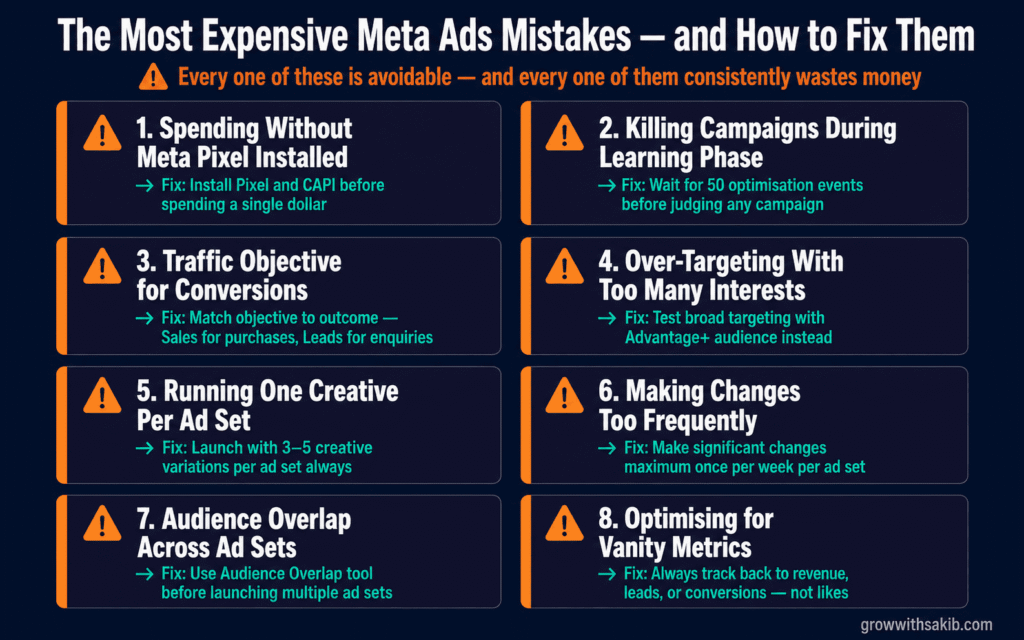
The Most Expensive Meta Ads Mistakes — and How to Avoid Them
These are the patterns that consistently waste the most money across the Meta ads accounts I have reviewed. Every one of them is avoidable with the right understanding.
| Mistake | What really happens | The fix |
|---|---|---|
| Spending without Meta Pixel installed | Every conversion is invisible — you cannot optimise what you cannot measure | Install Pixel and CAPI before spending a single dollar |
| Killing campaigns during the learning phase | Ad never exits learning — you never see real performance | Wait for 50 optimisation events before judging any campaign — if you are already seeing problems, the Meta Ads troubleshooting guide covers 12 common failure reasons organised by symptom with specific fixes for each. |
| Choosing Traffic objective for conversions | Meta finds clickers, not buyers — high CTR, zero sales | Match objective to actual desired outcome: Sales for purchases, Leads for enquiries |
| Over-targeting with too many interests | Constrains Meta’s algorithm unnecessarily — higher CPMs, slower learning | Test broad targeting with Advantage+ audience for conversion campaigns |
| Running one creative per ad set | No way to know what is working — first creative fatigue ends everything | Launch with 3–5 creative variations per ad set always |
| Making changes too frequently | Every edit resets the learning phase — campaign never stabilises | Make significant changes maximum once per week per ad set — the Meta Ads account audit guide gives you the full 4-layer diagnostic framework for identifying what actually needs changing before you touch anything. |
| Audience overlap across ad sets | Your ad sets compete against each other — you bid against yourself | Use Audience Overlap tool in Ads Manager before launching multiple ad sets |
| Optimising for vanity metrics | High reach and engagement with zero business outcomes | Always track back to revenue, leads, or conversions — not likes |
The GrowWithSakib Meta Ads Content Hub — What to Read Next
This pillar article gives you the complete framework. Each subtopic below goes deeper into one specific area — and links back to this guide as the central reference. Start with whichever section is your current biggest gap.
| Subtopic article | What it covers | Internal link from pillar |
|---|---|---|
| Meta Ads Setup Guide (Step-by-Step) | Business Manager, Pixel, CAPI, ad account structure, verification | ‘Before spending anything, read our complete setup guide’ |
| Meta Ad Formats Complete Guide 2026 | All 9 formats with exact specs, placements, when to use each | ‘See our full ad format breakdown for every placement’ |
| Meta Ads Targeting Deep Dive | Core, Custom, Lookalike audiences — post-iOS 14 strategy | ‘Full targeting strategy guide for every audience type’ |
| Advantage+ vs Manual Campaigns | When to use each — with real performance data | ‘Our complete Advantage+ decision framework’ |
| Meta Ads Budget Guide | Minimum budgets, learning phase math, scaling frameworks | ‘How to budget Meta ads at every stage of growth’ |
| Creative Strategy and A/B Testing | Hook formulas, creative testing frameworks, scaling winners | ‘The GrowWithSakib creative testing playbook’ |
| Meta Ads Measurement and Attribution | ROAS, CPL, attribution windows, Conversion Lift studies | ‘How to measure Meta ads properly post-iOS 14’ |
| Common Meta Ads Mistakes | Full breakdown of costly errors with account audit checklist | ‘The complete Meta ads mistake checklist’ |
After years of building and auditing Meta ad accounts, the pattern is consistent. The businesses that struggle treat Meta advertising as a simple transaction — spend money, get customers. The businesses that win treat it as a system — one that requires proper tracking, strategic campaign structure, disciplined creative testing, and the patience to let the algorithm learn before drawing conclusions.
Meta’s platform in 2026 is simultaneously more powerful and more complex than it has ever been. The AI automation genuinely works — when you give it the right inputs. The audience reach is unmatched. The creative formats are compelling. But the businesses that extract maximum value are the ones who understand the fundamentals well enough to make intelligent decisions about when to trust the machine and when to override it.
At GrowWithSakib, this guide represents the foundation we build every paid social strategy on. The subtopic articles in our Meta Ads content hub go deeper into each area — start with whichever section represents your biggest current gap, and work systematically from there.
The businesses that are showing up consistently in your feed, ahead of your content, in front of your customers — they are not doing something magical. They are doing the fundamentals exceptionally well, consistently, over time.
Frequently Asked Questions
How much should I spend to start with Meta Ads?
The honest answer depends on your target cost per conversion. Calculate your break-even CPA, then multiply by 50 — that is what you need to generate enough data to exit the learning phase in one week. A business targeting a $20 CPA needs approximately $1,000 in the first week to gather meaningful data. If that feels too high, start with a simpler conversion event (add-to-cart instead of purchase) that happens more frequently and costs less to optimise toward.
Do Meta Ads work for B2B businesses?
Yes — but the strategy is different. B2B on Meta is most effective when treated as a top-of-funnel awareness and retargeting channel rather than a direct conversion channel. Run video or content-based awareness campaigns to build an audience, then retarget video viewers and website visitors with direct lead generation campaigns. LinkedIn remains stronger for direct B2B outreach, but Meta’s scale and lower CPM makes it a cost-effective awareness complement.
What is a good ROAS for Meta Ads?
There is no universal answer because ROAS target depends entirely on your margins. Calculate your break-even ROAS first: divide 1 by your gross margin percentage. A business with 50% gross margin needs a minimum 2x ROAS to break even on ad spend. A profitable target is typically break-even ROAS plus 30–50%. Industry context matters too — e-commerce averages vary significantly by category.
How long before Meta Ads show results?
Expect 2–4 weeks before you have enough data to make meaningful optimisation decisions. The first week is the learning phase — results are unstable and should not be judged. Weeks 2–4 produce more stable data. Meaningful trend analysis typically requires 4–6 weeks of consistent spend. Businesses that evaluate Meta Ads after 3–5 days are almost always making decisions based on noise, not signal.
Facebook or Instagram — which platform should I focus on?
In 2026, 4 in 5 Facebook users are also on Instagram, meaning the audiences are not as distinct as most advertisers assume. The key difference is demographics and content behaviour: Facebook skews slightly older and is stronger for long-form content, community, and text-heavy ads. Instagram skews younger and is stronger for visual-first, Reels, and Stories formats. For most businesses, running across both through Meta’s automatic placements (letting the algorithm decide where to show ads) outperforms restricting to one platform.
Can I run Meta Ads without a website?
Yes — Lead Ads and Click-to-WhatsApp campaigns allow you to collect leads or drive conversations directly within Meta’s platform without requiring a website visit. These are particularly effective for service businesses and local businesses that convert through conversations rather than online purchases. The limitation: without a website, you cannot install the Pixel, which limits your retargeting and conversion optimisation capabilities.
What is ad fatigue and how do I know when it is happening?
Ad fatigue occurs when your audience has seen your creative so many times that engagement drops and costs rise. The primary signal is a frequency above 3–4 (each person in your audience has seen the ad more than 3–4 times) combined with a declining CTR and rising CPM. The fix is refreshing your creative — new images, new hooks, new offers — while keeping the audience and campaign structure intact. For smaller audiences, expect to need fresh creative every 2–4 weeks.